Disclaimer All information is offered in good faith and in the hope that it may be of use for educational purpose and for Database community purpose, but is not guaranteed to be correct, up to date or suitable for any particular purpose. db.geeksinsight.com accepts no liability in respect of this information or its use.
This site is independent of and does not represent Oracle Corporation in any way. Oracle does not officially sponsor, approve, or endorse this site or its content and if notify any such I am happy to remove.
Product and company names mentioned in this website may be the trademarks of their respective owners and published here for informational purpose only.
This is my personal blog. The views expressed on these pages are mine and learnt from other blogs and bloggers and to enhance and support the DBA community and this web blog does not represent the thoughts, intentions, plans or strategies of my current employer nor the Oracle and its affiliates or any other companies. And this website does not offer or take profit for providing these content and this is purely non-profit and for educational purpose only.
If you see any issues with Content and copy write issues, I am happy to remove if you notify me.
Contact Geek DBA Team, via geeksinsights@gmail.com
|
Earlier to 12c, the Flashback data archive option is not used compression of FDA data(the changes happens to the table will be copied to some internal FDA tables, Daily a partition is created for the table and the daily wise changes to the data will be copied to the FDA tables like SYS_FBA*).
From 12c onwards, the FDA can be optimized to reduce the storage consumption by enabling the compression at row level (compression for OLTP)
Those who does not know about FDA, read this post.
Lets take a closer look. Note, the FDA is not supported in Pluggable database
Let's create two tablespaces and create FDA and then enable FDA on the table with two options optimize and no optimize and see the difference in the DDL of FDA tables that created to manage/store the DML changes happens to the table.
Tablespace creation
SQL> CREATE TABLESPACE FBA_1 DATAFILE 'FBA_1.DBF' SIZE 1G;
Tablespace created.
SQL> CREATE TABLESPACE FBA_2 DATAFILE 'FBA_2.DBF' SIZE 1G;
Tablespace created.
Create FDA
SQL> CREATE FLASHBACK ARCHIVE FBA1 TABLESPACE FBA_11 RETENTION 1 MONTH NO OPTIMIZE DATA;
Flashback archive created.
SQL> CREATE FLASHBACK ARCHIVE FBA2 TABLESPACE FBA_2 RETENTION 1 MONTH OPTIMIZE DATA;
Flashback archive created.
Create Table and enable FDA
SQL> CREATE TABLE T1 (ID NUMBER(19), DESCRIPTION VARCHAR2(42)) FLASHBACK ARCHIVE FBA1;
Table created.
SQL> CREATE TABLE T2 (ID NUMBER(19), DESCRIPTION VARCHAR2(42)) FLASHBACK ARCHIVE FBA2;
Table created.
Add some data to the tables, so that SYS_FBA* get created.
SQL> INSERT INTO T1 VALUES (88, 'Geek DBA');
1 row created.
SQL> commit;
Commit complete.
SQL> DELETE FROM T1;
1 row deleted.
SQL> COMMIT;
Commit complete.
SQL> INSERT INTO T2 VALUES (83, 'Geek DBA');
1 row created.
SQL> COMMIT;
Commit complete.
SQL> DELETE FROM T2;
1 row deleted.
SQL> COMMIT;
Commit complete.
Check the syntax for the SYS_FBA* tables metadata and see the difference the tablespace that created with nooptimize data is not used any compression where in the other table used compression for OLTP.
SQL> select dbms_metadata.get_ddl('SYS_FBA_HIST_73535') from dual;
CREATE TABLE "SCOTT"."SYS_FBA_HIST_73535"
( "RID" VARCHAR2(4000 BYTE),
"STARTSCN" NUMBER,
"ENDSCN" NUMBER,
"XID" RAW(8),
"OPERATION" VARCHAR2(1 BYTE),
"ID" NUMBER(19,0),
"DESCRIPTION" VARCHAR2(42 BYTE)
) PCTFREE 10 PCTUSED 40 INITRANS 1 MAXTRANS 255
STORAGE(
BUFFER_POOL DEFAULT FLASH_CACHE DEFAULT CELL_FLASH_CACHE DEFAULT)
TABLESPACE "FBA_1"
PARTITION BY RANGE ("ENDSCN")
(PARTITION "HIGH_PART" VALUES LESS THAN (MAXVALUE) SEGMENT CREATION IMMEDIATE
PCTFREE 10 PCTUSED 40 INITRANS 1 MAXTRANS 255
NOCOMPRESS LOGGING
STORAGE(INITIAL 8388608 NEXT 1048576 MINEXTENTS 1 MAXEXTENTS 2147483645
PCTINCREASE 0 FREELISTS 1 FREELIST GROUPS 1
BUFFER_POOL DEFAULT FLASH_CACHE DEFAULT CELL_FLASH_CACHE DEFAULT)
TABLESPACE "FBA_1" ) ;
CREATE TABLE "SCOTT"."SYS_FBA_HIST_73538"
( "RID" VARCHAR2(4000 BYTE),
"STARTSCN" NUMBER,
"ENDSCN" NUMBER,
"XID" RAW(8),
"OPERATION" VARCHAR2(1 BYTE),
"ID" NUMBER(19,0),
"DESCRIPTION" VARCHAR2(42 BYTE)
) PCTFREE 10 PCTUSED 40 INITRANS 1 MAXTRANS 255
COMPRESS FOR OLTP
STORAGE(
BUFFER_POOL DEFAULT FLASH_CACHE DEFAULT CELL_FLASH_CACHE DEFAULT)
TABLESPACE "FBA_2"
PARTITION BY RANGE ("ENDSCN")
(PARTITION "HIGH_PART" VALUES LESS THAN (MAXVALUE) SEGMENT CREATION IMMEDIATE
PCTFREE 10 PCTUSED 40 INITRANS 1 MAXTRANS 255
COMPRESS FOR OLTP LOGGING
STORAGE(INITIAL 8388608 NEXT 1048576 MINEXTENTS 1 MAXEXTENTS 2147483645
PCTINCREASE 0 FREELISTS 1 FREELIST GROUPS 1
BUFFER_POOL DEFAULT FLASH_CACHE DEFAULT CELL_FLASH_CACHE DEFAULT)
TABLESPACE "FBA_2" ) ;
Thanks for reading
Geek DBA
In the last post you have seen how ADO helps us to cut down the storage costs and also improvise the efficiency.
In this post we will test and Before to drill down to practice, ADO works in two steps.
- When the instance level heatmap is on, the real time statistics i.e data usage is marked and collected as the data life cycle goes on. The statistics will be stored in v$heat_map_segment and periodically flushes to table like heat_map_stats$ through scheduler jobs. There on the data usage tracking can be viewed by dba_views like dba_heat_map_segment and dba_heat_map_seg_histogram
- Once the heat map tracking is on, you will need to create policies called ADO policies via alter statement to the tablespace/table etc "ADD POLICY". Once the policy is added, the jobs will be created in scheduler and periodically an policy run i.e compress or move to different tier will be taken care depends on the data age. The package name for ADO api is dbms_ilm
To simulate the case, Let's create the following (the following is based on Oracle Learning library example written here)
Enable Heatmap tracking on at database level
grant execute on set_stat to scott;
alter system set heat_map=on scope=both;
Create a procedure to simulate the data to be aged
CREATE OR REPLACE PROCEDURE set_stat (object_id number,
data_object_id number,
n_days number,
p_ts# number,
p_segment_access number)
as
begin
insert into sys.heat_map_stat$
(obj#,
dataobj#,
track_time,
segment_access,
ts#)
values
(object_id,
data_object_id,
sysdate - n_days,
p_segment_access,
p_ts# );
commit;
end;
/
Set the days for heat map tracking of data
exec dbms_ilm_admin.set_heat_map_start(start_date => sysdate - 30);
Create two tablespaces (one on tier 1 and another cheap storage tier i.e tier 2, for this example i created the tablespaces on same tier ofcourse)
create tablespace high_perf_tbs datafile '/oradata/Geek DBA12c/pdb1/high_perf_tbs1.dbf';
create tablespace low_perf_tbs datafile '/oradata/Geek DBA12c/pdb1/low_perf_tbs1.dbf';
Create the test object and simulate the data
create table myobjects (owner varchar2(30), object_name varchar2(30), object_type varchar2(25), created date) Partition by range (created) (partition p_old values less than (to_date ('01-JUL-2013','DD-MON-YYYY')) tablespace high_perf_tbs, partition p_new values less than (maxvalue)) tablespace high_perf_tbs;
insert into myobjects (select owner,object_name,object_type,created from all_objects);
Check the status of the object and tablespace
SQL> select sum(bytes)/1048576 from user_segments where
segment_name='MYOBJECTS';
SUM(BYTES)/1048576
------------------
320
SQL> select count(*) from myobjects;
COUNT(*)
----------
2360288
SQL> select table_name,compress,compress_for from dba_tables where table_name='MY_OBJECTS';
TABLE_NAME COMPRESS COMPRESS_FOR
----------- -------- ------------
MY_OBJECTS DISABLED
Add the policy to the object
- for advanced row compression for the data that older than 7 days
- for advanced query compression for the data older than 15 days
- for moving to different tier storage tablespace to low cost tbs if tablespace reaches 85%
ALTER TABLE scott.myobjects ILM ADD POLICY ROW STORE COMPRESS ADVANCED SEGMENT AFTER 30 DAYS OF NO MODIFICATION;
ALTER TABLE SCOTT.MYOBJECTS ADD POLICY COMPRESS FOR QUERY LOW AFTER 30 DAYS OF NO MODIFICATION;
ALTER TABLE myobjects MODIFY PARTITION p_old ILM ADD POLICY TIER TO low_cost_tbs;
Access the data.
- simulate that data is older than 7 days and run the policy job, verify the row compression in place
alter session set nls_date_format='dd-mon-yy hh:mi:ss';
declare
v_obj# number;
v_dataobj# number;
v_ts# number;
begin
select object_id, data_object_id into v_obj#, v_dataobj#
from all_objects
where object_name = 'MYOBJECTS'
and owner = 'SCOTT';
select ts# into v_ts#
from sys.ts$ a,
dba_segments b
where a.name = b.tablespace_name
and b.segment_name = 'MYOBJECTS';
commit;
sys.set_stat
(object_id => v_obj#,
data_object_id => v_dataobj#,
n_days => 7,
p_ts# => v_ts#,
p_segment_access => 1);
end;
/
SQL> conn scott/tiger
Connected.
declare
v_executionid number;
begin
dbms_ilm.execute_ILM (ILM_SCOPE => dbms_ilm.SCOPE_SCHEMA,
execution_mode => dbms_ilm.ilm_execution_offline,
task_id => v_executionid);
end;
/
We can now query the USER_ILMTASKS view and see that the ADO job has been started and the ILM policy we have defined has been earmarked for execution.
select task_id, start_time as start_time from user_ilmtasks;
TASK_ID START_TIME
---------- ---------------------------------------------------------------------------
7 09-SEP-13 12.25.24.768834 PM
select task_id, job_name, job_state, completion_time completion from user_ilmresults;
TASK_ID JOB_NAME JOB_STATE COMPLETION
---------- --------------------------------------------------------------------------------
8 ILMJOB1116 JOB CREATED
select task_id, policy_name, object_name, selected_for_execution, job_name from user_ilmevaluationdetails
where task_id=11;
TASK_ID POLICY_NAME OBJECT_NAME SELECTED_FOR_EXECUTION JOB_NAME
---------- --------------------------------------------------------------------------------
8 P3 MYOBJECTS ILMJOB1116
We can now see that the table has been compressed and the ADO job has been completed.
select task_id, job_name, job_state, completion_time completion from user_ilmresults;
TASK_ID JOB_NAME JOB_STATE COMPLETION
---------- -------------------------------------------------------------------------------
11 ILMJOB1116 COMPLETED SUCCESSFULLY 01-DEC-13 12.49.55.678970 PM
2. simulate that data is older than 15 days and run the policy job, verify the query compression in place(restart the db, or manual run the job)
alter session set nls_date_format='dd-mon-yy hh:mi:ss';
declare
v_obj# number;
v_dataobj# number;
v_ts# number;
begin
select object_id, data_object_id into v_obj#, v_dataobj#
from all_objects
where object_name = 'MYOBJECTS'
and owner = 'SCOTT';
select ts# into v_ts#
from sys.ts$ a,
dba_segments b
where a.name = b.tablespace_name
and b.segment_name = 'MYOBJECTS';
commit;
sys.set_stat
(object_id => v_obj#,
data_object_id => v_dataobj#,
n_days => 15,
p_ts# => v_ts#,
p_segment_access => 1);
end;
/
We can now query the USER_ILMTASKS view and see that the ADO job has been started and the ILM policy we have defined has been earmarked for execution.
select task_id, start_time as start_time from user_ilmtasks;
TASK_ID START_TIME
---------- ---------------------------------------------------------------------------
7 01-DEC-13 13.10.24.654834 PM
select task_id, job_name, job_state, completion_time completion from user_ilmresults;
TASK_ID JOB_NAME JOB_STATE COMPLETION
---------- --------------------------------------------------------------------------------
8 ILMJOB1210 JOB CREATED
select task_id, policy_name, object_name, selected_for_execution, job_name from user_ilmevaluationdetails
where task_id=11;
TASK_ID POLICY_NAME OBJECT_NAME SELECTED_FOR_EXECUTION JOB_NAME
---------- --------------------------------------------------------------------------------
8 P4 MYOBJECTS ILMJOB1210
We can now see that the table has been compressed and the ADO job has been completed.
select task_id, job_name, job_state, completion_time completion from user_ilmresults;
TASK_ID JOB_NAME JOB_STATE COMPLETION
---------- -------------------------------------------------------------------------------
11 ILMJOB1210 COMPLETED SUCCESSFULLY 01-DEC-13 13.26.44.98070 PM
Check the size of the table after compression
select compression, compress_for FROM user_tables where table_name = 'MYOBJECTS';
COMPRESS COMPRESS_FOR
-------- ------------------------------
ENABLED ADVANCED
select sum(bytes)/1048576 from user_segments where segment_name='MYOBJECTS';
SUM(BYTES)/1048576
------------------
60
3. Move the table partition to low cost storage, when the tablespace is 85% full
Tablespace sizes
Tablespace Size (MB) Free (MB) % Free % Used
------------------------------ ---------- ---------- ---------- ----------
LOW_COST_TBS 25 24 96 4
HIGH_PERF_TBS 25 8 32 68
Check ILM Params , the below shows the tablespace percent used 85 and free 25, means if tablespace usage came to 85% then the policy will execute the partition will move to low cost storage
col name format A20
col value format 9999
select * from dba_ilmparameters;
NAME VALUE
-------------------- -----
ENABLED 1
JOB LIMIT 10
EXECUTION MODE 3
EXECUTION INTERVAL 15
TBS PERCENT USED 85
TBS PERCENT FREE 25
Insert more data into the table so that tablespace get full and check user_ilmobjects
insert into myobjects (select owner,object_name,object_type,created from all_objects);
select * from user_ilmobjects where object_type='TABLE PARTITION'
POLICY_NAME OBJECT_OWNER OBJECT_NAME SUBOBJECT_NAME OBJECT_TYPE INHERITED_FROM ENA
------------- ------------- ------------- ------------- ------------- ------------- -------------
P25 SCOTT MYOBJECTS P_OLD TABLE PARTITION POLICY NOT INHERITED YES
Execute the policy
declare
v_executionid number;
begin
dbms_ilm.execute_ILM (ILM_SCOPE => dbms_ilm.SCOPE_SCHEMA,
execution_mode => dbms_ilm.ilm_execution_offline,
task_id => v_executionid);
end;
/
select task_id, job_name, job_state,
to_char(completion_time,’dd-MON-yyyy’)completion
from user_ilmresults;
TASK_ID JOB_NAME JOB_STATE COMPLETION
--------------------------------------------
97 ILMJOB1204 COMPLETED SUCCESSFULLY 10-SEP-2013
select SELECTED_FOR_EXECUTION from user_ilmevaluationdetails where task_id=97;
SELECTED_FOR_EXECUTION
---------------------
SELECTED FOR EXECUTION
Now check that the partition P_OLD has been relocated.
select partition_name,tablespace_name from user_tab_partitions where table_name='MYOBJECTS';
PARTITION_ TABLESPACE_NAME
---------- ------------------------------
P_NEW HIGH_PERF_TBS
P_OLD LOW_COST_TBS
Tablespace sizes
Tablespace Size (MB) Free (MB) % Free % Used
------------------------------ ---------- ---------- ---------- ----------
LOW_COST_TBS 25 8 32 68
HIGH_PERF_TBS 25 16 64 36
Before going to the topic, consider this example
An enterprise request system where utilized by the IT employees across the globe and raise requests for their needs like Desktop issues, telephone issues, request for software, request for databases, request for procurement etc. On and average daily 5000+ requests across as I know this system exists one of my previous employers.
After a period of time, the data in this tables become older and not that critical except to understand the trend of requests or understand SLA etc. So the cost of storage will be ever increasing and in demand as you cannot say I don't want this data any more. And that say's when you want you should be able to retrieve the data so it should reside in the database forever.
To manage this huge volume of the data, the design is something to do partitioning at tables or manage the older partitions and move the data to different archival tables and compress them.
Basically there are two flaws with this.
- Though you have partitioning methods in use, the optimizer has to do lot of work to get you the latest data for analysis, like pruning and all, coz the older data still be accessible and need to analyze by optimizer
- The second is the cost, though you moved the partitions to different tables or tablespaces the cost is still same coz you are using same stoage tier (tiering of storage is something associated with speed that comes with cost)
Both of the above were also manual way of managing and operational overhead includes.
So you need
- Compression of older data that is not in usage
- Storage cost reduction by moving to lower storage tier
- Performance benefit
- Fully automatic procedures to reduce operational maintenance
So how about a concept of introducing the optimizing your data that is not used say about 3 months ago and move to different and low storage tier and also gain the performance benefit and that too a native database tool which do this checks automatically and moves your data and mark cold and compress them too.
There you go, an introduction to "Automatic data optimization" a new feature in 12c which exactly address above. This is part of advanced compression feature and licensed one. Seriously I would love to use this feature to the system for the above I mentioned.
Automatic data optimization a part of Oracle Information Life cycle comes with two components called Heat Map and ADO.
- Heat Map which tracks and marks data even down to the row and block level as it goes through life cycle of data changes.
- ADO or Automatic Data Optimization works with the Heat Map feature and allows us to create policies at the tables, object and even row level which specify conditions to dictate when data will be moved or compressed based on statistics related to the data usage using scheduler jobs.
Lets take a closer look at Segment Compressions or Data optimization techniques that Oracle adapts so far. (12c Has new names of older compression technologies)
| Until 11g |
In 12c |
Explanation |
| OLTP Compression |
Advanced Row Compression |
Compress at row level |
| Secure File Compression |
Advanced Lob Compression |
Lob compression |
| Secure File Deduplication |
Advanced Lob Deduplication |
File level compression |
| |
Heat Map (object & row level) |
Tracks the access of data at row or segment level |
| |
Automatic Data Optimization |
Collection of policies and scheduler jobs to move and compress the data based on the heat map tracked data |
| |
Temporal Optimization |
Optimizing the data for temporary basis temporal validity |
| Hybrid Columnar Compression |
Hybrid columnar compression |
Compress the data at column level finally |
HeatMap:-
Heatmap with in the database when enabled (instance level parameter heatmap=on) it tracks the data usage at segment and row level. It will basically looks at following.
Heatmap tracks the data based on Active, Frequent Access, Occassional Access, Dormant and mark the row/segment/block appropriately. This is how the enterprise manager heatmap screen looks like.
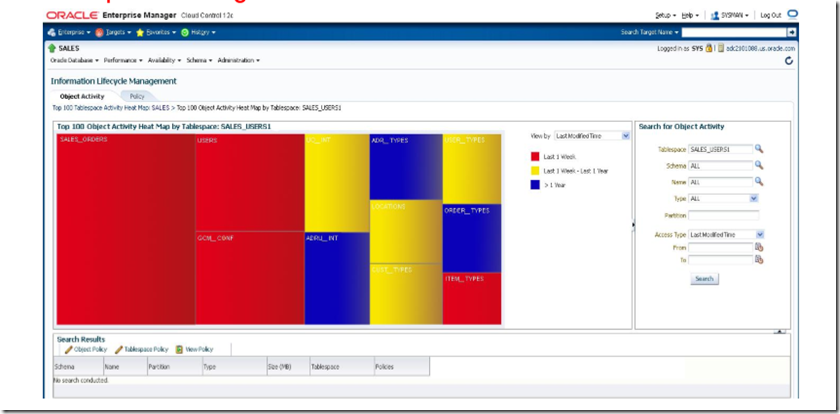
Notes about heatmap:-
- Database level Heat Map shows which tables and partitions are being used
- Block level Heat Map shows last modification at the block level
- Segment level shows both reads and writes
- Distinguishes index lookups from full scans
- Automatically excludes stats gathering, DDLs or table redefinitions
- Cost & Performance Object level at no cost , Block level < 5% cost
ADO (Automatic Data Optimization)
ADO is a policy based technique which can in turn to a declarative SQL statement condition and then action either compression or storage tiering. Once the condition met there are new jobs in dbms_scheduler which the action either compressing or moving will be invoked. For example
You want a table service_request where,
- All the data that should be row level compression older than one week if not used
- All the data that should be advanced compression older than a month if not used
- All the data that should be moved to lower tier storage older than three months if not used
- All the data that should be again compressed for archive (column level compression) older than a year if not used
So lets look at it, how and what you have to do (assuming you have heatmap enabled on )
| Table data if not used |
HeatMap Matrix |
Technique use |
ADO Command |
Compress % |
| Older than a week |
Active |
Advanced Row Compression |
alter table service_request add policy compress for advanced row after 7 days of no update; |
2-4X |
| Older than a month |
Frequent Access |
Advanced query compression |
alter table service_request add policy compress for query low after 30 days of no update; |
10X |
| Older than three months |
Occasional Access |
Advanced Columnar Compression |
ALTER TABLE service_request MODIFY PARTITION 2013_06_Req ILM ADD POLICY TIER TO Tier2_TBS;
Note:-Tier2_TBS is a new tablespace created on low cost storage |
10X |
| Older than a year |
Dormant |
Advanced Columnar Compression |
alter table service_request add policy compress for archive after 365 days of no update; |
15-50X |
You can also use other policies like compress basic segment after 3 months (basic compression no license required), Note the Hybrid columnar compression works only with exadata.
Once the policy is enabled for database/segment/tablespace etc the jobs will be run their schedule time.
Important views for ILM:-
- DBA_ILMPOLICIES – What are all policies and the status
- DBA_ILMDATAMOVEMENTPOLICIES – Storage movement policies enabled
- DBA_ILMEVALUATIONDETAILS – Prediction and evaluation details
- DBA_ILMPARAMETERS – Parameters for ILM
- DBA_ILMRESULTS – Results after the action taken
- DBA_ILMTASKS – About Jobs
Next Post:- Practice on Heatmap & ADO
Silent Installation using RunInstaller to install 12c Software, this will be useful when you do not have the X base system running on the machines (of course in real world they do not), either you need VNC or humming bird tools to install the oracle software if you want to use Oracle Universal Installer in GUI mode.
Oracle provides you the ability to run the installer with silent option which is a command line parameters and installs silent and you do not need the GUI.
Have a look at steps
1) Create a oracle_home directory
mkdir -p /u01/app/oracle/product/12.1.0/db_1
#Create inventory directory
[root@Geek DBA11g ~]# mkdir -p /u02/app/oraInventory
[root@Geek DBA11g ~]# chown -R oracle:oinstall /u02/app/oraInventory
2) Extract the 12c Software
unzip V38500-01_2of2.zip
unzip V38500-01_1of2.zip
3) Complete Oracle Pre-requisites' – Written here
4) Modify the response file especially below parameters. Navigate to the database/response/ directory and edit the db_install.rsp for the following parameters only
oracle.install.option=INSTALL_DB_SWONLY
ORACLE_HOSTNAME=Geek DBA11g
UNIX_GROUP_NAME=oinstall
INVENTORY_LOCATION=/u02/app/oraInventory
ORACLE_HOME=/u01/app/oracle/product/12.1.0/db_1
ORACLE_BASE=/u01/app/oracle
oracle.install.db.InstallEdition=EE
oracle.install.db.DBA_GROUP=dba
oracle.install.db.OPER_GROUP=oper
oracle.install.db.BACKUPDBA_GROUP=dba
oracle.install.db.DGDBA_GROUP=asmadmin
oracle.install.db.KMDBA_GROUP=dba
SECURITY_UPDATES_VIA_MYORACLESUPPORT=false
DECLINE_SECURITY_UPDATES=true
5) Run the runInstaller with options
[oracle@Geek DBA11g database]$ ./runInstaller -silent -ignoresysprereqs -responsefile /home/oracle/database/response/db_install.rsp
Starting Oracle Universal Installer...
Checking Temp space: must be greater than 500 MB. Actual 57706 MB Passed
Checking swap space: must be greater than 150 MB. Actual 1983 MB Passed
Preparing to launch Oracle Universal Installer from /tmp/OraInstall2013-11-20_10-16-24AM. Please wait ...[oracle@Geek DBA11g database]$ [WARNING] [INS-13014] Target environment does not meet some optional requirements.
CAUSE: Some of the optional prerequisites are not met. See logs for details. /u02/app/oraInventory/logs/installActions2013-11-20_10-16-24AM.log
ACTION: Identify the list of failed prerequisite checks from the log: /u02/app/oraInventory/logs/installActions2013-11-20_10-16-24AM.log. Then either from the log file or from installation manual find the appropriate configuration to meet the prerequisites and fix it manually.
You can find the log of this install session at:
/u02/app/oraInventory/logs/installActions2013-11-20_10-16-24AM.log
The installation of Oracle Database 12c was successful.
Please check '/u02/app/oraInventory/logs/silentInstall2013-11-20_10-16-24AM.log' for more details.
As a root user, execute the following script(s):
1. /u01/app/oracle/product/12.1.0/db_1/root.sh
Successfully Setup Software.
6) Create Database using DBCA with silent options
Create Directory structure
mkdir –p /u01/app/oracle/flash_recover_area/db12c
mkdir –p /u01/app/oracle/fast_recovery_area/db12c
mkdir –p /u01/oradata/db12c
	./dbca -silent \
	 -createDatabase \
	 -templateName General_Purpose.dbc \
	 -gdbName db12c \
	 -sid db12c     \
	 -SysPassword oracle123 \
	 -createAsContainerDatabase true \
	    -numberofPDBs 1 \
	    -pdbName PDB1 \
	 -SystemPassword oracle123 \
	 -emConfiguration DBEXPRESS  \
	 -redoLogFileSize 100   \
	 -recoveryAreaDestination FRA \
	 -storageType FS       \
	 -listeners LISTENER12c   \
	 -registerWithDirService false \
	 -characterSet AL32UTF8 \
	 -nationalCharacterSet AL16UTF16 \
	 -databaseType MULTIPURPOSE \
	  -initparams audit_file_dest='/u01/app/oracle/admin/db12c/adump' \
	     -initparams compatible='12.1.0.0' \
	     -initparams db_create_file_dest='/u01/oradata/db12c' \
	     -initparams db_create_online_log_dest_1='/u01/oradata/db12c' \
	     -initparams db_recovery_file_dest='/u01/app/oracle/flash_recovery_area' \
	     -initparams pga_aggregate_target=100M \
	     -initparams diagnostic_dest='/u01/app/oracle' \
	     -initparams parallel_max_servers=8 \
	     -initparams processes=400 \
	     -initparams sga_target=524288000 \
	     -initparams db_recovery_file_dest_size=4322230272
Log:-
4% complete
Copying database files
5% complete
6% complete
12% complete
17% complete
22% complete
30% complete
Creating and starting Oracle instance
32% complete
35% complete
36% complete
37% complete
41% complete
44% complete
45% complete
48% complete
Completing Database Creation
50% complete
53% complete
55% complete
63% complete
66% complete
74% complete
Creating Pluggable Databases
79% complete
100% complete
Look at the log file "/u01/app/oracle/cfgtoollogs/dbca/db12c/db12c2.log" for further details.
[oracle@Geek DBA11g bin]$
For RAC Silent Options:-
	./dbca -silent \
	 -createDatabase \
	 -templateName General_Purpose.dbc \
	 -gdbName db12c \
	 -sid db12c     \
	 -SysPassword oracle123 \
	 -createAsContainerDatabase true \
	    -numberofPDBs 1 \
	    -pdbName PDB1 \
	 -SystemPassword oracle123 \
	 -emConfiguration DBEXPRESS  \
	 -redoLogFileSize 100   \
	 -recoveryAreaDestination FRA \
	 -storageType ASM             \
	   -asmsnmpPassword oracle123 \
	   -asmSysPassword oracle123  \
	   -diskGroupName DATA \
	 -listeners LISTENER   \
	 -registerWithDirService false \
	 -characterSet AL32UTF8 \
	 -nationalCharacterSet AL16UTF16 \
	 -databaseType MULTIPURPOSE \
	 -nodelist Geek DBA-rac1,Geek DBA-rac2 \
	 -initparams audit_file_dest='/u01/app/oracle/admin/db12c/adump' \
	     -initparams compatible='12.1.0.0' \
	     -initparams db_create_file_dest='+DATA' \
	     -initparams db_create_online_log_dest_1='+DATA' \
	     -initparams db_create_online_log_dest_2='+FRA' \
	     -initparams db_recovery_file_dest='+FRA' \
	     -initparams pga_aggregate_target=100M \
	     -initparams diagnostic_dest='/u01/app/oracle' \
	     -initparams parallel_max_servers=8 \
	     -initparams processes=400 \
	     -initparams sga_target=524288000 \
	     -initparams db_recovery_file_dest_size=4322230272
Next : Upgrade 11.2.0.1 to 12.1.0.1
-Thanks
Geek DBA
When an transient disk failures happens the time to take to repair the offline disk from mirror groups will be set by diskgroup_repair_time.
For example, If diskgroup_repair_time is set as 3 hours and with in this period if disk repair is not completed, the ASM will drop the disks.
ASM keeps track of the changed extents that need to be applied to the offline disk. Once the disk is available, only the changed extents are written to resynchronize the disk, rather than overwriting the contents of the entire disk. This can speed up the resynchronization process considerably. This is called fast mirror resync.
Tricky question
	Difference between a rebalance and resync?

	TO my knowledge and understanding, conceptually both are similar

	a) Rebalance operation starts when the disk addition/deletion happens using rebalance power until 11, move/copy the extents as a whole to target disk
	b) Resync operations comes into picture when the disk becomes online after an offline and using rebalance power from 1 to 1024(12c) and synchronize those extents only not all the extents.
Back to post,
What if total failgroup is having problem, Because failure group outages are more likely to be transient in nature and because replacing all the disks in a failure group is much more expensive operation than replacing a single disk, it would typically make sense for failure groups to have a larger repair time to ensure that all the disks does not get dropped automatically in the event of a failure group outage.
Hence from 12c onwards we have failgroup_repair_time which defaults to 24 hours (diskgroup_repair_time is 3.6 hours)
Quick example:-
#Pre requisite must be 11.1.0 or higher
SQL> select NAME ,COMPATIBILITY,DATABASE_COMPATIBILITY from v$asm_diskgroup where name='TEST_FAILGROUP';
NAME COMPATIBILITY DATABASE_COMPATIBILITY
TEST_FAILGROUP 11.1.0.0.0 11.1.0.0.0
SQL> create diskgroup test_failgroup
normal redundancy
failgroup A disk '/dev/sde2','/dev/sdh2'
failgroup B disk '/dev/sdb4','/dev/sdi1';
Diskgroup created.
## Tried to set this attribute on same diskgroup,
SQL> alter diskgroup test_failgroup set attribute 'failgroup_repair_time'='3H';
Diskgroup altered.
SQL> select group_number,name,value from v$asm_attribute where group_number=4 and name like 'failgroup%';
GROUP_NUMBER NAME VALUE
4 failgroup_repair_time 3H
Just to make a note here, (From Jafar notes)
The ASM storage hard limits on maximum ASM disk groups and disk size has been drastically increased.
In 12cR1, ASM support 511 ASM disk groups against 63 ASM disk groups in 11gR2.
Also, an ASM disk can be now 32PB size against 20PB in 11gR2.
Excerpt from the documentation for easy reference. http://docs.oracle.com/cd/E16655_01/server.121/e17612/asmdiskgrps.htm#CHDCGGED
ASM groups, disks, and files:
-
511 disk groups in a storage system
-
10,000 Oracle ASM disks in a storage system
-
1 million files for each disk group
Without any Oracle Exadata Storage, Oracle ASM has the following storage limits if the COMPATIBLE.ASM disk group attribute is set to less than 12.1:
Without any Oracle Exadata Storage, Oracle ASM has the following storage limits if the COMPATIBLE.ASM disk group attribute is set to 12.1 or greater:
-
4 PB maximum storage for each Oracle ASM disk with the allocation unit (AU) size equal to 1 MB
-
8 PB maximum storage for each Oracle ASM disk with the AU size equal to 2 MB
-
16 PB maximum storage for each Oracle ASM disk with the AU size equal to 4 MB
-
32 PB maximum storage for each Oracle ASM disk with the AU size equal to 8 MB
-
320 exabytes (EB) maximum for the storage system
-Thanks
Geek DBA
Oracle Cluster Registry (OCR) backup in ASM disk group
Before to 12c the ocr backup is located in the master node local disk at GRID_HOME/cdata/backup, but if OCR is corrupted and you have to restore you will need to find the master node and initiate the restore option.
Storing the OCR backup in an Oracle ASM disk group simplifies OCR management by permitting access to the OCR backup from any node in the cluster should an OCR recovery become necessary.
Use ocrconfig command to specify an OCR backup location in an Oracle ASM disk group:
# ocrconfig –backuploc +DATA
-Thanks
Geek DBA
ASM version 11.2 allowed ASM spfile to be placed in a disk group.
In 12c we can also put ASM password file in an ASM disk group.
Unlike ASM spfile, the access to the ASM password file is possible only after ASM startup and once the disk group containing the password is mounted.
The orapw utility now accepts ASM disk group as a password destination. The asmcmd has also been enhanced to allow ASM password management.
	Create ASM password file
	+ASM1 > orapwd asm=y file='+DG1' password='*******'

	Create database password file
	ASMCMD> pwcreate --dbuniquename racdb  +DATA *****

	Locate password file
	+ASM1 > crsctl stat res ora.racdb.db -f | grep PWFILE
	PWFILE=+DG1/Geek DBA12C/PASSWORD/pwracdb.464.327076728
-Thanks
Geek DBA
ASM 12c provides proactive scrubbing capabilities on disks that check for logical corruptions and automatically repair them where possible.
SQL> alter diskgroup DG1 scrub repair;
Diskgroup altered.
SQL> alter diskgroup DG1 scrub file '+DATA_DISK/Geek DBA12C/DATAFILE/system.254.939393617' repair wait;
Diskgroup altered.
SQL> alter diskgroup DG1 scrub disk DATA_DISK1 repair power max force;
Diskgroup altered
REPAIR: If the repair option is not specified, ASM only check and report logical corruption
POWER: LOW, HIGH, or MAX. If power is not specified, the scrubbing power is controlled based on the system I/O load
FORCE: Command is processed immediately regarless of system load
Two ways of scrubbing: On-demand by administrator on specific area as like above, Occur as part of rebalance operation if disk attribute content.check=TRUE mentioned at disk level.
SQL> alter diskgroup DG1 attribute 'content.check' = 'TRUE';
Diskgroup altered.
-Thanks
Geek DBA
If an ASM disk becomes offline and cannot be repaired, administrators require the ability to replace the disk.
In prior versions of ASM, there was no replace command. Rather, administrators had to drop the faulty disk and then add a new one back into the disk group.
So,ASM level rebalance will takes place .Depending on multiple internal and external factor,reblance is time consuming.
In 12c ASM allows DBAs to simply replace an offline disk using one fast and efficient operation. There is no need for any additional reorganization or rebalancing across the rest of the disk group.
We now have a new ALTER DISKGROUP REPLACE DISK command, that is a mix of the rebalance and fast mirror resync functionality. Instead of a full rebalance, the new, replacement disk, is populated with data read from the surviving partner disks only. This effectively reduces the time to replace a failed disk.
Note that the disk being replaced must be in OFFLINE state. If the disk offline timer has expired, the disk is dropped, which initiates the rebalance. On a disk add, there will be another rebalance.
Few factors
> ASM diskgroup level attribute compatible.asm should be of 12.1.0.0 for this feature
> Replacing disk should bad in true sense , ASM will not replace online disk.
> The replacement disk takes the same name as the original disk and becomes part of the same failure group as the original disk.
> Then replacing good disk should be sized equal or greater than replacing bad disk.Else replace will fail.
	SQL> select name,path,total_mb from v$asm_disk where group_number=4;
	NAME                           PATH                               TOTAL_MB
	FAILGROUP_0003           /dev/sdi1                             2541
	FAILGROUP_0001           /dev/sdh2                             2565
	FAILGROUP_0002           /dev/sdb4                             2165
	FAILGROUP_0000           /dev/sde2                             2565

	SQL> !chmod 000 /dev/sdb4


	 SQL> alter diskgroup FAILGROUP replace disk FAILGROUP_0002 with '/dev/sdg1';
	 Diskgroup altered.

	# the disk partition /dev/sdg1 is actually more than 2165 mb,

	 ## From alert log file ,
	 Tue Nov 07 13:29:34 2013
	 GMON updating disk modes for group 4 at 39 for pid 42, osid 8783
	 NOTE: group FAILGROUP: updated PST location: disk 0000 (PST copy 0)
	 NOTE: group FAILGROUP: updated PST location: disk 0003 (PST copy 1)
	 Tue Nov 07 13:29:34 2013
	 NOTE: PST update grp = 4 completed successfully
	 NOTE: initiating PST update: grp 4 (FAILGROUP), dsk = 2/0x0, mask = 0x7d, op = assign
	 Tue Nov 07 13:29:34 2013
	 GMON updating disk modes for group 4 at 40 for pid 42, osid 8783
	 NOTE: group FAILGROUP: updated PST location: disk 0000 (PST copy 0)
	 NOTE: group FAILGROUP: updated PST location: disk 0003 (PST copy 1)
	 Tue Nov 07 13:29:34 2013
	 NOTE: PST update grp = 4 completed successfully
	 Tue Nov 07 13:29:34 2013
	 NOTE: Voting File refresh pending for group 4/0x60869f8 (FAILGROUP)
	 NOTE: Attempting voting file refresh on diskgroup FAILGROUP
	 Tue Nov 07 13:29:34 2013
	 SUCCESS: alter diskgroup FAILGROUP replace disk FAILGROUP_0002 with '/dev/sdg1'
	 Tue Nov 07 13:29:34 2013
	 NOTE: starting rebalance of group 4/0x60869f8 (FAILGROUP) at power 1
	 Starting background process ARB0

 ## Validated that replacing disk is taking same name as old disk

  SQL> select name,path,total_mb from v$asm_disk where group_number=4;
  NAME                      PATH                               TOTAL_MB

  FAILGROUP_0003           /dev/sdi1                              2541
  FAILGROUP_0001           /dev/sdh2                              2565
  FAILGROUP_0002           /dev/sdg1                              2165  << the size showing 2165 only as of failed disk size>>
  FAILGROUP_0000           /dev/sde2                              2565
Important Note: you cannot replace the disk that is smaller than failed disk size, if so you will face the followign issue.
  	ERROR at line 1:
  	 ORA-15032: not all alterations performed
  	ORA-15408: Replacement disk for 'FAILGROUP_0002' must be at least 2541 M.
|
 Oracle 23c New Features for DBA's
Follow Me!!!