Disclaimer All information is offered in good faith and in the hope that it may be of use for educational purpose and for Database community purpose, but is not guaranteed to be correct, up to date or suitable for any particular purpose. db.geeksinsight.com accepts no liability in respect of this information or its use.
This site is independent of and does not represent Oracle Corporation in any way. Oracle does not officially sponsor, approve, or endorse this site or its content and if notify any such I am happy to remove.
Product and company names mentioned in this website may be the trademarks of their respective owners and published here for informational purpose only.
This is my personal blog. The views expressed on these pages are mine and learnt from other blogs and bloggers and to enhance and support the DBA community and this web blog does not represent the thoughts, intentions, plans or strategies of my current employer nor the Oracle and its affiliates or any other companies. And this website does not offer or take profit for providing these content and this is purely non-profit and for educational purpose only.
If you see any issues with Content and copy write issues, I am happy to remove if you notify me.
Contact Geek DBA Team, via geeksinsights@gmail.com
|
Hello All,
This post is off the topic from Oracle which I generally not do in my blog, But I have to do this as I met my childhood teacher and wondered he has done a great work by creating a website for Telugu and trying to website as a medium to get the popularity for Telugu language. We have a great time with him and we (our childhood friends) had an opportunity to felicitate him in our old students meet up happened on 12-Jan-2014 at Vijayawada.
His name is K.V.S.V Prasad garu, He is well known Telugu teacher and remarkably contributing to the wide spread of the Telugu Language. He's not only attained the master ship in Telugu language but we always admired of his simple and principled living.
Here it is, http://prasadkale.webnode.in/
This website is so beautiful and attractive, not only that, you can see lot of Telugu related material which can be useful to your kids and of course we can recap our telugu language.
Thanks for reading this..
Geek DBAGeek DBA
Hello,
You might be wondering about no posts in my blog. But the fact is am busy learning BigData and praticising and preparing a tutorial content in my new subdomain blog. http://bigdata.db.geeksinsight.com
So far three lessons have been posted on Bigdata Hadoop Fundamentals, if you have missed to see them here are they,
- Hadoop Overview
- HDFS Architecture - Part 1
- HDFS Installation & SHELL - Part 2
- HDFS Using JAVA API - Part 3
Happy Reading !
-Thanks
Geek DBAGeek DBA
Howdy,
First of all, ****Many Many THANKS**** to all of my blog readers for the support and continuous encouragement through out the year 2013.
A wonderful year now on the history books as like my posts moves to Archives. I have tried to write as many as I can and that's again a great learning curve to me.
The testimonials and the comments I have received so far were so encouraging and inspires me always to keep on supporting the DBA community.
Okay Let's take a look at some of wonderful blogging times from my side.
- On Apr'4 2013 – I have moved my Geek DBAGeek DBA.wordpress.com site to my own domain www.db.geeksinsight.com
- Published 300 Posts so far
- 32 Pages all Together
- Just 91 Posts on 12c and its new features only
- Daily average increased from approx. 700 to 1100 (Excluding SPAM)
- Site Overall stats climbed the charts and recorded 1,65,522 views so far
- 280 Comments received and responded
- All time hits were Interview Questions & RAC & Performance Tuning
- My blog followers has been increased from last year's 50 to 205. Hey many many thanks to the folks for showing interest on my posts
- I am following at least 50+ blogs
- Published 3 presentations of my own
hmm. I will try to add more useful content going forward as well. Keep commenting, visiting and learning....
For a change and all aware that Industry Buzz is with "BIGDATA", I will write posts on Tutorials and BIGDATA going forward which will help you and me also. Hence my future posts will be on BIGDATA mostly atleast for couple of months. So keep on learning by visting , I am sure I will provide you the end to end posts on BIGDATA learning's.
Visit my new bigdata blog site :- "http://bigdata.db.geeksinsight.com/"
Let's have a clap together and cheers, Saying bye bye to 2013 and Welcome 2014.
I wish 2014 will be a great and promising year for you all, Wish you all for a Happy,Prosperous & Blissful NEW YEAR.
Happy Reading....
Geek DBAGeek DBA
Continuing from previous post,
Prerequisites for FlexCluster:-
- You must use Grid Naming Service (GNS) with an Oracle Flex Cluster deployment.
- You must configure the GNS VIP as a static IP address for Hub Nodes.
- On Multi-cluster configurations, you must identify the GNS client data file location for Leaf Nodes. The GNS client data files are copied over from the GNS server before you start configuring a GNS client cluster.
- All public network addresses for both Hub Nodes and Leaf Nodes, whether assigned manually or automatically, must be in the same subnet range.
- All Oracle Flex Cluster addresses must be either static IP addresses, DHCP addresses assigned through DHCP (IPv4) or autoconfiguration addresses assigned through an autoconfiguration service (IPv6), registered in the cluster through GNS.
Enabling Flexcluster:-
1. Via Installation, the first screenshot

2. Via CRSCTL command
Determine the existing cluster mode, ensure the GNS is configured with a fix VIP:
$ crsctl get cluster mode status
$ srvctl config gns | srvctl status gns
As root user, configure GNS with a fix VIP when no GNS is configured currently, and start GNS subsequently:
$ srvctl add gns -vip <rac1_gns_vip> -- can be used virtual hostname or IP here
$ srvctl start gns
As root user, run through the following commands to switch the current mode to Flex Cluster mode:
$ crsctl set cluster mode flex
$ crsctl stop crs -- this should be done on all nodes
$ crsctl start crs -use [-wait] option to display progress message
Modifying the node role i.e Hub or Leaf:-
1. While installation, select the nodes as hub or leaf

2. Via CRSCTL command
While the clusterware is up and running
After the cluster startup, change the node roles, HUB|LEAF accordingly, run through the following commands as root user:
$ crsctl get node role config
$ crsctl set node role hub|leaf
$ crsctl stop crs
$ crsctl start crs
$ crsctl status service node –f – shows the node role leaf or hub
Important Notes:-
- Once the cluster is moved to Flexcluster, you cannot revert to standard mode,
- The node roles can be modified i.e leaf to hub and vice versa.
- FlexASM is required before you enable flexcluster. See flexasm
- The database nodes should not be set as leaf node, the cluster crs will fail to start the service since there is a hard dependency on asm storage for voting disk and ocr, see error below if you do so.
- If there is no GNS the flexcluster mode will not be able to start up, the log throws the following error
Happy Reading,
-Thanks
Geek DBA
In 12c RAC, the srvctl can be run evaluation mode , where the command tells you the impact of running that command, what actions will take place by running that command etc.
For example, modifying the server pool will show the following.
$ srvctl relocate server -servers "rac1" -eval -serverpool pool2
Database db1
will stop on node rac1
will start on node rac7
Service mySrv1
will stop on node rac1, it will not run on any node
Service myServ2
will stop on node rac1
will start on node rac6
Server rac1
will be moved from pool myPoolX to pool pool2
So you need not to worry now what would be steps you should need to perform the change
Restrictions
1. Cannot be used in administer managed databases.
2. Only the following srvctl options are possible in eval mode.
srvctl add database
srvctl add service
srvctl add srvpool
srvctl modify database
srvctl modify service
srvctl modify srvpool
srvctl relocate server
srvctl relocate service
srvctl remove srvpool
srvctl start database
srvctl start service
srvctl stop database
srvctl stop service
Happy Reading.
-Thanks
Geek DBA
Hi,
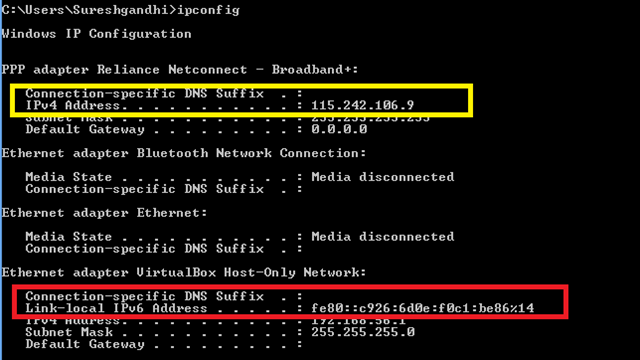
Before starting again, see following if you are not aware of what is IPV4 and IPV6 formats of IP Address.
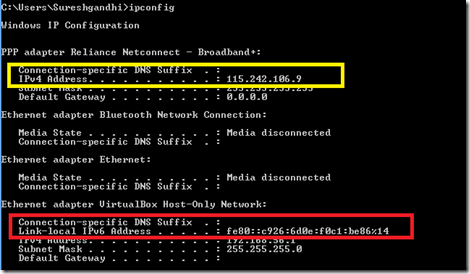
The screenshot above is my desktop ipconfig command, if you see the IPV4 address in yellow box, in format of 115.242.106.9, on other hand in red box the ipv6 format is some hexadecimal value. I am not pure network guy to explain in detailed about both of these formats, lets keep it simple for more security ipv6 is used.
Back to post,
Until 11g, Oracle Clusterware network can use only IPV4 format, IPV6 format is restricted. But from 12c onwards we can can have both.
# check the network subnet for cluster
[root@Geek DBA12c-rac1 ~]# oifcfg getif
eth1 192.168.1.0 global cluster_interconnect
eth0 192.168.56.0 global public
#check the network resource on cluster
[root@Geek DBA12c-rac1 ~]# srvctl config network
Network 1 exists
Subnet IPv4: 192.168.56.0/255.255.255.0/, static
Subnet IPv6:
#check the scan status and usage of subnets and eth
[root@Geek DBA12c-rac1 ~]# srvctl config scan
SCAN name: Geek DBA12c-scan, Network: 1
Subnet IPv4: 192.168.56.0/255.255.255.0/
Subnet IPv6:
SCAN 0 IPv4 VIP: 192.168.56.105
SCAN name: Geek DBA12c-scan, Network: 1
Subnet IPv4: 192.168.56.0/255.255.255.0/
Subnet IPv6:
SCAN 1 IPv4 VIP: 192.168.56.106
SCAN name: Geek DBA12c-scan, Network: 1
Subnet IPv4: 192.168.56.0/255.255.255.0/
Subnet IPv6:
SCAN 2 IPv4 VIP: 192.168.56.107
#check the vip configure for the network
[root@Geek DBA12c-rac1 ~]# srvctl config vip -node Geek DBA12c-rac1
VIP exists: network number 1, hosting node Geek DBA12c-rac1
VIP Name: Geek DBA12c-rac1-vip.localdomain
VIP IPv4 Address: 192.168.56.103
VIP IPv6 Address:
[root@Geek DBA12c-rac1 ~]#
As you see above all IPV6 address is blank since we are not using IPV6 format.
Now let's see how to set IPV6 format , a series of steps are required.
1. Change the network and type to both
2. Change the scan
3. Change the vip on all nodes
#Get the IPV6 format of your eth0 using ifconfig command.
[root@Geek DBA12c-rac1 ~]# ifconfig -a
eth0 Link encap:Ethernet HWaddr 08:00:27:4C:73:C1
inet addr:192.168.56.101 Bcast:192.168.56.255 Mask:255.255.255.0
inet6 addr: fe80::a00:27ff:fe4c:73c1/64 Scope:Link
UP BROADCAST RUNNING MULTICAST MTU:1500 Metric:1
RX packets:4448 errors:0 dropped:0 overruns:0 frame:0
TX packets:3899 errors:0 dropped:0 overruns:0 carrier:0
collisions:0 txqueuelen:1000
RX bytes:729169 (712.0 KiB) TX bytes:602026 (587.9 KiB)
#Firstly, enable the iptype for the network to both for the cluster to use IPV6 and IPV4
[root@Geek DBA12c-rac1 ~]# /u01/app/12.1.0/grid/bin/srvctl modify network -iptype both
# set the ipv6 for eth0 as public
[root@Geek DBA12c-rac1 ~]# oifcfg setif -global eth0/fe80::a00:27ff:fe4c:73c1:::public
# Change the cluster resource 'network' to use the ipv6 eth0 we just created
[root@Geek DBA12c-rac1 ~]# srvctl modify network -subnet fe80::a00:27ff:fe4c:73c1::/64/eth0
# Modify the scan to use these format
[root@Geek DBA12c-rac1 ~]# /u01/app/12.1.0/grid/bin/srvctl modify scan -scanname o12-cl1
# Modify the node vip's,
note:- option skip must be used since the vip is reachable as we enabled network above, and vip
must not be reachable before cluster starts, hence use skip
[root@Geek DBA12c-rac1 ~]# /u01/app/12.1.0/grid/bin/srvctl modify vip -node Geek DBA12c-rac1 -address Geek DBA12c-rac1-vip/64 -netnum 1 -skip
#Perform the vip modification on all nodes
[root@Geek DBA12c-rac1 ~]# /u01/app/12.1.0/grid/bin/srvctl modify vip -node Geek DBA12c-rac1 -address Geek DBA12c-rac2-vip/64 -netnum 1 -skip
Start up the cluster,
[root@Geek DBA12c-rac1 ~]# /u01/app/12.1.0/grid/bin/crsctl start cluster -all
Check IPV6 is used by cluster now.
# check the network subnet for cluster
[root@Geek DBA12c-rac1 ~]# oifcfg getif
eth1 192.168.1.0 global cluster_interconnect
eth0 192.168.56.0 global public
#check the network resource on cluster
[root@Geek DBA12c-rac1 ~]# srvctl config network
Network 1 exists
Subnet IPv4: 192.168.56.0/255.255.255.0/eth0, static
Subnet IPv6: fe80::a00:27ff:fe4c:73c1::64/eth0,static
#check the vip configure for the network
[root@Geek DBA12c-rac1 ~]# srvctl config vip -node Geek DBA12c-rac1
VIP exists: network number 1, hosting node Geek DBA12c-rac1
VIP Name: Geek DBA12c-rac1-vip.localdomain
VIP IPv4 Address: 192.168.56.103
VIP IPv6 Address: fe80::a00:27ff:fe4c:73c1
[root@Geek DBA12c-rac1 ~]#
#check the scan status and usage of subnets and eth0
[root@Geek DBA12c-rac1 ~]# srvctl config scan
SCAN name: Geek DBA12c-scan, Network: 1
Subnet IPv4: 192.168.56.0/255.255.255.0/
Subnet IPv6: fe80::a00:27ff:fe4c:73c1:0:0:3:5f
SCAN 0 IPv4 VIP: 192.168.56.105
SCAN name: Geek DBA12c-scan, Network: 1
Subnet IPv4: 192.168.56.0/255.255.255.0/
Subnet IPv6: fe80::a00:27ff:fe4c:73c1:0:0:3:49
SCAN 1 IPv4 VIP: 192.168.56.106
SCAN name: Geek DBA12c-scan, Network: 1
Subnet IPv4: 192.168.56.0/255.255.255.0/
Subnet IPv6: fe80::a00:27ff:fe4c:73c1:0:0:3:14a
SCAN 2 IPv4 VIP: 192.168.56.107
# check the scan status
[root@Geek DBA12c-rac1 ~]# /u01/app/12.1.0/grid/bin/srvctl status scan
SCAN VIP scan1 is enabled
SCAN VIP scan1 is running on node Geek DBA12c-rac1
SCAN VIP scan2 is enabled
SCAN VIP scan2 is running on node Geek DBA12c-rac2
SCAN VIP scan3 is enabled
SCAN VIP scan3 is running on node Geek DBA12c-rac1
#check that listeners using ipv6 using netstat -an
[root@Geek DBA12c-rac1 ~]#netstat -an | grep 1521
LISTEN 0 128 192.168.56.101:1521 *:*
LISTEN 0 128 fe80::a00:27ff:fe4c:73c1:1521 :::*
LISTEN 0 128 192.168.56.107:1521 *:*
LISTEN 0 128 fe80::a00:27ff:fe4c:73c1:4:201:1521 :::*
LISTEN 0 128 192.168.56.102:1521 *:*
LISTEN 0 128 fe80::a00:27ff:fe4c:73c1::3:60:1521 :::*
Happy Reading,
Thanks
Geek DBAGeek DBA
I will start this post with a Grid Infrastructure installation slide, which ask you the type of cluster you want to install.
As you noted, "Standard Cluster" and "Flex Cluster". We understood by now standard cluster is a traditional cluster. Now let's explore what is Flexcluster is.
Generally, an application layer and a database layer can be together and managed by a single cluster. So every node in cluster should have an access to the shared storage i.e Voting disk and OCR and every node should be tightly connected with shared storage. This tightly coupling will lead to the contention in the storage i.e voting disk polling by every node and also can cause cluster interconnect contention i.e network heart beat ping to all nodes need to be done. Another issue is that scalability, since the cluster can be limited to 100 nodes this can be a greater problem for larger enterprise system. Since both Application and Database layers may need to be managed as a single cluster so that entire services can be managed with high availability infrastructure.
Actually the application layer nodes need not to have access to shared storages, indeed the database layer since the data and the criticality lies here. To overcome this,
From 12c onwards, Flexcluster is designed over HUB-LEAF topology to scale the Cluster to large number of nodes, literally 1000s of nodes. Hub nodes are very much similar to the standard cluster architecture, they are tightly coupled through a private interconnect and have direct access to shared storage. On the contrary, Leaf nodes are very light weight servers, not connected to other leaf nodes, and have no direct access to the storage. A Hub node can have multiple leaf nodes, but, a node leaf can’t be part of multiple of Hub nodes. In a nutshell, the prime purpose of an Oracle Flex Cluster is to provide the combined database and application tiers together in a single clustering environment.
From Gridinfrastructure perspective, the hub nodes are database nodes contains full blown GI stack, where the Leaf nodes are typically application (middle layer) contains smaller footprint of GI stack.
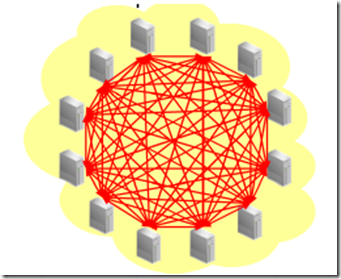
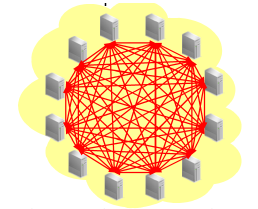
Take an example of 12 node (3 DB, 9 Application nodes) if connected to a standard and flex cluster.
In standard cluster environment below, all nodes connected to each other and accessed the shared storage, see the cluster interconnect contention
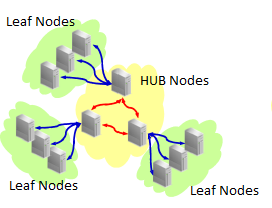
In below diagram, with 12c FlexCluster the app nodes refer to as leaf nodes and the center ones are db nodes called hub nodes.
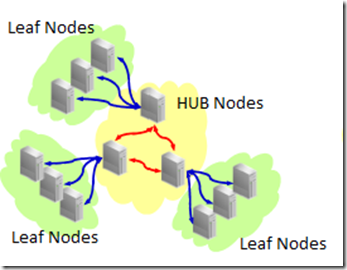
Here the leaf nodes (typically services/module) of application connected to the nodes to the db service. so each group of Leaf nodes will connect to one db node,
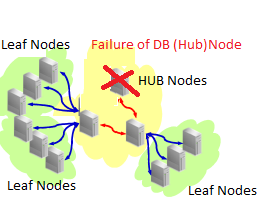
when a db node i.e hub node fails the db service failed over to other db nodes, then the leaf nodes attached to that hub node also failed over to another hub node where the service is running. See diagram below.
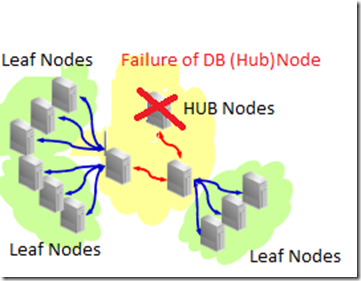
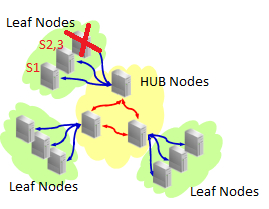
But when a leaf node is failed, the services attached to this leaf node will be failed over to another leaf node.
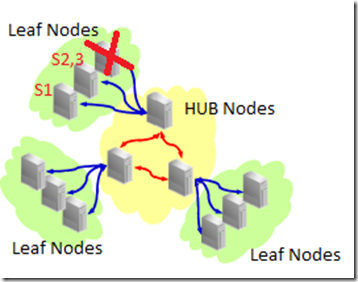
Image sources: Internet (modified a bit)
So this is the concept of Flex Cluster, BTW do not confuse with FlexASM both were different concepts.
Enabling Flexcluster ....
Happy reading.....
-Thanks
Geek DBA
If you are old junkie and rely more on "grant connect, resource to myself", then you should look back this.
From 12c onwards, resource role will not provide unlimited tablespace privilege and no longer available too. As we already know resource role is deprecated from 11g onwards and will not be available in future releases.
-Thanks
Geek DBAGeek DBA
Hello,
There were the cases of denying "select any dictionary" privilege from database security teams especially in banking section since this privilege can access the sensitive views like DEFAULT_PWD$ etc.
From 12c Onwards the "select any dictionary" system privilege no longer permits you to query the SYS schema system tables DEFAULT_PWD$, ENC$, LINK$, USER$, USER_HISTORY$, CDB_LOCAL_ADMINAUTH$, and XS$VERIFIERS. Only user SYS has access to these tables, but user SYS can grant object privileges (such as GRANT SELECT ON USER$ TO sec_admin) to other users.
So be aware when you do upgrade to 12c and your application user has granted this privilege for example to view the user$ table, now the user cannot access the same. So you have to manually provide the privilege if required.
-Thanks
Geek DBAGeek DBA
Going through the documentation and found the following were deprecated which we have may used in our environments.
The following tns parameters have been deprecated, When you process a query that involves a connected database link, the server acts as a client to the target database of the database link. For example, suppose you have an Oracle Database 12c Release 1 (12.1) database that connects to an Oracle 9i database. By setting the SQLNET.ALLOWED_LOGON_VERSION_SERVER parameter to 11 and the SQLNET.ALLOWED_LOGON_VERSION_CLIENT parameter to 8, you restrict connections to the Oracle Database 12c database to only clients running Oracle Database Release 11 or later
SQLNET.ALLOWED_LOGON_VERSION_SERVER
SQLNET.ALLOWED_LOGON_VERSION_CLIENT
IGNORECASE in orapwd utility has been deprecated, from 11g onwards the case sensitive password is allowed and while creating the password file you need specify ignorecase=y if case sensitive is switched off, I had a great problem during standby of doing this. Its a relief now.
Deprecation of SEC_CASE_SENSITIVE_LOGON parameter which enables or disables case sensitivity for passwords, is deprecated because the standards-based verifiers (SHA-1) do not support case sensitive password matching.
Deprecation of DBMS_NETWORK_ACL_ADMIN
Deprecation of DELETE_CATALOG_ROLE
Next Post : Introduction to unified auditing
-Thanks
Geek DBAGeek DBA
|
 Oracle 23c New Features for DBA's
Follow Me!!!