Disclaimer All information is offered in good faith and in the hope that it may be of use for educational purpose and for Database community purpose, but is not guaranteed to be correct, up to date or suitable for any particular purpose. db.geeksinsight.com accepts no liability in respect of this information or its use.
This site is independent of and does not represent Oracle Corporation in any way. Oracle does not officially sponsor, approve, or endorse this site or its content and if notify any such I am happy to remove.
Product and company names mentioned in this website may be the trademarks of their respective owners and published here for informational purpose only.
This is my personal blog. The views expressed on these pages are mine and learnt from other blogs and bloggers and to enhance and support the DBA community and this web blog does not represent the thoughts, intentions, plans or strategies of my current employer nor the Oracle and its affiliates or any other companies. And this website does not offer or take profit for providing these content and this is purely non-profit and for educational purpose only.
If you see any issues with Content and copy write issues, I am happy to remove if you notify me.
Contact Geek DBA Team, via geeksinsights@gmail.com
|
Before 12C,we can only come know about estimate time of disk add/drop like expensive operation at diskgroup level. So,We could not predict how much time this will take in before hand .
In 12c ASM, a more detailed and more accurate work plan is created at the beginning of each rebalance operation.
In addition, DBAs can separately generate and view the work plan before performing a rebalance operation.
This allows DBA to better plan and execute various changes such as adding storage, removing storage or moving between different storage systems.
DBAs can generate the work plan using the ESTIMATE WORK command.
Querying from V$ASM_ESTIMATE view give an idea of required time of that operation based on current workload on the system. So,in while planning such operation ,DBAs needs to take consideration of system load and without running the original operation can make approximate
estimation of their operation at ASM level.
If you want to drop a disk from a diskgroup and if you specify wrong disk name ,then this will estimation will fail. Need to give proper disk name.
SQL> explain work set statement_id='drop_test_failgroup_0000' for alter diskgroup test_failgroup drop disk test_failgroup_0000;
Explained.
SQL> select est_work from v$asm_estimate where statement_id='drop_test_failgroup_0000';
EST_WORK
----------
42
-Thanks
Geek DBA
Prior to 12c the ASM metadata is stored in the disk header under allocation unit 0 AU0, if this unit is got corrupted in the disk the whole disk is not usable.
Since version 11.1.0.7, ASM keeps a copy of the disk header in the second last block of AU1. Interestingly, in version 12.1, ASM still keeps the copy of the disk header in AU1, which means that now every ASM disk will have three copies of the disk header block.
Starting 12c, the allocation unit AU0 is replicated to AU11 (Allocation unit 11) under same disk to ensure a copy of the metadata. (Ofcourse a disk failure cannot overcome this).
So you have metadata copy of disk in three allocation unit AU0, AU1, AU11.
To use this feature a new asm disk attribute must be set to 12.1.0.1.
Disk group attribute PHYS_META_REPLICATED
The status of the physical metadata replication can be checked by querying the disk group attribute PHYS_META_REPLICATED. Here is an example with the asmcmd command that shows how to check the replication status for disk group DATA:
Create a disk group with compatibile attribute 11.2
SQL> create diskgroup DG1 external redundancy disk '/dev/sdc1' attribute COMPATIBLE.ASM'='11.2';
Diskgroup created.
Check the replication status:
$ asmcmd lsattr -G DG1 -l phys_meta_replicated
Name Value
There is no value for the DG1
Let's check the diskgroup header using kfed for flags,
Note: flag = 0 no replication of disk header
flag = 1 replication
flag = 2 replication is in progress
$ kfed read /dev/sdc1 | egrep "type|dskname|grpname|flags"
kfbh.type: 1 ; 0x002: KFBTYP_DISKHEAD
kfdhdb.dskname: DG1_0000 ; 0x028: length=8
kfdhdb.grpname: DG1 ; 0x048: length=3
kfdhdb.flags: 0 ; 0x0fc: 0x00000000
As you see the 0 is set means no disk header replication.
Now lets change the attribute of disk to 12.1, this time use asmcmd rather alter disk group
$asmcmd setattr -G DG1 compatible.asm 12.1.0.0.0
$ asmcmd lsattr -G DG1 -l phys_meta_replicated
Name Value
phys_meta_replicated true
As you see now the disk group phs_meta_replicated showing true now,
Lets check at the disk header directly using kfed.
$ kfed read /dev/sdc1 | egrep "dskname|flags"
kfdhdb.dskname: DG1_0000 ; 0x028: length=8
kfdhdb.flags: 1 ; 0x0fc: 0x00000001
Flags set to 1 means the header is replication, the other status numbers are 0 which is not replicated and 2 means the header replication is in progress.
ASM version 12 replicates the physically addressed metadata, i.e. it keeps the copy of AU0 in AU11 - on the same disk. This allows ASM to automatically recover from damage to any data in AU0. Note that ASM will not be able to recover from loss of any other data in an external redundancy disk group. In a normal redundancy disk group, ASM will be able to recover from a loss of any data in one or more disks in a single failgroup. In a high redundancy disk group, ASM will be able to recover from a loss of any data in one or more disks in any two failgroups.
Flex ASM is a new architecture in Oracle Cluster/Grid Infrastructure where you can reduce the foot print of ASM instances in the cluster. I.e you really do not need 4 ASM instances for 4 Nodes.
In addition to above, Flex ASM also alleviate the problem of RDBMS instance dependency on ASM instance. For instance, if an ASM instance is down in a node , all of the rdbms instances in that node will fail and down.
To understand how this works. we just need to get some brief on leaf nodes and hub nodes.
In a clustered environment (Now oracle Flexcluster), Oracle now expands the capability of monitoring and managing the middleware layer through grid infrastructure i.e if you have oracle ebs instances as your middleware those also can be part of your cluster but having less priority those are called leaf nodes. Hub nodes in the contrast are high priority like RDBMS instances or ASM instances etc.
Coming back to the Flex ASM, asm disks can be mounted across this hub nodes for example a group of nodes called as a hub and managed by certain set of asm instances and so on with either a separate ASM private network or with private cluster interconnect. The ASM instances itself now acts as clients to its ASM instances in flex asm mode, as the one of the hub nodes really not running the asm instance rather connected as a client to other hub node and uses that asm instance remotely In order to achieve this, you will need to have special considerations on your RAC Cluster.
ASM network
With Flex ASM Oracle 12c, a new type of network is called the ASM network. it is used for communication between ASM and its clients and is accessible on all the nodes. All ASM clients in the cluster have access to one or ore ASM network. Also it is possible to configure single network can perform both function as a private and an ASM network
ASM Listeners
To support FLex ASM, a set of ASM listeners are configured for every ASM network. Up to three ASM listener addresses are registred as remote listeners in each client database instance. All clients connections are load balanced across the entire set of ASM instances
        ora.ASMNET1LSNR_ASM.lsnr
                        ONLINE  ONLINE       Geek DBA12c-rac01                STABLE
                        ONLINE  ONLINE       Geek DBA12c-rac02                STABLE
                        ONLINE  ONLINE       Geek DBA12c-rac03                STABLE
ADVM Proxy
ASM Dynamic Volume Manager (ADVM) Proxy is a special Orale instance.  It enables ADVM to connect to Flex ASM and is required to run on the same node as ADVM and ACFS. It can be shutdown when ACFS is not running
                ora.proxy_advm

                NAME                           TARGET     STATE           SERVER       STATE_DETAILS
                -------------------------      ---------- ----------      ------------ ------------------
                Name       Target          State        Server State
                ora.proxy_advm                 ONLINE     ONLINE          Geek DBA12c-rac01       STABLE
                ora.proxy_advm                 ONLINE     ONLINE          Geek DBA12c-rac02       STABLE
                ora.proxy_advm                 ONLINE     ONLINE          Geek DBA12c-rac03       STABLE

                # a seperate apx instance will be running
                $ ps -elf | grep pmon | grep APX
                0 S oragrid      4019     1  0  80   0 - 457594 semtim 08:09 ?       00:00:00 apx_pmon_+APX2
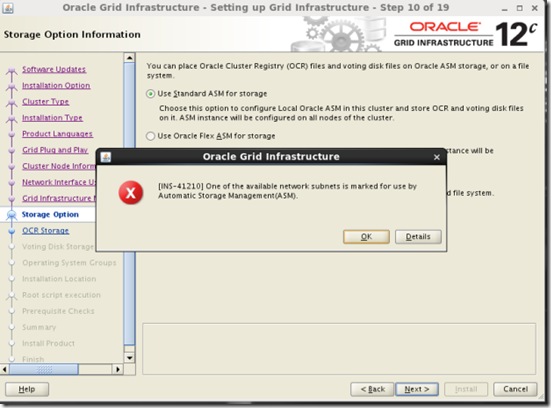
See the installation screen shots while you install the Grid Infrastructure the ASM has new options
The first one is selection of ASM Network so that you can use seperate cluster network for ASM
The second one is selection of ASM flex storage option if this option is selected the Flex ASM option will be enabled and the ASM instances will not run on all instances and clients has direct access to the ASM storage by reading the metadata from other ASM instances.

Let's see practicaly what is it,
   #Checking whether ASM instance is not in FlexASM Mode and the ASM clients
        $srvctl config asm

        ASM home: /u01/app/oracle/12.1.0.1/grid
        Password file: +DATA/ASM/PASSWORD/pwdasm.490.780738119
        ASM listener: LISTENER
        ASM instance count: ALL
        Cluster ASM listener: ASMNET1LSNR_ASM

        Notice the ASM Instance count = ALL says that asm instances should run on all instances

        #Another check , check the cardinality in the CRS Profile, the crs_hub_size means asm should run
        on all instances

        $ crsctl status resource ora.asm -f | grep CARDINALITY=
        CARDINALITY=%CRS_HUB_SIZE%


        # v$asm_client shows the clients connected to asm instances
        # as you see the asm instances are local to the database clients

        SQL> select INST_ID,GROUP_NUMBER, INSTANCE_NAME, DB_NAME,
        INSTANCE_NAME||':'||DB_NAME client_id, STATUS from gv$asm_client;

           INST_ID GROUP_NUMBER INSTANCE_N DB_NAME  CLIENT_ID             STATUS
        ---------- ------------ ---------- -------- -------------------- ------------
             1          1       racdb1   racdb   racdb1:racdb           CONNECTED -->asm instance 1 to db instance 1
             2          1       racdb2   racdb   racdb2:racdb           CONNECTED -->asm instance 2 to db instance 2
             3          1       racdb3   racdb   racdb3:racdb           CONNECTED -->asm instance 3 to db instance 3
             3          0       +APX1       +APX     +APX1:+APX         CONNECTED --> ADVM proxy instances
             3          0       +APX2       +APX     +APX2:+APX         CONNECTED
             3          0       +APX3       +APX     +APX3:+APX         CONNECTED
             3          1       -MGMTDB    _mgmtdb  -MGMTDB:_mgmtdb     CONNECTED --> MGMT repository db


        The asm instances are locally connected to each of its own asm instances like below
General Architecture - Non Flex ASM (i.e Standard ASM)
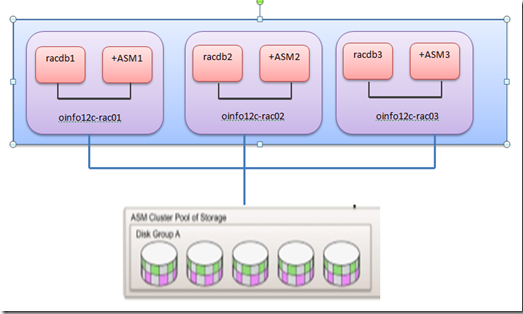 Cardinality=cluster hub size, or ALL Cardinality=cluster hub size, or ALL
Let's set the cardinality to 2, means I want only 2 asm instances in my cluster, Means Enabling Flex ASM
#Enabling Flex ASM
   # asm is running on three nodes

        $  srvctl status asm -detail
        ASM is running on racdb3,racdb2,racdb1
        ASM is enabled.

        # modify the asm count
        $ srvctl modify asm -count 2

        # check the ASM configuration
        srvctl config asm

                ASM home: /u01/oracle/12.1.0.1/grid
                Password file: +DATA/ASM/PASSWORD/pwdasm.490.780738119
                ASM listener: LISTENER
                ASM instance count: 2
                Cluster ASM listener: ASMNET1LSNR_ASM

                Notice the ASM Instance count = ALL says that asm instances should run on all instances

                Another check , check the cardinality in the CRS Profile

                +ASM1 > crsctl status resource ora.asm -f | grep CARDINALITY=
                CARDINALITY=2

        # check the asm, its now running only on two nodes

        $  srvctl status asm -detail
        ASM is running on racdb3,racdb2
        ASM is enabled.

        # check the status of database instances to which db asm instance its serving.
        # as you saw the node 3

        SQL> select INST_ID,GROUP_NUMBER, INSTANCE_NAME, DB_NAME, INSTANCE_NAME||':'||DB_NAME client_id, STATUS from gv$asm_client
              where DB_NAME = 'racdb';
        INST_ID   GROUP_NUMBER  INSTANCE_N DB_NAME  CLIENT_ID         STATUS
        ---------- ------------ ---------- -------- -------------------- ------------
             3          1       racdb1   racdb   racdb1:racdb     CONNECTED  <-- ASM connection connected via Network
             3          1       racdb2   racdb   racdb2:racdb     CONNECTED
             2          1       racdb3   racdb   racdb3:racdb     CONNECTED

        # v$asm_client shows the clients connected to asm instances
        # as you see the inst_id 3 serving racdb1 & racdb3 instances now.
        # also see now the asm instance 3 is part of asm client, means asm instance 3 itself register
        # as part of client

        SQL> select INST_ID,GROUP_NUMBER, INSTANCE_NAME, DB_NAME, INSTANCE_NAME||':'||DB_NAME client_id, STATUS from gv$asm_client;

           INST_ID GROUP_NUMBER INSTANCE_N DB_NAME  CLIENT_ID         STATUS
        ---------- ------------ ---------- -------- -------------------- ------------
             3          1       +ASM3       +ASM     +ASM3:+ASM         CONNECTED --> ASM instance
             3          1       racdb1      racdb   racdb1:racdb        CONNECTED --> INST_ID=3 serving
             3          1       racdb2      racdb   racdb2:racdb        CONNECTED   serving t wo databases
             2          1       racdb3      racdb   racdb3:racdb        CONNECTED
             3          0       +APX1       +APX     +APX1:+APX         CONNECTED --> ADVM proxy instances
             3          0       +APX2       +APX     +APX2:+APX         CONNECTED
             3          0       +APX3       +APX     +APX3:+APX         CONNECTED
             3          1       -MGMTDB    _mgmtdb  -MGMTDB:_mgmtdb     CONNECTED --> MGMT repository db


        #once you set the cardinality to two the asm alert log shows this
        Thu Oct 27 09:35:35 2013
        NOTE: ASMB registering with ASM instance as client 0x70004 (reg:398621261)
        NOTE: ASMB connected to ASM instance +ASM3 (Flex mode; client id 0x70004)
        NOTE: ASMB rebuilding ASM server state
        NOTE: ASMB rebuilt 1 (of 1) groups
        NOTE: ASMB rebuilt 20 (of 20) allocated files
        NOTE: fetching new locked extents from server
        NOTE: 0 locks established; 0 pending writes sent to server
        SUCCESS: ASMB reconnected & completed ASM server state
General Architecture - Flex ASM
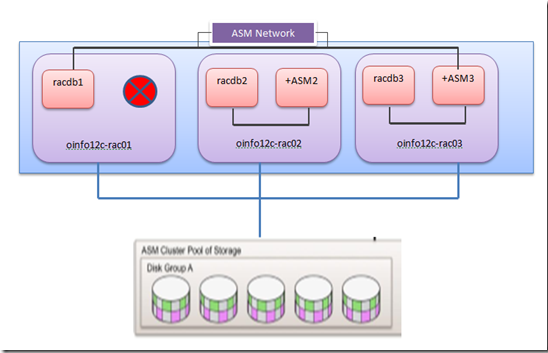 Cardinality or count = 2 Cardinality or count = 2
Next Post:- Some other new features in ASM
Technorati : 12c ASM, 12c ASM Enhancements, 12c ASM New features, 12c Flex ASM, 12c database, 12c database new features
From 12c, one can influence the clustering factor i.e set at custom level.
For those who does not know about clustering factor and how does it influence the optimizer to use index or not. Suggesting to read the following, if you already know skip the following and proceed to test case.
The clustering factor is a number which represent the degree to which data is randomly distributed in a table. It is the number of "block switches" while reading a table using an index.
It is used by Oracle's optimizer to help determine the cost associated with index range scans in comparison to full table scans.
To calculate the clustering factor of an index during the gathering of index statistics, Oracle does the following.
For each entry in the index Oracle compares the entry's table rowid block with the block of the previous index entry.
If the block is different, Oracle increments the clustering factor by 1.
Typically, Clustering factor can drastically increase if the table insertions or unordered as the index entry has to revisit the block again and again.
In addition to above, if the table is in ASSM tablespace and concurrent inserts from multiple sessions (parallel sessions) can increase clustering factor due to the fact of freelists and each session will use it own block to insert the same value of data and apparently index entries are have to unordered.
For example:-
		Table (6 rows) (3 blocks)
		Id	Name
		1	XXX
		2	XXX
		3	XXX
		3	XXX
		2	XXX
		1	XXX

		Index will look like this
		Good Clustering factor

			Root
			Branch 1 - 4
			Index Block - Key 	Table block Entries
			Leaf 1 	    - 1		Block 1 - Rows 1
			Leaf 2 	    - 2		Block 2 - Rows 2
			Leaf 3      - 3		Block 3 - Rows 3

		Clustering factor will be close to 3 i.e num of blocks, since this need not revist the block again.

		Bad clustering factor (unordered table insertions)
			Root
			Branch 1 - 4
			Index Block - Key 	Table block Entries
			Leaf 1 	      -1 	Block 1 - 1,2
			Leaf 2        -2 	Block 2 - 3,1
			Leaf 3        -3 	Block 3 - 2,3

Clustering factor will be close to 5 i.e num of blocks, since this has to revisit the table block again and again,
To search for a value 1, it has to revist the table block 1 and table block 3 and increase the CF from 3 to 4 accordingly
Again for value 3, it has to revist the table block 2, and 3 , and thus increase the CF from 4 to 5 accordingly
As with bad clustering factor optimizer sees there is no benefit to access the table via index it will choose full tablescan.
Test Case:-
Create a table with simple index and perform some deletes and inserts of same values.
This makes the table unordered and also the index entries to revisit the table blocks again
and again. making clustering factor on higher side.
If so the optimizer will choose full table scan rather index scan and will not use index at all.

	SQL> create table TEST as select object_id,object_name from all_objects;

	Table created.

	SQL> create index test_idx on TEST(object_id) compute statistics;

	Index created.

	/* deleted some rows */
	SQL> delete from TEST where rownum < 10000;

	9999 rows deleted.

	SQL> commit;

	Commit complete.

	/* inserted the rows again with same values that has been deleted and 10000 rows more to get duplicate values */
	SQL>  insert into TEST select object_id,object_name from all_objects where rownum < 20000;

	19999 rows created.

	SQL> commit;

	Commit complete.

	SQL> exec dbms_stats.gather_table_stats(ownname=>'OE',tabname=>'TEST',cascade=>true);

	PL/SQL procedure successfully completed.
Check the index status
	SQL> select tablespace_name,index_name,num_rows leaf_blocks, avg_leaf_blocks_per_key, avg_data_blocks_per_key, clustering_factor, distinct_keys from dba_indexes where index_name='test_idx';

	TABLESPACE_NAME                INDEX_NAME LEAF_BLOCKS AVG_LEAF_BLOCKS_PER_KEY AVG_DATA_BLOCKS_PER_KEY CLUSTERING_FACTOR DISTINCT_KEYS
	------------------------------ ---------- ----------- ----------------------- ----------------------- ----------------- -------------
	EXAMPLE                        test_idx               266                       1                       1             58346         90748
As you saw the index clustering factor is closer to num_rows which makes optimizer to derive index cost is
higher as it has to scan more than 50% of table blocks.
Take a look at execution plan
	SQL> explain plan for select object_id from TEST where object_id between 5000 and 20000;

	Explained.

	SQL>  select * from table(dbms_xplan.display());

	PLAN_TABLE_OUTPUT
	--------------------------------------------------------------------
	Plan hash value: 1033171814

	--------------------------------------------------------------------------
	| Id  | Operation         | Name | Rows  | Bytes | Cost (%CPU)| Time     |
	--------------------------------------------------------------------------
	|   0 | SELECT STATEMENT  |      | 19413 | 97065 |   163   (1)| 00:00:01 |
	|*  1 |  TABLE ACCESS FULL| TEST  | 19413 | 97065 |   163   (1)| 00:00:01 |
	--------------------------------------------------------------------------

	Predicate Information (identified by operation id):
	---------------------------------------------------

	   1 - filter("OBJECT_ID"< =20000 AND "OBJECT_ID">=5000)

	13 rows selected.
As discussed, Full tablescan is performed rather index scan though we are just accessing 15% of the data.
To overcome this situation, 12c offers new table level statistics preference TABLE_CACHE_BLOCKS to set at reasonable (not sure what reasonable) value
The range you can set is from 1 to 255. This value depicts how much of table blocks already cached with index scan during stats collection. For example if you set maximum 255 while collecting index statistics it skips the incrementing the clustering factor by every 255 entries and so on.
Let's take a closer look at it.
	SQL>  exec dbms_stats.set_table_prefs(ownname=>'OE', tabname=>'TEST',pname=>'TABLE_CACHED_BLOCKS', pvalue=> 255);

	PL/SQL procedure successfully completed.

	SQL> EXEC dbms_stats.gather_table_stats(ownname=>'OE', tabname=>'TEST', estimate_percent=> null, cascade=> true,method_opt=>'FOR ALL COLUMNS SIZE 1');

	PL/SQL procedure successfully completed.

	SQL> select tablespace_name,index_name, leaf_blocks, avg_leaf_blocks_per_key, avg_data_blocks_per_key, clustering_factor, distinct_keys from dba_indexes where index_name='test_idx';

	TABLESPACE_NAME                INDEX_NAME LEAF_BLOCKS AVG_LEAF_BLOCKS_PER_KEY AVG_DATA_BLOCKS_PER_KEY CLUSTERING_FACTOR DISTINCT_KEYS
	------------------------------ ---------- ----------- ----------------------- ----------------------- ----------------- -------------
	EXAMPLE                        test_idx               266                       1                       1               960         90748


	SQL> explain plan for select object_id from TEST where object_id between 5000 and 20000;

	Explained.


	SQL> select * from table(dbms_xplan.display());

	PLAN_TABLE_OUTPUT
	--------------------------------------------------------------------
	Plan hash value: 3649445643

	-------------------------------------------------------------------------
	| Id  | Operation        | Name | Rows  | Bytes | Cost (%CPU)| Time     |
	-------------------------------------------------------------------------
	|   0 | SELECT STATEMENT |      | 19413 | 97065 |    45   (0)| 00:00:01 |
	|*  1 |  INDEX RANGE SCAN| test_idx | 19413 | 97065 |    45   (0)| 00:00:01 |
	-------------------------------------------------------------------------

	Predicate Information (identified by operation id):
	---------------------------------------------------

	   1 - access("OBJECT_ID">=5000 AND "OBJECT_ID"< =20000)

	13 rows selected.
Few notes;
	1) Value has been set to maximum 255
	2) clustering factor has came down from 58346 to 960 which is close to num of blocks
	3) Optimizer choose index scan rather full table scan

This is pesimistic approach, especially useful for volatile tables but note the following
	1) This setting is for whole table level preference , not for a single column
	2) Need Careful consideration of table_cached_blocks value to reasonable number
SQL Translation framework is a new feature in 12c to give ability to the developers to migrate code without changing the underlying code.
In addition , this feature also provides the translation of code from non-oracle to oracle coding.
Further more, this feature can be a enhancement to sql profiles baselines etc. which can be used for plan stability.
In order to work with this feature, you will need to work on below
1) Create a translation profile
2) Register sql statements that need to convert into the profile
3) Set the event 10601 to enable the profile to work
Quick look.
	SQL> exec dbms_sql_translator.create_profile('TEST');

	PL/SQL procedure successfully completed.

	SQL> select object_name, object_type from dba_objects where object_name like 'TEST';

	OBJECT_NAME 				OBJECT_TYPE
	------------------------------------------------------------
	TEST        				SQL TRANSLATION PROFILE

	SQL> exec dbms_sql_translator.register_sql_translation('TEST','select count(*) from hr.countries','select count(*) from oe.countries');

	PL/SQL procedure successfully completed.

	SQL> grant all on sql translation profile TEST to hr,oe;

	Grant succeeded.

	SQL> alter session set sql_translation_profile = TEST;

	Session altered.

	SQL> alter session set events = '10601 trace name context forever, level 32';

	Session altered.

	SQL> set echo on
	SQL> select count(*) from hr.countries;

	  COUNT(*)
	----------
		25

	SQL> select * from table(dbms_xplan.display_cursor());

	PLAN_TABLE_OUTPUT
	-----------------------------------------------------------
	SQL_ID  2yyznfag9cypc, child number 0
	-------------------------------------
	select count(*) from oe.countries

	Plan hash value: 1399856367

	----------------------------------------------------------------------------
	| Id  | Operation        | Name            | Rows  | Cost (%CPU)| Time     |
	----------------------------------------------------------------------------
	|   0 | SELECT STATEMENT |                 |       |     1 (100)|          |
	|   1 |  SORT AGGREGATE  |                 |     1 |            |          |
	|   2 |   INDEX FULL SCAN| COUNTRY_C_ID_PK |    25 |     1   (0)| 00:00:01 |
	----------------------------------------------------------------------------


	14 rows selected.
Did u observe the execution plan, it says oe.countries rather hr.countries. This feature is already there in MySQL and seems oracle listenting to all 🙂
Do you want to restrict row results not to display/retrieve fully?
Until 11g, Oracle uses Top -n query method to retrieve top or bottom set of data using rownum, dense, rank etc.
But this has limitation when order is required for that data and also an inline view is required and complex to write.
For example for simple query that need to return top 5 rows:-
	SELECT sal
	FROM   (SELECT sal
		FROM   employees
		ORDER BY sal)
	WHERE rownum < = 5;
To do the same in 12c,
	SELECT sal
	FROM   employees
	ORDER BY sal DESC
	FETCH FIRST 5 ROWS ONLY;
The later one is just simple and easy to understand as well.
In addition to fetch above, there are an options like Ties, Percentage of data to return, specific set of data when grouping
Read more here:-
http://docs.oracle.com/cd/E16655_01/server.121/e17209/statements_10002.htm#BABHFGAA
From 12c onwards, you can view the database home patch list from sql prompt itself . A new package dbms_qopatch has been introduced to accomplish this.
Few cool sub routines in this package are get_opatch_install, lsinventory, opatch_bugs etc.
	SQL> set longchunksize 1000
	SQL> select DBMS_QOPATCH.get_opatch_install_info() from dual


	DBMS_QOPATCH.GET_OPATCH_INSTALL_INFO()
	-----------------------------------------------------------------------
	OracleHome-5958ed72-136c-4adc-a078-e3ec7081a6e8
	oracle_home
	oneoff
	/u01/app/oracle/product/12.1.0.1/db_1
	oracle_home
	/u01/app/oraInventory
	false
Opatch lsinventory (Typically inventory.xml file)
SQL> select DBMS_QOPATCH.get_opatch_lsinventory() from dual;
DBMS_QOPATCH.GET_OPATCH_LSINVENTORY()
---------------------------------------------------------------------------
< ?xml version="1.0" encoding="US-ASCII" standalone='yes'?>
OracleHome-2979699c-6748-4b7a-9477-ae79a63c0580
oracle_home
oneoff
/u01/app/oracle/product/12.1.0.1/db_1
oracle_home
/u01/app/oraInventory
false
OUIComponent-7eb53931-ee95-43b7-b37d-c41fdf749926
Installs an optional preconfigured starter database, product options, management tools, networking services, utilities, and basic client software for an Oracle Database server. This option also supports Automatic Storage Management database configuration.
12.1.0.1.0
en
Oracle Database 12c
Installs an optional preconfigured starter database, product options, management tools, networking services, utilities, and basic client software for an Oracle Database server. This option also supports Automatic Storage Management database configuration.
12.1.0.1.0
OUIComponent-77467009-bbea-4623-907d-f3bbee4a810b
Installs Sun JDK
1.6.0.37.0
en
Sun JDK
Installs Sun JDK
1.6.0.37.0
OUIComponent-370d483f-6754-443c-a3a6-36f0e7285a09
New OUI core minimum component that contains only the jars that are required for a) Patching via OPatch b) Applying Patchsets via OUI c) Inventory Management
12.1.0.1.0
en
oracle.swd.oui.core.min
New OUI core minimum component that contains only the jars that are required for a) Patching via OPatch b) Applying Patchsets via OUI c) Inventory Management
12.1.0.1.0
OUIComponent-625b11d1-f708-499f-be7c-1b3f7f51b4a9
Install SDK libraries available for install developers
12.1.0.1.0
en
Installer SDK Component
Install SDK libraries available for install developers
12.1.0.1.0
OUIComponent-d86f1ee1-a5e3-44a6-aca4-85f1c40ce689
Oracle One-Off Patch Installer
12.1.0.1.0
en
Oracle One-Off Patch Installer
Oracle One-Off Patch Installer
12.1.0.1.0
OUIComponent-b6be1c57-c02c-4078-9a99-2e749ed05995
Installs the components developed using the Oracle Software Packager.
12.1.0.1.0
en
Oracle Universal Installer
Installs the components developed using the Oracle Software Packager.
12.1.0.1.0
OUIComponent-38ccf7f6-b749-448d-affd-0bdca211dbb9
USM-specific files necessary for deconfig/deinstall
12.1.0.1.0
en
Oracle USM Deconfiguration
USM-specific files necessary for deconfig/deinstall
12.1.0.1.0
OUIComponent-cb68a64b-f01e-47ec-a222-61e80de54526
Deconfig tool for Oracle Configuration Manager
10.3.1.0.0
en
Oracle Configuration Manager Deconfiguration
Deconfig tool for Oracle Configuration Manager
10.3.1.0.0
OUIComponent-309edf5e-6112-46e2-b231-ed325a576cd6
HAS-specific files necessary for deconfig/deinstall
12.1.0.1.0
en
Oracle RAC Deconfiguration
HAS-specific files necessary for deconfig/deinstall
12.1.0.1.0
OUIComponent-44227088-7174-4d40-b5ba-6ddb85d2152b
DBCA-specific files necessary for deconfig/deinstall
12.1.0.1.0
en
Oracle DBCA Deconfiguration
DBCA-specific files necessary for deconfig/deinstall
12.1.0.1.0
OUIComponent-61d02517-7a84-496e-aa53-7eaa27e2227d
Oracle Database Plugin for Oracle Virtual Assembly Builder
12.1.0.1.0
en
Oracle Database Plugin for Oracle Virtual Assembly Builder
Oracle Database Plugin for Oracle Virtual Assembly Builder
12.1.0.1.0
OUIComponent-0aac8ffb-1a01-4c54-9da0-6bb9f2c880a6
Installs Oracle Configuration Manager Client jars
10.3.2.1.0
en
Oracle Configuration Manager Client
Installs Oracle Configuration Manager Client jars
10.3.2.1.0
OUIComponent-5fa99099-4ca2-4462-9995-71469e1586de
Installs Oracle Configuration Manager
10.3.7.0.3
en
Oracle Configuration Manager
Installs Oracle Configuration Manager
10.3.7.0.3
	SQL> select dbms_qopatch.GET_OPATCH_BUGS from dual;
		As i have no patches applied on this home, no rows returned.
-Thanks
Geek DBA
Often, when the global temporary tables are in use in batch processing, we have lot of problems regarding plan stability.
For example
	A session inserting 1 row in a global temporary table based on some other table joins

	Another session which were apparently doing the same insert but will try to insert 1000
	 rows will use same plan which can be a disaster

	To overcome this,

	- Use stored outlines, profiles, fixed statistics, lock statistics

	- gather statistics after the load i.e insert

	- use optimizer samplings like dynamic sampling,cardinality or cursor_sharing hints

	- use different schemas for different workloads to avoid the sharing of sql statements
But from 12c onwards this has been enhanced to use the session level statistics for global temporary tables,
so that they can leverage the session statistics only rather the one that has been done in another processing.
So lets have a look with test case.
Tables for Test case
	CREATE TABLE test_obj AS SELECT * FROM dba_objects,
	(SELECT * FROM dual CONNECT BY rownum < =10);

	A table test_obj_types that contains all distinct data types derived from ALL_OBJECTS

	CREATE TABLE test_obj_types AS
	 SELECT DISTINCT object_type FROM all_objects;

	A table T that has the same structure as test_obj


	CREATE TABLE t AS SELECT * FROM test_obj WHERE 1=2;

	And a global temporary table temp_gtt that has only one column which will accept OBJECT_IDs

	CREATE GLOBAL TEMPORARY TABLE temp_gtt
	 (object_id NUMBER NOT NULL)
	 ON COMMIT PRESERVE ROWS;

	EXEC dbms_stats.gather_table_stats(ownname=>'SH',tabname=>'TEST_OBJ',cascade=>true);

	EXEC dbms_stats.gather_table_stats(ownname=>'SH',tabname=>'TEST_OBJ_TYPES',cascade=>true);
In Session 1
	SQL> INSERT INTO temp_gtt (SELECT object_id FROM all_objects WHERE rownum< =1);
	1 row created

	SQL> INSERT INTO t
	 SELECT /*+ gather_plan_statistics */ o.*
	 FROM test_obj o
	   , test_obj_types t
	   , temp_gtt tt
	 WHERE o.object_type=t.object_type
	  AND o.object_id=tt.object_id;
	10 rows created.

	SQL> select * from table(dbms_xplan.display)cursor());

	SQL> select * from table(dbms_xplan.display_cursor());

	PLAN_TABLE_OUTPUT
	------------------------------------------------------------------
	SQL_ID  21rvq7cdg8gjv, child number 0
	-------------------------------------
	INSERT INTO t  SELECT /*+ gather_plan_statistics */ o.*  FROM test_obj
	o    , test_obj_types t    , temp_gtt tt  WHERE
	o.object_type=t.object_type   AND o.object_id=tt.object_id

	Plan hash value: 1735148311

	-------------------------------------------------------------------------------------------
	| Id  | Operation                | Name           | Rows  | Bytes | Cost (%CPU)| Time     |
	-------------------------------------------------------------------------------------------
	|   0 | INSERT STATEMENT         |                |       |       |  4299 (100)|          |
	|   1 |  LOAD TABLE CONVENTIONAL |                |       |       |            |          |
	|*  2 |   HASH JOIN              |                |     9 |  1260 |  4299   (1)| 00:00:01 |
	|   3 |    MERGE JOIN CARTESIAN  |                |    41 |   943 |     5   (0)| 00:00:01 |
	|   4 |     TABLE ACCESS FULL    | TEMP_GTT       |     1 |    13 |     2   (0)| 00:00:01 |
	|   5 |     BUFFER SORT          |                |    41 |   410 |     3   (0)| 00:00:01 |
	|   6 |      TABLE ACCESS FULL   | TEST_OBJ_TYPES |    41 |   410 |     3   (0)| 00:00:01 |
	|   7 |    TABLE ACCESS FULL     | TEST_OBJ       |   915K|   102M|  4292   (1)| 00:00:01 |
	-------------------------------------------------------------------------------------------

	Predicate Information (identified by operation id):
	---------------------------------------------------

	   2 - access("O"."OBJECT_TYPE"="T"."OBJECT_TYPE" AND
		      "O"."OBJECT_ID"="TT"."OBJECT_ID")

	Note
	-----
	   - dynamic statistics used: dynamic sampling (level=2)
Session 2
	SQL> INSERT INTO temp_gtt (SELECT object_id FROM all_objects WHERE rownum < =1000);

	1000 rows created.

	SQL> exec dbms_stats.gather_table_stats(ownname=>'SH', tabname=>'TEMP_GTT');

	PL/SQL procedure successfully completed.


	SQL> INSERT INTO t
	 SELECT /*+ gather_plan_statistics */ o.*
	 FROM test_obj o
	   , test_obj_types t
	   , temp_gtt tt
	 WHERE o.object_type=t.object_type
	  AND o.object_id=tt.object_id;

	10000 rows created.


	SQL> select * from table(dbms_xplan.display_cursor());

	PLAN_TABLE_OUTPUT
	-----------------------------------------------------------------
	SQL_ID  21rvq7cdg8gjv, child number 0
	-------------------------------------
	INSERT INTO t  SELECT /*+ gather_plan_statistics */ o.*  FROM test_obj
	o    , test_obj_types t    , temp_gtt tt  WHERE
	o.object_type=t.object_type   AND o.object_id=tt.object_id

	Plan hash value: 1735148311

	-------------------------------------------------------------------------------------------
	| Id  | Operation                | Name           | Rows  | Bytes | Cost (%CPU)| Time     |
	-------------------------------------------------------------------------------------------
	|   0 | INSERT STATEMENT         |                |       |       |  4299 (100)|          |
	|   1 |  LOAD TABLE CONVENTIONAL |                |       |       |            |          |
	|*  2 |   HASH JOIN              |                |     9 |  1260 |  4299   (1)| 00:00:01 |
	|   3 |    MERGE JOIN CARTESIAN  |                |    41 |   943 |     5   (0)| 00:00:01 |
	|   4 |     TABLE ACCESS FULL    | TEMP_GTT       |     1 |    13 |     2   (0)| 00:00:01 |
	|   5 |     BUFFER SORT          |                |    41 |   410 |     3   (0)| 00:00:01 |
	|   6 |      TABLE ACCESS FULL   | TEST_OBJ_TYPES |    41 |   410 |     3   (0)| 00:00:01 |
	|   7 |    TABLE ACCESS FULL     | TEST_OBJ       |   915K|   102M|  4292   (1)| 00:00:01 |
	-------------------------------------------------------------------------------------------

	Predicate Information (identified by operation id):
	---------------------------------------------------

	   2 - access("O"."OBJECT_TYPE"="T"."OBJECT_TYPE" AND
		      "O"."OBJECT_ID"="TT"."OBJECT_ID")

	Note
	-----
	   - dynamic statistics used: dynamic sampling (level=2)
See above, the same plan has been used to insert both 10 rows and 10000 rows,
and merge join cartesian will have drastic performance degradation
Check the V$sql to see whether cursor is invalidated
	SQL> select plan_hash_value, child_number, CHILD_ADDRESS, executions, invalidations, is_shareable,
	     is_obsolete from v$sql where sql_id='21rvq7cdg8gjv';

	PLAN_HASH_VALUE CHILD_NUMBER CHILD_ADDRESS    EXECUTIONS INVALIDATIONS I I
	--------------- ------------ ---------------- ---------- ------------- - -
	     1735148311            0 00000000A14AD990          2             0 Y N
This is due to the cursor that has been shared and the statistics of the temporary table been used by both session.
Now from 12c, onwards each session can be use its own statistics (session level statistics) for Temporary tables.
Get the table preferences using get_prefs
	SQL> select dbms_stats.get_prefs(ownname=>'SH', tabname=>'TEMP_GTT',pname=>'GLOBAL_TEMP_TABLE_STATS') from dual;

	DBMS_STATS.GET_PREFS(OWNNAME=>'SH',TABNAME=>'TEMP_GTT',PNAME=>'GLOBAL_TEMP_TABLE_STATS')
	--------------------------------------------------------------
	SHARED
Set this value to "Session"
	SQL> exec dbms_stats.set_table_prefs(ownname=>'SH', tabname=>'TEMP_GTT',pname=>'GLOBAL_TEMP_TABLE_STATS',pvalue=>'SESSION');


	SQL> select dbms_stats.get_prefs(ownname=>'SH', tabname=>'TEMP_GTT',pname=>'GLOBAL_TEMP_TABLE_STATS') from dual;

	DBMS_STATS.GET_PREFS(OWNNAME=>'SH',TABNAME=>'TEMP_GTT',PNAME=>'GLOBAL_TEMP_TABLE_STATS')
	--------------------------------------------------------------
	SESSION
Initiate the insert operation again
	SQL> truncate table temp_gtt;

	Table truncated.

	SQL> INSERT INTO temp_gtt (SELECT object_id FROM all_objects WHERE rownum < =1000);

	1000 rows created.

	SQL> exec dbms_stats.gather_table_stats(ownname=>'SH', tabname=>'TEMP_GTT');

	PL/SQL procedure successfully completed.

	SQL> INSERT INTO t
	 SELECT /*+ gather_plan_statistics */ o.*
	 FROM test_obj o
	   , test_obj_types t
	   , temp_gtt tt
	 WHERE o.object_type=t.object_type
	  AND o.object_id=tt.object_id;  2    3    4    5    6    7

	10000 rows created.


	SQL> select * from table(dbms_xplan.display_cursor());

	PLAN_TABLE_OUTPUT
	--------------------------------------------------------------
	SQL_ID  21rvq7cdg8gjv, child number 1
	-------------------------------------
	INSERT INTO t  SELECT /*+ gather_plan_statistics */ o.*  FROM test_obj
	o    , test_obj_types t    , temp_gtt tt  WHERE
	o.object_type=t.object_type   AND o.object_id=tt.object_id

	Plan hash value: 908924331

	-------------------------------------------------------------------------------------------
	| Id  | Operation                | Name           | Rows  | Bytes | Cost (%CPU)| Time     |
	-------------------------------------------------------------------------------------------
	|   0 | INSERT STATEMENT         |                |       |       |  4299 (100)|          |
	|   1 |  LOAD TABLE CONVENTIONAL |                |       |       |            |          |
	|*  2 |   HASH JOIN              |                |  8804 |  1126K|  4299   (1)| 00:00:01 |
	|   3 |    TABLE ACCESS FULL     | TEST_OBJ_TYPES |    41 |   410 |     3   (0)| 00:00:01 |
	|*  4 |    HASH JOIN             |                |  9877 |  1167K|  4296   (1)| 00:00:01 |
	|   5 |     TABLE ACCESS FULL    | TEMP_GTT       |  1000 |  4000 |     2   (0)| 00:00:01 |
	|   6 |     TABLE ACCESS FULL    | TEST_OBJ       |   915K|   102M|  4292   (1)| 00:00:01 |
	-------------------------------------------------------------------------------------------

	Predicate Information (identified by operation id):
	---------------------------------------------------

	   2 - access("O"."OBJECT_TYPE"="T"."OBJECT_TYPE")
	   4 - access("O"."OBJECT_ID"="TT"."OBJECT_ID")

	Note
	-----
	   - Global temporary table session private statistics used


	30 rows selected.
The plan has been changed now and used correct statistics for TEMP_GTT 1000 rows rather 1 row earlier.
Take a look at the V$SQL about cursor invalidation.
	SQL> select plan_hash_value, child_number, CHILD_ADDRESS, executions, invalidations, is_shareable,
	     is_obsolete from v$sql where sql_id='21rvq7cdg8gjv';

	PLAN_HASH_VALUE CHILD_NUMBER CHILD_ADDRESS    EXECUTIONS INVALIDATIONS I I
	--------------- ------------ ---------------- ---------- ------------- - -
	     1735148311            0 00000000A14AD990          2             2 Y N
	      908924331            1 000000009FACFE20          1             0 Y N
This feature will help and make subtle difference in post processing of batch insertion and no more statistics
gotchas for temporary tables. Its that you have to collect statistics and do not close that session
and continue further processing.
-Thanks
Geek DBA
Before to 12c, we have a problem to revert back to a question, how much time does the statistics operation will run?
This is common problem, as we cannot anticipate the time and its depend on the various factors that will take place at time of statistics job execution.
To accomplish this we will have to use queries written here
Now, from 12c onwards there are reporting feasibility with statistics jobs , rather running actual you can run in reporting mode and see the details and revert back to the question above.
The following are sub programs for dbms_stats package where you can run the respective statistics collection in reporting mode.
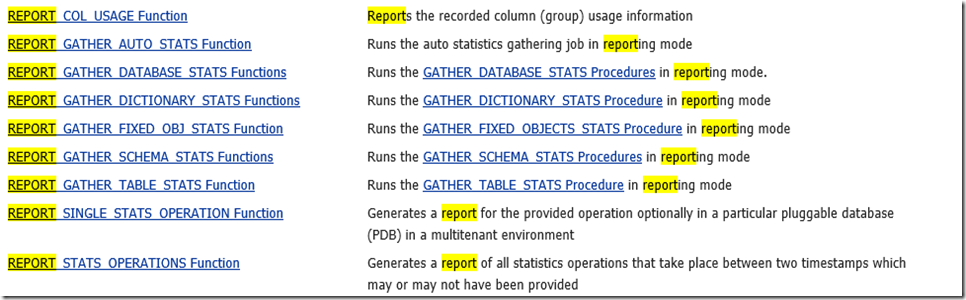
For example, If I want to know the report for Schema OE statistics job, what all it will collect including histograms.
Scroll to right, you can see the full report.
variable myreport clob;
set long 1000000
begin
:myreport := dbms_stats.report_gather_schema_stats
(ownname =>'OE',
detail_level=>'ALL',
format=>'TEXT');
end;
/
SQL> SQL> print myreport
MYREPORT
----------------------------------------------------------------------------------------------------------------------------------------------------------------------------------------------------------------------------------------------------------------------------------------------------------------------------------------------------------------------------------------------------------------------------------------------------------------------------------------------------------------------------------------------------------------------------------------------------------------------------------------------------------------------------------------------------------------------------------------------------------------------------------------------------------------------------------------------------------------------------------------------------------------------------------------------------------------------------------------------------------------------------------------
-----------------------------------------------------------------------------------------------------------------------------------------------------------------------------------------------------
| Operation Id | Operation | Target | Start Time | End Time | Status | Total Tasks | Successful | Failed Tasks | Active Tasks | Job Name | Session Id | Additional Info |
| | | | | | | | Tasks | | | | | |
-----------------------------------------------------------------------------------------------------------------------------------------------------------------------------------------------------
| 711 | gather_schema_stats | OE | | | | 47 | | | | | | Parameters: [block_sample: |
| | (reporting mode) | | | | | | | | | | | FALSE] [cascade: NULL] |
| | | | | | | | | | | | | [concurrent: FALSE] [degree: |
| | | | | | | | | | | | | ] [estimate_percent: |
| | | | | | | | | | | | | DBMS_STATS.AUTO_SAMPLE_SIZE] |
| | | | | | | | | | | | | [force: FALSE] |
| | | | | | | | | | | | | [gather_fixed: FALSE] |
| | | | | | | | | | | | | [gather_temp: FALSE] |
| | | | | | | | | | | | | [granularity: AUTO] |
| | | | | | | | | | | | | [method_opt: FOR ALL COLUMNS |
| | | | | | | | | | | | | SIZE AUTO] [no_invalidate: |
| | | | | | | | | | | | | NULL] [options: GATHER] |
| | | | | | | | | | | | | [ownname: OE] |
| | | | | | | | | | | | | [reporting_mode: TRUE] |
| | | | | | | | | | | | | [statid: ] [statown: ] |
| | | | | | | | | | | | | [stattab: ] [stattype: DATA] |
-----------------------------------------------------------------------------------------------------------------------------------------------------------------------------------------------------
-------------------------------------------------------------------------------------------------------------------------------------------------------------------------------------------------------
| |
| --------------------------------------------------------------------------------------------------------------------------------------------------------------------------------------------------- |
| T A S K S |
| --------------------------------------------------------------------------------------------------------------------------------------------------------------------------------------------------- |
| ---------------------------------------------------------------------------------------------------------------------------------------------------------------------------------------- |
| | Target | Type | Start | End | Status | Rank | Job | Estimated | Batching | Histogram Columns | Extended | Additional | |
| | | | Time | Time | | | Name | Cost | Info | | Stats | Info | |
| ---------------------------------------------------------------------------------------------------------------------------------------------------------------------------------------- |
| | OE.ACTION_TABLE | TABLE | | | | 1 | | N/A | N/A | | | | |
| ---------------------------------------------------------------------------------------------------------------------------------------------------------------------------------------- |
| | OE.SYS_C009916 | INDEX | | | | 1/1 | | N/A | N/A | | | | |
| ---------------------------------------------------------------------------------------------------------------------------------------------------------------------------------------- |
| | OE.CATEGORIES_TAB | TABLE | | | | 2 | | N/A | N/A | | | | |
| ---------------------------------------------------------------------------------------------------------------------------------------------------------------------------------------- |
| | OE.SYS_C009921 | INDEX | | | | 2/1 | | N/A | N/A | | | | |
| ---------------------------------------------------------------------------------------------------------------------------------------------------------------------------------------- |
| | OE.SYS_C009922 | INDEX | | | | 2/2 | | N/A | N/A | | | | |
| ---------------------------------------------------------------------------------------------------------------------------------------------------------------------------------------- |
| | OE.SYS_C009923 | INDEX | | | | 2/3 | | N/A | N/A | | | | |
| ---------------------------------------------------------------------------------------------------------------------------------------------------------------------------------------- |
| | OE.SYS_C009924 | INDEX | | | | 2/4 | | N/A | N/A | | | | |
| ---------------------------------------------------------------------------------------------------------------------------------------------------------------------------------------- |
| | OE.CUSTOMERS | TABLE | | | | 3 | | N/A | N/A | (3) SYS_NC00008$;SYS_NC00009$;ACCOUNT_MGR_ID; | | | |
| ---------------------------------------------------------------------------------------------------------------------------------------------------------------------------------------- |
| | OE.CUST_ACCOUNT_MANAGER_IX | INDEX | | | | 3/1 | | N/A | N/A | | | | |
| ---------------------------------------------------------------------------------------------------------------------------------------------------------------------------------------- |
| | OE.CUST_LNAME_IX | INDEX | | | | 3/2 | | N/A | N/A | | | | |
| ---------------------------------------------------------------------------------------------------------------------------------------------------------------------------------------- |
| | OE.CUST_EMAIL_IX | INDEX | | | | 3/3 | | N/A | N/A | | | | |
| ---------------------------------------------------------------------------------------------------------------------------------------------------------------------------------------- |
| | OE.CUST_UPPER_NAME_IX | INDEX | | | | 3/4 | | N/A | N/A | | | | |
| ---------------------------------------------------------------------------------------------------------------------------------------------------------------------------------------- |
| | OE.CUSTOMERS_PK | INDEX | | | | 3/5 | | N/A | N/A | | | | |
| ---------------------------------------------------------------------------------------------------------------------------------------------------------------------------------------- |
| | OE.INVENTORIES | TABLE | | | | 4 | | N/A | N/A | (2) PRODUCT_ID;WAREHOUSE_ID; | | | |
| ---------------------------------------------------------------------------------------------------------------------------------------------------------------------------------------- |
| | OE.INV_PRODUCT_IX | INDEX | | | | 4/1 | | N/A | N/A | | | | |
| ---------------------------------------------------------------------------------------------------------------------------------------------------------------------------------------- |
| | OE.INVENTORY_IX | INDEX | | | | 4/2 | | N/A | N/A | | | | |
| ---------------------------------------------------------------------------------------------------------------------------------------------------------------------------------------- |
| | OE.LINEITEM_TABLE | TABLE | | | | 5 | | N/A | N/A | | | | |
| ---------------------------------------------------------------------------------------------------------------------------------------------------------------------------------------- |
| | OE.SYS_C009917 | INDEX | | | | 5/1 | | N/A | N/A | | | | |
| ---------------------------------------------------------------------------------------------------------------------------------------------------------------------------------------- |
| | OE.ORDERS | TABLE | | | | 6 | | N/A | N/A | (3) ORDER_MODE;CUSTOMER_ID;SALES_REP_ID; | | | |
| ---------------------------------------------------------------------------------------------------------------------------------------------------------------------------------------- |
| | OE.ORD_SALES_REP_IX | INDEX | | | | 6/1 | | N/A | N/A | | | | |
| ---------------------------------------------------------------------------------------------------------------------------------------------------------------------------------------- |
| | OE.ORD_CUSTOMER_IX | INDEX | | | | 6/2 | | N/A | N/A | | | | |
| ---------------------------------------------------------------------------------------------------------------------------------------------------------------------------------------- |
| | OE.ORD_ORDER_DATE_IX | INDEX | | | | 6/3 | | N/A | N/A | | | | |
| ---------------------------------------------------------------------------------------------------------------------------------------------------------------------------------------- |
| | OE.ORDER_PK | INDEX | | | | 6/4 | | N/A | N/A | | | | |
| ---------------------------------------------------------------------------------------------------------------------------------------------------------------------------------------- |
| | OE.ORDER_ITEMS | TABLE | | | | 7 | | N/A | N/A | (4) ORDER_ID;PRODUCT_ID;UNIT_PRICE;QUANTITY; | | | |
| ---------------------------------------------------------------------------------------------------------------------------------------------------------------------------------------- |
| | OE.ITEM_ORDER_IX | INDEX | | | | 7/1 | | N/A | N/A | | | | |
| ---------------------------------------------------------------------------------------------------------------------------------------------------------------------------------------- |
| | OE.ITEM_PRODUCT_IX | INDEX | | | | 7/2 | | N/A | N/A | | | | |
| ---------------------------------------------------------------------------------------------------------------------------------------------------------------------------------------- |
| | OE.ORDER_ITEMS_PK | INDEX | | | | 7/3 | | N/A | N/A | | | | |
| ---------------------------------------------------------------------------------------------------------------------------------------------------------------------------------------- |
| | OE.ORDER_ITEMS_UK | INDEX | | | | 7/4 | | N/A | N/A | | | | |
| ---------------------------------------------------------------------------------------------------------------------------------------------------------------------------------------- |
| | OE.PRODUCT_DESCRIPTIONS | TABLE | | | | 8 | | N/A | N/A | (1) PRODUCT_ID; | | | |
| ---------------------------------------------------------------------------------------------------------------------------------------------------------------------------------------- |
| | OE.PRD_DESC_PK | INDEX | | | | 8/1 | | N/A | N/A | | | | |
| ---------------------------------------------------------------------------------------------------------------------------------------------------------------------------------------- |
| | OE.PROD_NAME_IX | INDEX | | | | 8/2 | | N/A | N/A | | | | |
| ---------------------------------------------------------------------------------------------------------------------------------------------------------------------------------------- |
| | OE.PRODUCT_INFORMATION | TABLE | | | | 9 | | N/A | N/A | (4) | | | |
| | | | | | | | | | | PRODUCT_NAME;CATEGORY_ID;LIST_PRICE;MIN_PRICE; | | | |
| ---------------------------------------------------------------------------------------------------------------------------------------------------------------------------------------- |
| | OE.PROD_SUPPLIER_IX | INDEX | | | | 9/1 | | N/A | N/A | | | | |
| ---------------------------------------------------------------------------------------------------------------------------------------------------------------------------------------- |
| | OE.PRODUCT_INFORMATION_PK | INDEX | | | | 9/2 | | N/A | N/A | | | | |
| ---------------------------------------------------------------------------------------------------------------------------------------------------------------------------------------- |
| | OE.PRODUCT_REF_LIST_NESTEDTAB | TABLE | | | | 10 | | N/A | N/A | | | | |
| ---------------------------------------------------------------------------------------------------------------------------------------------------------------------------------------- |
| | OE.SYS_FK0000091701N00007$ | INDEX | | | | 10/1 | | N/A | N/A | | | | |
| ---------------------------------------------------------------------------------------------------------------------------------------------------------------------------------------- |
| | OE.PROMOTIONS | TABLE | | | | 11 | | N/A | N/A | | | | |
| ---------------------------------------------------------------------------------------------------------------------------------------------------------------------------------------- |
| | OE.PROMO_ID_PK | INDEX | | | | 11/1 | | N/A | N/A | | | | |
| ---------------------------------------------------------------------------------------------------------------------------------------------------------------------------------------- |
| | OE.PURCHASEORDER | TABLE | | | | 12 | | N/A | N/A | | | | |
| ---------------------------------------------------------------------------------------------------------------------------------------------------------------------------------------- |
| | OE.LINEITEM_TABLE_MEMBERS | INDEX | | | | 12/1 | | N/A | N/A | | | | |
| ---------------------------------------------------------------------------------------------------------------------------------------------------------------------------------------- |
| | OE.ACTION_TABLE_MEMBERS | INDEX | | | | 12/2 | | N/A | N/A | | | | |
| ---------------------------------------------------------------------------------------------------------------------------------------------------------------------------------------- |
| | OE.SYS_C009920 | INDEX | | | | 12/3 | | N/A | N/A | | | | |
| ---------------------------------------------------------------------------------------------------------------------------------------------------------------------------------------- |
| | OE.SUBCATEGORY_REF_LIST_NESTEDTAB | TABLE | | | | 13 | | N/A | N/A | | | | |
| ---------------------------------------------------------------------------------------------------------------------------------------------------------------------------------------- |
| | OE.SYS_FK0000091701N00009$ | INDEX | | | | 13/1 | | N/A | N/A | | | | |
| ---------------------------------------------------------------------------------------------------------------------------------------------------------------------------------------- |
| | OE.WAREHOUSES | TABLE | | | | 14 | | N/A | N/A | (1) LOCATION_ID; | | | |
| ---------------------------------------------------------------------------------------------------------------------------------------------------------------------------------------- |
| | OE.WHS_LOCATION_IX | INDEX | | | | 14/1 | | N/A | N/A | | | | |
| ---------------------------------------------------------------------------------------------------------------------------------------------------------------------------------------- |
| | OE.WAREHOUSES_PK | INDEX | | | | 14/2 | | N/A | N/A | | | | |
| ---------------------------------------------------------------------------------------------------------------------------------------------------------------------------------------- |
| |
| |
-------------------------------------------------------------------------------------------------------------------------------------------------------------------------------------------------------
SQL>
SQL>
Previous to 12c, when you want to perform an monitoring the Session you will have to turn the trace etc or trace with application/module/program/sql_id etc.
But, what if you want to monitor specific operation for that session not whole or application. Kind of set of operations you want to peform not all with in that application/module/sql_id etc.
From 12c, You can do that using dbms_SQL_MONITOR.begin_operation.
Let's have a look,
Connect to the sample schema and begin the monitoring operation.
. oraenv
sqlplus hr/hr@noncdb
VAR dbop_eid NUMBER;
EXEC :dbop_eid := DBMS_SQL_MONITOR.BEGIN_OPERATION ('ORA.HR.select', forced_tracking => 'Y')
select a.employee_id, b.employee_id from hr.employees a, hr.employees b;
select * from hr.departments;
select a.table_name , b.table_name FROM dict a, dict b;
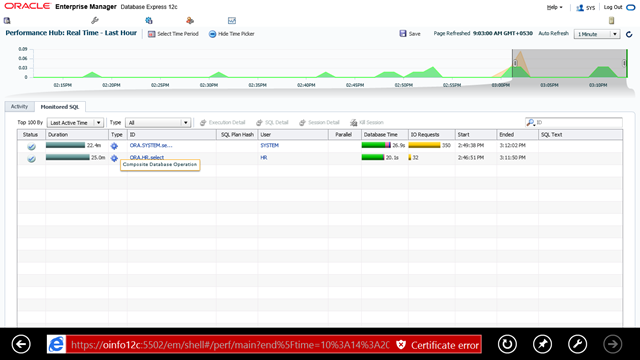
Connect to EM Express using https://dbhost:5502/em
Note: EM Express is a light weight performance monitoring replaced the db console. Its in built with database engine and looks similar like 12c cloud control pages
Once connected, Go to Performance --> SQL Monitor --> And observe you operation
As I turned on the Begin operation this was showing me the status still running.
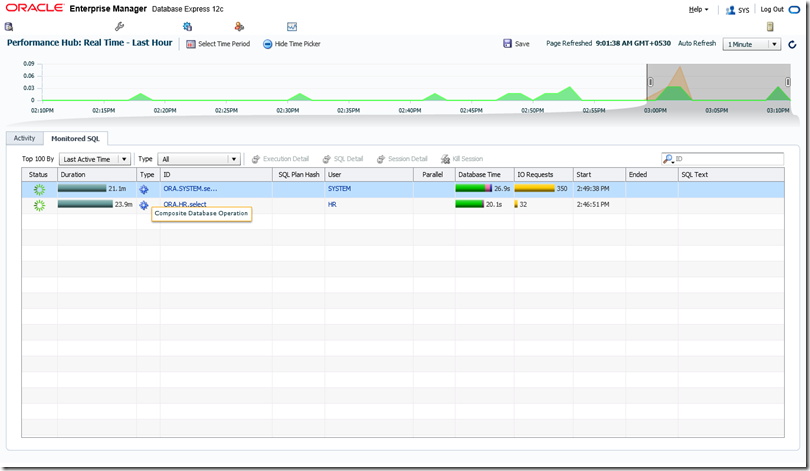
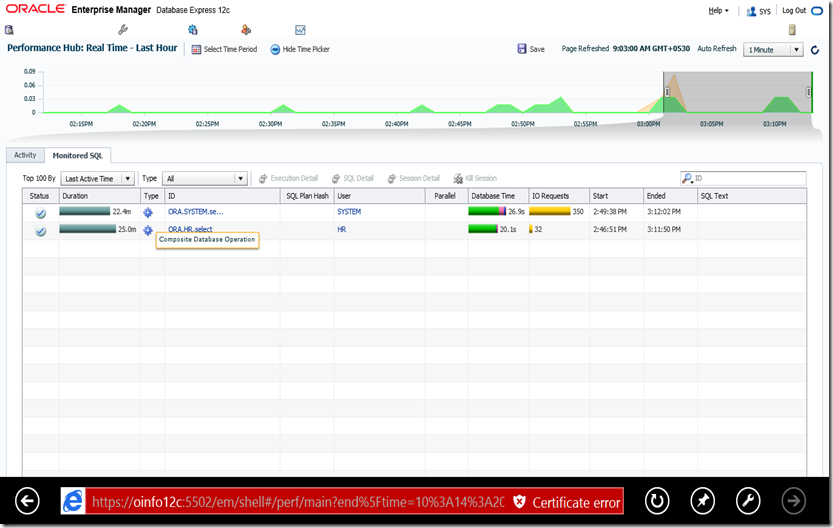
Once I stopped the operation using below, the console shows the operation completes.
This work has been determined as composite database operation.
EXEC DBMS_SQL_MONITOR.END_OPERATION('ORA.HR.select', :dbop_eid)
-Thanks
Geek DBA
|
 Oracle 23c New Features for DBA's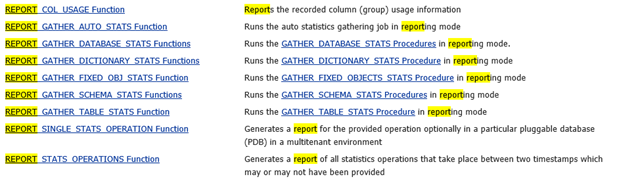
Follow Me!!!