Subscribe to Posts by Email

Subscriber Count

    705

Disclaimer

All information is offered in good faith and in the hope that it may be of use for educational purpose and for Database community purpose, but is not guaranteed to be correct, up to date or suitable for any particular purpose. db.geeksinsight.com accepts no liability in respect of this information or its use. This site is independent of and does not represent Oracle Corporation in any way. Oracle does not officially sponsor, approve, or endorse this site or its content and if notify any such I am happy to remove. Product and company names mentioned in this website may be the trademarks of their respective owners and published here for informational purpose only. This is my personal blog. The views expressed on these pages are mine and learnt from other blogs and bloggers and to enhance and support the DBA community and this web blog does not represent the thoughts, intentions, plans or strategies of my current employer nor the Oracle and its affiliates or any other companies. And this website does not offer or take profit for providing these content and this is purely non-profit and for educational purpose only. If you see any issues with Content and copy write issues, I am happy to remove if you notify me. Contact Geek DBA Team, via geeksinsights@gmail.com

Pages

Interpreting RAC global workload characteristics in AWR report, understanding RAC related statistics part in AWR

The following sections are key to analyze in the AWR report and identify for RAC global characteristics or load profile.

  • Number of Instances
  • Instance global cache load profile
  • Global cache efficiency percentages
  • GCS-GES workload characteristics
  • Messaging statistics
  • Service Statistics
  • Service Wait class statistics
  • Top segments related to CR and current blocks

Number of Instances:-

image 

Global Cache Load Profile section:-

imageExplanation:-

the first two statistics indicate the number of blocks transferred to or from this instance, thus if you are using a 8K block size

         Sent:        240 x 8,192 = 1966080 bytes/sec = 2.0 MB/sec
         Received:  315 x 8,192 = 2580480 bytes/sec = 2.6 MB/sec

to determine the amount of network traffic generated due to messaging you first need to find the average message size (this was 193 on my system)

SQL>select sum(kjxmsize * (kjxmrcv + kjxmsnt + kjxmqsnt)) / sum((kjxmrcv + kjxmsnt + kjxmqsnt)) "avg Message size" from x$kjxm
        where kjxmrcv > 0 or kjxmsnt > 0 or kjxmqsnt > 0;

then calculate the amount of messaging traffic on this network
    193 (765 + 525) = 387000 = 0.4 MB

to calculate the total network traffic generated by cache fusion
     = 2.0 + 2.6 + 0.4 = 5 MBytes/sec
      = 5 x 8 = 40 Mbits/sec

The DBWR Fusion writes statistic indicates the number of times the local DBWR was forced to write a block to disk due to remote instances, this number should be low.


Global Cache Efficiency Percentage:-

 image

Explanation:-

this section shows how the instance is getting all the data blocks it needs. The best order is the following

  • Local cache
  • Remote cache
  • Disk

The first two give the cache hit ratio for the instance, you are looking for a value less than 10%, if you are getting higher values then you may consider application partitioning.


GCS & GES Workload characteristics Section:-

 image Explanation:-

this section contains timing statistics for global enqueue and global cache. As a general rule you are looking for

  • All timings related to CR (Consistent Read) processing block should be less than 10 ms
  • All timings related to CURRENT block processing should be less than 20 ms

GCS & GES Message Statistics section:-

 image Explanation:-

The first section relates to sending a message and should be less than 1 second.

The second section details the breakup of direct and indirect messages, direct messages are sent by a instance foreground or the user processes to remote instances, indirect are messages that are not urgent and are pooled and sent.

Service Wait section:-

image Explanation:-

shows the resources used by all the service instance supports

Service Wait class section:-

imageExplanation:- 

summarizes waits in different categories for each service

Top segment section:-

image

Explanation:-

Contains the names of the top 5 contentious segments (table or index). If a table or index has a very high percentage of CR and Current block transfers you need to investigate. This is pretty much like a normal single instance.

Reference:- Oracle 10g Real application clusters handbook, K. GopalKrishnan


-Thanks

Geek DBA
ASM : Intelligent Data Placement (IDP)

Starting 11gr2,

ASM now classifies reads/writes into two - COLD and HOT. As you guessed, HOT read/writes are those coming from the blocks which are classified as HOT - meaning placed in the outer sectors. COLD is the default - meaning data placed in inner sectors. Data blocks of most often accessed segments are candidates for placement in HOT region. This is done at the datafile level in an ASM disk.

ALTER DISKGROUP ASMDISK01 MODIFY FILE '+ASMDISK01/BDBE01/DATAFILE/APP_DATA.256.697380955' ATTRIBUTES (HOT)

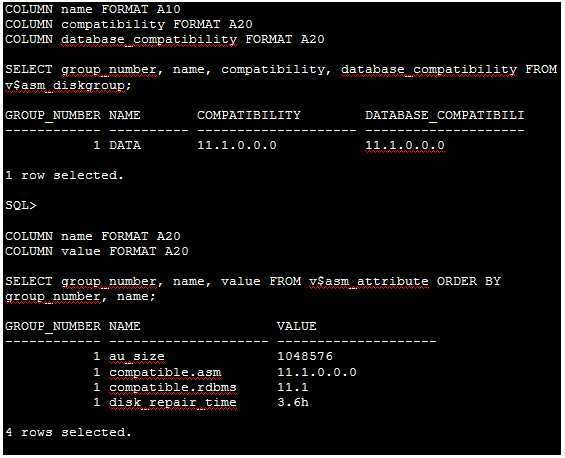
Checking different compatibility modes of disk attributes

image

-Thanks

Geek DBA

ACFS Resize: ACFS filesystem resize or adding some disks

Adding Disk to diskgroup and resize of volume with added disk

Remember, in previous post, we have two disks one utilized for /u04/acfstest which is 1.8gb, now am going to add another disk to the existing group which it can increase upto 4gb.

I got /dev/oracleasm/disks/ACFSDISK2

First check what is the size of current /u04/acfstest mount.

clip_image002

Its 1.8GB

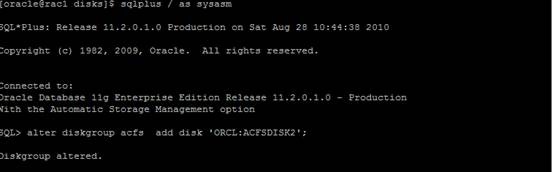
Add disk to existing diskgroup ACFS

clip_image004

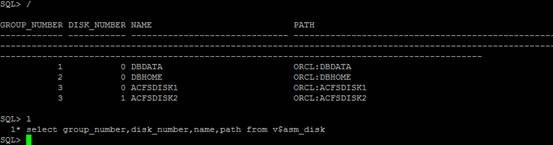
Check in v$asm_disk

clip_image006

Disk added, now check the size of the asm diskgroup by executing lsdg in asmcmd

clip_image008

Showing 4gb

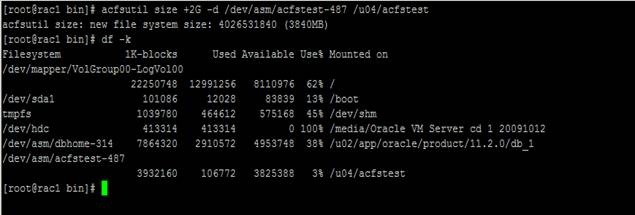
Now resize at OS level also using acfsutil or volresize in asmcmd.

acfsutil size +2G –d /dev/asm/acfstest-487 /u04/acfstest

clip_image010

Now, /u04/acfstest showing 4g instead of 2g

As discussed, resize of disks or add storage does not effect and doesn’t need downtime and does not need storage admin help too.

ACFS: Oracle ACFS Snapshots – A backups inside your OS directories of the directories,

ACFS snapshots are the snapshot of the directories that taken as a snap for particular time period. For example your restore point in database, all changes can be reverted until that point. Similarly with ACFS the directories also can be managed to revert to specific point in time to when the snapshot is created. Let’s see how does it work.

SNAPSHOTS:-

Snapshots are nothing but a backup of your working directories or folders with different times of collections,

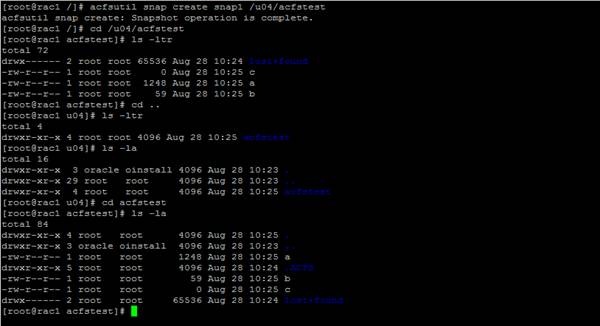
Create a snap on acfs filesystem using acfsutil

clip_image002

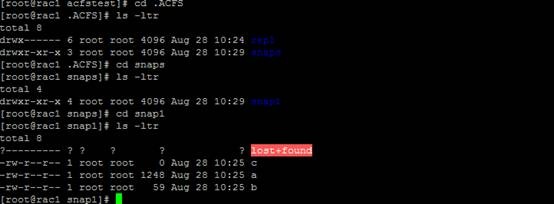
The folder .ACFS is a snap base folder

clip_image004

Now I navigate through certain folder inside .ACFS and I got my files. C,a,b

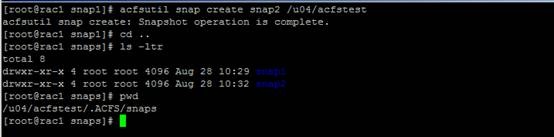
Lets create another snap and below I got two snap folder inside my /u04/acfstest

clip_image006

You can have upto 64 snap images for different times. This is similar like netapps storage where you can leverage the snapshots backups with ASM.


-Thanks

Geek DBA

ASM: ACFS Filesystem , practiced and explained.

Background:- According to documentation here

A lot more on that part in documentation,

  • How about creating a database home on the ASM Diskgroups?
  • How about using my asm diskgroups to store my backups or any other generic files?
  • How about using my asm diskgroup as cluster filesystem like vxfs

Well the answer is ACFS!!!! Read on…

The acfs filesystem is capable of providing the generic or cluster filesystem capabilities like VCFS etc.

It supports to generic files like Oracle Homes or any other journling filesystem capabilities, remember without this only database related files are managed in the diskgroups in ASM, that restriction is lifted with help of ACFS.

What you need?

1) ADVM – ASM Dynamic Volume Manager (the module that provides by Oracle Grid infrastructure now, acfs* executables in the $GI_HOME)

“acfsload” – to start and stop the drivers

“advmutil” – to display ASM dynamic volume details

“acfsutil” – to register and unregister acfs mount points, display the “registry” contents, display acfs file system metadata and create and remove acfs snapshots.

“asmcmd” – to create and delete asm dynamic volumes, display volume metadata, list disk groups anddisplay volume statistics

2) ASMLib – ASM Library, ASM Support lib and ASM Drivers from oracle site.

3) ASM Instance

What you will learn today?

We will use ACFS filesystem as my Oracle Home, this ACFS filesystem is mounted by ASM diskgroups, facilitated by ASM Volumes, volumes created on the disk partitions added in the asm registry.

The high level steps will be:-

1) Load the ACFS driver into kernel

2) Create partitions (but do not journal them) for the newly added disks

3) Provision the partitions with ASM Lib i.e creating asm disks

4) Use ASMCA to configure the Volumes and ACFS filesystem

The asmca broadly does the following, Just in case if you want to do the same in asmcmd

1) executes volcreate

2) execute volenable

3) execute mkdg to create a diskgroup based on the volume created in step 1

4) execute mount diskgroup

5) Add the entries in fstab with acfs filesystem

6) Mount the acfsfilesystem


Let’s Practice

Step1 : Load the acfs into kernel

(assuming you have Grid Home installed and asm is running and ASM lib is loaded)

Manually load the modules required for ACFS, with the command:

/u01/app/grid/product/11.2.0/grid/bin/acfsload start -s


Step2: Create Partitions

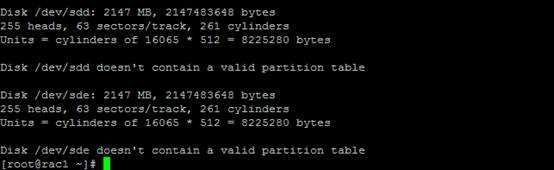
Two new disks on my server, lets utilize those, fdisk –l reveals the same.

clip_image002

Create a partition layout in those two /dev/sdd, /dev/sde disks

clip_image002[5]

Note:- You need to create a partitions on disk before using and recognised by ASM as a provisioned disk


Step3: Provision the disks with ASM libraries.

clip_image002[7]

You can see that I have the ACFSDISK1 and ACFSDISK2 as my asm provisioned disks, DBDATA and DBHOME also.

Step 4: Use ASMCA , to add this acfs disks to my ASM instances as volumes, for that First you need to create diskgroups

a) Click on Diskgroup tab & create.

 clip_image002[9]

b) Provide the Diskgroup Name as ACFS

clip_image002[11]

c) See, the diskgroup ACFS, DBDATA, DBHOME has been created.(the DBHOME and DBDATA is created earlier, not to be confused, please)

clip_image002[13]

Now create a mount point clusterfilesystem/Volumes. Click on cluster filesystem tab and select create volume.

clip_image002[15]

d) Provide the acfs Volume name, etc and also you will see two sections, the volume you are creating is for Database Home or generic filesystem etc.

clip_image002[19]


e)clip_image002[21]

clip_image002[23]

Now your Diskgroup created,acfs volume created and mounted and registered for next reboot. Lets check in OS.

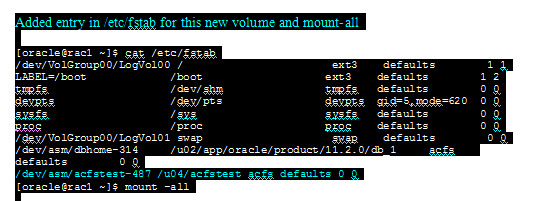
5) Add entries in /etc/fstab for persistent mount of volumes during the reboots.

image

Note: Observe the filesystem mount type acfs for the line /dev/asm/* stuff , its acfs, for normal it will be ext3,

6) Mount them.

Before ACFS snap:-

clip_image002[27]

After ACFS creation snap:-

clip_image002[25]

I had now, /u02/acfstest as my generic filesystem and the /u02/app/oracle/product/11.2.0/db_1 as the database home (this has created as dbhome earlier on acfs only)

Below table is for your understanding more on this,

image

Troubleshooting:-

Sometimes the acfs volumes does not mount when the reboot happens, you may need to rely on the command line using asmcmd.

Case:- ACFS Volumes does not mount after reboot

1) Verify the asm driver and advm is loaded and running

The screenshot says advm is not running.

clip_image002[29]

2) Start ADVM,

Go to Oracle Grid Home and then use acfsload start –s,

observe the advm is now loaded into kernel

clip_image002[31]


3) Check the volume now in asmcmd, if not enabled let enable with volenable command

clip_image002[33]

Its disabled …..

4) Lets enable it… When you enable the volume the underlying diskgroup will be mounted automatically here in this case DBHOME

clip_image002[35]

Observe the mountpath, the volume device etc, same entries as like in fstab

5) Check in OS, my sqlplus is not available, as at OS level the volume is not mounted.

clip_image002[37]


6) Either keeping the following lines in fstab or using mount –t with acfs filessytem will help now

/dev/asm/dbhome-314 /u02/app/oracle/product/11.2.0/db_1 acfs

or

/bin/mount –t acfs /dev/asm/dbhome-314 /u02/app/oracle/product/11.2.0/db_1


7) Verify the mounts at OS level now, my DB HOME back again, you can sqlplus and your database binaries now.

image 

Not that too complex, but one must know about the storage and the basic unix administration in order to get along with this.

-Thanks

Geek DBA

ORA-00600: internal error code, arguments: [kcratr1_lostwrt].

Hello,

Here is one the knowledge share that has been posted by Sarma. Many thanks to him for his enthusiastic contribution.

ORA-00600: internal error code, arguments: [kcratr1_lostwrt].


As per 351678.1, the last block written was lost when the instance crashed. On startup, Oracle checks the last version of the block written to disk; if an old block is found, the ORA-600 [kcratr1_lostwrt] is raised.

To fix this,

SQL> shutdown immediate;
SQL> startup mount;
SQL> recover database;
SQL> alter database open;

All happy!!! You may need to have latest online redo log files or even archive to made this happy.

If you do not have archives/redo then you may need to consider this alternative way.

add the _allow_resetlogs_corruption=true –>  to parameter and to skip redo log/archives

Startup the database in mount state

SQL> startup mount

ORACLE instance started.

SQL recover database until cancel; –> Recover no possibility –> Recover will fail no archives etc etc

SQL> Alter Database open resetlogs; or just alter database open


Hope this is helpful to you

-Thanks

Geek DBA

ora-8104: this index object XXXX is being online built or rebuilt

Thanks to my friend (Siva Krishna) who updated me to post this in blog,

If session performing online index rebuild will be killed by mistake Oracle end up with some inconsistency inside dictionary.

If you try to re-run killed command to create index once more database will complain that index already exist.

Although if you try to drop index database will complain that index is in rebuild state and could not be dropped at that time.

To fix that issue you need to use package dbms_repair as showed in example:

Building test table

SQL> create table test tablespace users as select rownum id,

'xxxxxxxxxxxxxxxxxxxxxxxx' col1 from dba_source, dba_source where rownum < 10000000;

Table created.

New index build has been started with online clause and session has been killed

SQL> create index test_index on test (id) tablespace users online;
create index test_index on test (id) tablespace users online
*
ERROR at line 1:
ORA-03113: end-of-file on communication channel
Process ID: 4356
Session ID: 191 Serial number: 13

Sanity check - index exist even if build has been never completed.

SQL> select index_name from dba_indexes where table_name = 'TEST';
INDEX_NAME
-------------------------
TEST_INDEX

Now let's try to drop it

SQL> drop index test_index;
drop index test_index
*
ERROR at line 1:
ORA-08104: this index object 66960 is being online built or rebuilt

So maybe we can create it again ?

SQL> create index test_index on test (id) tablespace users online;
create index test_index on test (id) tablespace users online
*
ERROR at line 1:
ORA-00955: name is already used by an existing object

Let's clean it up and allow Oracle to drop index - ONLINE_INDEX_CLEAN need a object number which can be taken from drop index error message or using the following query (at least it worked for me).

SQL> select min(object_id) from dba_objects where object_name = 'TEST_INDEX';
MIN(OBJECT_ID)
--------------------
66960
SQL> declare
ret boolean;
 begin
ret:=dbms_repair.ONLINE_INDEX_CLEAN(66960);
 end;
/
PL/SQL procedure successfully completed.

and now let's check if index is still there

SQL> select index_name from dba_indexes where table_name = 'TEST';
no rows selected


As I have used drop index, the case is the index has been dropped, if its alter index rebuilt session got killed, your index state would be normal, you can rebuilt later.

-Thanks

Geek DBA

Quick Question: Duplicate database command’s another benefit

Came across one good note [1079563.1] on mixed platforms backup/restore/recovery things.  This is especially beneficial than long process of export/import or transport tablespaces. you Just fire the duplicate database and then done.

The note say’s

Mixed platforms are supported for the following types of backups:-

+ Active Database DUPLICATE
+ Backup-based DUPLICATE using image copies or backup sets
+ RESTORE and RECOVER using image copies or backup sets

But only the following types of platforms

For Oracle Database 10g Release 2 and above releases:

Solaris x86-64 <-> Linux x86-64

HP-PA <-> HP-IA

Windows IA (64-bit) / Windows (64-bit Itanium) <-> Windows 64-bit for AMD / Windows (x86-64)

For Oracle Database 11g Release 1 and above releases (requires minimum 11.1 compatible setting):

Linux <-> Windows

For Oracle Database 11g Release 2 (11.2.0.2) and above releases:

Solaris SPARC (64-bit) <-> AIX (64-bit) - Note: this platform combination is currently not supported due to Bug 12702521

So go on, when some body ask you, that I have a oracle database on windows, which I want to create the database on linux, you can do it with rman backups or duplicate database command above rather export/import or the transport tablespace.


-Thanks

Geek DBA

Quick Question: Different RDBMS versions of dataguard possible?

Yes, you heard it correct.

The question is, Is it possibel to have the standby is in higher version than the production database of course with same OS, for example Production in 10g and the standby in 11g on both sides having RHEL?

Answer:

Yes, the standby should logical and the compatibility parameters on both sides should be same. Possible from 10g onwards.

From 11g onwards, still yes, but physical standby can be transited to logical and then managed with different versions.

-Thanks

Geek DBA

Dataguard: Platform compatibilities

Hello,

A question from Application Teams or the business, does dataguard supports hetergenous platforms, means can I have my production in linux and dataguard (standby) in windows environment, the answer is Yes.

This is possible from 11g onwards where you dataguard environment’s platforms can vary.

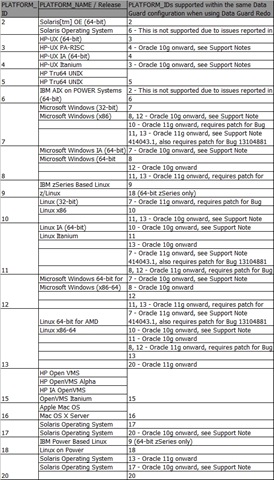
Look the metalink document 413484.1, which describes the same and here the compatability matrix of the same.

By looking at the same example given above, First you have to determine which platform your database is by executing the following query.

SQL> select platform_id, platform_name from v$database;
PLATFORM_ID PLATFORM_NAME
----------- -----------------------------------
10 Linux IA (32-bit)


My platform is 32 Bit Linux and let check in the following table for the first column 10, by cross looking the third column it say platform 7 and 10 are compatible, means 7 is windows 32 Bit platform.

Be aware some additional patches need to apply before you take over the work.

bsgyp3yi


Hope this helps