Disclaimer All information is offered in good faith and in the hope that it may be of use for educational purpose and for Database community purpose, but is not guaranteed to be correct, up to date or suitable for any particular purpose. db.geeksinsight.com accepts no liability in respect of this information or its use.
This site is independent of and does not represent Oracle Corporation in any way. Oracle does not officially sponsor, approve, or endorse this site or its content and if notify any such I am happy to remove.
Product and company names mentioned in this website may be the trademarks of their respective owners and published here for informational purpose only.
This is my personal blog. The views expressed on these pages are mine and learnt from other blogs and bloggers and to enhance and support the DBA community and this web blog does not represent the thoughts, intentions, plans or strategies of my current employer nor the Oracle and its affiliates or any other companies. And this website does not offer or take profit for providing these content and this is purely non-profit and for educational purpose only.
If you see any issues with Content and copy write issues, I am happy to remove if you notify me.
Contact Geek DBA Team, via geeksinsights@gmail.com
|
We all know to maintain the consistency of the buffers and its integrity oracle has to clone the current copy of the buffer to consistent read and change the latest one. There are different buffer states in x$bh column out of all our interest to this post is only to cr and xcur.
First lets create a table with one block and the issue updates
Our check would be how many cr clones it can create. Is there any maximum limit.
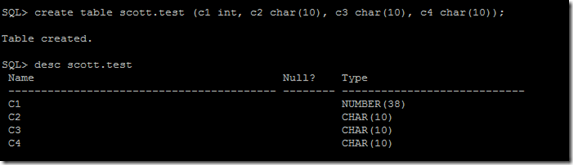
Insert some rows

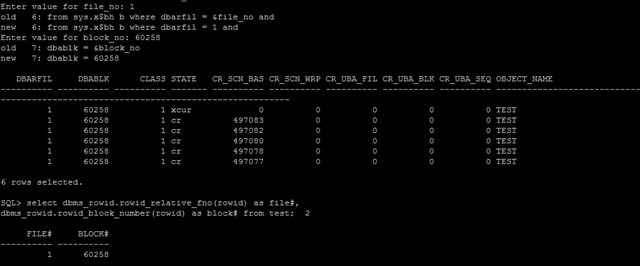
Check the block filenum and the block address
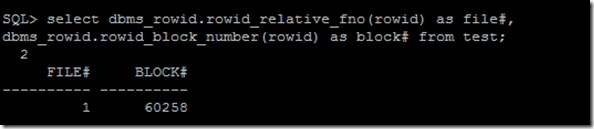
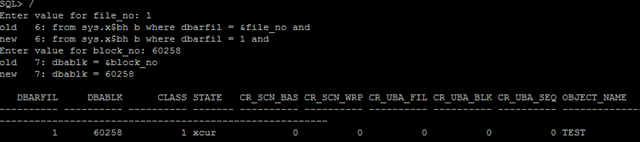
Run this query what is our block status in the buffer cache.
select b.dbarfil, b.dbablk, b.class,
decode(state,0,'free',1,'xcur',2,'scur',3,'cr', 4,'read',5,'mrec',6,'irec',
7,'write',8,'pi', 9,'memory',10,'mwrite',11,'donated') as state,
cr_scn_bas, cr_scn_wrp, cr_uba_fil, cr_uba_blk, cr_uba_seq,
(select object_name from dba_objects where object_id = b.obj) as object_name
from sys.x$bh b where dbarfil = &file_no and
dbablk = &block_no;
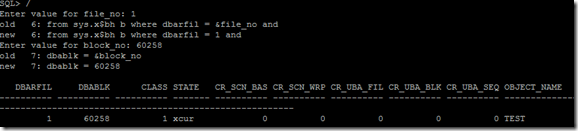
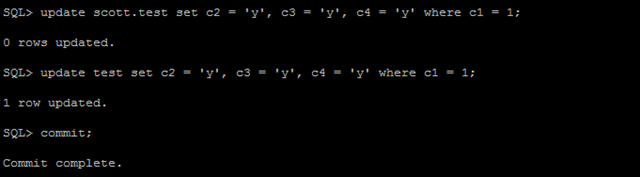
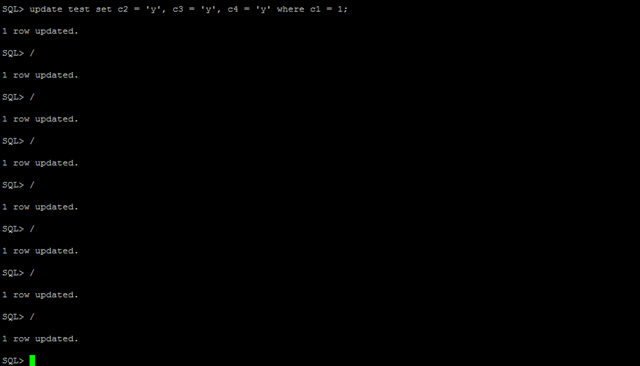
We have got a block with xcur state, now give few updates.
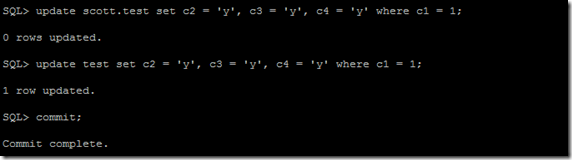
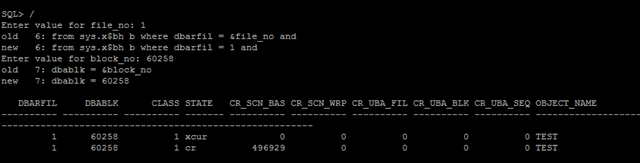
See the buffer states using above query.
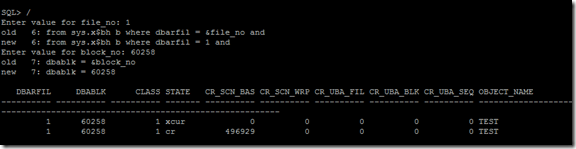
You have got a CR block now. Few more update

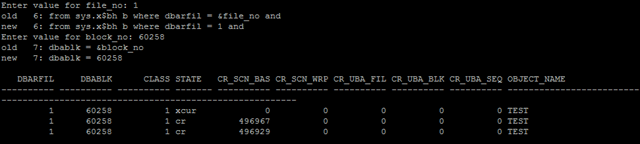
Check again, you have got 2 CR blocks
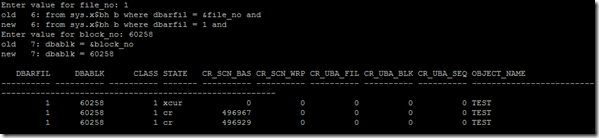
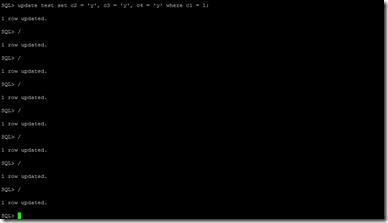
Few more updates again,
Check again,
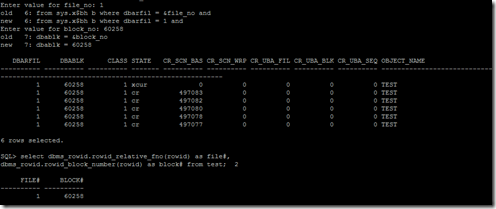
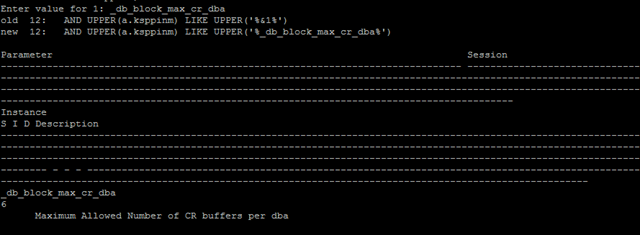
Now hold, Despite of giving 8-10 updates I still have 6 buffers (5 CR + 1 XCUR) buffers , this is due to the hidden parameter that controls the cr clones _db_block_max_cr_dba
Hidden parameter query:-
SELECT
a.ksppinm "Parameter",
decode(p.isses_modifiable,'FALSE',NULL,NULL,NULL,b.ksppstvl) "Session",
c.ksppstvl "Instance",
decode(p.isses_modifiable,'FALSE','F','TRUE','T') "S",
decode(p.issys_modifiable,'FALSE','F','TRUE','T','IMMEDIATE','I','DEFERRED','D') "I",
decode(p.isdefault,'FALSE','F','TRUE','T') "D",
a.ksppdesc "Description"
FROM x$ksppi a, x$ksppcv b, x$ksppsv c, v$parameter p
WHERE a.indx = b.indx AND a.indx = c.indx
AND p.name(+) = a.ksppinm
AND UPPER(a.ksppinm) LIKE UPPER('%&1%')
ORDER BY a.ksppinm;
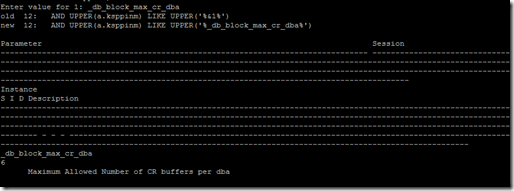
Now change the parameter to 8 and shut down the db and start up again.

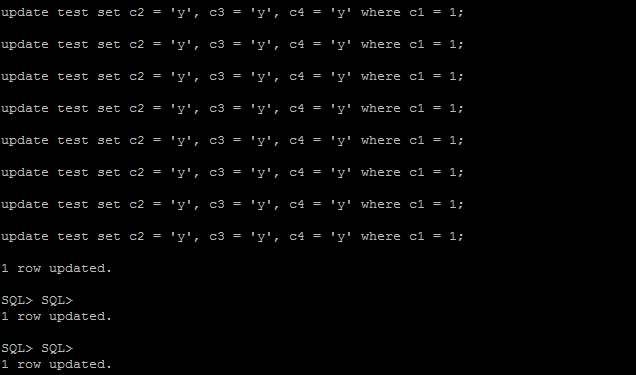
Back to work, Update the rows (more than 8)
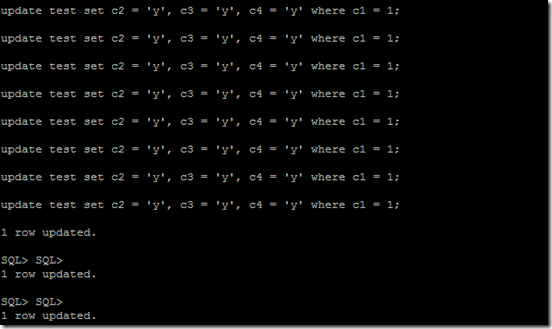
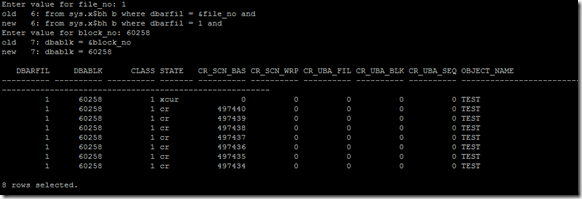
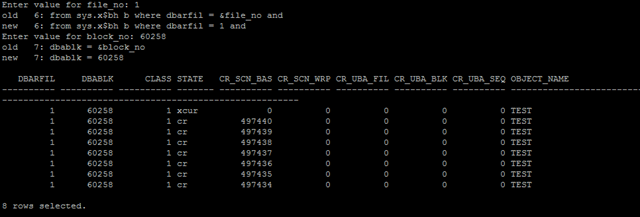
Now, you can see 8 rows only as "_db_block_max_cr_dba" is 8
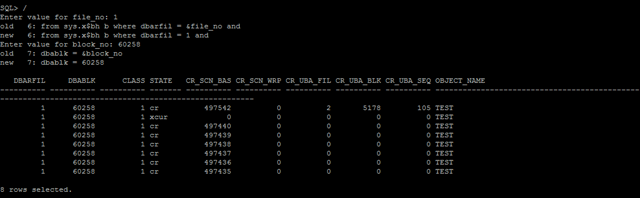
Now issue query on test table and see
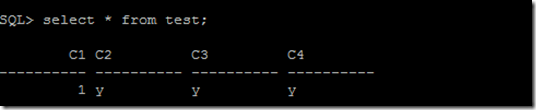
Observe the change in the SCN for xcur, and the top most row came from the undo due to the fact that one of the session need a consistent read record and has been read from undo.
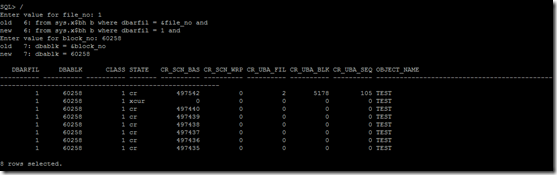
Again hold the parameter "_db_block_max_cr_dba"= is not a hard limit, its just a soft limit, I tried with in the same session of updating same row, if you try opening fewer more session and updating different rows the limit of the 8 can go exceed without changing the parameter. No control over in real.
Hope this
Introduction to server pool, (the real meaning of ‘g’ in the oracle’s advertisement since 10g)
Very long post, take free time to read and to get a clear understanding…..
Grid computing is a concept within Oracle database which has been there since 10g. The basic meaning of grid computing is to divide the hard coupling of the availability of a resource over the machines thus letting the resources be available on a ‘wherever and whenever’ kind of basis. This means that there shouldn’t be a restriction on a said resource which must be present on a specific machine itself or can only be accessed from a specific machine. The very same concept is enhanced in 11.2 RAC with the introduction of Server Pools.
Server Pools allow the same functionality of logically dividing the cluster into small segments that can be used for varying workloads. But unlike the traditional mechanism available up to 11.1, which only allows this task by choosing the instances to run on nodes as Preferred & Available and running services using the same architecture, server pools offer a much larger list of attributes which help in the management of resources in a rather simple and transparent way. In server pools, the underlying hosts of the cluster are added (and removed) from the pools much more on-the-fly, and take the burden off the DBA’s shoulders for this task. With just a few parameters to take care of, the whole stack becomes much easier to govern and administer, while still being completely transparent yet powerful to manage all the types of different resources in the RAC clusterware environment, especially when the number of the nodes go beyond two digits.
Server Pool: is managed by the cluster
- Logical division of the cluster into pools of servers
- Applications (including databases) run in one or more server pools
- Managed by crsctl (applications), srvctl (Oracle)
- Defined by 3 attributes (min, max, importance) or a defined list of nodes Min- minimum number of servers (default 0)
Max – maximum number of servers (default 0 or -1)
Importance – 0 (least important) to 1000
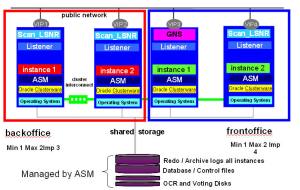
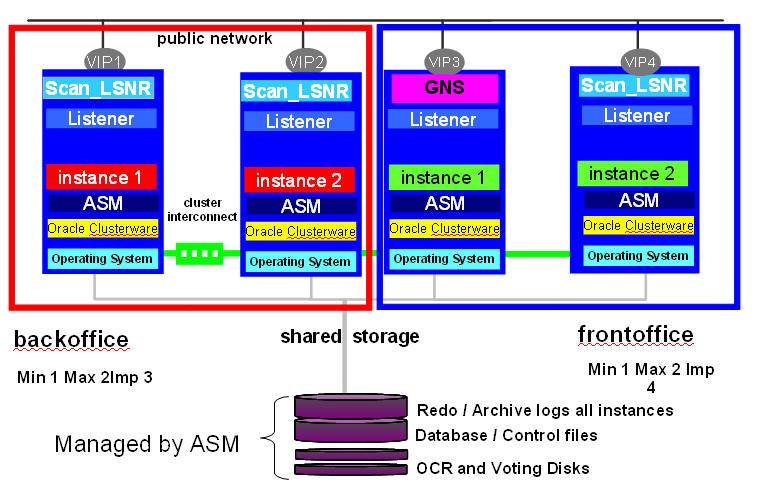
In this example we have a 4 node cluster and a server pool named back office to run a database. So whatever servers are in that server pool will run an instance of that server pool. This is seen by the red boxes with two instances in the server pool. There is a front office database where another database is running. It has two instances running in it. One for each server in the server pool. Cluster resources can run on any node in the cluster independent of any of the server pools defined in the cluster.
Now services that are used for our oracle databases work slightly different when working with a policy managed environment. When we create a service it can only run in a server pool. So a service can only be defined in one server pool. Where as a database can be run in multiple server pools. So services are uniform (run on all instances in the pool) or singleton (runs on only one instance in the pool). If it is a singleton service and that instance fails we will fail over that service to another instance in the server pool.
Assigning Servers in the Server Pool:
Servers are assigned in the following order:
- Generic server pool
- User assigned server pool
- Free
Oracle Clusterware uses importance of server pool to determine order
- Fill all server pools in order of importance until they meet their minimum
- Fill all server pools in order of importance until they meet their maximum
- By Default any left over go into FREE
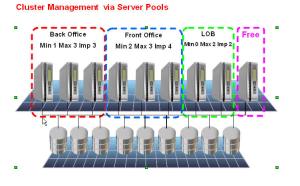
In the example above: There are three server pools. Note the importance front office has the higher importance so two servers are assigned to it first. The Back office is assigned its minimum of one server and if there are any left over LOB is assigned a server and the rest go into the free pool. Hear we have assign max's identified. So if there are available servers in Free back office and front office will be able to grow to their maxs.
What happens if a server fails.
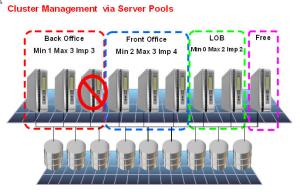
Lets say in backup office a server goes down. Well we have one in free. So the server would be moved out of free into back office and an instance would be started on that server.
If a server leaves the cluster Oracle Clusterware may move servers from one server pool to another only if a server pool falls below its min. It chooses the server to move from:
- A server pool that is less important.
- A server from a server pool of the same importance which has more servers than its min
Practical approach:-
Check the status of server pools using crsctl
[grid@host01 ~]$ crsctl status serverpool -p
NAME=Free
IMPORTANCE=0
MIN_SIZE=0
MAX_SIZE=-1
SERVER_NAMES=
PARENT_POOLS=
EXCLUSIVE_POOLS=
ACL=owner:grid:rwx,pgrp:oinstall:rwx,other::r-x
NAME=Generic
IMPORTANCE=0
MIN_SIZE=0
MAX_SIZE=-1
SERVER_NAMES=host01 host02 host03
PARENT_POOLS=
EXCLUSIVE_POOLS=
ACL=owner:grid:r-x,pgrp:oinstall:r-x,other::r-x
NAME=ora.orcladm
IMPORTANCE=1
MIN_SIZE=0
MAX_SIZE=-1
SERVER_NAMES=host01 host02 host03
PARENT_POOLS=Generic
EXCLUSIVE_POOLS=
ACL=owner:oracle:rwx,pgrp:oinstall:rwx,other::r--
NAME=sp1
IMPORTANCE=2
MIN_SIZE=1
MAX_SIZE=2
SERVER_NAMES=
PARENT_POOLS=
EXCLUSIVE_POOLS=
ACL=owner:grid:rwx,pgrp:oinstall:rwx,other::r
Check the server pools using srvctl
[grid@host01 bin]$ srvctl config serverpool -g Free
Server pool name: Free
Importance: 0, Min: 0, Max: -1
Candidate server names:
[grid@host01 bin]$ srvctl config serverpool -g Generic
PRKO-3160 : Server pool Generic is internally managed as part of administrator-
managed database configuration and therefore cannot be queried directly via srvpool
Note:- The MIN_SIZE attribute specifies the cardinality of the resources (database etc) suppose if you have min_size 2, the database instances can run on the two servers in the serverpool. So here its transparent as you are not specifying srvctl add instance –d –i –n etc.
Another Important note:- Adding server pools to clusterware using crsctl (caveat:- using crsctl for adding serverpool will work for non-database resources such as application server etc, for database resources if you are creating serverpool use srvctl instead Read doc here)
For non-database resources,
[grid@host01 ~]$ crsctl add serverpool sp1 -attr "MIN_SIZE=1, MAX_SIZE=1, IMPORTANCE=1"
[grid@host01 ~]$ crsctl add serverpool sp2 -attr "MIN_SIZE=1, MAX_SIZE=1, IMPORTANCE=2"
For database resources create like this
[grid@host01 ~]$ srvctl add srvpool -g sp1 -l 1 -u 2 -i 999 -n host02
[grid@host01 ~]$ srvctl add srvpool -g sp2 -l 1 -u 2 -i 999 -n host03
Note:- Observer the difference, you cannot specify the individual or your wish hosts when using crsctl but when using srvctl you can
[grid@host01 ~]$ crsctl status server -f
NAME=host01
STATE=ONLINE
ACTIVE_POOLS=Free
STATE_DETAILS=
NAME=host02
STATE=ONLINE
ACTIVE_POOLS=sp2
STATE_DETAILS=
NAME=host03
STATE=ONLINE
ACTIVE_POOLS=sp1
STATE_DETAILS=
Host01 is assigned to free pool and rest of the two hosts.
Adding child pools to the serverpools (parentpools)
[grid@host01 Disk1]$ crsctl add serverpool sp_child1 -attr "PARENT_POOLS=sp1,
MIN_SIZE=1, MAX_SIZE=1, IMPORTANCE=2"
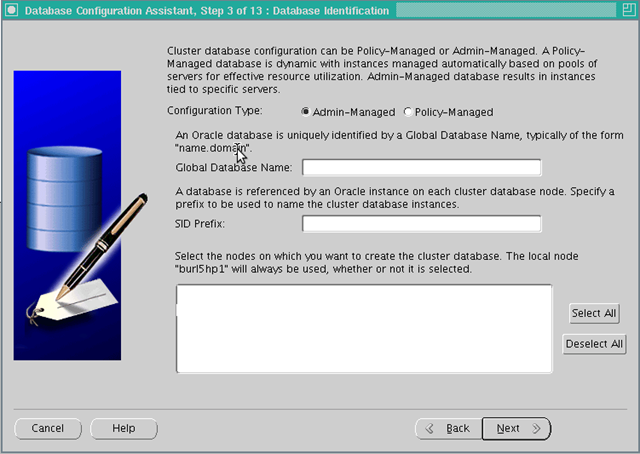
In order to effectively use the serverpools aka host resources segregation as stated in the starting of this post, oracle has changed the database options, while using dbca in RAC installation you might found the following screen.
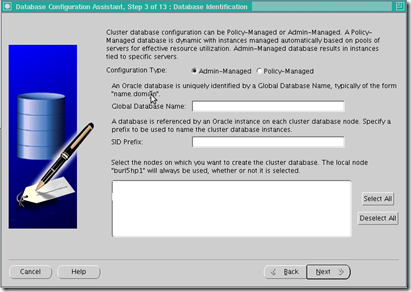
From 11G Release 2 Database when you run DBCA , the third screen in the sequence have this for real application clusters (RAC) installation, Configuration type, Admin or policy managed. so What are they?
Administrator Managed Databases:- (as of now)
Traditionally Oracle had defined or had the DBA’s define which instances run on which servers in a RAC environment. They would clearly define that node1 would run RAC1, and node2 would run RAC2, etc….. Those instances would be tied to those nodes. This is known as Administrator Managed Databases because the instances are being managed by the DBA and the DBA has specifically assigned an instance to a server.
Policy Managed Databases:- (going forward)
In a Policy Managed Databases the DBA specifies the requirements of the database workload. IE. How many instances do we want to run in this workload – Cardinality of the database. With this specified Oracle RAC will try to keep that many instances running for that database. If we need to expand the size all we need to do is expand the cardinality. As long as there are that many servers in the cluster the cluster will keep that many up and running.
- The goal behind Policy Managed Databases is to remove the hard coding of a service to a specific instance or service.
- The database can be associated with a server pool rather than a specific set of nodes. It will decide the minimum and maximum no. of servers needed by that resource (database , service, third party application).
- The database will run on the servers which have been allocated to the serverpool it has been assigned to. (uses min_size to determine where it has to run and how may servers it has to run)
- Since servers allocated to the server pool can change dynamically, this would allow Oracle to dynamically deliver services based on the total no. of servers available to the cluster.
- The database will started on enough servers subject to the availability of the servers. We need not hardcode the servers a database should run on.
- Any instance of the database can run on any node. There is no fixed mapping between instance number and node.
- As servers are freed/added/deleted, they will be allocated to existing pools as per the rules mentioned earlier.
For example, if a cluster consisted of eight nodes in total and supported three RAC databases. Each database would be defined with a minimum and maximum number of servers. Let's assume that
DB1 is defined with a minimum of 4 and a maximum of 6 with an importance of 10,
- DB2 is defined with a minimum of 2 and maximum of 3 and an importance of 7, and
- DB3 is set to a minimum of 2 and maximum of 3 with an importance of 5.
- Initially the 8 nodes could be configured as nodes 1-4 allocated to DB1, nodes 5-6 allocated to DB2 and nodes 7-8 allocated to DB3. If node 3 failed for some reason, the system would allocate node 7 or 8 to DB1 because it has a higher importance than DB3 and a minimum requirement of 4 servers, even though it would cause DB3 to fall below the minimum number of servers. If node 3 is re-enabled it would be allocated immediately to DB3 to bring that database back to its minimum required servers.
- If a 9th node were added to the cluster, it would be assigned to DB1 because of the importance factor and the fact that DB1 has not yet hit its maximum number of servers.
Checking the Database serverpools and modifying them , read below
To check that a database is admin-managed or policy-managed, we can use the command SRVCTL like below:
[grid@host01 Disk1]$ srvctl config database -d orcladm
Database unique name: orcladm
Database name: orcladm
Oracle home: /u01/app/oracle/product/11.2.0/dbhome_1
Oracle user: oracle
Spfile: +FRA/orcladm/spfileorcladm.ora
Domain:
Start options: open
Stop options: immediate
Database role: PRIMARY
Management policy: AUTOMATIC
Server pools: orcladm
Database instances: orcladm1,orcladm2
Disk Groups: FRA
Services:
Database is administrator managed
So we can see that the database ORCLADM is Admin Managed. To convert this database to Policy managed, you can proceed as follows:
[grid@host01 Disk1]$ srvctl stop database -d orcladm
[grid@host01 Disk1]$ srvctl modify database -d orcladm -g sp1
Here sp1 is a server pool over which the database ORCLADM would be running and we can confirm it using the same command SRVCTL: last line say’s that this database is now policy managed
[grid@host01 Disk1]$ srvctl config database -d orcladm
Database unique name: orcladm
Database name: orcladm
Oracle home: /u01/app/oracle/product/11.2.0/dbhome_1
Oracle user: oracle
Spfile: +FRA/orcladm/spfileorcladm.ora
Domain:
Start options: open
Stop options: immediate
Database role: PRIMARY
Management policy: AUTOMATIC
Server pools: sp1
Database instances:
Disk Groups: FRA
Services:
Database is policy managed
But how to control, the services pointing to specific nodes of the serverpool? by using –c option in srvctl add service.
Finally, creating RAC services, First look at the table below for adding a service using srvctl,
srvctl add service -h
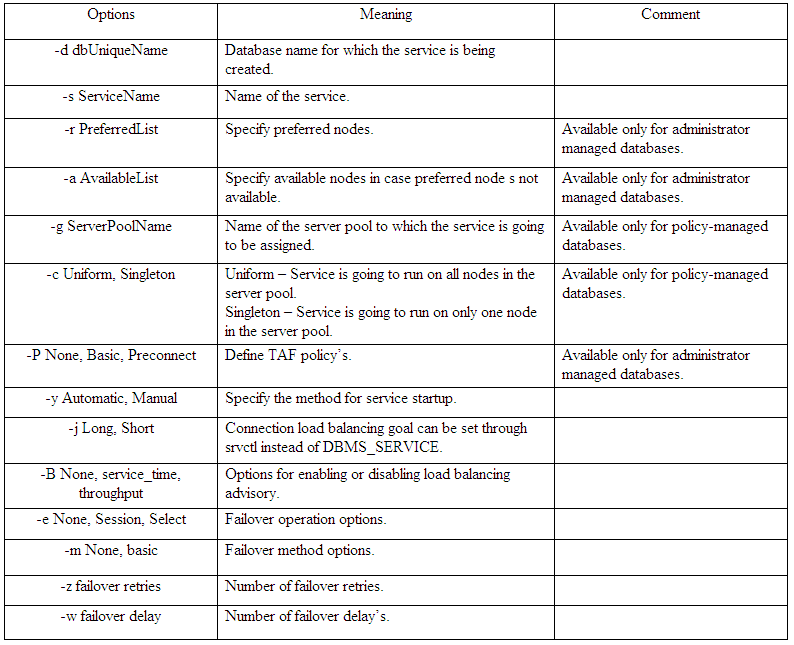
Did you see the options serverpool, uniform, singleton, this two options states the service nature, for policy based databases you will not specify the available and preferred instances, instead you will opt for above two. (See last column)
For example:-
If you want to create a service “all” that should run in sp1 (serverpool) on all nodes. the command should be
srvctl add service –d orcladm –s all –g sp1 –c uniform …
If you want to create a service “one” that should run in sp1(serverpool) on only one node, the command should be
srvctl add service –d orcladm –s all –g sp1 –c singleton ..
Note above I haven’t specified any available or preferred node as orcladm is no more admin managed DB.
Some other notes to DBA,
SIDs are DYNAMIC
- DBA scripts may have to be adjusted
- Environment variables settings in profiles will have to check the current sid
- Directories for LOG files will change over restarts
“Pin” Nodes
- Forces Oracle Clusterware to maintain the same
- Node number when restarted (which maintains SID) Automatically done on upgrades
- Required when running pre-11g Release 2 versions in the cluster
- On upgrade, the nodes will be “pinned”
crsctl pin css -n nodename
Thanks
Geek DBA
References:-
http://levipereira.wordpress.com/2012/05/30/what-should-i-use-srvctl-add-serverpool-or-crsctl-add-serverpool/
Server Pool - Oracle 11g RAC New Feature
Administering Oracle Clusterware
Server Pool experiments in RAC 11.2 « Martins Blog
Rac 11gR2 Server Pool
Does flashback logs generates even if the flashback option is disabled?
Answer: Yes, when you have guaranteed restore point exists in your database.
No, if you does not have guaranteed restore point. Please read further.
SQL> select log_mode,flashback_on from v$database;
LOG_MODE FLASHBACK_ON
------------ ------------------
ARCHIVELOG NO
SQL> CREATE RESTORE POINT before_upgrade GUARANTEE FLASHBACK DATABASE;
Restore point created.
SQL> SELECT NAME, SCN, TIME, DATABASE_INCARNATION# DI,GUARANTEE_FLASHBACK_DATABASE,
STORAGE_SIZE FROM V$RESTORE_POINT
NAME SCN TIME DI GUA STORAGE_SIZE
----------------- ---------- ----------------------------- ---------- --- ------------
BEFORE_UPGRADE 451792 14-FEB-15 08.14.20.000000000 PM 2 YES 8192000
SQL>
SQL> select log_mode,flashback_on from v$database;
LOG_MODE FLASHBACK_ON
------------ ------------------
ARCHIVELOG RESTORE POINT ONLY
SQL> insert into m select * from dba_objects;
49745 rows created.
49745 rows created.
49745 rows created.
49745 rows created.
49745 rows created.
49745 rows created.
49745 rows created.
...
49745 rows created.
SQL>
Commit complete.
Look at the flashback generation
[oracle@Geek DBA flashback]$ ls -ltr
total 16040
-rw-r----- 1 oracle oinstall 8200192 Feb 14 20:15 o1_mf_bfyq822w_.flb
-rw-r----- 1 oracle oinstall 8200192 Feb 14 20:17 o1_mf_bfyqx47g_.flb
[oracle@Geek DBA flashback]$ ls -ltr
total 16040
-rw-r----- 1 oracle oinstall 8200192 Feb 14 20:15 o1_mf_bfyq822w_.flb
-rw-r----- 1 oracle oinstall 8200192 Feb 14 20:17 o1_mf_bfyqx47g_.flb
[oracle@Geek DBA flashback]$ ls -ltr
total 16040
-rw-r----- 1 oracle oinstall 8200192 Feb 14 20:15 o1_mf_bfyq822w_.flb
-rw-r----- 1 oracle oinstall 8200192 Feb 14 20:17 o1_mf_bfyqx47g_.flb
[oracle@Geek DBA flashback]$ ls -ltr
total 24060
-rw-r----- 1 oracle oinstall 8200192 Feb 14 20:15 o1_mf_bfyq822w_.flb
-rw-r----- 1 oracle oinstall 8200192 Feb 14 20:17 o1_mf_bfyqx47g_.flb
-rw-r----- 1 oracle oinstall 8200192 Feb 14 20:18 o1_mf_bfyr0x6o_.flb
Okay flashback logs are still generated though the database flashback option is off. Let do some more work
SQL> delete from m where rownum < 10000000;
1989291 rows deleted.
SQL> commit;
Commit complete.
SQL>
[oracle@Geek DBA flashback]$ ls -ltr
total 88220
-rw-r----- 1 oracle oinstall 8200192 Feb 14 20:15 o1_mf_bfyq822w_.flb
-rw-r----- 1 oracle oinstall 8200192 Feb 14 20:17 o1_mf_bfyqx47g_.flb
-rw-r----- 1 oracle oinstall 8200192 Feb 14 20:18 o1_mf_bfyr0x6o_.flb
-rw-r----- 1 oracle oinstall 8200192 Feb 14 20:18 o1_mf_bfyr16df_.flb
-rw-r----- 1 oracle oinstall 8200192 Feb 14 20:18 o1_mf_bfyr1kmz_.flb
-rw-r----- 1 oracle oinstall 8200192 Feb 14 20:18 o1_mf_bfyr1vkk_.flb
-rw-r----- 1 oracle oinstall 8200192 Feb 14 20:18 o1_mf_bfyr273z_.flb
-rw-r----- 1 oracle oinstall 8200192 Feb 14 20:18 o1_mf_bfyr2j6n_.flb
-rw-r----- 1 oracle oinstall 8200192 Feb 14 20:19 o1_mf_bfyr2tmz_.flb
-rw-r----- 1 oracle oinstall 8200192 Feb 14 20:19 o1_mf_bfyr34h6_.flb
-rw-r----- 1 oracle oinstall 8200192 Feb 14 20:22 o1_mf_bfyr3lc9_.flb
So it means though the flashback option off, when you create guaranteed restore point
oracle will switch on the flashback on option implicitly and maintain the flashback logs.
Let's try to drop the restore point
SQL> drop restore point before_upgrade;
Restore point dropped.
SQL>
SQL> select * from v$restore_point;
no rows selected
SQL>
Implicit change of flashback_on NO automatically when you drop the restore point.
SQL> select open_mode,log_mode,flashback_on from v$database;
OPEN_MODE LOG_MODE FLASHBACK_ON
---------- ------------ ------------------
READ WRITE ARCHIVELOG NO
SQL>
Check the flashback logs, wow they are gone automatically,
[oracle@Geek DBA flashback]$ ls -ltr
total 0
[oracle@Geek DBA flashback]$ date
Sat Feb 14 20:26:20 IST 2015
[oracle@Geek DBA flashback]$ ls -ltr
total 0
[oracle@Geek DBA flashback]$
Lets check one more round with normal restore point. what could be the status of flashback
SQL> create restore point test;
Restore point created.
SQL> select * from v$restore_point;
SCN DATABASE_INCARNATION# GUA STORAGE_SIZE TIME NAME
---------- --------------------- --- ------------ ----------------------------------- -------
480565 2 NO 0 14-FEB-15 08.28.41.000000000 PM TEST
SQL>
SQL> select open_mode,log_mode,flashback_on from v$database;
OPEN_MODE LOG_MODE FLASHBACK_ON
---------- ------------ ------------------
READ WRITE ARCHIVELOG NO
See Flashback on is still no, with normal restore point, so it wont generate flashbacks,lets test that too. Let do some DML,
SQL> insert into m select * from dba_objects;
49745 rows created.
SQL> /
49745 rows created.
SQL> /
49745 rows created.
SQL> /
49745 rows created.
SQL> /
49745 rows created.
SQL> /
49745 rows created.
SQL> /
Commit complete.
SQL> alter system switch logfile ;
System altered.
SQL> delete from m where rownum < 1000000;
999999 rows deleted.
Check flashback logs. None generated.
[oracle@Geek DBA flashback]$ date
Sat Feb 14 20:30:14 IST 2015
[oracle@Geek DBA flashback]$ ls -ltr
total 0
[oracle@Geek DBA flashback]$ ls -ltr
total 0
[oracle@Geek DBA flashback]$ ls -ltr
total 0
[oracle@Geek DBA flashback]$Some other notes on this from AskTom.
Guaranteed restore points guarantee only that the database will maintain enough flashback logs to flashback the database to the guaranteed restore point. It does not guarantee that the database will have enough undo to flashback any table to the same restore point.
Bottom Line:- When you are experiencing the flashback log generation even in the flashback option off, guaranteed restore point might exists in the database. option off, guaranteed restore point might exists in the database.
-Thanks
Geek DBA
In Oracle 11gR2 11.2.0.2 there is a new clause added to the truncate table SQL statement allowing to release the space allocated even for extents corresponding to the minextents storage clause. Prior to 11.2.0.2 truncate table statement with its different flavor of clauses was used to delete all the rows from the table and possibly release the space but up to the space allocated with minextents.
STORAGE Clauses
The STORAGE clauses let you determine what happens to the space freed by the truncated rows. The DROP STORAGE clause, DROP ALL STORAGE clause, and REUSE STORAGE clause also apply to the space freed by the data deleted from associated indexes.
DROP STORAGE Specify DROP STORAGE to deallocate all space from the deleted rows from the table except the space allocated by the MINEXTENTS parameter of the table. This space can subsequently be used by other objects in the tablespace. Oracle Database also sets the NEXT storage parameter to the size of the last extent removed from the segment in the truncation process. This setting, which is the default, is useful for small and medium-sized objects. The extent management in locally managed tablespace is very fast in these cases, so there is no need to reserve space.
SQL> Truncate table drop storage;
DROP ALL STORAGE Specify DROP ALL STORAGE to deallocate all space from the deleted rows from the table, including the space allocated by the MINEXTENTS parameter. All segments for the table, as well as all segments for its dependent objects, will be deallocated.
SQL> Truncate table drop all storage;
REUSE STORAGE Specify REUSE STORAGE to retain the space from the deleted rows allocated to the table. Storage values are not reset to the values when the table was created. This space can subsequently be used only by new data in the table resulting from insert or update operations. This clause leaves storage parameters at their current settings
SQL> Truncate table reuse storage;
Example: Test case:-
This option will only works in conjunction with other new feature called deferred_segment_creation.
SQL> show parameter defer
NAME TYPE VALUE
-------------------------------------------------------
deferred_segment_creation boolean TRUE
SQL> create table mytest01 (col number) storage
(initial 60k next 60k minextents 4 maxextents unlimited pctincrease 0);
Table created.
SQL> select segment_name, segment_type, extent_id, bytes,
blocks from user_extents where segment_name = 'MYTEST01';
no rows selected
SQL> select segment_name, segment_type, extent_id, bytes,
blocks from user_extents where segment_name = 'MYTEST01';
SQL> insert into mytest01 values (1);
1 row created.
SQL> commit;
Commit complete.
SQL> truncate table mytest01 drop storage;
Table truncated.
SQL> select segment_name, segment_type, extent_id, bytes, blocks
from user_extents where segment_name = 'MYTEST01';
SEGMENT_NAME SEGMENT_TYPE EXTENT_ID BYTES BLOCKS
------------- ------------------ ---------- ---------- ----------
MYTEST01 TABLE 0 65536 8
MYTEST01 TABLE 1 65536 8
MYTEST01 TABLE 2 65536 8
MYTEST01 TABLE 3 65536 8
SQL> insert into mytest01 values (1);
1 row created.
SQL> commit;
Commit complete.
SQL>
SQL> insert into mytest01 values (1);
1 row created.
SQL> commit;
Commit complete.
SQL> truncate table mytest01 reuse storage;
Table truncated.
SQL> select segment_name, segment_type, extent_id, bytes,
blocks from user_extents where segment_name = 'MYTEST01';
SEGMENT_NAME SEGMENT_TYPE EXTENT_ID BYTES BLOCKS
-------------- ------------------ ---------- ---------- ----------
MYTEST01 TABLE 0 65536 8
MYTEST01 TABLE 1 65536 8
MYTEST01 TABLE 2 65536 8
MYTEST01 TABLE 3 65536 8
SQL> truncate table mytest01 drop all storage;
Table truncated.
SQL> select segment_name, segment_type, extent_id, bytes,
blocks from user_extents where segment_name = 'MYTEST01';
no rows selected.
See the extents dropped with drop all storage clause, this is nice feature to bring down the high water mark of table to the min extents or completely remove.
But this can work only you have segment deferred creation enabled in database, ofcourse it has some caevets especially with impdp/expdp
-Thanks
Geek DBA
The following is the real nice work from
http://intermediatesql.com/oracle/what-is-the-difference-between-sql-profile-and-spm-baseline/
This was very good post and awesome write up which help my blog readers too. End to end on sqlprofiles and spm, happy reading, thanks to Maxym.
SQL Profiles
Note
-----
- SQL profile "SYS_SQLPROF_012ad8267d9c0000" used FOR this statement
and
SPM Baselines
Note
-----
- SQL plan baseline "SQL_PLAN_01yu884fpund494ecae5c" used FOR this statement
are both relatively new features of ORACLE Optimizer with Profiles first appearing in version 10 and SPM Baselines in version 11.
Both SQL Profiles and SPM Baselines are designed to deal with the same problem: Optimizer may sometimes produce a very inefficient execution plan, and they are both doing it by essentially abandoning the idea that all SQLs are created equal. Instead, another idea is put forward: Some SQLs are special and deserve individual treatment.
The way they are implemented, both SQL Profiles and SPM Baselines are:
- External objects that contain additional magic information for the optimizer
- Attached to individual SQLs and influence them only
- Built by actually running the SQL and using feedback from runtime engine
What is the magic contents that profiles and baselines use to influence SQL execution plans ? It turns out to be nothing more than hints (what else ?). In other words, both SQL Profiles and SPM Baselines are collections of stored hints that’s attach to their target SQLs.
There is no much subtle difference So, has ORACLE mislead us into thinking that the two are different (perhaps to collect more license $$) ? Let’s dig dipper and find out
Is there any difference in contents ?
As we have already established, both Profiles and Baselines are nothing more than stored collections of hints. But what exactly those hints are ?
They are fairly easy to see when we use the dump them for export to another database technique.
For Profiles:
EXEC dbms_sqltune.create_stgtab_sqlprof('profile_stg');
EXEC dbms_sqltune.pack_stgtab_sqlprof(staging_table_name => 'profile_stg');
And for SPM Baselines:
var n NUMBER
EXEC dbms_spm.create_stgtab_baseline('baseline_stg');
EXEC :n := dbms_spm.pack_stgtab_baseline('baseline_stg');
Let’s look at the Profile staging table first.
The hint contents of a typical profile will look like this:
OPT_ESTIMATE(@"SEL$1", INDEX_SCAN, "T"@"SEL$1", "T_N_IDX", SCALE_ROWS=2.156967362e-06)
OPT_ESTIMATE here is a good old CARDINALITY hint in disguise (albeit somewhat more useful). Its mechanics are simple: default cardinality estimation for, say table T that is coming out of the optimizer is multiplied by SCALE_ROWS coefficient to get to the real cardinality.
Let’s now look at hint contents of SPM baselines.
FULL(@"SEL$1" "T"@"SEL$1")
INDEX_RS_ASC(@"SEL$1" "T2"@"SEL$1" ("T2"."N"))
See the difference ? These are the more familiar directional hints that are driving ORACLE to choose specific operations during this SQL execution.
In other words, based on hint contents, there are some major differences in SQL influence mechanics between SQL Profiles and SPM Baselines:
- SQL Profiles (Soft power) are mostly ADVISORS that work with the Optimizer making its estimations more precise
- SPM Baselines (Hard Power) on the other hand are ENFORCERS. They completely ignore the Optimizer and simply tell the runtime engine what to do
Is there any difference in purpose ?
Now that we have seen the actual contents of both SQL Profiles and SPM Baselines, let’s talk about their purpose.
SQL Profiles were designed to correct Optimizer behavior when underlying data does not fit anymore into its statistical (and simplistic) world view. Their goal is to create the absolute best execution plan for the SQL by giving the very precise data to the optimizer. In other words, SQL Profiles are all about ON THE SPOT SQL PERFORMANCE.
SPM Baselines, on the other hand are different. They were designed to prevent execution plans from changing uncontrollably and their goal is to only allow execution plans that were proven to be efficient. In other words, SPM Baselines are all about LONG TERM STABILITY.
The bottom line: What’s the same and what’s different ?
We’ve seen a few major differences between SQL Profiles and SPM Baselines, but there are others, of course: how profiles and baselines are created, how they are managed, how they behave under various circumstances etc.
| Basic Info |
SQL Profiles |
SPM Baselines |
| What they are |
Stored collections of Hints
(plus some technical
information for the optimizer) |
Stored collections of Hints
(plus some technical
information for the optimizer) |
| Available from |
10g |
11g |
| They affect |
Individual SQL |
Individual SQL |
| What they do |
Adjust Optimizer cardinality estimations |
Direct SQL to follow
specific execution plan |
Motto
(as far as
SQL Plans are concerned) |
Be the Best you can be ! |
Only the Worthy
may Pass ! |
| Managed by PL/SQL package |
dbms_sqltune |
dbms_spm |
| Loading |
SQL Profiles |
SPM Baselines |
| How are they created ? |
Run SQL Tuning task
(dbms_sqltune.
execute_tuning_task)
to analyze existing SQL
and IF cardinality
is skewed, store it
as SQL Profile |
Take existing execution plan
from SQL that already ran
and store it as SPM baseline |
Can their
creation be forced ? |
YES, |
YES, any SQL execution plan
can be made into SPM
baseline |
Can they be
created automatically ? |
YES,
by AutoTask analyzing Top SQLs |
YES, if optimizer_capture
_sql_plan_baselines=TRUE |
Can they be created
manually for
individual SQL ? |
YES, by dbms_sqltune.
execute_tuning_task() |
YES, but SQL needs
to already have run
: dbms_spm.
load_plans_
from_cursor_cache
(sql_id => ‘’) |
Can they be
captured for the
ongoing workload ? |
YES, through SQL Tuning Sets |
YES, if optimizer_capture
_sql_plan_baselines=TRUE |
Can they be group
loaded from SQLs
in the shared pool ? |
YES, through SQL Tuning Sets |
YES, directly |
Can they be group
loaded from SQLs
in AWR repository ? |
YES, through SQL Tuning Sets |
YES, through SQL Tuning Sets |
Are they activated
upon creation ? |
NO, SQL Profiles need to be explicitly accepted |
MAYBE, Baseline is activated if
it is the first baseline captured
(for the SQL) OR if loaded
from cursor cache, AWR etc |
Can they be activated
automatically ? |
YES, if accept_sql_profiles is set for SQL Tuning AutoTask |
MAYBE, SPM baseline is
activated if it is the first
baseline captured (for the SQL) |
Can they be
deactivated globally ? |
NO |
YES, Set optimizer_use
_sql_plan_baselines=FALSE |
Can they be
deactivated locally ? |
YES, set sqltune_category |
NO |
Can they be transferred
to another database ? |
YES |
YES |
| Behavior |
SQL Profiles |
SPM Baselines |
Can they fire for the
object in different schema ? |
YES |
YES |
Can they fire when
object has a
different structure ? |
YES |
YES |
Can they fire when
table is replaced
with MVIEW ? |
YES |
NO |
Can they fire when
some objects
(i.e. indexes) used in
the original plan are
missing for the new object ? |
YES |
NO |
| Licensing |
SQL Profiles |
SPM Baselines |
Available in
Standard Edition ? |
NO |
NO |
Available in
generic ENTERPRISE Edition ? |
NO, you need to also license DIAGNOSTICS and TUNING packs |
YES |
Hi,
Suppose you have been asked about how much reads/writes happening and what are the wait events that occured for a object(table) in a given period or overall. so then read on….
We have different ways to get the Table level statistics like waits/reads/logical reads/physical reads /writes etc.
1) In Oracle 8i you can use catio.sql to measure the I/O for a given period.
$ORACLE_HOME/rdbms/admin/catio.sql

SQL> exec sample_io(10,60);

PL/SQL procedure successfully completed.

SQL> select * from io_per_object;
2) In Oracle 9i, we have got v$segment_statistics, the following script provides the cross tab report for the segment level statistics (run time)
SQL> select distinct statistic_name from v$segment_statistics;

STATISTIC_NAME
----------------------------------------
ITL waits
buffer busy waits
db block changes
global cache cr blocks served
global cache current blocks served
logical reads
physical reads
physical reads direct
physical writes
physical writes direct
row lock waits

-- Crosstab of object and statistic for an owner -- (source dbaoracle)
col "Object" format a20
set numwidth 12
set lines 132
set pages 50
@title132 'Object Wait Statistics'
spool rep_out&&dbobj_stat_xtab
select * from
(
   select
      DECODE
      (GROUPING(a.object_name), 1, 'All Objects', a.object_name)
   AS "Object",
sum(case when
   a.statistic_name = 'ITL waits'
then
   a.value else null end) "ITL Waits",
sum(case when
   a.statistic_name = 'buffer busy waits'
then
   a.value else null end) "Buffer Busy Waits",
sum(case when
   a.statistic_name = 'row lock waits'
then
   a.value else null end) "Row Lock Waits",
sum(case when
   a.statistic_name = 'physical reads'
then
   a.value else null end) "Physical Reads",
sum(case when
   a.statistic_name = 'logical reads'
then
   a.value else null end) "Logical Reads"
from
   v$segment_statistics a
where
   a.owner like upper('&owner')
group by
   rollup(a.object_name)) b
where (b."ITL Waits">0 or b."Buffer Busy Waits">0)
/
spool off
clear columns
3) Further enhancement, history of these statistics in dba_hist_seg_stat views. can be viewed, the following query generates a report of physical writes/or reads for the given owner day wise.
select distinct
to_char(begin_interval_time,'mm/dd') c1,
sum(physical_reads_total) reads,
sum(physical_writes_total) writes
from
dba_hist_seg_stat s,
dba_hist_seg_stat_obj o
,dba_hist_snapshot sn
where
o.owner = '&USERNAME
and
s.obj# = o.obj#
and
sn.snap_id = s.snap_id
and
object_name = '&OBJNAME
group by to_char(begin_interval_time,'mm/dd')
order by 1;
For all period:-
select
   to_char(begin_interval_time,'yy/mm/dd/hh24') c1,
   logical_reads_total c2,
   physical_reads_total c3
from
   dba_hist_seg_stat     s,
   dba_hist_seg_stat_obj o,
   dba_hist_snapshot     sn
where
   o.owner = '&schemaname'
and
   s.obj# = o.obj#
and
   sn.snap_id = s.snap_id
and
   object_name = '&objname'
order by
   begin_interval_time;
Hope this scripts will be useful to you all as well.
-Thanks
Geek DBA
Hello All,
One of our fellow DBA posted me this link about disk basics and disk partitioning in solaris servers. Thanks to him (Shiva Krishna)
Nice video. Thanks to the author. Hope this helps you all to understand the basics of disk management.
[youtube=http://www.youtube.com/watch?v=HExfJZ_Qd3Y]
Hi,
Thanks to my colleague(Bhanu) fo raising this,
Issue with ASM disks not persistent in reboot (due to some mis configuration in creating devices or its assignments, thats a different story) causing ASM disks to be failed, fortunately the Voting Disk and the OCR were on the normal redundancy group which does not lid up the night mares for us.
Here you go, seeing the asm disk and status showing the status very wrong,
Point #1, the GRID disk group are part of Diskgroup 3 where the first two lines shows 0 as GN (group number)
Point #2, the line 4 shows the status of the diskgrup is dropped, (can be many reasons, hung after drop etc etc)
Point #3, Candidate disks are just candidates which need not to worry they have just allocated.
So we have problematic disks /dev/mapper/asmt1nrocr3,/dev/mapper/asmt1nrocr1 which are failgroups of GRID (normal redundancy)
col PATH for a50
col HEADER_STATUS for a15
col STATE for a15
col FAILGROUP for a20
col FAILGROUP_TYPE for a25
select group_number as gn, path, name, header_status, state,
failgroup,FAILGROUP_TYPE from v$asm_disk;

       GN PATH                       NAME                 HEADER_STATUS   STATE     FAILGROUP    FAILGROUP_TYPE
---------- -------------------------- -------------------- --------------- --------- ------------ -------------------------
         0 /dev/mapper/asmt1nrocr3                         MEMBER          NORMAL                 REGULAR
         0 /dev/mapper/asmt1nrocr1                         MEMBER          NORMAL                 REGULAR
         0 /dev/mapper/asmt1nrredo2                        CANDIDATE       NORMAL                 REGULAR
         3                            _DROPPED_0001_GRID   UNKNOWN         FORCING   GRID_0001    REGULAR
         0 /dev/mapper/asmt1nrredo1                        CANDIDATE       NORMAL                 REGULAR
         2 /dev/mapper/asmt1nr0002    FRA01_0000           MEMBER          NORMAL    FRA01_0000   REGULAR
         1 /dev/mapper/asmt1nr0001    DATA01_0000          MEMBER          NORMAL    DATA01_0000  REGULAR
         3 /dev/mapper/asmt1nrocr2    GRID_0000            MEMBER          NORMAL    GRID_0003    REGULAR
Lets check the voting disk status , to confirm which disk is now accessible
$ crsctl query css votedisk
##  STATE    File Universal Id                File Name Disk group
--  -----    -----------------                --------- ---------
 1. ONLINE   556186cec0944fafbf8d03cd09767110 (/dev/mapper/asmt1nrocr2) [GRID]
Located 1 voting disk(s).
We have only one working disk which is /dev/mapper/asmt1nrocr2 so the rest two above in Point#1 were just name sake there.
Another check for OCR, okay, OCRCHECK only shows the diskgroup name not the path of the disks, you can skip this step if you want.
$ ocrcheck
Status of Oracle Cluster Registry is as follows :
         Version                  :          3
         Total space (kbytes)     :     262120
         Used space (kbytes)      :       2964
         Available space (kbytes) :     259156
         ID                       :   26755138
         Device/File Name         :      +GRID
                                    Device/File integrity check succeeded

                                    Device/File not configured

                                    Device/File not configured

                                    Device/File not configured

                                    Device/File not configured

         Cluster registry integrity check succeeded

         Logical corruption check bypassed due to non-privileged user
To fix this, (ensure, double ensure you are adding right disks),
1) add to dummy diskgroup (use force option as their metadata is already part of somedisk as it knows, not we ;))
2) And drop the dummy diskgroup
SQL> create diskgroup DUMMY external redundancy
        disk '/dev/mapper/asmt1nrocr3' force;

Diskgroup created.

SQL> drop diskgroup dummy;

Diskgroup dropped.

SQL> create diskgroup DUMMY1 external redundancy
     disk '/dev/mapper/asmt1nrocr1'

Diskgroup created.

SQL> drop diskgroup dummy1;

Diskgroup dropped.
When you verify the disks become FORMER, as like below.
SQL> select group_number as gn, path, name, header_status, state,
        failgroup,FAILGROUP_TYPE from v$asm_disk;

        GN PATH                      NAME               HEADER_STATUS   STATE    FAILGROUP  FAILGROUP_TYPE
---------- ------------------------- ------------------ --------------- -------- -------------------------
         0 /dev/mapper/asmt1nrocr3                      FORMER          NORMAL              REGULAR
         0 /dev/mapper/asmt1nrocr1                      FORMER          NORMAL              REGULAR
         0 /dev/mapper/asmt1nrredo2                     CANDIDATE       NORMAL              REGULAR
         3                           _DROPPED_0001_GRID UNKNOWN         FORCING  GRID_0001  REGULAR
         0 /dev/mapper/asmt1nrredo1                     CANDIDATE       NORMAL              REGULAR
         2 /dev/mapper/asmt1nr0002   FRA01_0000         MEMBER          NORMAL   FRA01_0000 REGULAR
         1 /dev/mapper/asmt1nr0001   DATA01_0000        MEMBER          NORMAL   DATA01_0000REGULAR
         3 /dev/mapper/asmt1nrocr2   GRID_0000          MEMBER          NORMAL   GRID_0003  REGULAR

8 rows selected.
Now add back to the disks to failure groups of diskgroup GRID
SQL> alter diskgroup GRID add failgroup GRID_0001
        disk '/dev/mapper/asmt1nrocr1';

Diskgroup altered.

SQL>  alter diskgroup GRID add failgroup GRID_0002
        disk '/dev/mapper/asmt1nrocr3';

Diskgroup altered.
Verify the disks now, Whoa!!! the dropped disk also gone and the disks are part of GRID now,
SQL>  select group_number as gn, path, name, header_status,
         state,failgroup,FAILGROUP_TYPE from v$asm_disk;

        GN PATH                     NAME        HEADER_STATUS   STATE  FAILGROUP   FAILGROUP_TYPE
---------- ------------------------ ----------- --------------- ------ ----------- --------------
         0 /dev/mapper/asmt1nrredo2             CANDIDATE       NORMAL             REGULAR
         0 /dev/mapper/asmt1nrredo1             CANDIDATE       NORMAL             REGULAR
         2 /dev/mapper/asmt1nr0002  FRA01_0000  MEMBER          NORMAL FRA01_0000  REGULAR
         1 /dev/mapper/asmt1nr0001  DATA01_0000 MEMBER          NORMAL DATA01_0000 REGULAR
         3 /dev/mapper/asmt1nrocr3  GRID_0001   MEMBER          NORMAL GRID_0002   REGULAR
         3 /dev/mapper/asmt1nrocr2  GRID_0000   MEMBER          NORMAL GRID_0003   REGULAR
         3 /dev/mapper/asmt1nrocr1  GRID_0002   MEMBER          NORMAL GRID_0001   REGULAR

7 rows selected.
Verify the voting disks, cool three disks were on the slide
$ crsctl query css votedisk
##  STATE    File Universal Id                File Name Disk group
--  -----    -----------------                --------- ---------
 1. ONLINE   556186cec0944fafbf8d03cd09767110 (/dev/mapper/asmt1nrocr2) [GRID]
 2. ONLINE   08922b1061924ffbbf147a7afa5aac83 (/dev/mapper/asmt1nrocr1) [GRID]
 3. ONLINE   6fd6e2184f544f0dbfa855a8812b9ca1 (/dev/mapper/asmt1nrocr3) [GRID]
Located 3 voting disk(s).
Last check if you want, ocrcheck
$ ocrcheck
Status of Oracle Cluster Registry is as follows :
         Version                  :          3
         Total space (kbytes)     :     262120
         Used space (kbytes)      :       2964
         Available space (kbytes) :     259156
         ID                       :   26755138
         Device/File Name         :      +GRID
                                    Device/File integrity check succeeded

                                    Device/File not configured

                                    Device/File not configured

                                    Device/File not configured

                                    Device/File not configured

         Cluster registry integrity check succeeded

         Logical corruption check bypassed due to non-privileged user
Hope this helps to you all as well
How many types of SCN, well the better question would be how many places the SCN is stored.
Well, there are not MANY types of SCN which are there actually but stored many places with different names and different purposes.
The SCN will be only one number, a incremented value of every 3?(5 seconds 10g?). The SCN number at a specific moment is recorded in a lot of different places to help identify the state of the database. For each different place it is recorded, and for each different purpose it is recorded, it is commonly given a different name.
How many kinds of SCN are there? or how many places SCN store.
There are a few places in each database block, a few in the data file headers, a couple in the control files, some in the redo log files, some in the UNDO/ROLLBACK segments, and a number on the system dictionary (as well as some other plaves not mentioned). Each location basically provides a target 'time' at which an important change (relative to data) occurred, allowing the database software to rebuild that object to that time.
There are checkpoint SCNs(end of checkpoint),Commit SCNs(end of transaction),Snapshot SCNs(beginning of the query) ,system SCN etc..They are basically sequence of integers Oracle uses internally to keep track of various events and block versions to ensure statement level read consistency,multiversioning,transaction rollback,instance recovery etc etc. They(system SCNs) DO GET incremented as and when you make changes to data blocks irrespective of the state of the transaction. Oracle differentiates between these SCNs depending on its purpose(for example you are concerned about Snapshot SCN when you begin your statement. You are concerned about COMMIT SCN when you commit or rollback.You are concerned about CHECKPOINT SCN when performing recovery and so on )
What is SCN? (From Riyaz post)
SCN (System Change Number) is a primary mechanism to maintain data consistency in Oracle database. SCN is used primarily in the following areas, of course, this is not a complete list:
- Every redo record has an SCN version of the redo record in the redo header (and redo records can have non-unique SCN). Given redo records from two threads (as in the case of RAC), Recovery will order them in SCN order, essentially maintaining a strict sequential order. every redo record has multiple change vectors too.
- Every data block also has block SCN (aka block version). In addition to that, a change vector in a redo record also has expected block SCN. This means that a change vector can be applied to one and only version of the block. Code checks if the target SCN in a change vector is matching with the block SCN before applying the redo record. If there is a mismatch, corruption errors are thrown.
- Read consistency also uses SCN. Every query has query environment which includes an SCN at the start of the query. A session can see the transactional changes only if that transaction commit SCN is lower then the query environment SCN.
- Commit. Every commit will generate SCN, aka commit SCN, that marks a transaction boundary. Group commits are possible too.
What happens when a transaction commits? from the documentation.
When a transaction commits, the following actions occur:
- A system change number (SCN) is generated for the COMMIT.
- The internal transaction table for the associated undo tablespace records that the transaction has committed. The corresponding unique SCN of the transaction is assigned and recorded in the transaction table. See "Serializable Isolation Level".
- The log writer (LGWR) process writes remaining redo log entries in the redo log buffers to the online redo log and writes the transaction SCN to the online redo log. This atomic event constitutes the commit of the transaction.
- Oracle Database releases locks held on rows and tables.
- Users who were enqueued waiting on locks held by the uncommitted transaction are allowed to proceed with their work.
- Oracle Database deletes savepoints.
- Oracle Database performs a commit cleanout.
- If modified blocks containing data from the committed transaction are still in the SGA, and if no other session is modifying them, then the database removes lock-related transaction information from the blocks. Ideally, the COMMIT cleans out the blocks so that a subsequent SELECT does not have to perform this task.
Side note:- So cleanout (full with redo) will be performed during commit if the blocks are still in the SGA. In active systems, it is common for blocks with uncommited transactions to be written to disk and flushed from the SGA. In this case, the block is left as is and the next query that touches the block will perform delayed block cleanout (your point 5 doesn't happen in all cases).
Each type of SCN and their location and what they have been called and its purpose
| Placestored |
Called as |
Visible as column |
Related View |
Purpose |
| ControlFile |
System SCN |
checkpoint
_change# |
V$database |
For recover database using backup control file |
| ControlFile |
individual datafile SCN |
checkpoint
_change# |
v$datafile |
We need this individual SCN for each datafile since there are some datafiles which need recovery due to offline status, this is different from the System SCN above |
| ControlFile |
Stop SCN |
last_change# |
v$datafile |
For Instance Recovery |
| Datafile |
Start SCN |
checkpoint
_change# |
v$datafile_header |
The start of the SCn when the instance started |
| Redofile |
HighSCN |
Next_change# |
V$log_history |
The last scn recorded in the redo log files. |
| Redofile |
LowSCN |
FIRST_CHANGE# |
V$log |
The oldest recorded SCN from where the next redo log file starts. |
| Block |
BlockSCN |
Ex: scn: 0x0000.
00046911 |
Dump the block
alter system
dump datafile
3 block min
10 block
max 12;
|
Every data block also has block SCN (aka block version). to match up the redo records before applying it |
| Redofile |
CommitSCN |
ITL
List header |
v$database
current_scn
dbms_flashback.
get_
system_
change_
number
|
Every commit will generate SCN, aka commit SCN, that marks a transaction boundary. |
| Redo? PGA? Not sure where it records |
SnapshotSCN |
When a transaction or query begins, the current SCN is recorded. That SCN serves as the snapshot SCN for the query or transaction |
scn: kcmgss in v$sysstat?
Current SCN from v$database? |
When the query starts it has to note down the SCN that current database or block has so that it can report consistent block back |
Thanks to nice references or post below:-
References:-
Commit Scn (JL Comp)
Permanent link to SCN – What, why, and how-
http://www.ixora.com.au/tips/admin/ora-1555.htm
-Thanks
Geek DBA
Hello
Thanks to my colleague (Satish) to share this.
Here is the nice script to find the relative object name that is having block corruption, ofcourse the the v$database_block_corruption will populate only when you run the rman command.
1) RMAN>  Backup validate check logical database;

This will populate the v$data_block_corruption with rows about the blocks
that is involved in block corruption and the type
in v$data_block_corruption has different values

2) Next run this statement to identify the objects associated with corruption
SQL> SELECT e.owner, e.segment_type, e.segment_name, e.partition_name, c.file#
, greatest(e.block_id, c.block#) corr_start_block#
, least(e.block_id+e.blocks-1, c.block#+c.blocks-1) corr_end_block#
, least(e.block_id+e.blocks-1, c.block#+c.blocks-1)
- greatest(e.block_id, c.block#) + 1 blocks_corrupted
, null description
FROM dba_extents e, v$database_block_corruption c
WHERE e.file_id = c.file#
AND e.block_id = c.block#;

OWNER      SEGMENT_TYPE         SEGMENT_NAME         PARTITION_NAME       FILE#
---------- -------------------- -------------------- --------------- ----------
CORR_START_BLOCK# CORR_END_BLOCK# BLOCKS_CORRUPTED D
----------------- --------------- ---------------- -
TEST       INDEX                XXXXXXXXXXXX                         62
                                ME_IDX
           292779          292779                1
Hope this helps
-Thanks
Geek DBA
|
 Oracle 23c New Features for DBA's





Follow Me!!!