Disclaimer All information is offered in good faith and in the hope that it may be of use for educational purpose and for Database community purpose, but is not guaranteed to be correct, up to date or suitable for any particular purpose. db.geeksinsight.com accepts no liability in respect of this information or its use.
This site is independent of and does not represent Oracle Corporation in any way. Oracle does not officially sponsor, approve, or endorse this site or its content and if notify any such I am happy to remove.
Product and company names mentioned in this website may be the trademarks of their respective owners and published here for informational purpose only.
This is my personal blog. The views expressed on these pages are mine and learnt from other blogs and bloggers and to enhance and support the DBA community and this web blog does not represent the thoughts, intentions, plans or strategies of my current employer nor the Oracle and its affiliates or any other companies. And this website does not offer or take profit for providing these content and this is purely non-profit and for educational purpose only.
If you see any issues with Content and copy write issues, I am happy to remove if you notify me.
Contact Geek DBA Team, via geeksinsights@gmail.com
|
According to notes 9282521.8 and 9239863.8 describing the patches, the enhancements should be used:
When there is true contention on a specific library cache object….
For example:- A package that is so hot (heavily accessed ) in library cache will be contended and the sessions appear to be waited on Library Cache: mutex X.
There are many bugs and cases appeared in metalink with mutexes where in the below case is just a one of them.
Disclaimer:- Do not test in production
The below script is just calling dbms_application_info package and when executed concurrently in many sessions it may cause the contention on library cache.
declare
i number;
begin
for i in 1..1000000
loop
execute immediate 'begin dbms_application_info.set_client_info(''mutex'');end;';
end loop;
end;
/
As the sessions running, generate a awr report and you can see the Wait event library cache: mutex X in concurrency class.
So this is evident that you are having latch(mutex) issue.

How to overcome this.?
Oracle gives the ability to create a multiple clones of the hot objects in library cache and the sessions will access/use them individually rather contending for one.
Please note, its not pin (pin in the library cache), its marking the library cache object as hot to allow oracle to create multiple copies of the same.
Solution 1: Prior to 11gR2
a) Parameter "_kgl_hot_object_copies" controls the maximum number of copies.
b) Complementary parameter _kgl_debug marks hot library cache objects as a candidate for cloning.
Syntax of this parameter can be found in MOS descriptions of bugs 9684368, 11775293 and others. One form of such marking is
"_kgl_debug"="name=’schema=’ namespace= debug=33554432?
With our example the syntax would be,
SQL>alter system set “_kgl_debug”=”name=’DBMS_APPLICATION_INFO’ schema=’SYS’ namespace=1 debug=33554432″, “name=’DBMS_APPLICATION_INFO’ schema=’SYS’ namespace=2 debug=33554432″ scope=spfile;
SQL>alter system set “_kgl_hot_object_copies”= 255 scope=spfile;
Solution 2: 11gr2 onwards
dbms_shared_pool.markhot(
schema IN VARCHAR2,
objname IN VARCHAR2,
namespace IN NUMBER DEFAULT 1, — library cache namespace to search
global IN BOOLEAN DEFAULT TRUE); — If TRUE mark hot on all RAC instances
or
dbms_shared_pool.markhot(
hash IN VARCHAR2, — 16-byte hash value for the object
namespace IN NUMBER DEFAULT 1,
global IN BOOLEAN DEFAULT TRUE);
exec dbms_shared_pool.markhot(‘SYS’,'DBMS_APPLICATION_INFO’,1);
exec dbms_shared_pool.markhot(‘SYS’,'DBMS_APPLICATION_INFO’,2);
exec dbms_shared_pool.markhot(hash=>3222383532,NAMESPACE=>0);
The namespace can be found with the following query (Andrey.Nikolaev blog)
col name format a20
col cursor format a12 noprint
col type format a7
col LOCKED_TOTAL heading Locked format 99999
col PINNED_TOTAL heading Pinned format 99999999
col EXECUTIONS heading Executed format 99999999
col NAMESPACE heading Nsp format 999
set wrap on
set linesize 80
select * from (
select case when (kglhdadr = kglhdpar) then 'Parent' else 'Child '||kglobt09 end cursor,
kglhdadr ADDRESS,substr(kglnaobj,1,20) name, kglnahsh hash_value,kglobtyd type,kglobt23 LOCKED_TOTAL,kglobt24 PINNED_TOTAL,kglhdexc EXECUTIONS,kglhdnsp NAMESPACE
from x$kglob
order by kglobt24 desc)
where rownum <= 10;
Originally posted here,
http://hemantoracledba.blogspot.in/2013/02/backup-and-recovery-with-intermediate.html
Asked why the incremental backup fails
oracle@linux64 ~]$ rman target /
Recovery Manager: Release 11.2.0.1.0 - Production on Thu Feb 7 21:30:18 2013
Copyright (c) 1982, 2009, Oracle and/or its affiliates. All rights reserved.
connected to target database: ORCL (DBID=1229390655)
RMAN> backup database plus archivelog;
Starting backup at 07-FEB-13
current log archived
using target database control file instead of recovery catalog
allocated channel: ORA_DISK_1
channel ORA_DISK_1: SID=196 device type=DISK
channel ORA_DISK_1: starting archived log backup set
channel ORA_DISK_1: specifying archived log(s) in backup set
input archived log thread=1 sequence
After some transactions and a database kept in archive log mode,
RMAN> backup incremental level 1 cumulative database;

Starting backup at 07-FEB-13
using target database control file instead of recovery catalog
allocated channel: ORA_DISK_1
channel ORA_DISK_1: SID=67 device type=DISK
no parent backup or copy of datafile 2 found
no parent backup or copy of datafile 1 found
no parent backup or copy of datafile 3 found
no parent backup or copy of datafile 4 found
no parent backup or copy of datafile 5 found
channel ORA_DISK_1: starting incremental level 0 datafile backup set
channel ORA_DISK_1: specifying datafile(s) in backup set
Observed? no parent backup copy found? even though you have full backup exists.
The reason, if you look at the first backup command that was backup database a full backup not the level 0 , if you want to take a level, you will need to use backup level 0 database.
The answer to the hemant’s post is,
A level 0 incremental backup is physically identical to a full backup. The only difference is that the level 0 backup is recorded as an incremental backup in the RMAN repository, so it can be used as the parent for a level 1 backup.
As you have used backup database plus archivelog instead of backup incremental level 0 database. Thats why rman is unable to find the parent backup
Hemant’s Answer
All : See the update on 08-Feb.
Oracle does not treat a BACKUP [FULL] DATABASE as a base from which it can take L1 Backups.
-Thanks
Geek DBA
Hello,
Thanks to my colleague (Naga) for this information, We have got a question from another friend on how to find the export dump file whether its belongs to export (exp) or datapump export(expdp).
The question is "I am planning to import the dump to a new database but I am confused by seeing the dumpfile Whether it belong to "exp/expdp" "
If export is executed with exp command then how to find the the file which is executed with exp command
Well you can use the unix strings command to read the dump file
$ strings | more
you'll find some differences... for example a traditional export file could start like this
[oracle]$ strings one.dmp | more
EXPORT:V10.02.01
DDBABATCH
RENTIRE
1024
If export is executed with expdp command then how to find the the file is executed with expdp command
expdp filename=one.dmp owner=scott
exp file : expdp DUMPFILE=one.dmp DIRECTORY=dmpdir SCHEMAS=scott
[oracle]$ strings one.dmp | more
!(~* ---> expdp
"DBABATCH"."SYS_EXPORT_FULL_01"
SVR4-be-64bit-8.1.0
AL32UTF8
Hope this helps
-Naga
We often need to find which process ID is causing high I/O or having I/O waits.
Unfortunately there is no real time specific tool that is available apart from iotop which is by default not available in all environments (as in my case).
How we can determine which process is generating more I/O (or in other words I would call it as waiting uninterruptible.
The first and foremost part is top command, where in many of us does not know that “wa” is I/O related. (as we are DBA’s)
# top
top - 14:31:20 up 35 min, 4 users, load average: 2.25, 1.74, 1.68
Tasks: 71 total, 1 running, 70 sleeping, 0 stopped, 0 zombie
Cpu(s): 2.3%us, 1.7%sy, 0.0%ni, 0.0%id, 96.0%wa, 0.0%hi, 0.0%si, 0.0%st
Mem: 245440k total, 241004k used, 4436k free, 496k buffers
Swap: 409596k total, 5436k used, 404160k free, 182812k cached
wa -- iowait Amount of time the CPU has been waiting for I/O to complete.
The second important part is to check is iostat with –x option, extended,
$ iostat -x 2 5
avg-cpu: %user %nice %system %iowait %steal %idle
3.66 0.00 47.64 48.69 0.00 0.00
Device: rrqm/s wrqm/s r/s w/s rkB/s wkB/s avgrq-sz avgqu-sz await r_await w_await svctm %util
sda 44.50 39.27 117.28 29.32 11220.94 13126.70 332.17 65.77 462.79 9.80 2274.71 7.60 111.41
dm-0 0.00 0.00 83.25 9.95 10515.18 4295.29 317.84 57.01 648.54 16.73 5935.79 11.48 107.02
dm-1 0.00 0.00 57.07 40.84 228.27 163.35 8.00 93.84 979.61 13.94 2329.08 10.93 107.02
The bold parts in the above command tells me that %util of the sda and dm-0 and dm-1 are very huge, means that my server is I/O bounded.
The third part will be finding what is the culprit process or the problematic process that is causing (uninterruptible) sleep to complete the I/O.
Before going to do that, we should know process list state options
The ps command has statistics for memory and cpu but it does not have a statistic for disk I/O. While it may not have a statistic for I/O it does show the processes state which can be used to indicate whether or not a process is waiting for I/O.
The ps state field provides the processes current state; below is a list of states from the man page.
PROCESS STATE CODES
D uninterruptible sleep (usually IO)
R running or runnable (on run queue)
S interruptible sleep (waiting for an event to complete)
T stopped, either by a job control signal or because it is being traced.
W paging (not valid since the 2.6.xx kernel)
X dead (should never be seen)
Z defunct ("zombie") process, terminated but not reaped by its parent.
So we can use D to know which process sleeping on I/O to complete. Processes that are waiting for I/O are commonly in an “uninterruptible sleep” state or “D”; given this information we can simply find the processes that are constantly in a wait state.
To do that a simple loop with ps command with certain arguments and grep the D state gives us the processes that are waiting for I/O.
Command to find the process that are sleeping on I/O to complete
# for x in `seq 1 1 10`; do ps -eo state,pid,cmd | grep "^D"; echo "----"; sleep 5; done
The above for loop will print the processes in a “D” state every 5 seconds for 10 intervals.
Example Output:-
D 248 [jbd2/dm-0-8]
D 16528 C++ -n 0 -u 0 -r 239 -s 478 -f -b -d /tmp
----
D 22 [kswapd0]
D 16528 C++ -n 0 -u 0 -r 239 -s 478 -f -b -d /tmp
----
D 22 [kswapd0]
D 16528 C++ -n 0 -u 0 -r 239 -s 478 -f -b -d /tmp
----
D 22 [kswapd0]
D 16528 C++ -n 0 -u 0 -r 239 -s 478 -f -b -d /tmp
----
D 16528 C++ -n 0 -u 0 -r 239 -s 478 -f -b -d /tmp
As you see constantly 16528 process is having high I/O wait sleep on /tmp, to determine further we can drill down to I/O statistics for this process using, this is fourth part
# cat /proc/16528/io
rchar: 48752567
wchar: 549961789
syscr: 5967
syscw: 67138
read_bytes: 49020928
write_bytes: 549961728
cancelled_write_bytes: 0
I have approx 46 MB reads and 524 MB writes to the disk /tmp
Now I have identified the top process that causing high I/O and now determine which filesystem the I/O is spreading to, well we are familiar with this, just use lsof
# lsof -p 16528
COMMAND PID USER FD TYPE DEVICE SIZE/OFF NODE NAME
C++ 16528 root cwd DIR 252,0 4096 130597 /tmp
<truncated>
C++ 16528 root 8u REG 252,0 501219328 131869 /tmp/C++.16528
C++ 16528 root 9u REG 252,0 501219328 131869 /tmp/C++.16528
C++ 16528 root 10u REG 252,0 501219328 131869 /tmp/C++.16528
C++ 16528 root 11u REG 252,0 501219328 131869 /tmp/C++.16528
C++ 16528 root 12u REG 252,0 501219328 131869 /tmp/C++.16528
Finally just use df /tmp will show you the disk/devices that it is mounted.
So we have use top down approach as follows:-
1) identified with top commands whether any I/O waits appearing - “wa” section
2) Using iostat –x 2 5 , we have checked and confirmed by seeing the util% column that system is I/O bounded
3) Using simple loop and proceses state list “D” , we have checked which process is sleeping on I/O
4) Further we confirmed from the process statistics /proc/pid/io that how much read/writes doing by this process
5) Finally we used lsof which files that process is touching upon and using df for those files we have identified which filesystem is having more I/O
Thanks
Geek DBA
1. What are Oracle enqueues?
Oracle enqueues are locks at database level that coordinate parallel access to Oracle resources such as objects or data records. For example, enqueues are responsible for several transactions not being able to change the same data record at the same time.Enqueue requests are divided into queues whose requests are then processed in the chronological sequence of their arrival. This is an important difference to Oracle latches (Note 767414), for which there are no queues.Oracle enqueues are often also referred to as exclusive lockwaits.
2. What happens if a requested enqueue has already been allocated?
There are no more timeouts in connection with enqueues. Either an error occurs immediately, or the session waits as long as it has to:
Enqueue requests with NOWAIT
If an enqueue with NOWAIT is requested (for example, as part of a DDL statement without an ONLINE option) and the enqueue is already being held by another session, the following error message is issued:
ORA-00054: resource busy and acquire with NOWAIT specified
Enqueue requests without NOWAIT
If an enqueue without NOWAIT is requested (for example, by SAP transactions), the session waits as long as required if another session is holding the requested enqueue.
3. How can I determine whether I have problems with Oracle enqueues?
Carry out a wait event analysis in accordance with Note 619188 to determine whether the general database performance is impaired by enqueues or whether long-running transactions must wait for enqueues.While there was only one generic wait event "enqueue" up until Oracle 9i, Oracle 10g or higher differentiates between the different enqueue types and causes for the wait event. For example, "enq: TX - allocate ITL entry" denotes an enqueue in the Interested Transaction List in the block header.
4. What are the different types of Oracle enqueues?
Oracle enqueues are always specified in the form of a 2-digit ID. User enqueues and system enqueues are differentiated as follows:
User enqueues:
- TX (transaction enqueue): This enqueue type occurs if you want to change a data record but you cannot do this because a transaction is running in parallel (for example, because the transaction changed the same data record because a unique or primary constraint cannot be guaranteed or because a free ITL slot is no longer available in the block header).
- TM (DML enqueue): This enqueue type occurs if a complete object has to be protected against changes (for example, as part of an index rebuild or a consistency check using VALIDATE STRUCTURE). Whenever a TX enqueue blocks table entries, a TM enqueue is also set so that parallel activities such as index rebuilds or consistency checks are not possible. ONE TM enqueue is set for each transaction and changed object.
- UL (user-defined enqueue): A transaction has set an enqueue using DBMS_LOCK.REQUEST
System enqueues:
- ST (space transaction enqueue): This enqueue is held in dictionary-managed tablespaces within extent allocations and releases.
- CI (Cross instance call invocation enqueue)
- TT (Temporary table enqueue)
- US (Undo segment enqueue)
- CF (Control file enqueue)
- TC (Thread checkpoint enqueue)
- RO (Reuse object enqueue)
- ... and so on However, there are numerous other system enqueues which are generally negligible because system enqueues are only held for a very short time.
As of Oracle 10g, the table V$LOCK_TYPE contains an overview of all enqueues that exist.
5. Which Oracle parameters play a role in the enqueue environment?
DML_LOCKS
The DML_LOCKS parameter specifies the maximum number of requests of TM enqueues that may be active simultaneously. If the limit is reached, ORA-00055 occurs (see Note 398927).
ENQUEUE_RESOURCES
The ENQUEUE_RESOURCES parameter specifies the maximum total number of enqueue requests that may be active simultaneously. If the limit is reached, ORA-00052 occurs.
To determine which limits are defined, what the previous highest level was and how many requests are currently active, you can execute the following SELECT on V$RESOURCE_LIMIT:
SQL> SELECT * FROM V$RESOURCE_LIMIT WHERE RESOURCE_NAME IN ('dml_locks', 'enqueue_resources');
6. In which modes can I hold or request an enqueue?
- 0: Enqueue is not held or requested
- 1: null (NULL)
- 2: row-S (SS)
- 3: row-X (SX)
- 4: share (S)
- 5: S/Row-X (SSX)
- 6: exclusive (X)
7. How do I find out which sessions are currently holding enqueues or waiting for enqueues?
The V$SESSION_WAIT view or the Oracle session overview displays the wait event "enqueue" (Oracle 9i or lower) or "enq: <type> - <description>" (Oracle 10g or higher) if a session is waiting for an enqueue (see Note 619188).
The V$LOCK Oracle view contains all information about sessions that hold or wait for an enqueue:
SID: SID of the Oracle session that holds the enqueue or waits for it
Associated Type: Enqueue type
ID1, ID2: Enqueue-dependent lock IDs
TM enqueue -> ID1 = Object ID of the locked object
LMODE: Mode of the held enqueues
REQUEST: Mode of the requested enqueues
CTIME: Time in current mode (in seconds), that is, hold or queue time
BLOCK: 0 -> no session waits for the enqueue; 1 -> at least one session waits for the enqueue
For sessions that hold an enqueue, REQUEST is 0 and LMODE is higher than 0. For sessions that wait for an enqueue, REQUEST is greater than 0 and LMODE is 0. In the Oracle session overview, you can recognize the sessions that wait for an enqueue (REQUEST > 0) by the fact that they wait for an "enqueue" wait event.
You can identify sessions that want to access the same enqueue and are thus locked by identical entries for TYPE, ID1 and ID2.
9. How I can determine the enqueue type for which a session is currently waiting?
Continue reading Basics: Oracle Enqueue Waits & Causes
Hi,
In 10g, you can use data dictionary view v$sql_bind_capture or AWR view dba_hist_sqlbind (historical version of v$sql_bind_capture) to find bind variables’ values. However it has some significant limitations:
Captured periodically (_cursor_bind_capture_interval=900 seconds by default), not at real time.
Captured under maximum size(_cursor_bind_capture_area_size=400)
Only bind variables in WHERE clause are captured (e.g bind variables passed to function are not captured !)
select name, position, datatype_string, value_string from v$sql_bind_capture where sql_id = '';
But there is a bug related to v$sql_bind_capture as reported in note 444551.1
V$SQL_BIND_CAPTURE Does Not Show The Value For Binds Of Type TIMESTAMP [ID 444551.1] as a workaround you can get value of TIMESTAMP bind variable by
select name, position, datatype_string, was_captured, value_string, anydata.accesstimestamp(value_anydata) from v$sql_bind_capture where sql_id = '';

it’s fixed in 11.2.
-Thanks
Geek DBA
A long running job and you have identified that statistics of a table is causing sub optimal plan and you have gathered the statistics and asked teams to rerun the job. But still picking old plan or the statistics which should not, the reasons are and how to invalidate the cursor in library cache (SQL AREA)
1. when no_invalidate = false (default as of 9i)
Change in statistics makes all dependent cursors invalidated immediately.
2. when no_invalidate = true
Change in statistics makes no invalidation. New execution plan is generated only after the cursor is flushed out and reloaded.
3. when no_invalidate = dbms_stats.auto_invalidate (default as of 10g/11g)
The most interesting case. Change in statistics makes all dependent cursors invalidated after some specific period of time. This time is determined by the hidden parameter "_optimizer_invalidation_period". The default value of this parameter is 18000(s) == 5 hour.
The weird thing is that this does not make the dependent cursor "really invalidated". Instead, new child cursor is generated when the cursor is accessed after time has expired. v$sql_shared_cursor.roll_invalid_mismatch is 'Y' on those child cursors, Oracle does a hard parse when ROLL_INVALID_MISMATCH flag/bit is set. Like this.
According to Point 3, you have to wait 5 Hours to make your cursor invalidated,
So how to invalidate the cursor immediately,
1) SQL> alter system set "_optimizer_invalidation_period" = 60 scope=memory; (default is 18000 or 5 hours)
System altered.
Note: this is at system level so may give weird results
2) Quicker option is to comment any of the one of the column in the referenced table of query and comment is DDL, when DDL fires the statement will be invalidated, finally revert back the comment to null.
SQL> comment on table x 'test';
once done, revert
SQL> comment on table x null;
3) Append any hint so that its look like different sql statement (if you can change the query)
SQL> Select /*+ test */
Hope this helps.
Consider this scenario (as explained by My colleague for his requirement, Thanks Rambo)
Source database: Tablespace T1 created with locally managed tablespace with auto segment space management.
Destination Database: Tablespace T1 created with locally managed tablespace with uniform extent allocation.
Read carefully the underline parts,
Now If I import this tablespace T1 into the Destination database what will happen
Assuming those tables are not there in destination database
1) IMPDP first fire the create tablespace DDL statement as it like source database
For example:-
CREATE TABLE "HR"."EMPLOYEES"
( "EMPLOYEE_ID" NUMBER(6,0),
"FIRST_NAME" VARCHAR2(20),
"LAST_NAME" VARCHAR2(25) CONSTRAINT "EMP_LAST_NAME_NN" NOT NULL ENABLE,
"EMAIL" VARCHAR2(25) CONSTRAINT "EMP_EMAIL_NN" NOT NULL ENABLE,
"PHONE_NUMBER" VARCHAR2(20),
"HIRE_DATE" DATE CONSTRAINT "EMP_HIRE_DATE_NN" NOT NULL ENABLE,
"JOB_ID" VARCHAR2(10) CONSTRAINT "EMP_JOB_NN" NOT NULL ENABLE,
"SALARY" NUMBER(8,2),
"COMMISSION_PCT" NUMBER(2,2),
"MANAGER_ID" NUMBER(6,0),
"DEPARTMENT_ID" NUMBER(4,0)
) PCTFREE 10 PCTUSED 40 INITRANS 1 MAXTRANS 255 NOCOMPRESS LOGGING
STORAGE(INITIAL 10240 NEXT 16384 MINEXTENTS 1 MAXEXTENTS 121
PCTINCREASE 50 FREELISTS 1 FREELIST GROUPS 1 BUFFER_POOL DEFAULT)
TABLESPACE "SYSTEM" ;
Bold is the problematic part, why? read below the error
2) It will fail with following error, since the tablespace T1 in the destination is uniform extent allocation
ORA-39083: Object type TABLE:TEST"."PLAN_TABLE" failed to create with error:
ORA-02219: invalid NEXT storage option value
It is obvious that Oracle cannot translate the table level storage/segment parameters to uniform extents which like in destination, so it has to skip this part from above DDL command
PCTFREE 10 PCTUSED 40 INITRANS 1 MAXTRANS 255 NOCOMPRESS LOGGING
STORAGE(INITIAL 10240 NEXT 16384 MINEXTENTS 1 MAXEXTENTS 121
PCTINCREASE 50 FREELISTS 1 FREELIST GROUPS 1 BUFFER_POOL DEFAULT)
and it just should run the below while creating table during import by skipping the above
CREATE TABLE "HR"."EMPLOYEES"
( "EMPLOYEE_ID" NUMBER(6,0),
"FIRST_NAME" VARCHAR2(20),
"LAST_NAME" VARCHAR2(25) CONSTRAINT "EMP_LAST_NAME_NN" NOT NULL ENABLE,
"EMAIL" VARCHAR2(25) CONSTRAINT "EMP_EMAIL_NN" NOT NULL ENABLE,
"PHONE_NUMBER" VARCHAR2(20),
"HIRE_DATE" DATE CONSTRAINT "EMP_HIRE_DATE_NN" NOT NULL ENABLE,
"JOB_ID" VARCHAR2(10) CONSTRAINT "EMP_JOB_NN" NOT NULL ENABLE,
"SALARY" NUMBER(8,2),
"COMMISSION_PCT" NUMBER(2,2),
"MANAGER_ID" NUMBER(6,0),
"DEPARTMENT_ID" NUMBER(4,0)
) TABLESPACE "SYSTEM" ;
So now, nevertheless the tablespace is in locally/dictionary/ or uniform/auto allocate, this table will be created into that required tablespace in destination and inherits the tablespace level segment attributes as it does not contain the attributes any more.
To do, this Oracle IMPDP has a option called TRANSFORM which provides you to skip this parts
It contains the segment/storage/OID/PCTSPACE as TRANSFORM types
Syntax: transform = segment_attributes:n:table
Here at the place,
segment_attributes, you can define only storage,OID,PCTspace
and at table , you can define all objects (constraints,index,table which you want trim the segment attributes, but based on this table)
and at n, it can be y (default is y mean the impdp process by default ship the segment attributes in ddl)
So to perform above as per our requirement, our impdp syntax should like below.
impdp hr/hr TABLES=hr.employees DIRECTORY=dpump_dir1 DUMPFILE=hr_emp.dmp TRANSFORM=storage:n:table
then it will trim/skip the segment attributes part from the impdp dump and just run the create table statement as like above without the segment_attribute clauses
If you want just segment attributes (pct stuff) to be skipped, run
> impdp hr/hr TABLES=hr.employees DIRECTORY=dpump_dir1 DUMPFILE=hr_emp.dmp TRANSFORM=segment_attributes:n:table
If you want all segment attributes must be skipped while import, remove table option
> impdp hr/hr DIRECTORY=dpump_dir1 DUMPFILE=hr.dmp SCHEMAS=hr TRANSFORM=SEGMENT_ATTRIBUTES:n
If you want all storage attributes must be skipped while import, remove table option
> impdp hr/hr DIRECTORY=dpump_dir1 DUMPFILE=hr.dmp SCHEMAS=hr TRANSFORM=Storage:n
As, environments vary and the requirements demands are different, we should have this type of options available, looks nice feature to me.
Reference:- http://docs.oracle.com/cd/B19306_01/server.102/b14215/dp_import.htm
-Thanks
Geek DBA
Somtimes you might be into a situation, that you have created an sql profile and unfortunately that has not been picked up?
Well as per my reads and understanding and limited knowledge, these may be the causes.
1) Signature mismatch - SQL statements as converted to signature (with possible extra space truncation, replace literals etc)
2) Force Matching = False, Assume you have created a sql profile for a statement that contains literal values of 10,20. where the current statement is using different literals, You have to keep force_matching option to true in order to accept or work with profile even though there is a mismatch. Force Matching is something like cursor_sharing=force (tanel poder)
3) Invalid hints - Due to version changes, (Kerry Osborne) , some change in mechanism, for example, INDEX_XXX (table_name.column_name) hint is the simple INDEX(alias index_name) hint.
Note: If a hint is invalid the whole sql profile wont be invalidated, the optimizer just simply ignore that part of hint and rest of execution path will be same , but different plan
4) Dynamic Queries (Tanel Poder), Yes the dynamic generated queries may give you different combinations and its impossible to have signature will be same.
5) Category, that placed at database level is different from the category in the sql profile
6) Underlying object changes, A sql profile having with a statemetn that contains a "view" representation, but the view got changed aftersome tiem due to the view's underlying column order changes, the SEL$ may change in the view and as well as the sql profile which will be invalid and sql profile silently ignored (Confusing part, but yes can happen, I will write up with examples on this)
7) Cardinality especially when non static tables like GTT, when you create a profile when the GTT has some data in it and you want to use the same profile when GTT does not has rows at all. This may cause to change the plans and profile is of no use then (Bryan)
If anyone knows about more than above, please comment and I will update in the list too
Thanks
Geek DBA
Many thanks to Shiva & Swathi for sharing their real time experience and appreciating their wish to share this to in my blog.
Further, the following is very nice work from Swathi with screenshots and well written to understand the situation and how to resolve the same!!!
Read on!!!
Sharing one situation of my learning experience.
Please be careful while using below commands in cronjobs.
prstat -Z
top
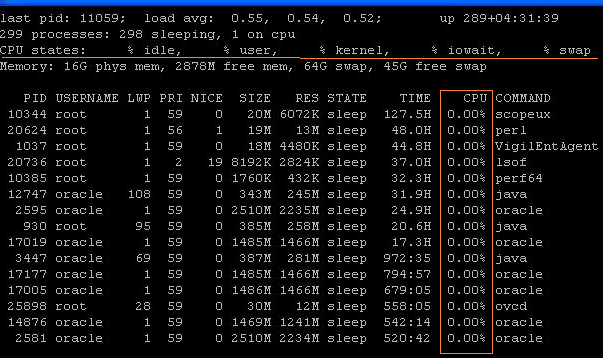
Please use top -d 2 to capture output of top command. This will run top command twice with an interval of 5 seconds(default).
For the first run top won't give any valid output...only 0's will be displayed.
For Example:

And when using prstat -Z in cronjob , You might have used in below format.
prstat -Z 5 1
( 5 -means interval of 5 seconds(default) 1-means one iteration) This makes prstat command to run once and exit...else it will be running continuously till we manually kill it.
Disasters that can happen:
- First run of the cronjob will trigger prstat -Z and will run continuously ...so our script won't exit.
- As per our cron schedule, cronjob will be triggered again ....so prstat -Z will run again with new process id and as a consequence our script won't exit again.
- Here we will be having 2 instances of same job running. In case we schedule the cronjob every 5 minutes, within one hour 12 instances of our script and 12 instances of prstat -Z will be running....resulting in an increase of CPU & memory usage.
If this continues ......
Our cron jobs won't run..... (Surprizing !!!!) Why?
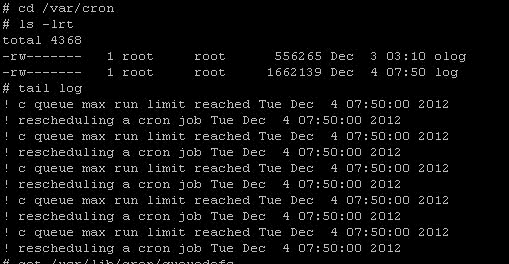
5. There is one location where we can check what happened to cron....
$ cd /var/cron

6. Why does a cronjob get rescheduled???
But the script runs successfully when run manually...what could the reason be?? Insufficient RAM ???

The reason is,
By default a cron can run only 100 jobs at a time from its queue. (new learning to me :()
Let check, how many jobs a cron is running currently ?

Here 277 is process id of cron.

See, Cron is already holding 100 jobs which haven't exited. This is the reason for rescheduling/halting of all cronjobs.
All this happened because of prstat –Z

A whole day !!!!!!!!  watching, the jobs to back normal watching, the jobs to back normal
After killing all these prstat processes.....everything came back to normal...
All cronjobs are running on time.... Hooooooray!!!!!
Morale:- To those who fond of automations, these are disastrous sometimes where you have no control.
-Thanks
Geek DBA.(On behalf of Swathi & Shiva)
|
 Oracle 23c New Features for DBA's





Follow Me!!!