Disclaimer All information is offered in good faith and in the hope that it may be of use for educational purpose and for Database community purpose, but is not guaranteed to be correct, up to date or suitable for any particular purpose. db.geeksinsight.com accepts no liability in respect of this information or its use.
This site is independent of and does not represent Oracle Corporation in any way. Oracle does not officially sponsor, approve, or endorse this site or its content and if notify any such I am happy to remove.
Product and company names mentioned in this website may be the trademarks of their respective owners and published here for informational purpose only.
This is my personal blog. The views expressed on these pages are mine and learnt from other blogs and bloggers and to enhance and support the DBA community and this web blog does not represent the thoughts, intentions, plans or strategies of my current employer nor the Oracle and its affiliates or any other companies. And this website does not offer or take profit for providing these content and this is purely non-profit and for educational purpose only.
If you see any issues with Content and copy write issues, I am happy to remove if you notify me.
Contact Geek DBA Team, via geeksinsights@gmail.com
|
In a container architecture, the parameters for PDB will inherit from the root database. That means if statistics_level=all in the root that will cascade to the PDB databases.
You can over ride this by using Alter system set, if that parameter is pdb modifiable, there is a new column in v$system_parameter for the same.
The inheritance property for some parameters must be true.
For other parameters, you can change the inheritance property by running the ALTER SYSTEM SET statement to set the parameter when the current container is the PDB.
If ISPDB_MODIFIABLE is TRUE for an initialization parameter in the V$SYSTEM_PARAMETER view, then the inheritance property can be false for the parameter.
	SQL> select NAME,ISSES_MODIFIABLE,ISSYS_MODIFIABLE,ISINSTANCE_MODIFIABLE from V$SYSTEM_PARAMETER where name='open_cursors';

	NAME              ISSES ISSYS_MOD ISINS   ISPDB
	-----------------  ----- --------- -----  -------
	open_cursors      FALSE IMMEDIATE TRUE    TRUE

	SQL>
The above example of open_cursors for ISPDB_MODIFIABLE is true means that this parameter can be inherited for PDB's from root database
Further the parameters can be changed all together for all databases or for specific container (PDB) by using again a CONTAINER Clause in ALTER SYSTEM
	The following changes the open_cursor parameter to 200 in root and all the PDB's

	ALTER SYSTEM SET OPEN_CURSORS = 200 CONTAINER = ALL;


	If you logged in root, The following changes the open_cursor parameter to 200 in root and all the PDB's as the instance inheritance parameter is true, if you change in root it will applicable to all.

	ALTER SYSTEM SET OPEN_CURSORS = 200 CONTAINER = CURRENT;


	If you logged in PDB, The following changes the open_cursor parameter to 200 in PDB only.

	ALTER SYSTEM SET OPEN_CURSORS = 200 CONTAINER = CURRENT;
Important Note: PDB parameters cannot be changed if you are using PFILE, You must use SPFILE
-Thanks
Geek DBA
Here is the filtered tables after comparison of 11g with 12c Background Processes.
| Name |
Expanded Name |
Short Description |
Long Description |
External Properties |
| AQPC |
AQ Process Coordinator |
Per instance AQ global coordinator |
AQPC is responsible for performing administrative tasks for AQ Master Class Processes including commands like starting, stopping, and other administrative tasks. This process is automatically started on instance startup. |
Database instances Advanced Queueing |
| ARSn |
ASM Recovery Slave Process |
Recovers ASM transactional operations |
The ASM RBAL background process coordinates and spawns one or more of these slave processes to recover aborted ASM transactional operations. These processes run only in the Oracle ASM instance. |
Oracle ASM instances |
| Possible processes are ARS0-ARS9. |
| BWnn |
Database Writer Process |
Writes modified blocks from the database buffer cache to the data files |
See the Long Description for the DBWn process in this table for more information about the BWnn process. |
Database instances |
| FENC |
Fence Monitor Process |
Processes fence requests for RDBMS instances which are using Oracle ASM instances |
CSS monitors RDBMS instances which are connected to the Oracle ASM instance and constantly doing I/Os. When the RDBMS instance terminates due to a failure, all the outstanding I/O's from the RDBMS instance should be drained and any new I/O's rejected. FENC receives and processes the fence request from CSSD. |
Oracle ASM instances |
| GCRn |
Global Conflict Resolution Slave Process |
Performs synchronous tasks on behalf of LMHB |
GCRn processes are transient slaves that are started and stopped as required by LMHB to perform synchronous or resource intensive tasks. |
Database instances, Oracle ASM instances, Oracle RAC |
| IPC0 |
IPC Service Background Process |
Common background server for basic messaging and RDMA primitives based on IPC (Inter-process communication) methods. |
IPC0 handles very high rates of incoming connect requests, as well as, completing reconfigurations to support basic messaging and RDMA primitives over several transports such as UDP, RDS, InfiniBand and RC. |
Oracle RAC |
| LDDn |
Global Enqueue Service Daemon Helper Slave |
Helps the LMDn processes with various tasks |
LDDn processes are slave processes spawned on demand by LMDn processes. They are spawned to help the dedicated LMDn processes with various tasks when certain workloads start creating performance bottlenecks. These slave processes are transient as they are started on demand and they can be shutdown when no longer needed. There can be up to 36 of these slave processes (LDD0-LDDz). |
Database instances, Oracle ASM instances, Oracle RAC |
| LGnn |
Log Writer Worker |
Writes redo log |
On multiprocessor systems, LGWR creates worker processes to improve the performance of writing to the redo log. LGWR workers are not used when there is a SYNC standby destination. Possible processes include LG00-LG99. |
Database instances |
| LREG |
Listener Registration Process |
Registers the instance with the listeners |
LREG notifies the listeners about instances, services, handlers, and endpoint. |
Database instances, Oracle ASM instances, Oracle RAC |
| OFSD |
Oracle File Server Background Process |
Serves file system requests submitted to an Oracle instance |
This background process listens for new file system requests, both management (like mount, unmount, and export) and I/O requests, and executes them using Oracle threads. |
Database instances, Oracle RAC |
| QMnn |
AQ Master Class Process |
Per instance per AQ Master Class Process |
Each of this type of process represents a single class of work item such as AQ notification, queue monitors, and cross process. |
Database instances Advanced Queueing |
| RM |
RAT Masking Slave Process |
Extracts and masks bind values from workloads like SQL tuning sets and DB Replay capture files |
This background process is used with Data Masking and Real Application Testing. |
Database instances |
| RMON |
Rolling Migration Monitor Process |
Manages the rolling migration procedure for an Oracle ASM cluster |
The RMON process is spawned on demand to run the protocol for transitioning an ASM cluster in and out of rolling migration mode. |
Oracle ASM instance, Oracle RAC |
| RPOP |
Instant Recovery Repopulation Daemon |
Responsible for re-creating and/or repopulating data files from snapshot files and backup files |
The RPOP process is responsible for re-creating and repopulating data files from snapshots files. It works with the instant recovery feature to ensure immediate data file access. The local instance has immediate access to the remote snapshot file's data, while repopulation of the recovered primary data files happens concurrently. Any changes in the data are managed between the instance's DBW processes and RPOP to ensure the latest copy of the data is returned to the user. |
Database instances |
| SAnn |
SGA Allocator |
Allocates SGA |
A small fraction of SGA is allocated during instance startup. The SAnn process allocates the rest of SGA in small chunks. The process exits upon completion of SGA allocation. |
Database instances |
| The possible processes are SA00 - SAzz. |
| SCCn |
ASM Disk Scrubbing Slave Check Process |
Performs Oracle ASM disk scrubbing check operation |
SCCn acts as a slave process for SCRB and performs the checking operations. The possible processes are SCC0-SCC9. |
Oracle ASM instances |
| SCRB |
ASM Disk Scrubbing Master Process |
Coordinates Oracle ASM disk scrubbing operations |
SCRB runs in an Oracle ASM instance and coordinates Oracle ASM disk scrubbing operations. |
Oracle ASM instances |
| SCRn |
ASM Disk Scrubbing Slave Repair Process |
Performs Oracle ASM disk scrubbing repair operation |
SCRn acts as a slave process for SCRB and performs the repairing operations. The possible processes are SCR0-SCR9. |
Oracle ASM instances |
| SCVn |
ASM Disk Scrubbing Slave Verify Process |
Performs Oracle ASM disk scrubbing verify operation |
SCVn acts as a slave process for SCRB and performs the verifying operations. The possible processes are SCV0-SCV9. |
Oracle ASM instances |
| TTnn |
Redo Transport Slave Process |
Ships redo from current online and standby redo logs to remote standby destinations configured for ASYNC transport |
TTnn can run as multiple processes, where nn is 00 to ZZ. |
Database instances, Data Guard |
| See Also: Oracle Data Guard Concepts and Administration |
| VUBG |
Volume drive Umbilicus Background |
Relays messages between Oracle ASM instance and Oracle ASM Proxy instance that is used by ADVM (for ACFS) |
|
Oracle ASM instances, Oracle ASM Proxy instances |
Architecture of Data dictionary in view of multiple containers in a Single SGA
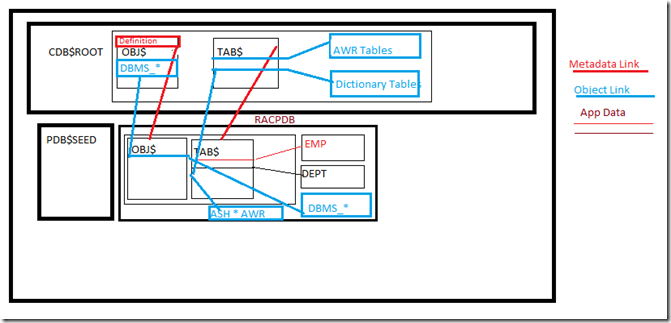
The above diagram requires a explanation.
Data Dictionary
- A data dictionary resides in CDB is shared (definitions) between CDB & PDB, for those objects that are system (internal) For example: AWR is global, TAB$, OBJ$ etc.A data dictionary objects or tables such as obj$ or tab$ or DBA_VIEWS or DBMS_PACKAGE a pointer to PDB called Metadata Link (Red Line)
- A data dictionary objects
DBA_HIST_ACTIVE_SESS_HISTORY and DBA_HIST_BASELINE such as DBMS packages will have a pointers called Object Links (Blue Lines). This is because we don’t need all tables to be created here rather the awr data only we need for that PDB ,, a reference is enough to read the data.
- A data dictionary in PDB contains the local data such emp , dept tables in tab$ reflect only PDB not in the CDB database, only TAB$ definition will have a metadata pointer link.
For example of metalink, if you create table mytable in hrpdb and add rows to it, then the rows are stored in the PDB files. The data dictionary views in the PDB and in the root contain different rows. For example, a new row describing mytable exists in the OBJ$ table in hrpdb, but not in the OBJ$ table in the root. Thus, a query of DBA_OBJECTS in the root and DBA_OBJECTS in hrdpb shows different result sets.
For example of object Link, Oracle Database stores the data (not metadata) for an object only once in the root. For example, AWR data resides in the root. Each PDB uses an internal mechanism called an object link to point to the AWR data in the root, thereby making views such as DBA_HIST_ACTIVE_SESS_HISTORY and DBA_HIST_BASELINE accessible in each separate container
Container Objects in CDB
A container data object is a table or view containing data pertaining to multiple containers and possibly the CDB as a whole, along with mechanisms to restrict data visible to specific common users through such objects to one or more containers. Examples of container data objects are Oracle-supplied views whose names begin with V$ and CDB
In a CDB, for every DBA_ view, a corresponding CDB_ view exists. The owner of a CDB_ view is the owner of the corresponding DBA_ view. The following graphic shows the relationship among the different categories of dictionary views:

Source: 12c Documentation.
For example:-
If you logged in a Root database and fire a query on DBA_USERS, that will show the users related to that database only not whole
If you logged in root database and fire a query on CDB_USERS, that will show all users (common) and local users which may be different from the DBA_USERS
If you logged into a PDB database and fire a query on DBA_USERS, that will show only the users that local to PDB not others
If you logged into a PDB database and fire a query on CDB_USERS, that will show only the users that are local, output will be similar like DBA_USERS only.
Note: DBA_* views only shows the current container data only.
-Thanks
Geek DBA
Before to 12c, when using a single database the user management is pretty straight , create a user and assign the privileges or roles and manage it.
In view of multitenant architecture, where multiple databases exists managing multiple databases with a single users can be cumbersome, For example you a host that hosts 10 applications in a single container databases every application has their own dba, assuming this is a consolidated server in your environment.
So now one dba want to shut down their database in normal case, we have to inform all other 9 application dba’s and get their blessing and so on.
Now with multi tenant , your database is self contained (PDB) and can bring down or up without impacting the other databases.
To manage this way , Oracle introduced a concept called Common Users and Local Users, CDB_DBA or PDB_DBA
Lets take a look at Common Users
- A common user is a user exist in the root database and all the PDB databases
- Contains super privileges to manage whole database (CDB)
- A common user can perform administrative tasks specific to the root or PDBs, such as plugging and unplugging PDBs
- specifying the temporary tablespace for the multitenant container database (CDB).
- Common users can connect to the root and perform operationsC
- Common users can perform the following operations across multiple PDBs, Granting privs, Alter database command that effects pdb, Alter pluggable database etc.
- Example of Common Users: SYS, SYSTEM
Lets take a look at Local Users
- Local users exists only in one PDB and local to that database only
- Local user accounts cannot create common user accounts or commonly grant them privileges
- A local user can create and modify local user accounts or locally grant privileges to common or local users in a given PDB.
- The local user account must be unique only within its PDB. Means a user can exists with same name in other PDB, CDB_USERS view has to be filtered with con_id
- With the appropriate privileges, a local user can access objects in a common user's schema. For example, a local user can access a table within the schema of a common user if the common user has granted the local user privileges to access it.
A picture saves 1000 words
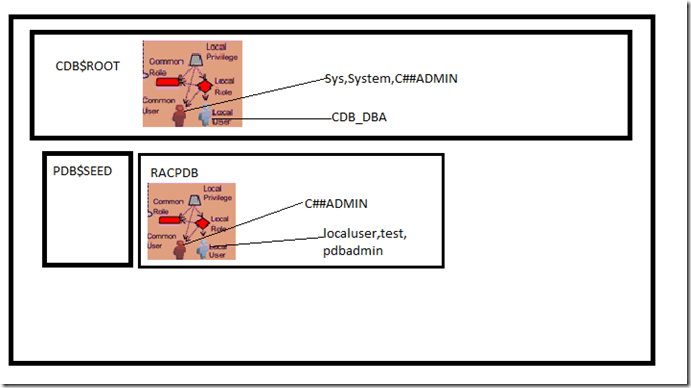
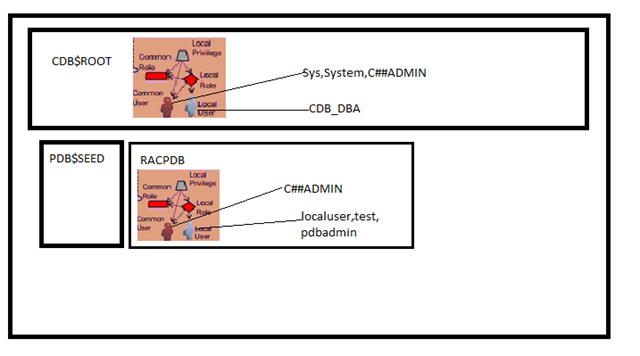
In the above Picture
I want to create
In CDB, a common user C##ADMIN and a local user CDB_DBA in root database who can perform CDB (root level) operations
In PDB (racpdb) a local user will need to create localuser,test,pdbadmin for different purposes
Let’s see examples
Example to create a common user
Rules:-
- To create common user you must be in CDB$root
- The user must have create user privilege
- Name of common user must start with
C## or c## and contain only ASCII characters
- designate a user account as a common user, in the
CREATE USER statement, specify CONTAINER=ALL.
- Do not create the tables or any stuff related to application in common users, can cause problems when plug and unplug
- CONTAINER= clause should be provided in the create user statement , by default container=all is set , means a user created inn CDB will be replicated to all PDB’s
- When you create common user with container=all and assigning default tablespace, that tablespace must be in all containers
Example: Create a common user and assign users tablespace and quota
CONNECT SYSTEM@root
Enter password: password
Connected.
CREATE USER c##admin
IDENTIFIED BY password
DEFAULT TABLESPACE USERS
QUOTA 100M ON USERS
TEMPORARY TABLESPACE temp
CONTAINER = ALL;
CREATE USER CDB_DBA
IDENTIFIED BY password
DEFAULT TABLESPACE USERS
QUOTA 100M ON USERS
TEMPORARY TABLESPACE temp
CONTAINER = CURRENT;
GRANT SET CONTAINER, CREATE SESSION, CREATE_USER TO c##_admin CONTAINER = ALL;
GRANT SET CONTAINER, CREATE SESSION, DBA TO CDB_DBA CONTAINER = CURRENT;
Example to create a local user
Rules:-
- Connect to the PDB you want to create the user
- Use Container=current clause in create user statement
- Your username cannot start with C##
- User name cannot be same as username in root database
- Both common and local users connected to a PDB can create local user accounts, as long as they have the appropriate privileges.
Example to create a Local user
CONNECT SYSTEM@racpdb
Enter password: password
Connected.
CREATE USER localuser
IDENTIFIED BY password
DEFAULT TABLESPACE USERS
QUOTA 100M ON USERS
TEMPORARY TABLESPACE temp
CONTAINER = CURRENT;
CREATE USER test
IDENTIFIED BY password
DEFAULT TABLESPACE USERS
QUOTA 100M ON USERS
TEMPORARY TABLESPACE temp
CONTAINER = CURRENT;
CREATE USER pdb_admin
IDENTIFIED BY password
DEFAULT TABLESPACE USERS
QUOTA 100M ON USERS
TEMPORARY TABLESPACE temp
CONTAINER = CURRENT;
GRANT SET CONTAINER, CREATE SESSION to localuser,test,pdbadmin CONTAINER = CURRENT;
GRANT DBA TO PDB_ADMIN CONTAINER=CURRENT;
Altering Users also requires container clause
For all containers in CDB
ALTER USER c##admin
DEFAULT TABLESPACE USERS
TEMPORARY TABLESPACE temp
QUOTA 200M ON USERS
CONTAINER=ALL
For the current container in CDB
ALTER USER c##admin
DEFAULT TABLESPACE USERS
TEMPORARY TABLESPACE temp
QUOTA 200M ON USERS
CONTAINER=CURRENT
Enabling Single view for data related to other containers from current container
ALTER USER c##admin
DEFAULT TABLESPACE USERS
TEMPORARY TABLESPACE temp
QUOTA 200M ON USERS
CONTAINER=CURRENT SET CONTAINER_DATA=(EMP_DB, HR_DB) FOR V$SESSION CONTAINER = CURRENT;
The above enables the common user C##admin to view the emp_db, hr_db sessions details with in the current container only, need not to access from that container.
Important views
CDB_USERS, DBA_USERS,ALL_USERS, DBA_PDBS
Viewing the users for all PDB’s (Note PDB_ID > 2 means I am excluding the root and PDB$seed which will always have 1,2 in container enabled databases)
COLUMN PDB_NAME FORMAT A15
COLUMN USERNAME FORMAT A30
SELECT p.PDB_ID, p.PDB_NAME, u.USERNAME
FROM DBA_PDBS p, CDB_USERS u
WHERE p.PDB_ID > 2 AND
p.PDB_ID = u.CON_ID
ORDER BY p.PDB_ID;
PDB_ID PDB_NAME USERNAME
---------- --------------- ------------------------------
.
.
.
3 RACPDB LOCALUSER
3 RACPDB TEST
3 RACPDB PDB_ADMIN
Source: Online Documentation 12c
-Thanks
Geek DBA
From the release 12c Database, the new architecture has been introduced similar to MS-SQL concepts a master database and the multiple databases attached to that master database shares a single SGA.
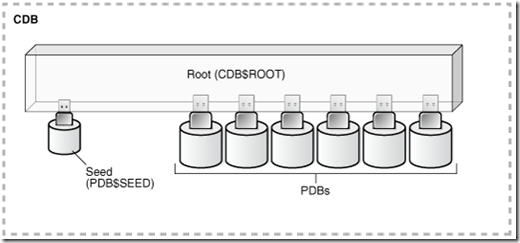
In same way Oracle Introduced multitenant architecture where the multiple databases share same SGA and all databases are interlinked to master database called Root (CDB$root) databases which the whole things called as CDB.
The CDB components are:-
- Root
The root, named CDB$ROOT, stores Oracle-supplied metadata and common users. An example of metadata is the source code for Oracle-supplied PL/SQL packages. A common user is a database user known in every container. A CDB has exactly one root.
- Seed
The seed, named PDB$SEED, is a template that you can use to create new PDBs. You cannot add objects to or modify objects in the seed. A CDB has exactly one seed.
- PDBs
A PDB appears to users and applications as if it were a non-CDB. For example, a PDB can contain the data and code required to support a specific application. A PDB is fully backward compatible with Oracle Database releases before Oracle Database 12c.
The all above is called a container, Therefore, the root is a container, the seed is a container, and each PDB is a container. Each container has a unique container ID and name within a CDB
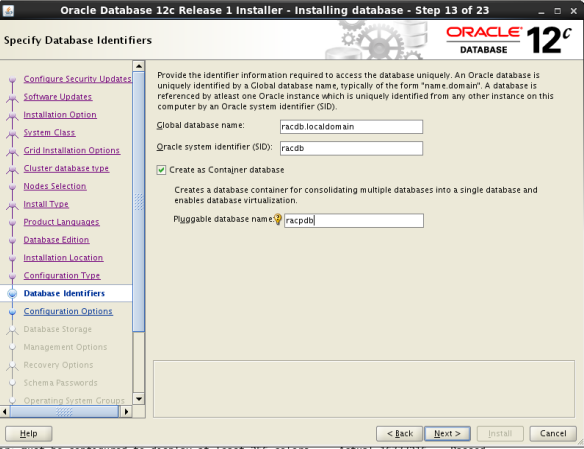
When you create the database with multitenant option as like in below screenshot when using DBCA
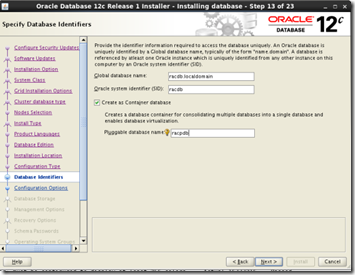 or Using Create Database Command with option ‘enable pluggable database’ as like below or Using Create Database Command with option ‘enable pluggable database’ as like below
CREATE DATABASE newcdb
USER SYS IDENTIFIED BY sys_password
USER SYSTEM IDENTIFIED BY system_password
LOGFILE GROUP 1 ('/u01/logs/my/redo01a.log','/u02/logs/my/redo01b.log')
SIZE 100M BLOCKSIZE 512,
GROUP 2 ('/u01/logs/my/redo02a.log','/u02/logs/my/redo02b.log')
SIZE 100M BLOCKSIZE 512,
GROUP 3 ('/u01/logs/my/redo03a.log','/u02/logs/my/redo03b.log')
SIZE 100M BLOCKSIZE 512
MAXLOGHISTORY 1
MAXLOGFILES 16
MAXLOGMEMBERS 3
MAXDATAFILES 1024
CHARACTER SET AL32UTF8
NATIONAL CHARACTER SET AL16UTF16
EXTENT MANAGEMENT LOCAL
DATAFILE '/u01/app/oracle/oradata/newcdb/system01.dbf'
SIZE 700M REUSE AUTOEXTEND ON NEXT 10240K MAXSIZE UNLIMITED
SYSAUX DATAFILE '/u01/app/oracle/oradata/newcdb/sysaux01.dbf'
SIZE 550M REUSE AUTOEXTEND ON NEXT 10240K MAXSIZE UNLIMITED
DEFAULT TABLESPACE deftbs
DATAFILE '/u01/app/oracle/oradata/newcdb/deftbs01.dbf'
SIZE 500M REUSE AUTOEXTEND ON MAXSIZE UNLIMITED
DEFAULT TEMPORARY TABLESPACE tempts1
TEMPFILE '/u01/app/oracle/oradata/newcdb/temp01.dbf'
SIZE 20M REUSE AUTOEXTEND ON NEXT 640K MAXSIZE UNLIMITED
UNDO TABLESPACE undotbs1
DATAFILE '/u01/app/oracle/oradata/newcdb/undotbs01.dbf'
SIZE 200M REUSE AUTOEXTEND ON NEXT 5120K MAXSIZE UNLIMITED
ENABLE PLUGGABLE DATABASE
SEED
FILE_NAME_CONVERT = ('/u01/app/oracle/oradata/newcdb/', '/u01/app/oracle/oradata/pdbseed/')
SYSTEM DATAFILES SIZE 125M AUTOEXTEND ON NEXT 10M MAXSIZE UNLIMITED
SYSAUX DATAFILES SIZE 100M
USER_DATA TABLESPACE usertbs
DATAFILE '/u01/app/oracle/oradata/pdbseed/usertbs01.dbf'
SIZE 200M REUSE AUTOEXTEND ON MAXSIZE UNLIMITED;
So this is how to create a container database, now some important clauses here
The above command creates a two databases with one SGA, A root database and the Seed database for Future Pluggable databases.
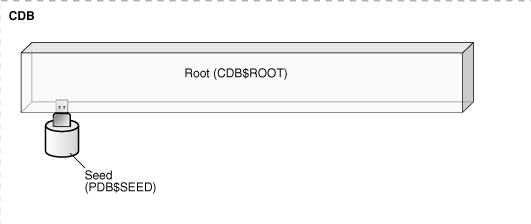
A fresh CDB Database could like this.
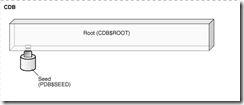 It contains two databases initially, A Root and PDB$Seed which is a seed template database. It contains two databases initially, A Root and PDB$Seed which is a seed template database.
Notes for root Database:-
1. A CDB (root) database with no PDB’s inside is just like a normal database only.
2. Each CDB (root) has its own datafiles, (System,Sysaux,Tempfiles, Undo)
3. Representation of databases will be managed by CON_ID column in all the dynamic views or base tables, and the root database is always 0
Notes for PDB$SEED database:-
1. This does contains structures that can be used as a template for the new pluggable databases created ahead.
2. No data should be resided on created on PDB$SEED Database
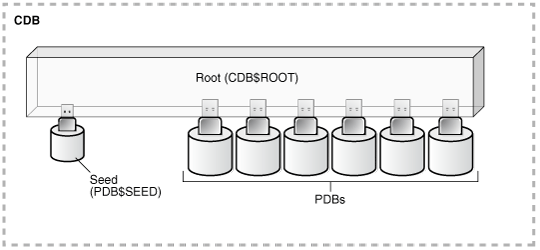
When you create a pluggable databases in a CDB the diagram show how it could be
Creating PDB Example:-
Example:1 , Simple PDB without any clauses
SQL> CREATE PLUGGABLE DATABASE racpdb ADMIN USER racpdb IDENTIFIED BY password;
Example: 2. Simple PDB without any clauses except the new role should granted to admin user
SQL> CREATE PLUGGABLE DATABASE racpdb ADMIN USER racpdb IDENTIFIED BY password ROLES=(DBA);
Example 3: Simple PDB with all clauses,
- This PDB tablespaces should not grow more than 2g
- Should use the temp tablespace of ROOT of 100m only
- A default tablespaces racpdb is created
- PATH Prefix , any directory prefixes to make this database files to go in one folder
- FILE_NAME_CONVERT, as there is no OMF and no PDB_FILE_NAME_CONVERT set at parameter , file_name_convert parameter should specify, here the example to create the pdb from the see, so we have to give the seed database the destination directory
SQL> CREATE PLUGGABLE DATABASE racdb ADMIN USER racadm IDENTIFIED BY password
STORAGE (MAXSIZE 2G MAX_SHARED_TEMP_SIZE 100M)
DEFAULT TABLESPACE racdb
DATAFILE '/disk1/oracle/dbs/racpdb/sales01.dbf' SIZE 250M AUTOEXTEND ON
PATH_PREFIX = '/disk1/oracle/dbs/racpdb/'
FILE_NAME_CONVERT = ('/disk1/oracle/dbs/pdbseed/', '/disk1/oracle/dbs/racdb/');
Notes for PDB databases:-
1. Well this is pretty straight ( I would like to call them schemas rather databases) which contains its own set of datafiles (System, Sysaux, Temp, Users)
2. They share rest of structures from the CDB root. (BG Process, datadictionary for awr etc, User profiles etc)
3. A link between root to pdb database will be created called metalink which used to communicate between root and pdb (for example querying a user from local PDB to root database cdb_users)
4. If you create a object on pdb that is local to pdb not for rest of PDB’s
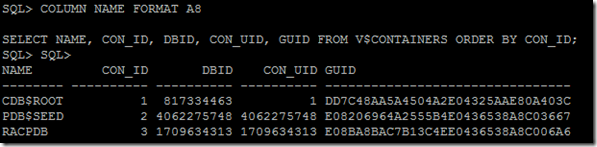
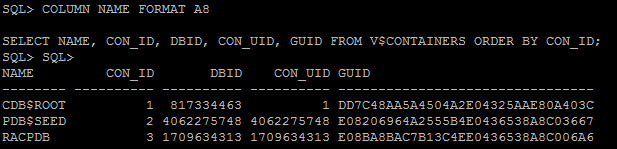
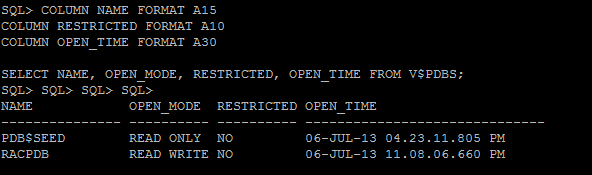
In my instance, this is how it looks like with Container of Root, Seed and a PDB
Viewing CDB and all containers
 Viewing PDB Status Viewing PDB Status 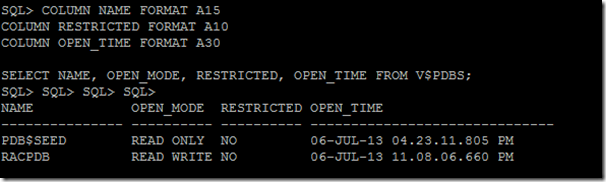 Viewing Datafiles for all CDB & PDB Viewing Datafiles for all CDB & PDB
COLUMN PDB_ID FORMAT 999
COLUMN PDB_NAME FORMAT A8
COLUMN FILE_ID FORMAT 9999
COLUMN TABLESPACE_NAME FORMAT A10
COLUMN FILE_NAME FORMAT A45

SELECT p.PDB_ID, p.PDB_NAME, d.FILE_ID, d.TABLESPACE_NAME, d.FILE_NAME
  FROM DBA_PDBS p, CDB_DATA_FILES d
  WHERE p.PDB_ID = d.CON_ID
  ORDER BY p.PDB_ID;
Some facts about Container databases:-
1) Parameter , Redo, Undo is only one for all databases
2) Common users and local users can be created for ease of use
3) DBA’s can be further segregated into PDB_DBA or CDB_DBA
4) All dictionary objects have been added a column called con_id to distinguish the databases
Lot more to discuss
Next:- Understanding how data dictionary works in view of multiple databases sharing single SGA
Sources: The great blogs in the internet, (see left side of my blog roll)
Source: Oracle Online Documentation
-Thanks
Geek DBA
Excellent step by step document from my colleague, Venkat, with his kind permission I am publishing the same for all benefit.
Please note the following can be done using Duplicate database from active database without moving any backups etc. But that is another variant.
###########################################################################################
Copy RAC database to another RAC Server
###########################################################################################
	Task: Copy RAC database to another RAC Server over ASM.

	----------------
	Source details:
	----------------

	Server 			: SourceDBNode1/SourceDBNode2
	Backup Location 	: /u01/backup/backup

	--------------------
	Destination details:
	--------------------

	Server 			: DestinationNode1/DestinationNode2
	Backup Location 	: /u01/sq/backup

	Database Name to be converted: RACDB

	Assumptions : All the database files are stored on +DATA01 ASM Diskgroup and same diskgroup name is available on Destination Server.
		      In case of different location, need to  use ( db_file_name_convert, log_file_name_convert on destination pfile/spfile )
###########################################################################################
Step 1 : Backup the Source database and generate PFILE and copy to Destination path
###########################################################################################
	export ORACLE_SID=RACDB1

	#!/usr/bin/ksh
	rman target /  < < eof
	run {
	SHOW ALL;
	CONFIGURE BACKUP OPTIMIZATION ON;
	backup as compressed backupset format '/u01/backup/backup/%d_DB_%U_%D_%M_%Y' database plus archivelog delete all input tag='${ORACLE_SID}';
	backup as compressed backupset format '/u01/backup/backup/%d_ARCH_%U_%D_%M_%Y' archivelog all delete input tag='${ORACLE_SID}';
	backup as compressed backupset format '/u01/backup/backup/%d_CTL_%U_%D_%M_%Y' current controlfile tag='${ORACLE_SID}' ;
	backup as compressed backupset format '/u01/backup/backup/%d_SPF_%U_%D_%M_%Y' spfile tag='${ORACLE_SID}';
	}
	eof
	exit

	******* Take backup of pfile from source database
	create pfile='/u01/backup/backup/init_&_connect_identifier.ora' from spfile;

	******* Transfer the rman backups and pfile to Destination server
###########################################################################################
Step 2 : ORACLE BASE ,PFILE and Configuration on Node 1 - DestinationNode1
###########################################################################################
	echo "RACDB:/u01/sq/ora_1/db/11.2.0.3:N" >> /etc/oratab
	echo "RACDB1:/u01/sq/ora_1/db/11.2.0.3:N" >> /etc/oratab

	export ORACLE_SID=RACDB1
	mkdir -p /u01/sq/admin/RACDB
	cd /u01/sq/admin/RACDB

	mkdir create pfile cdump adump bdump udump

	cd /u01/sq/admin/RACDB/pfile

	--> Copy the source pfile generated to /u01/sq/admin/RACDB/pfile/

	cp /u01/sq/backup/init_RACDB1ora initRACDB.ora

	export ORACLE_SID=RACDB1

	orapwd file=$ORACLE_HOME/dbs/orapwRACDB1 password= entries=10 force=y ignorecase=y
###########################################################################################
Step 3 : Append RAC Specific parameters to init.ora file - on Node 1 - DestinationNode1
###########################################################################################
	*.cluster_database=FALSE
	*.control_files='+DATA01/RACDB/controlfile/control01.ctl','+FRA01/RACDB/controlfile/control02.ctl'
	*.remote_listener=':51100'

	******* Remove the listener specific parameters at this step.

	e.g Please refer to /u01/sq/admin/RACDB/pfile/initRACDB.ora
###########################################################################################
Step 4 : DB Restore and Recover from Node 1 - DestinationNode1
###########################################################################################
	export ORACLE_SID=RACDB1
	echo $ORACLE_SID $ORACLE_HOME

	sqlplus '/as sysdba'
	startup nomount pfile='/u01/sq/admin/RACDB/pfile/initRACDB.ora';

	rman target /
	restore controlfile from '/u01/sq/backup/RACDB_CTL_1dod8e62_1_1_27_06_2013';
	alter database mount;
	catalog start with '/u01/sq/backup/';

	run
	{
	ALLOCATE CHANNEL d1 DEVICE TYPE DISK;
	ALLOCATE CHANNEL d2 DEVICE TYPE DISK;
	ALLOCATE CHANNEL d3 DEVICE TYPE DISK;
	ALLOCATE CHANNEL d4 DEVICE TYPE DISK;
	ALLOCATE CHANNEL d5 DEVICE TYPE DISK;
	ALLOCATE CHANNEL d6 DEVICE TYPE DISK;
	ALLOCATE CHANNEL d7 DEVICE TYPE DISK;
	ALLOCATE CHANNEL d8 DEVICE TYPE DISK;
	ALLOCATE CHANNEL d9 DEVICE TYPE DISK;
	ALLOCATE CHANNEL d10 DEVICE TYPE DISK;
	restore database;
	recover database;
	}

	alter database open resetlogs;
	shu immediate;
	startup pfile='/u01/sq/admin/RACDB/pfile/initRACDB.ora';
###########################################################################################
Step 5 : Update the tnsnames.ora in both the Nodes
###########################################################################################
	# Entries for RACDB begin here - Do not remove this comment

	RACDB =
	  (DESCRIPTION =
	    (ADDRESS_LIST =
	      (ADDRESS = (PROTOCOL = TCP)(HOST = )(PORT = 51100))
	    )
	    (CONNECT_DATA = (SERVER = DEDICATED) (SERVICE_NAME = RACDB)
	      (FAILOVER_MODE =
		(TYPE = SELECT)
		(METHOD = BASIC)
		(RETRIES = 100)
		(DELAY = 20)
	      )
	    )
	  )

	LISTENER_RACDB1 =
	  (ADDRESS = (PROTOCOL = TCP)(HOST = )(PORT = 1522))

	RACDB1 =
	  (DESCRIPTION =
	    (ADDRESS = (PROTOCOL = TCP)(HOST = )(PORT = 1522))
	    (CONNECT_DATA = (SERVICE_NAME = RACDB) (INSTANCE_NAME = RACDB1))
	  )

	LISTENER_RACDB2 =
	  (ADDRESS = (PROTOCOL = TCP)(HOST = )(PORT = 1522))

	RACDB2 =
	  (DESCRIPTION =
	    (ADDRESS = (PROTOCOL = TCP)(HOST = )(PORT = 1522))
	    (CONNECT_DATA = (SERVICE_NAME = RACDB) (INSTANCE_NAME = RACDB2))
	  )

	LISTENERS_RACDB =
	  (ADDRESS_LIST =
	    (ADDRESS = (PROTOCOL = TCP)(HOST = )(PORT = 1522))
	    (ADDRESS = (PROTOCOL = TCP)(HOST = )(PORT = 1522))
	  )
	# Entries for RACDB end here - Do not remove this comment
###########################################################################################
Step 6 : PFILE and SPFILE Configuration on Node 1 - DestinationNode1
###########################################################################################
	cd $ORACLE_HOME/dbs/
	ln -s /u01/sq/admin/RACDB/pfile/initRACDB.ora .

	vi initRACDB1.ora
	SPFILE='+DATA01/RACDB/spfileRACDB.ora'

	export ORACLE_SID=RACDB1
	create spfile='+DATA01/RACDB/spfileRACDB.ora' from pfile='/u01/sq/admin/RACDB/pfile/initRACDB.ora';

	cd $ORACLE_HOME/dbs
	scp initRACDB1.ora initRACDB.ora orapwRACDB1 DestinationNode2:/u01/sq/ora_1/db/11.2.0.3/dbs/
###########################################################################################
Step 7 : ORACLE BASE , PFILE and SPFILE Configuration on Node 2 - DestinationNode2
###########################################################################################
	echo "RACDB:/u01/sq/ora_1/db/11.2.0.3:N" >> /etc/oratab
	echo "RACDB2:/u01/sq/ora_1/db/11.2.0.3:N" >> /etc/oratab

	cd /u01/sq/ora_1/db/11.2.0.3/dbs/
	mv orapwRACDB1 orapwRACDB2
	mv initRACDB1.ora initRACDB2.ora

	mkdir -p /u01/sq/admin/RACDB
	cd /u01/sq/admin/RACDB
	mkdir create pfile cdump adump bdump udump

	cd /u01/sq/ora_1/db/11.2.0.3/dbs/
	cp /u01/sq/ora_1/db/11.2.0.3/dbs/initRACDB.ora /u01/sq/admin/RACDB/pfile/
	rm -rf initRACDB.ora
	ln -s /u01/sq/admin/RACDB/pfile/initRACDB.ora .
###########################################################################################
Step 8 : Enable cluster specific parameters from Node 1 - DestinationNode1
###########################################################################################
	export ORACLE_SID=RACDB1
	echo $ORACLE_SID $ORACLE_HOME

	sqlplus '/as sysdba'

	shu immediate;
	startup;
	show parameter pfile;
	alter system set cluster_database=true scope=spfile;
	alter system set local_listener='LISTENER_RACDB1' scope=spfile sid='RACDB1';
	alter system set local_listener='LISTENER_RACDB2' scope=spfile sid='RACDB2';
	alter system set remote_listener='LISTENERS_RACDB' scope=spfile;
###########################################################################################
Step 9 : Add instances to Cluster from Node 1 - DestinationNode1
###########################################################################################
	export CRS_HOME=/u01/gi/oragrid/grid/11.2.0.3
	$CRS_HOME/bin/srvctl add database -d RACDB -o /u01/sq/ora_1/db/11.2.0.3 -p '+DATA01/RACDB/spfileRACDB.ora'
	$CRS_HOME/bin/srvctl add instance -d RACDB -i RACDB1 -n DestinationNode1
	$CRS_HOME/bin/srvctl add instance -d RACDB -i RACDB2 -n DestinationNode2

	srvctl status database -d RACDB
	srvctl start instance -d RACDB -i RACDB1
	srvctl status database -d RACDB
	srvctl start instance -d RACDB -i RACDB2
	srvctl status database -d RACDB

	srvctl stop database -d RACDB
	srvctl start database -d RACDB
	srvctl status database -d RACDB
The first part I.e Grid Infrastructure (RAC) Installation is here
And the Final part You can download it from here
http://db.geeksinsight.com/wp-content/uploads/2013/07/Step-by-Step-Oracle-12c-RAC-Database-on-Linux-64bit.docx
-Thanks
Geek DBA
Hello,
While installing 12c grid infrastructure, observed that vktm and LMS process are consuming high CPU
top - 23:48:23 up  4:58,  4 users,  load average: 13.38, 13.80, 12.08
Tasks: 217 total,   2 running, 215 sleeping,   0 stopped,   0 zombie
Cpu(s): 27.5%us, 26.1%sy,  0.0%ni,  0.7%id,  0.7%wa,  0.0%hi, 45.1%si,  0.0%st
Mem:   3519360k total,  3416516k used,   102844k free,    38652k buffers
Swap:  3522556k total,    51436k used,  3471120k free,  2031560k cached

  PID USER      PR  NI  VIRT  RES  SHR S %CPU %MEM    TIME+  COMMAND
16699 oracle    -2   0 1369m  16m  14m S 54.8  0.5  11:43.68 asm_vktm_+ASM1
16719 oracle    -2   0 1383m  32m  19m S  9.0  0.9   1:57.39 asm_lms0_+ASM1

[oracle@Geek DBA12c-rac1 ~]$ vmstat 5 5
procs -----------memory---------- ---swap-- -----io---- --system-- -----cpu-----
 r  b   swpd   free   buff  cache   si   so    bi    bo   in   cs us sy id wa st
11  0  51436  98760  39500 2039132    0    8  2047  2113  642  842 22 63 11  4  0
 7  0  51544 103152  39504 2035180    0   22     1    69  275  825 26 74  0  0  0
12  0  51544 105036  39512 2035560    0    0    52    28  259  857 26 73  0  0  0
17  0  51544 104968  39520 2035652    0    0     1    29  260  795 25 75  0  0  0
 7  0  51544 104664  39528 2035716    0    0    10   136  259  767 24 76  0  0  0
This is expected nature in vm environments (mine is a linux guest OS on Virtual Box) To fix this
*** Do not do it on Production Systems ****
[oracle@Geek DBA12c-rac1 ~]$

SQL> select ksppstvl from x$ksppi join x$ksppcv using (indx) where ksppinm='_high_priority_processes';

KSPPSTVL
--------------------------------------------------------------------------------
LMS*|VKTM


SQL> alter system set "_high_priority_processes"='' scope=spfile;

System altered.
After the bounce of ASM and clusterware the cpu usage fot VKTM came down and the usage back to normal.
Hope this helps
Hello All
Finally able to install the 12c Grid Infrastructure and here is the procedural document. You can download from below link, Also added in downloads link
http://db.geeksinsight.com/wp-content/uploads/2013/07/Step-by-Step-Oracle-12c-Grid-Infrastructure_Installation.docx
-Thanks
Geek DBA
New ASMCMD commands, now ASMCMD has the ability to do password file management, patches on asm instances, and version
	pwcopy Copies a password file to the specified location.


	pwcreate Creates a password file at the specified location.


	pwdelete Deletes a password file at the specified location.


	pwget Returns the location of the password file.


	pwmove Moves the location of the password file.


	pwset Sets the location of the password file.


	showclustermode Displays the current mode of the Oracle ASM cluster.


	showclusterstate Displays the current state of the cluster.


	showpatches Lists the patches applied to the Oracle Grid Infrastructure home.


	showversion Displays the Oracle ASM cluster release and software patch levels.
and there are lots of changes new stuff in acfs command line tool
|
 Oracle 23c New Features for DBA's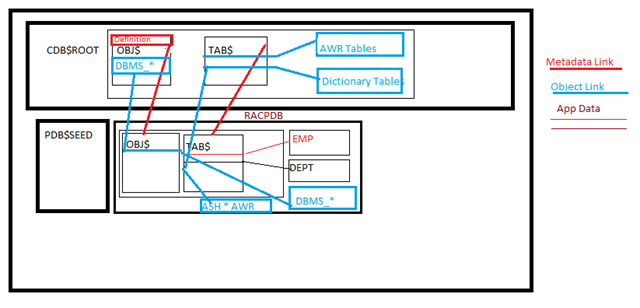
Follow Me!!!