Disclaimer All information is offered in good faith and in the hope that it may be of use for educational purpose and for Database community purpose, but is not guaranteed to be correct, up to date or suitable for any particular purpose. db.geeksinsight.com accepts no liability in respect of this information or its use.
This site is independent of and does not represent Oracle Corporation in any way. Oracle does not officially sponsor, approve, or endorse this site or its content and if notify any such I am happy to remove.
Product and company names mentioned in this website may be the trademarks of their respective owners and published here for informational purpose only.
This is my personal blog. The views expressed on these pages are mine and learnt from other blogs and bloggers and to enhance and support the DBA community and this web blog does not represent the thoughts, intentions, plans or strategies of my current employer nor the Oracle and its affiliates or any other companies. And this website does not offer or take profit for providing these content and this is purely non-profit and for educational purpose only.
If you see any issues with Content and copy write issues, I am happy to remove if you notify me.
Contact Geek DBA Team, via geeksinsights@gmail.com
|
From 12c onwards, Oracle optimizer maintains the directives that influence the optimizer to take appropriate decision while executing the statement or estimation.
As you read from previous posts, Optimizer maintains the execution statistics now,they can be used to create a directive for future executions. These directives can be used by optimizer and determine which optimization technique should be used, ex: statistics feedback or performance feedback or dynamic statistics etc.
Further, this directives are at expressions or object levels not unlike the statement level like profiles etc.So this directives can be used for any other executions also.
For example, a cardinality misestimate, statistics missing etc.
Directive can be viewed in the following view
	dba_sql_plan_directives
	dba_sql_plan_dir_objects.
SQL Plan directives can be created automatically , no manual way is possible and they initial stored in shared pool and flushes every 15 minutes. A manual flush can also be possible using dbms_spd package.
DBMS_SPD.FLUSH_SQL_PLAN_DIRECTIVE;
From the diagram as you see the automatic reoptimization uses directives and do appropriate estimation and therefore an optimal plan.
Take a look at directives in our database
	SQL> l
	  1  select to_char(d.directive_id) dir_id, o.owner,o.object_name,o.subobject_name col_name,o.object_type,
	  2  d.type,d.state,d.reason
	  3  from dba_sql_plan_directives d,dba_sql_plan_dir_objects o
	  4  where o.directive_id=d.directive_id
	  5  and o.owner='OE'
	  6* order by 1,2,3,4,5
	SQL> /

	DIR_ID               OWNER OBJECT_NAME                    COL_NAME                  OBJECT TYPE             STATE         REASON
	-------------------- ----- ------------------------------ ------------------------- ------ ---------------- ------------- ------------------------------------
	11444517666625484927 OE    PRODUCT_INFORMATION            CATEGORY_ID               COLUMN DYNAMIC_SAMPLING NEW           SINGLE TABLE CARDINALITY MISESTIMATE
			     OE    PRODUCT_INFORMATION            PRODUCT_NAME              COLUMN DYNAMIC_SAMPLING NEW           SINGLE TABLE CARDINALITY MISESTIMATE
			     OE    PRODUCT_INFORMATION                                      TABLE  DYNAMIC_SAMPLING NEW           SINGLE TABLE CARDINALITY MISESTIMATE
	14168459673260404402 OE    ORDER_ITEMS                                              TABLE  DYNAMIC_SAMPLING NEW           SINGLE TABLE CARDINALITY MISESTIMATE
	14406986910879485910 OE    ORDERS                                                   TABLE  DYNAMIC_SAMPLING HAS_STATS     JOIN CARDINALITY MISESTIMATE
			     OE    ORDER_ITEMS                                              TABLE  DYNAMIC_SAMPLING HAS_STATS     JOIN CARDINALITY MISESTIMATE
			     OE    PRODUCT_INFORMATION                                      TABLE  DYNAMIC_SAMPLING HAS_STATS     JOIN CARDINALITY MISESTIMATE
	4398363510362722611  OE    ORDER_ITEMS                    QUANTITY                  COLUMN DYNAMIC_SAMPLING HAS_STATS     SINGLE TABLE CARDINALITY MISESTIMATE
			     OE    ORDER_ITEMS                    UNIT_PRICE                COLUMN DYNAMIC_SAMPLING HAS_STATS     SINGLE TABLE CARDINALITY MISESTIMATE
			     OE    ORDER_ITEMS                                              TABLE  DYNAMIC_SAMPLING HAS_STATS     SINGLE TABLE CARDINALITY MISESTIMATE
	4827112249096099760  OE    PRODUCT_INFORMATION            LIST_PRICE                COLUMN DYNAMIC_SAMPLING HAS_STATS     SINGLE TABLE CARDINALITY MISESTIMATE
			     OE    PRODUCT_INFORMATION            MIN_PRICE                 COLUMN DYNAMIC_SAMPLING HAS_STATS     SINGLE TABLE CARDINALITY MISESTIMATE
			     OE    PRODUCT_INFORMATION                                      TABLE  DYNAMIC_SAMPLING HAS_STATS     SINGLE TABLE CARDINALITY MISESTIMATE

13 rows selected.

SQL>
At the moment for OE schema,we have
	Dynamic Sampling is the one directive whenever optimizer see the expression quantity,unit_price,category_id
	in a query it will use this directives

	On status column we have new directives and some objects that have statistics
		Status exaplanation

		NEW - Newly created directive

		MISSING_STATS - directive object does not have relevant statistics

		HAS_STATS - Objects have statistics

		CANDIDATE - Candidate directive, the server to evaluate effectiveness

		PERMANENT - A permanent directive determined by the server to be effective and useful


	Reason column says what lead to create this directive.we have single table and join cardinality is missing.
Lets flush the directives if any in the memory
	SQL> exec 	DBMS_SPD.FLUSH_SQL_PLAN_DIRECTIVE;

	SQL> select to_char(d.directive_id) dir_id, o.owner,o.object_name,o.subobject_name col_name,o.object_type,
	d.type,d.state,d.reason
	from dba_sql_plan_directives d,dba_sql_plan_dir_objects o
	where o.directive_id=d.directive_id
	and o.owner='OE'
	order by 1,2,3,4,5


	DIR_ID               OWNER OBJECT_NAME                    COL_NAME                  OBJECT TYPE             STATE         REASON
	-------------------- ----- ------------------------------ ------------------------- ------ ---------------- ------------- ------------------------------------
	11444517666625484927 OE    PRODUCT_INFORMATION            CATEGORY_ID               COLUMN DYNAMIC_SAMPLING NEW           SINGLE TABLE CARDINALITY MISESTIMATE
			     OE    PRODUCT_INFORMATION            PRODUCT_NAME              COLUMN DYNAMIC_SAMPLING NEW           SINGLE TABLE CARDINALITY MISESTIMATE
			     OE    PRODUCT_INFORMATION                                      TABLE  DYNAMIC_SAMPLING NEW           SINGLE TABLE CARDINALITY MISESTIMATE
	14168459673260404402 OE    ORDER_ITEMS                                              TABLE  DYNAMIC_SAMPLING NEW           SINGLE TABLE CARDINALITY MISESTIMATE
	14406986910879485910 OE    ORDERS                                                   TABLE  DYNAMIC_SAMPLING HAS_STATS     JOIN CARDINALITY MISESTIMATE
			     OE    ORDER_ITEMS                                              TABLE  DYNAMIC_SAMPLING HAS_STATS     JOIN CARDINALITY MISESTIMATE
			     OE    PRODUCT_INFORMATION                                      TABLE  DYNAMIC_SAMPLING HAS_STATS     JOIN CARDINALITY MISESTIMATE
	16873896872332424225 OE    ORDER_ITEMS                                              TABLE  DYNAMIC_SAMPLING NEW           JOIN CARDINALITY MISESTIMATE
			     OE    PRODUCT_INFORMATION                                      TABLE  DYNAMIC_SAMPLING NEW           JOIN CARDINALITY MISESTIMATE
	4398363510362722611  OE    ORDER_ITEMS                    QUANTITY                  COLUMN DYNAMIC_SAMPLING HAS_STATS     SINGLE TABLE CARDINALITY MISESTIMATE
			     OE    ORDER_ITEMS                    UNIT_PRICE                COLUMN DYNAMIC_SAMPLING HAS_STATS     SINGLE TABLE CARDINALITY MISESTIMATE
			     OE    ORDER_ITEMS                                              TABLE  DYNAMIC_SAMPLING HAS_STATS     SINGLE TABLE CARDINALITY MISESTIMATE
	4827112249096099760  OE    PRODUCT_INFORMATION            LIST_PRICE                COLUMN DYNAMIC_SAMPLING HAS_STATS     SINGLE TABLE CARDINALITY MISESTIMATE
			     OE    PRODUCT_INFORMATION            MIN_PRICE                 COLUMN DYNAMIC_SAMPLING HAS_STATS     SINGLE TABLE CARDINALITY MISESTIMATE
			     OE    PRODUCT_INFORMATION                                      TABLE  DYNAMIC_SAMPLING HAS_STATS     SINGLE TABLE CARDINALITY MISESTIMATE

	15 rows selected.
As you observe there are few more (2) directives pushed and stored to disk now.
How to find the directive has been used.

	a) Note section in execution plan

Example:-

	Once the statement is marked reoptimizable Y
-Thanks
Geek DBA
In continuation of previous post,
Further to adaptive plans, Optimizer uses automatic reoptimization using
1) Statistics feedback (Cardinality feedback)
2) Dynamic statistics (Dynamic sampling)
Let's take a closer look
Case 5: Adaptive reoptimization using Dynamic statistics
	1) Deleted the statistics for table Product information and ORDER_ITEMS
	2) Deleted few rows from the order_items

	so that optimizer mis estimates comparing to the object statistics.

	Upon first execution,

	SQL> select * from table(dbms_xplan.display_cursor(NULL,NULL,'ADAPTIVE ALL ALLSTATS'));

	PLAN_TABLE_OUTPUT
	-------------------------------------------------------------
	SQL_ID  8fuhzh9f2k54q, child number 0
	-------------------------------------
	SELECT /*+ gather_plan_statistics */ o.order_id, v.product_name FROM
	orders o,        ( SELECT order_id, product_name          FROM
	order_items o, product_information p          WHERE  p.product_id =
	o.product_id AND list_price < 50          AND    min_price < 100 ) v
	WHERE o.order_id = v.order_id

	Plan hash value: 1332280512

	-------------------------------------------------------------------------------------------------------------------------------------------------------------------------------------
	|   Id  | Operation                              | Name                | Starts | E-Rows |E-Bytes| Cost (%CPU)| E-Time   | A-Rows |   A-Time   | Buffers |  OMem |  1Mem |  O/1/M   |
	-------------------------------------------------------------------------------------------------------------------------------------------------------------------------------------
	|     0 | SELECT STATEMENT                       |                     |      1 |        |       |     8 (100)|          |    319 |00:00:00.01 |      70 |      |        |          |
	|     1 |  NESTED LOOPS                          |                     |      1 |    324 | 31104 |     8   (0)| 00:00:01 |    319 |00:00:00.01 |      70 |      |        |          |
	|  *  2 |   HASH JOIN                            |                     |      1 |    324 | 29808 |     8   (0)| 00:00:01 |    319 |00:00:00.01 |      45 |  1281K|  1281K|     1/0/0|
	|-    3 |    NESTED LOOPS                        |                     |      1 |    324 | 29808 |     8   (0)| 00:00:01 |     90 |00:00:00.01 |      16 |      |        |          |
	|-    4 |     STATISTICS COLLECTOR               |                     |      1 |        |       |            |          |     90 |00:00:00.01 |      16 |      |        |          |
	|  *  5 |      TABLE ACCESS FULL                 | PRODUCT_INFORMATION |      1 |     90 |  5940 |     5   (0)| 00:00:01 |     90 |00:00:00.01 |      16 |      |        |          |
	|-    6 |     TABLE ACCESS BY INDEX ROWID BATCHED| ORDER_ITEMS         |      0 |      4 |   104 |     3   (0)| 00:00:01 |      0 |00:00:00.01 |       0 |      |        |          |
	|- *  7 |      INDEX RANGE SCAN                  | ITEM_PRODUCT_IX     |      0 |    300 |       |     3   (0)| 00:00:01 |      0 |00:00:00.01 |       0 |      |        |          |
	|     8 |    TABLE ACCESS FULL                   | ORDER_ITEMS         |      1 |    300 | 17290 |     3   (0)| 00:00:01 |    665 |00:00:00.01 |      29 |      |        |          |
	|  *  9 |   INDEX UNIQUE SCAN                    | ORDER_PK            |    319 |      1 |     4 |     0   (0)|          |    319 |00:00:00.01 |      25 |      |        |          |
	-------------------------------------------------------------------------------------------------------------------------------------------------------------------------------------

	Note
	-----
	   - this is an adaptive plan (rows marked '-' are inactive)

	SQL> select sql_id,child_number,plan_hash_value,is_resolved_adaptive_plan,
	is_reoptimizable from v$sql where sql_id='8fuhzh9f2k54q';

	SQL_ID        CHILD_NUMBER PLAN_HASH_VALUE I I
	------------- ------------ --------------- - -
	8fuhzh9f2k54q            0      1332280512 Y Y


	Notes:-
	1) Order items estimated rows were 300 but actual returned was 665 and vice versa for product information
	2) Optimizer picks sub optimal plan and uses adaptive technique and resolves an adaptive plan
	3) Optimizer upon completion of execution it compares the estimated and actual rows that
	returned and marked this statement can still optimized
	marked as is_reoptimizable as Y
	4) So, The next execution will kick off the statistics feedback feature.
Second execution of same statement
 	SQL> select * from table(dbms_xplan.display_cursor(NULL,NULL,'ADAPTIVE ALL ALLSTATS'));

	SQL_ID  8fuhzh9f2k54q, child number 1
	-------------------------------------
	SELECT /*+ gather_plan_statistics */ o.order_id, v.product_name FROM
	orders o,        ( SELECT order_id, product_name          FROM
	order_items o, product_information p          WHERE  p.product_id =
	o.product_id AND list_price < 50          AND    min_price < 100 ) v
	WHERE o.order_id = v.order_id

	Plan hash value: 1332280512

	--------------------------------------------------------------------------------------------------------------------------------------------------------------------------------
	|   Id  | Operation                      | Name                   | Starts | E-Rows |E-Bytes| Cost (%CPU)| E-Time   | A-Rows |   A-Time   | Buffers |  OMem |  1Mem |  O/1/M   |
	--------------------------------------------------------------------------------------------------------------------------------------------------------------------------------
	|     0 | SELECT STATEMENT               |                        |      2 |        |       |     8 (100)|          |     40 |00:00:00.01 |      60 |       |      |           |
	|     1 |  NESTED LOOPS                  |                        |      2 |     20 |  1920 |     8   (0)| 00:00:01 |     40 |00:00:00.01 |      60 |       |      |           |
	|  *  2 |   HASH JOIN                    |                        |      2 |     20 |  1840 |     8   (0)| 00:00:01 |     40 |00:00:00.01 |      50 |  1696K|  1696K|     2/0/0|
	|-    3 |    NESTED LOOPS                |                        |      2 |     20 |  1840 |     8   (0)| 00:00:01 |    134 |00:00:00.01 |      14 |       |      |           |
	|-    4 |     STATISTICS COLLECTOR       |                        |      2 |        |       |            |          |    134 |00:00:00.01 |      14 |       |      |           |
	|     5 |      TABLE ACCESS FULL         | ORDER_ITEMS            |      2 |     67 |  1742 |     3   (0)| 00:00:01 |    134 |00:00:00.01 |      14 |       |      |           |
	|- *  6 |     TABLE ACCESS BY INDEX ROWID| PRODUCT_INFORMATION    |      0 |      1 |    66 |     5   (0)| 00:00:01 |      0 |00:00:00.01 |       0 |       |      |           |
	|- *  7 |      INDEX UNIQUE SCAN         | PRODUCT_INFORMATION_PK |      0 |        |       |            |          |      0 |00:00:00.01 |       0 |       |      |           |
	|  *  8 |    TABLE ACCESS FULL           | PRODUCT_INFORMATION    |      2 |     90 |  5940 |     5   (0)| 00:00:01 |    180 |00:00:00.01 |      36 |       |      |           |
	|  *  9 |   INDEX UNIQUE SCAN            | ORDER_PK               |     40 |      1 |     4 |     0   (0)|          |     40 |00:00:00.01 |      10 |       |      |           |
	--------------------------------------------------------------------------------------------------------------------------------------------------------------------------------

	Note
	-----
	   - statistics feedback used for this statement
	   - this is an adaptive plan (rows marked '-' are inactive)

	SQL> select sql_id,child_number,plan_hash_value,is_resolved_adaptive_plan,
	is_reoptimizable from v$sql where sql_id='8fuhzh9f2k54q';

	SQL_ID        CHILD_NUMBER PLAN_HASH_VALUE I I
	------------- ------------ --------------- - -
	8fuhzh9f2k54q            0      1332280512 Y Y
	8fuhzh9f2k54q            1      1332280512 Y N

	SQL> select sql_id,child_number,use_feedback_stats from
	v$sql_shared_cursor where sql_id='8fuhzh9f2k54q';

	SQL_ID        CHILD_NUMBER U
	------------- ------------ -
	8fuhzh9f2k54q            0 N
	8fuhzh9f2k54q            1 Y


	Notes:-
	1) First execution made optimizer to see actual difference in estimated rows and a
	   ctual rows, so it marked the statement as is_optimizable=Y
	2) Upon second execution of same statement the optimizer uses the previous
	   execution statistics (statistics feedback in note section)
	   and marked the is_reoptimizable=N determining that no further improvements can be made.
Case 6:- Refinement to estimation by using Dynamic statistics.
	SQL> Alter system set optimizer_dynamic_sampling=11;
	system altered.

	SQL> Alter system flush shared_pool;

	Execution of first time

	SQL_ID  9pamqb0nqdrpq, child number 1
	-------------------------------------
	SELECT o.order_id, v.product_name FROM   orders o,        ( SELECT
	order_id, product_name          FROM   order_items o,
	product_information p          WHERE  p.product_id = o.product_id AND
	list_price < 50          AND    min_price < 100 ) v WHERE o.order_id =
	v.order_id

	Plan hash value: 1332280512

	-------------------------------------------------------------------------------------------
	| Id  | Operation           | Name                | Rows  | Bytes | Cost (%CPU)| Time     |
	-------------------------------------------------------------------------------------------
	|   0 | SELECT STATEMENT    |                     |       |       |     8 (100)|          |
	|   1 |  NESTED LOOPS       |                     |    20 |  1920 |     8   (0)| 00:00:01 |
	|*  2 |   HASH JOIN         |                     |    20 |  1840 |     8   (0)| 00:00:01 |
	|   3 |    TABLE ACCESS FULL| ORDER_ITEMS         |    67 |  1742 |     3   (0)| 00:00:01 |
	|*  4 |    TABLE ACCESS FULL| PRODUCT_INFORMATION |    90 |  5940 |     5   (0)| 00:00:01 |
	|*  5 |   INDEX UNIQUE SCAN | ORDER_PK            |     1 |     4 |     0   (0)|          |
	-------------------------------------------------------------------------------------------

	Predicate Information (identified by operation id):
	---------------------------------------------------

	   2 - access("P"."PRODUCT_ID"="O"."PRODUCT_ID")
	   4 - filter(("LIST_PRICE"<50 AND "MIN_PRICE"<100))
	   5 - access("O"."ORDER_ID"="ORDER_ID")

	Note
	-----
	   - dynamic statistics used: dynamic sampling (level=AUTO)
	   - this is an adaptive plan


	SQL> select sql_id,child_number,plan_hash_value,is_resolved_adaptive_plan,
	is_reoptimizable from v$sql where sql_id='9pamqb0nqdrpq';

	SQL_ID        CHILD_NUMBER PLAN_HASH_VALUE I I
	------------- ------------ --------------- - -
	9pamqb0nqdrpq            0      1332280512 Y Y
	9pamqb0nqdrpq            1      1332280512 Y N

	SQL>

	Notes:-
	1) As you see the setting dynamic sampling to level 11 makes optimizer
	   to sample auto, you need not to worry about level now
	2) Upon first execution the optimizer marked its adaptive and
	   further can be reoptimized
	3) Upon second execution the optimizer enhanced it by using dynamic
	    statistics (dynamic sampling) and then provided the optimal plan
	4) Once optimized and executed optimizer see's there's no difference
	   than actual to estimated marked the reoptimzed as NO.
-Thanks
Geek DBA
If you have read the previous post on automatic query reoptimation, this post is the continuation of the same, by looking them closely.
All the examples used are from oracle white paper.
Parameters that influence optimizer to use adaptive features
SQL> show parameter adaptive

NAME                                 TYPE        VALUE
------------------------------------ ----------- ------------------------------
optimizer_adaptive_features          boolean     FALSE
optimizer_adaptive_reporting_only    boolean     FALSE

Note 1:-

	optimizer_adaptive_features = True , Enables new 12c adaptive features
	optimizer_adaptive_reporting_only = True, Rather implementing the adaptive features they may just report you.

Note 2:-
	1) Two new columns in v$sql
		is_resolved_adaptive_plan = Null means not an adaptive plan
		is_reoptimizable = N Means optimizer see there is no optimization requires
				   since the estimation and actual rows matches

Note 3:- V$shared_sql_cursor = used_feedback_stats
We will see adaptive execution plans in this post how does this works. With combination of those parameters above.
Case 1: Switch off features (both params false)
	select * from table(dbms_xplan.display_cursor(NULL,NULL,format=>'ADAPTIVE +report'));


	SQL_ID  69ky4556y8shw, child number 0
	-------------------------------------
	SELECT o.order_id, v.product_name FROM   orders o,        ( SELECT
	order_id, product_name          FROM   order_items o,
	product_information p          WHERE  p.product_id = o.product_id AND
	 list_price < 50          AND    min_price < 100 ) v WHERE o.order_id =
	v.order_id

	Plan hash value: 173749393

	--------------------------------------------------------------------------------------------------------------------------
	| Id  | Operation              | Name                | E-Rows |E-Bytes| Cost (%CPU)| E-Time   |  OMem |  1Mem |  O/1/M   |
	--------------------------------------------------------------------------------------------------------------------------
	|   0 | SELECT STATEMENT       |                     |        |       |     7 (100)|          |       |       |          |
	|   1 |  NESTED LOOPS          |                     |    196 |  7840 |     7   (0)| 00:00:01 |       |       |          |
	|*  2 |   NESTED LOOPS         |                     |    196 |  7056 |     7   (0)| 00:00:01 |  1321K|  1321K|     2/0/0|
	|*  3 |    TABLE ACCESS FULL   | PRODUCT_INFORMATION |     55 |  1540 |     5   (0)| 00:00:01 |       |       |          |
	|   4 |    INDEX FAST FULL SCAN| ORDER_ITEMS_UK      |    665 |  5320 |     2   (0)| 00:00:01 |       |       |          |
	|*  5 |   INDEX UNIQUE SCAN    | ORDER_PK            |      1 |     4 |     0   (0)|          |       |       |          |
	--------------------------------------------------------------------------------------------------------------------------

	SQL> select sql_id,plan_hash_value,child_number,is_resolved_adaptive_plan,
	is_reoptimizable from v$sql where sql_id='9vc2g7duayw4t';

	SQL_ID        PLAN_HASH_VALUE CHILD_NUMBER I I
	------------- --------------- ------------ - -
	69ky4556y8shw        173749393           0   N

	SQL>


	Notes:- Optimizer uses nested loops and not an adaptive plan which is normal in case.
Case 2:- Turn on reporting mode only
	SQL> alter system set optimizer_adaptive_features=true;

	System altered.

	SQL> alter system set optimizer_adaptive_reporting_only=true;

	System altered.

	SQL> show parameter adaptive

	NAME                                 TYPE        VALUE
	------------------------------------ ----------- ------------------------------
	optimizer_adaptive_features          boolean     TRUE
	optimizer_adaptive_reporting_only    boolean     TRUE
	parallel_adaptive_multi_user         boolean     TRUE
	SQL>

	SQL> select * from table(dbms_xplan.display_cursor(NULL,NULL,format=>'ADAPTIVE ALL ALLSTATS'));

	SQL_ID  69ky4556y8shw, child number 0
	-------------------------------------
	SELECT o.order_id, v.product_name FROM   orders o,        ( SELECT
	order_id, product_name          FROM   order_items o,
	product_information p          WHERE  p.product_id = o.product_id AND
	list_price < 50          AND    min_price < 100 ) v WHERE o.order_id =
	v.order_id

	Plan hash value: 35479787

	----------------------------------------------------------------------------------------------------------------
	|   Id  | Operation                              | Name                | Rows  | Bytes | Cost (%CPU)| Time     |
	----------------------------------------------------------------------------------------------------------------
	|     0 | SELECT STATEMENT                       |                     |       |       |     7 (100)|          |
	|     1 |  NESTED LOOPS                          |                     |   196 |  7840 |     7   (0)| 00:00:01 |
	|  *  2 |   HASH JOIN                            |                     |   196 |  7056 |     7   (0)| 00:00:01 |
	|-    3 |    NESTED LOOPS                        |                     |   196 |  7056 |     7   (0)| 00:00:01 |
	|-    4 |     STATISTICS COLLECTOR               |                     |       |       |            |          |
	|  *  5 |      TABLE ACCESS FULL                 | PRODUCT_INFORMATION |    55 |  1540 |     5   (0)| 00:00:01 |
	|-    6 |     TABLE ACCESS BY INDEX ROWID BATCHED| ORDER_ITEMS         |     4 |    32 |     2   (0)| 00:00:01 |
	|- *  7 |      INDEX RANGE SCAN                  | ITEM_PRODUCT_IX     |   665 |       |     2   (0)| 00:00:01 |
	|     8 |    INDEX FAST FULL SCAN                | ORDER_ITEMS_UK      |   665 |  5320 |     2   (0)| 00:00:01 |
	|  *  9 |   INDEX UNIQUE SCAN                    | ORDER_PK            |     1 |     4 |     0   (0)|          |
	----------------------------------------------------------------------------------------------------------------

	Predicate Information (identified by operation id):
	---------------------------------------------------

	   2 - access("P"."PRODUCT_ID"="O"."PRODUCT_ID")
	   5 - filter(("LIST_PRICE"<50 AND "MIN_PRICE"<100))
	   7 - access("P"."PRODUCT_ID"="O"."PRODUCT_ID")
	   9 - access("O"."ORDER_ID"="ORDER_ID")

	Note
	-----
	   - this is an adaptive plan (rows marked '-' are inactive)

	SQL> select sql_id,plan_hash_value,child_number,is_resolved_adaptive_plan,is_reoptimizable
	from v$sql where plan_hash_value=35479787;

	SQL_ID        PLAN_HASH_VALUE CHILD_NUMBER I I
	------------- --------------- ------------ - -
	69ky4556y8shw        35479787            0 N N

	Notes:-
	1) The plan is still not adaptive (N) since the reporting mode is on.
	2) In execution plan the execution ID, 3,4,6,7 will be discarded once the final plan is executed,
	   - are inactive execution ID
	3) Also observe there is a new thing called statistics collector, this gather information about execution and
	buffers a portion of rows coming into the subplan. In our case initially a nested loops has been choosen (ID 3) ,
	where the statistics collectors see there is a difference in the rows that coming in,
	and hence chooses a different access method, from nested loops to hash join. Once this is collected statistics collector
	will stop monitoring.
Case 3: Adaptive features true and reporting mode is false i.e execute the final plan
	SQL_ID  9pamqb0nqdrpq, child number 0
	-------------------------------------
	SELECT o.order_id, v.product_name FROM   orders o,        ( SELECT
	order_id, product_name          FROM   order_items o,
	product_information p          WHERE  p.product_id = o.product_id AND
	list_price < 50          AND    min_price < 100 ) v WHERE o.order_id =
	v.order_id

	Plan hash value: 35479787

	----------------------------------------------------------------------------------------------------------------
	|   Id  | Operation                              | Name                | Rows  | Bytes | Cost (%CPU)| Time     |
	----------------------------------------------------------------------------------------------------------------
	|     0 | SELECT STATEMENT                       |                     |       |       |     7 (100)|          |
	|     1 |  NESTED LOOPS                          |                     |   196 |  7840 |     7   (0)| 00:00:01 |
	|  *  2 |   HASH JOIN                            |                     |   196 |  7056 |     7   (0)| 00:00:01 |
	|-    3 |    NESTED LOOPS                        |                     |   196 |  7056 |     7   (0)| 00:00:01 |
	|-    4 |     STATISTICS COLLECTOR               |                     |       |       |            |          |
	|  *  5 |      TABLE ACCESS FULL                 | PRODUCT_INFORMATION |    55 |  1540 |     5   (0)| 00:00:01 |
	|-    6 |     TABLE ACCESS BY INDEX ROWID BATCHED| ORDER_ITEMS         |     4 |    32 |     2   (0)| 00:00:01 |
	|- *  7 |      INDEX RANGE SCAN                  | ITEM_PRODUCT_IX     |   665 |       |     2   (0)| 00:00:01 |
	|     8 |    INDEX FAST FULL SCAN                | ORDER_ITEMS_UK      |   665 |  5320 |     2   (0)| 00:00:01 |
	|  *  9 |   INDEX UNIQUE SCAN                    | ORDER_PK            |     1 |     4 |     0   (0)|          |
	----------------------------------------------------------------------------------------------------------------

	Predicate Information (identified by operation id):
	---------------------------------------------------

	   2 - access("P"."PRODUCT_ID"="O"."PRODUCT_ID")
	   5 - filter(("LIST_PRICE"<50 AND "MIN_PRICE"<100))
	   7 - access("P"."PRODUCT_ID"="O"."PRODUCT_ID")
	   9 - access("O"."ORDER_ID"="ORDER_ID")

	Note
	-----
	   - this is an adaptive plan (rows marked '-' are inactive)

	SQL> select sql_id,plan_hash_value,child_number,is_resolved_adaptive_plan,is_reoptimizable from v$sql where sql_id='69ky4556y8shw';

	SQL_ID        PLAN_HASH_VALUE CHILD_NUMBER I I
	------------- --------------- ------------ - -
	69ky4556y8shw        35479787            0 Y N

	SQL>

	Notes:
	1) As you see now the plan is adaptive
Case 4: Adaptive plans with parallelism Hybrid hash
	In parallel execution, optimizer uses broadcast and HASH method to distribute the work between PQ's
	Where in 12c, using Hybrid Hash mechanism the optimizer can defer its distribution until execution
	and distributes based on the rows that monitors by statistics collector on fly, taking into consideration
	that distribution can switch from Broadcast to HASH Method.

	Also it determines how much parallelism can be used.


	Hybrid Hash Execution in 12c.

	PLAN_TABLE_OUTPUT
	--------------------------------------
	Plan hash value: 948598645

	-------------------------------------------------------------------------------------------------------------------------------
	| Id  | Operation                          | Name        | Rows  | Bytes | Cost (%CPU)| Time     |    TQ  |IN-OUT| PQ Distrib |
	-------------------------------------------------------------------------------------------------------------------------------
	|   0 | SELECT STATEMENT                   |             |    27 |   621 |     4   (0)| 00:00:01 |        |      |            |
	|   1 |  PX COORDINATOR                    |             |       |       |            |          |        |      |            |
	|   2 |   PX SEND QC (RANDOM)              | :TQ10003    |    27 |   621 |     4   (0)| 00:00:01 |  Q1,03 | P->S | QC (RAND)  |
	|   3 |    HASH GROUP BY                   |             |    27 |   621 |     4   (0)| 00:00:01 |  Q1,03 | PCWP |            |
	|   4 |     PX RECEIVE                     |             |    27 |   621 |     4   (0)| 00:00:01 |  Q1,03 | PCWP |            |
	|   5 |      PX SEND HASH                  | :TQ10002    |    27 |   621 |     4   (0)| 00:00:01 |  Q1,02 | P->P | HASH       |
	|   6 |       HASH GROUP BY                |             |    27 |   621 |     4   (0)| 00:00:01 |  Q1,02 | PCWP |            |
	|*  7 |        HASH JOIN                   |             |   106 |  2438 |     4   (0)| 00:00:01 |  Q1,02 | PCWP |            |
	|   8 |         PX RECEIVE                 |             |    27 |   432 |     2   (0)| 00:00:01 |  Q1,02 | PCWP |            |
	|   9 |          PX SEND HYBRID HASH       | :TQ10000    |    27 |   432 |     2   (0)| 00:00:01 |  Q1,00 | P->P | HYBRID HASH|
	|  10 |           PX BLOCK ITERATOR        |             |    27 |   432 |     2   (0)| 00:00:01 |  Q1,00 | PCWC |            |
	|  11 |            TABLE ACCESS FULL       | DEPARTMENTS |    27 |   432 |     2   (0)| 00:00:01 |  Q1,00 | PCWP |            |
	|  12 |         PX RECEIVE                 |             |   107 |   749 |     2   (0)| 00:00:01 |  Q1,02 | PCWP |            |
	|  13 |          PX SEND HYBRID HASH (SKEW)| :TQ10001    |   107 |   749 |     2   (0)| 00:00:01 |  Q1,01 | P->P | HYBRID HASH|
	|  14 |           PX BLOCK ITERATOR        |             |   107 |   749 |     2   (0)| 00:00:01 |  Q1,01 | PCWC |            |
	|  15 |            TABLE ACCESS FULL       | EMPLOYEES   |   107 |   749 |     2   (0)| 00:00:01 |  Q1,01 | PCWP |            |
	-------------------------------------------------------------------------------------------------------------------------------
Next Post, Automatic Reoptimization
-Thanks
Geek DBA
Before to 12c, all the sql tuning features like ACS, SQL Profiles, SQL Outlines, SPM etc are for proactive tuning and plan stability. There is no way around to decide and change the optimizer decision on fly during the execution of a sql statement.
Since 12c, Oracle introduced the set of capabilities called "adaptive query optimization" that changes the optimizer decision on fly during the execution of a statement. This means the execution plan may initially choose hash join but if that is not correct this may change on fly to nested loops. Further more is that now all execution plans and statistics can be stored in SYSAUX tables and if a query runs next time it will compare the previous execution statistics and can change the execution plan or can choose to collect statistics on fly etc using a set of directive
Let's look closely what does they mean to us.
To start using this capabilities, the following parameters must be set
OPTIMIZER_FEATURES_ENABLE set to 12.1.0.1 above
OPTIMIZER_ADAPTIVE_REPORTING_ONLY set to false
optimizer_adaptive_features set to TRUE
If the above are set, there are four enhancements you will see Oracle 12c uses.
1) Adapative Plans
2) SQL Plan directives
3) Dynamic statistics
4) Automatic re-optimization
To start with I will represent with a diagram to better understand this whole features in combined.
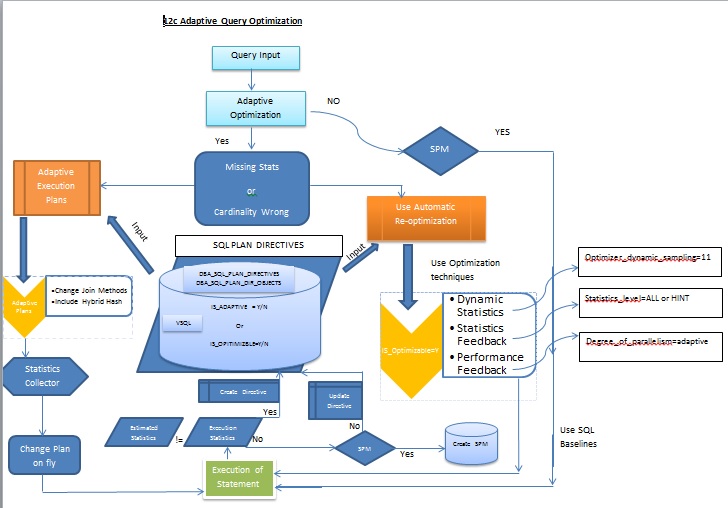
Adaptive Plans:-
When a query runs first time, Optimizer usually estimates and present a optimal plan based on the statistics available. Ocassionaly (not true majority :)) optimizer picks a suboptimal plan due to some misestimates. So the query run time or performance can impact. What if , if the plan can adapt a new join method i.e switch basically a new plan on fly. If so, the optimizer defer the estimated and changes it run time. The estimations that has been kept in the plan will be discarded and uses new final plan during execution.
The ability to adapt the plan at run time based on actual execution statistics results in a more optimal final plan. After choosing the final plan, the optimizer uses it for subsequent executions, thus ensuring that the suboptimal plan is not reused.
	Comes in two different flavour's
	1) Influencing join methods by switch the nested loops to hash join and vice versa
	2) Influencing the parallel distribution method by introducing hybrid hash mechanism

	One can find whether the plan is adapted, it can be two ways
	a) The note section of a execution plan contains the following
		- adaptive plan has been used
	b) v$sql.is_resolved_adaptive_plan = Y means the query is adaptive
Automatic Reoptimization:-
As you see above, The optimizer defers the plan and re-assess the join methods from nested loops to hash join or vice versa (as of now 12c Release 1). But consider a scenario, a join order situation which perform sub optimally due to cardinality misestimate in those cases Oracle optimizer now utilizes the technique called Automatic re-optimization. Adaptive plans will change in first execution itself where in the automatic re-optimization works for the second time of execution of statement.
Earlier to 12c, the execution statistics were not persistent and not available to the optimizer immediately, now they store in sysaux tablespace and optimizer quickly get them and use them for further to improvise the plans. It will try to optimize every time the statement runs and keep storing the information unlike discarding the old plans. So this can be steps (as of my understanding)
a) When a statement executes first time,
1) Optimizer estimates the plan and execute it
2) At end, optimizer compare the execution statistics with estimated statistics
3) If it found differs, (for example e-rows differs than a-rows), then optimizer marks it as re-optimization for next run
4) Creates SQL Plan directives and stores
b) Upon next run, The optimizer see that this statement is need to reoptimized and see what kind of optimization technique it should use. It can use either of the following depending on cases.
a) For example, if a object has missing stats, and dynamic sampling set to 11(new) level then it uses the feature "Dynamic statistics" and gather the statistics run time
b) For example, if a cardinality misestimate happens in a join order, then it uses the technique called "Statistics feedback(formerly known as cardinality feedback) or "performance feedback" i.e switching from serial to parallel execution (Adaptive parallelism if DOP set as adaptive)
Note: In both the cases above SQL Plan directives that gathered for previous execution will be used and performed accordingly.
Finally, the statement will be executed with new plan and optimizer again compare the execution statistics and estimated statisitcs, if it found both same it marks this statement is_reoptimizable as NO. If it's not then the above cycle continues. Optimizer learns everytime and tries to reoptimize the statement everytime. (ofcourse many child cursors, many parses etc)
SQL Plan Directives:-
A SQL plan directive is additional information that the optimizer uses to generate a more optimal plan. For example, when the database joins two tables that have a data skew in their join columns, a SQL plan directive can direct the optimizer to use dynamic statistics to obtain an accurate cardinality estimate.The optimizer collects SQL plan directives on query expressions rather than at the statement level. In this way, the optimizer can apply directives to multiple SQL statements. The database automatically maintains directives, and stores them in the SYSAUX tablespace. You can manage directives using the package DBMS_SPD.
By default every 15 minutes this sql plan directives are flushed to sysaux as they collect automatically.
Columns V$SQL=is_reoptimizable columns value 'Y' tells whether this query needs reoptimization if so the next execution will use all sorts of reoptimization techninques using SQL Plan directives exists.
You can view DBA_SQL_PLAN_DIRECTIVES, DBA_SQL_PLAN_DIR_OBJECTS to view the objects used in statement were been used of which technique.
Dynamic Statistics (Dynamic sampling) Enhancements:-
When an object statistics missing during execution, Oracle optimizer will collect the statistics based on sampling of blocks (optimizer_dynamic_sampling level 2 etc). But this can be very misleading sometimes since sampling can be inaccurate.
From 12c, onwards a new level has been introduced i.e setting optimizer_dynamic_sampling to level 11) causes optimizer "AUTOMATICALLY DETERMINES " to collect the statistics run time of execution which eases your job if you are unsure of the data trend and tries to utilize the new statistics. Albeit the query execution time will increase ofcourse.
Next Posts on closely looking at each of this options:-
Adaptive Plans
Adaptive Re-optimization
Dynamic Statistics
Statistics Feedback
-Thanks
Geek DBA
Earlier to 12c, when an partition is truncated with update global index clause the operation will take longer to complete since it has to perform the operation on index also to remove corresponding keys in index partition/index and then rebuild entire partition. But that is history,
Asynchronous global index maintainence is the feature to clear up the orphan entries later (on demand) not by immediate, that means the oracle will defer the cleanup thus by provides faster index maintainence when there is a partition maintainence like truncate or drop etc.
But how about Oracle take care of those orphan entries
	1) Optimizer reads the entries by skipping those orphan entries and performs reads only that
	   contains valid key entries
	2) Oracle will not reuse those blocks for subsequent index entries until the clean up is performed
	3) A new column orphaned_entries in dba_indexes/part_indexes etc will show up with any orphan entries.
But, How to clean up those orphan entries?
	1) Automatic job PMO_DEFERRED_GIDX_MAINT_JOB  scheduled every 2.00 AM
	2) Perform manually alter index
Now look at these Options
 Test Case

	CREATE TABLE employees
	(employee_id NUMBER NOT NULL,
	last_name VARCHAR2(10),
	department_id NUMBER)
	PARTITION BY RANGE (department_id)
	(PARTITION employees_part1 VALUES LESS THAN (10000),
	PARTITION employees_part2 VALUES LESS THAN (20000) ,
	PARTITION employees_part3 VALUES LESS THAN (30000),
	PARTITION employees_part4 VALUES LESS THAN (40000) ,
	PARTITION employees_part5 VALUES LESS THAN (50000) ,
	PARTITION employees_part6 VALUES LESS THAN (60000)) tablespace users;


	 declare
	 v_no number :=1;
	 begin
	 delete employees;
	 for i in 1..59999 loop
	 insert into employees values(v_no,'name...',v_no);
	 v_no := v_no+1;
	 end loop;
	 commit;
	 end;
	 /
	A global index

	CREATE INDEX employees_global_idx ON employees(employee_id);

	A global partitioned index
	CREATE INDEX employees_global_part_idx ON employees(employee_id)
	GLOBAL PARTITION BY RANGE(employee_id)
	(PARTITION p1 VALUES LESS THAN(10000),
	 PARTITION p2 VALUES LESS THAN(20000),
	 PARTITION p3 VALUES LESS THAN(30000),
	 PARTITION p4 VALUES LESS THAN(40000),
	 PARTITION p5 VALUES LESS THAN(MAXVALUE));

 Check the index status

	select index_name, null partition_name, num_rows, s.blocks, leaf_blocks, status, orphaned_entries from dba_indexes i,
	dba_segments s where i.index_name = s.segment_name and table_name='EMPLOYEES' and partitioned = 'NO'
	union select index_name, i.partition_name, num_rows, s.blocks, leaf_blocks, status, orphaned_entries
	from dba_ind_partitions i, dba_segments s where i.partition_name = s.partition_name and index_name like 'IDX%';

	INDEX_NAME                               PARTITION_NAME                             NUM_ROWS     BLOCKS LEAF_BLOCKS STATUS   ORP
	---------------------------------------- ---------------------------------------- ---------- ---------- ----------- -------- ---
	EMPLOYEES_GLOBAL_IDX                                                                   59999        256         166 VALID    NO


 Option 2, Perform coalesce clean up
Notes:- As you see below, the partition truncation operation create 9999 rows orphaned though we have

mentioned update global indexes, means indexes have not been rebuilt but deferred to later.
	SQL> alter table employees truncate partition employees_part1 update global indexes;

	Table truncated.

	Elapsed: 00:00:00.20
	SQL> analyze index EMPLOYEES_GLOBAL_IDX validate structure;

	Index analyzed.

	Elapsed: 00:00:00.09
	SQL>  select name, lf_rows, del_lf_rows from index_stats;

	NAME                               LF_ROWS    DEL_LF_ROWS
	--------------------------------- ---------- -----------
	EMPLOYEES_GLOBAL_IDX               59999        9999

	Elapsed: 00:00:00.05

	SQL> exec dbms_stats.gather_table_stats(ownname=>'TEST', tabname=>'EMPLOYEES', cascade=>true, estimate_percent=>null,
	     method_opt=>'FOR ALL COLUMNS SIZE 1');

	SQL> select index_name, null partition_name, num_rows, s.blocks, leaf_blocks, status, orphaned_entries from dba_indexes i,
	  2  dba_segments s where i.index_name = s.segment_name and table_name='EMPLOYEES' and partitioned = 'NO'
	  3  union select index_name, i.partition_name, num_rows, s.blocks, leaf_blocks, status, orphaned_entries
	  4  from dba_ind_partitions i, dba_segments s where i.partition_name = s.partition_name and index_name like 'IDX%';


	INDEX_NAME                               PARTITION_NAME                             NUM_ROWS     BLOCKS LEAF_BLOCKS STATUS   ORP
	---------------------------------------- ---------------------------------------- ---------- ---------- ----------- -------- ---
	EMPLOYEES_GLOBAL_IDX                                                                   50000        256         140 VALID    YES


	Elapsed: 00:00:01.21
	SQL>


	If you query the table for those entries that has been truncated, of course index usage has not been performed
	no rows will be returned and full table access performed scanning those partition only

	SQL> set autotrace on

	SQL> select * from employees where department_id between 100 and 2000;

	no rows selected

	Elapsed: 00:00:00.01

	Execution Plan
	----------------------------------------------------------
	Plan hash value: 3450816879

	----------------------------------------------------------------------------------------------------
	| Id  | Operation              | Name      | Rows  | Bytes | Cost (%CPU)| Time     | Pstart| Pstop |
	----------------------------------------------------------------------------------------------------
	|   0 | SELECT STATEMENT       |           |     1 |    33 |     2   (0)| 00:00:01 |       |       |
	|   1 |  PARTITION RANGE SINGLE|           |     1 |    33 |     2   (0)| 00:00:01 |     1 |     1 |
	|*  2 |   TABLE ACCESS FULL    | EMPLOYEES |     1 |    33 |     2   (0)| 00:00:01 |     1 |     1 |
	----------------------------------------------------------------------------------------------------

	Predicate Information (identified by operation id):
	---------------------------------------------------

	   2 - filter("DEPARTMENT_ID">=100 AND "DEPARTMENT_ID"< =2000)


	Statistics
	----------------------------------------------------------
		  0  recursive calls
		  0  db block gets
		  3  consistent gets
		  0  physical reads
		  0  redo size
		493  bytes sent via SQL*Net to client
		532  bytes received via SQL*Net from client
		  1  SQL*Net roundtrips to/from client
		  0  sorts (memory)
		  0  sorts (disk)
		  0  rows processed

	# perform the clean up (12c command)

	SQL> alter index EMPLOYEES_GLOBAL_IDX coalesce cleanup;

	Index altered.

	# orphaned column shows NO entries

	SQL> select index_name, null partition_name, num_rows, s.blocks, leaf_blocks, status, orphaned_entries from dba_indexes i,
	  2  dba_segments s where i.index_name = s.segment_name and table_name='EMPLOYEES' and partitioned = 'NO'
	  3  union select index_name, i.partition_name, num_rows, s.blocks, leaf_blocks, status, orphaned_entries
	  4  from dba_ind_partitions i, dba_segments s where i.partition_name = s.partition_name and index_name like 'IDX%';

	INDEX_NAME                               PARTITION_NAME                             NUM_ROWS     BLOCKS LEAF_BLOCKS STATUS   ORP
	---------------------------------------- ---------------------------------------- ---------- ---------- ----------- -------- ---
	EMPLOYEES_GLOBAL_IDX                                                                   50000        256         140 VALID    NO

	# analyze the index to confirm no delete keys exists, yes it does not have any

	SQL> analyze index EMPLOYEES_GLOBAL_IDX validate structure;

	Index analyzed.

	Elapsed: 00:00:00.09

	SQL> select name, lf_rows, del_lf_rows from index_stats;

	NAME                         LF_ROWS DEL_LF_ROWS
	--------------------------------------- -----------
	EMPLOYEES_GLOBAL_IDX         50000      0

	Elapsed: 00:00:00.04
	SQL>

 Option 3, Perform dbms_part clean up operation


	SQL> alter table employees truncate partition employees_part2 update global indexes;

	Table truncated.

	SQL> exec dbms_stats.gather_table_stats(ownname=>'TEST', tabname=>'EMPLOYEES', cascade=>true,
	     estimate_percent=>null, method_opt=>'FOR ALL COLUMNS SIZE 1');

	SQL> select index_name, null partition_name, num_rows, s.blocks, leaf_blocks, status, orphaned_entries from dba_indexes i,
	  2  dba_segments s where i.index_name = s.segment_name and table_name='EMPLOYEES' and partitioned = 'NO'
	  3  union select index_name, i.partition_name, num_rows, s.blocks, leaf_blocks, status, orphaned_entries
	  4  from dba_ind_partitions i, dba_segments s where i.partition_name = s.partition_name and index_name like 'IDX%';

	INDEX_NAME                               PARTITION_NAME                             NUM_ROWS     BLOCKS LEAF_BLOCKS STATUS   ORP
	---------------------------------------- ---------------------------------------- ---------- ---------- ----------- -------- ---
	EMPLOYEES_GLOBAL_IDX                                                                   40000        256         112 VALID    YES


	SQL> analyze index EMPLOYEES_GLOBAL_IDX validate structure;

	Index analyzed.

	Elapsed: 00:00:00.03

	SQL> select name, lf_rows, del_lf_rows from index_stats;

	NAME                        LF_ROWS DEL_LF_ROWS
	-------------------------------------- -----------
	EMPLOYEES_GLOBAL_IDX        50000  10000

	Elapsed: 00:00:00.00

	SQL>

	# perform the clean up using dbms_part

	SQL> exec dbms_part.cleanup_gidx;

	PL/SQL procedure successfully completed.

	SQL> analyze index EMPLOYEES_GLOBAL_IDX validate structure;

	Index analyzed.

	Elapsed: 00:00:00.03
	SQL> select name, lf_rows, del_lf_rows from index_stats;

	NAME                        LF_ROWS DEL_LF_ROWS
	-------------------------------------- -----------
	EMPLOYEES_GLOBAL_IDX        50000        0

	SQL> select index_name, null partition_name, num_rows, s.blocks, leaf_blocks, status, orphaned_entries from dba_indexes i,
	  2  dba_segments s where i.index_name = s.segment_name and table_name='EMPLOYEES' and partitioned = 'NO'
	  3  union select index_name, i.partition_name, num_rows, s.blocks, leaf_blocks, status, orphaned_entries
	  4  from dba_ind_partitions i, dba_segments s where i.partition_name = s.partition_name and index_name like 'IDX%';

	INDEX_NAME                               PARTITION_NAME                             NUM_ROWS     BLOCKS LEAF_BLOCKS STATUS   ORP
	---------------------------------------- ---------------------------------------- ---------- ---------- ----------- -------- ---
	EMPLOYEES_GLOBAL_IDX                                                                   40000        256         112 VALID    NO


 Option 1, Run the job manually,

	SQL> alter table employees truncate partition employees_part3 update global indexes;

	Table truncated.

	Elapsed: 00:00:00.20
	SQL> select index_name, null partition_name, num_rows, s.blocks, leaf_blocks, status, orphaned_entries from dba_indexes i,
	  2  dba_segments s where i.index_name = s.segment_name and table_name='EMPLOYEES' and partitioned = 'NO'
	  3  union select index_name, i.partition_name, num_rows, s.blocks, leaf_blocks, status, orphaned_entries
	  4  from dba_ind_partitions i, dba_segments s where i.partition_name = s.partition_name and index_name like 'IDX%';

	INDEX_NAME                               PARTITION_NAME                             NUM_ROWS     BLOCKS LEAF_BLOCKS STATUS   ORP
	---------------------------------------- ---------------------------------------- ---------- ---------- ----------- -------- ---
	EMPLOYEES_GLOBAL_IDX                                                                   40000        256         112 VALID    YES

	Elapsed: 00:00:00.07
	SQL>

	As sys,

	SQL>  exec dbms_scheduler.run_job('PMO_DEFERRED_GIDX_MAINT_JOB');

	PL/SQL procedure successfully completed.

	Elapsed: 00:00:00.25
	SQL>


	SQL> select index_name, null partition_name, num_rows, s.blocks, leaf_blocks, status, orphaned_entries from dba_indexes i,
	  2     dba_segments s where i.index_name = s.segment_name and table_name='EMPLOYEES' and partitioned = 'NO'
	  3     union select index_name, i.partition_name, num_rows, s.blocks, leaf_blocks, status, orphaned_entries
	  4     from dba_ind_partitions i, dba_segments s where i.partition_name = s.partition_name and index_name like 'IDX%';

	INDEX_NAME                               PARTITION_NAME                             NUM_ROWS     BLOCKS LEAF_BLOCKS STATUS   ORP
	---------------------------------------- ---------------------------------------- ---------- ---------- ----------- -------- ---
	EMPLOYEES_GLOBAL_IDX                                                                   30000        256          84 VALID    YES


 Option 4, Rebuild index manually,

	SQL> alter index EMPLOYEES_GLOBAL_IDX rebuild online;

	Index altered.

	Elapsed: 00:00:01.73
	SQL> select index_name, null partition_name, num_rows, s.blocks, leaf_blocks, status, orphaned_entries from dba_indexes i,
	  2     dba_segments s where i.index_name = s.segment_name and table_name='EMPLOYEES' and partitioned = 'NO'
	  3     union select index_name, i.partition_name, num_rows, s.blocks, leaf_blocks, status, orphaned_entries
	  4     from dba_ind_partitions i, dba_segments s where i.partition_name = s.partition_name and index_name like 'IDX%';

	INDEX_NAME                               PARTITION_NAME                             NUM_ROWS     BLOCKS LEAF_BLOCKS STATUS   ORP
	---------------------------------------- ---------------------------------------- ---------- ---------- ----------- -------- ---
	EMPLOYEES_GLOBAL_IDX                                                                   30000         96          84 VALID    NO

	Elapsed: 00:00:01.24
	SQL>

Conclusion,
	1) JOB removed orphan entries but not reduce HWM of index, but removed orphan entries

	2) Colease also did same thing what job had done and removed orphan entries

	3) Manual rebuild reduced the HWM of index from 256 blocks to 96 blocks and removed orphan entries.
-Thanks

Geek DBA

Reference: Richard foote blog, Oracle Documentation.

Query courtesy:Richard foote blog
From 12c, interval partitions has been enhanced to use reference partitioning,
With this you can create a parent/child table with references in them using interval partitioning.
The following is the test case.
	Create table EMPLOYEE (
	EMPLOYEE_ID number primary key,
	EMPLOYEE_NAME varchar(25),
	JOINING_DATE date)
	PARTITION BY RANGE (JOINING_DATE) INTERVAL (NUMTOYMINTERVAL(1,'YEAR'))
	(
	PARTITION P_2013_06 VALUES LESS THAN (to_date('31-12-2011','dd-mm-yyyy')) NOCOMPRESS,
	PARTITION P_2013_07 VALUES LESS THAN (to_date('31-12-2012','dd-mm-yyyy')) NOCOMPRESS,
	PARTITION P_2013_08 VALUES LESS THAN (to_date('31-12-2013','dd-mm-yyyy')) NOCOMPRESS) tablespace users;

	Create table EMP_SALES (SALE_ID number primary key,
	SALES_DATE date,
	EMPLOYEE_ID number not null,
	Constraint fk_empid foreign key (employee_id) references EMPLOYEE(employee_id) ON DELETE CASCADE)
	Partition by reference (fk_empid) tablespace users;

	SQL> insert into EMPLOYEE values (1,'Geek DBA',to_date('11-06-2013','dd-mm-yyyy'));
	SQL> insert into EMPLOYEE values (2,'Ramesh',to_date('26-06-2013','dd-mm-yyyy'));
	SQL> insert into EMPLOYEE values (3,'Mahesh',to_date('30-07-2013','dd-mm-yyyy'));
	SQL> insert into EMPLOYEE values (4,'Naresh',to_date('27-06-2013','dd-mm-yyyy'));
	SQL> insert into EMPLOYEE values (5,'Sarvesh',to_date('18-08-2013','dd-mm-yyyy'));
	SQL> commit;

	Insert the child records

	SQL> insert into EMP_SALES values (1, to_date('21-06-2013','dd-mm-yyyy'),1);
	SQL> insert into EMP_SALES values (2, to_date('15-06-2013','dd-mm-yyyy'),2);
	SQL> commit;
Lets check the partitions for both tables
	SQL> select table_name, partitioning_type, ref_ptn_constraint_name from user_part_tables
	     where table_name in ('EMPLOYEE','EMP_SALES');

	TABLE_NAME                               PARTITION REF_PTN_CONSTRAINT_NAME
	---------------------------------------- --------- -----------------------
	EMPLOYEE                                 RANGE
	EMP_SALES                                REFERENCE FK_EMPID

	SQL> select table_name, partition_name from user_tab_partitions
	     where table_name in ('EMPLOYEE','EMP_SALES');

	TABLE_NAME                               PARTITION_NAME
	---------------------------------------- ----------------------------------------
	EMPLOYEE                                 P_2013_06
	EMPLOYEE                                 P_2013_07
	EMPLOYEE                                 P_2013_08
	EMP_SALES                                P_2013_06
	EMP_SALES                                P_2013_07
	EMP_SALES                                P_2013_08

	6 rows selected.

	SQL>
Let's insert a new row which falls beyond new interval
and see whether the partition is created in master and child table
	SQL> insert into EMPLOYEE values (7,'Mangesh',to_date('11-06-2014','dd-mm-yyyy'));
	SQL> insert into EMP_SALES values (4, to_date('15-07-2014','dd-mm-yyyy'),7);
As you see below, the interval partitions (P726) created for both EMPLOYEE and EMP_SALES created automatically,
	SQL>  select table_name, partition_name from user_tab_partitions
	where table_name in ('EMPLOYEE','EMP_SALES');

	TABLE_NAME                               PARTITION_NAME
	---------------------------------------- ----------------------------------------
	EMPLOYEE                                 P_2013_06
	EMPLOYEE                                 P_2013_07
	EMPLOYEE                                 P_2013_08
	EMPLOYEE                                 SYS_P726
	EMP_SALES                                P_2013_06
	EMP_SALES                                P_2013_07
	EMP_SALES                                P_2013_08
	EMP_SALES                                SYS_P726
-Thanks
Geek DBA
From 12c, you can truncate partitions from a referenced partition with cascade option.
The following is the test case.
	Create table EMPLOYEE (
	EMPLOYEE_ID number primary key,
	EMPLOYEE_NAME varchar(25),
	JOINING_DATE date)
	PARTITION BY RANGE (JOINING_DATE)(
	PARTITION P_2013_06 VALUES LESS THAN (to_date('30-06-2013','dd-mm-yyyy')) NOCOMPRESS,
	PARTITION P_2013_07 VALUES LESS THAN (to_date('31-07-2013','dd-mm-yyyy')) NOCOMPRESS,
	PARTITION P_2013_08 VALUES LESS THAN (to_date('31-08-2013','dd-mm-yyyy')) NOCOMPRESS) tablespace users;

	Create table EMP_SALES (SALE_ID number primary key,
	SALES_DATE date,
	EMPLOYEE_ID number not null,
	Constraint fk_empid foreign key (employee_id) references EMPLOYEE(employee_id) ON DELETE CASCADE)
	Partition by reference (fk_empid) tablespace users;

	SQL> insert into EMPLOYEE values (1,'Geek DBA',to_date('11-06-2013','dd-mm-yyyy'));
	SQL> insert into EMPLOYEE values (2,'Ramesh',to_date('26-06-2013','dd-mm-yyyy'));
	SQL> insert into EMPLOYEE values (3,'Mahesh',to_date('30-07-2013','dd-mm-yyyy'));
	SQL> insert into EMPLOYEE values (4,'Naresh',to_date('27-06-2013','dd-mm-yyyy'));
	SQL> insert into EMPLOYEE values (5,'Sarvesh',to_date('18-08-2013','dd-mm-yyyy'));
	SQL> commit;

	Insert the child records

	SQL> insert into EMP_SALES values (1, to_date('21-06-2013','dd-mm-yyyy'),1);
	SQL> insert into EMP_SALES values (2, to_date('15-06-2013','dd-mm-yyyy'),2);
	SQL> commit;
Lets check the partitions for both tables
	SQL> select table_name, partition_name from user_tab_partitions where
	      table_name in ('EMPLOYEE','EMP_SALES');

	TABLE_NAME                               PARTITION_NAME
	---------------------------------------- ----------------------------------------
	EMP_SALES                                P_2013_08
	EMP_SALES                                P_2013_07
	EMP_SALES                                P_2013_06
	EMPLOYEE                                 P_2013_08
	EMPLOYEE                                 P_2013_07
	EMPLOYEE                                 P_2013_06

	6 rows selected.
Let's truncate the partition P_2013_06 which is having child records of emp sales.
	SQL> alter table employee truncate partition P_2013_06 ;
	alter table employee truncate partition P_2013_06
		    *
	ERROR at line 1:
	ORA-02266: unique/primary keys in table referenced by enabled foreign keys
Error has been thrown as there are child records, behaviour until 11g,
	SQL> alter table employee truncate partition P_2013_06 cascade;

	Table truncated.
As you see above, the parent partition has been truncated with cascade option and the child records
Lets check the data in both tables
No data in the child table

	SQL> select * from emp_sales;

	no rows selected

Only data in parent table after truncation of one partition.

	SQL> select * from employee;

	EMPLOYEE_ID EMPLOYEE_NAME             JOINING_D
	----------- ------------------------- ---------
		  3 Mahesh                    30-JUL-13
		  5 Sarvesh                   18-AUG-13

SQL>
-Thanks
Geek DBA
In 12c, Oracle introduced package to manage the global indexes orphan entry clean up and clearing up the online partition movement stuff. Here it is
	PROCEDURE CLEANUP_GIDX- To clean up the global indexes , this runs daily at 2.00AM via scheduler job automatically
	PROCEDURE CLEANUP_GIDX_INTERNAL - To clean up the internal tables
	PROCEDURE CLEANUP_ONLINE_OP - To clean up the online partition movements


	SQL> desc dbms_part

	PROCEDURE CLEANUP_GIDX
	 Argument Name                  Type                    In/Out Default?
	 ------------------------------ ----------------------- ------ --------
	 SCHEMA_NAME_IN                 VARCHAR2                IN     DEFAULT
	 TABLE_NAME_IN                  VARCHAR2                IN     DEFAULT

	PROCEDURE CLEANUP_GIDX_INTERNAL
	 Argument Name                  Type                    In/Out Default?
	 ------------------------------ ----------------------- ------ --------
	 SCHEMA_NAME_IN                 VARCHAR2                IN     DEFAULT
	 TABLE_NAME_IN                  VARCHAR2                IN     DEFAULT
	 ORPHANS_ONLY_IN                NUMBER(38)              IN     DEFAULT
	 NOOP_OKAY_IN                   NUMBER(38)              IN     DEFAULT

	PROCEDURE CLEANUP_ONLINE_OP
	 Argument Name                  Type                    In/Out Default?
	 ------------------------------ ----------------------- ------ --------
	 SCHEMA_NAME                    VARCHAR2                IN     DEFAULT
	 TABLE_NAME                     VARCHAR2                IN     DEFAULT
	 PARTITION_NAME                 VARCHAR2                IN     DEFAULT

	SQL>
Before to 12c, if you want to maintain partitions you will need to execute that many alter statements partition commands that many times.
For example to add p7,p8 partitions, you have to use
SQL> alter table test_tbl add partition p7 values less than (7)
SQL> alter table test_tbl add partition p8 values less than (8)
12c has simplified this for following operations in a single Alter commmand.
	ADD Multiple partitions/SUB partitions
	DROP Multiple partitions/SUB partitions
	MERGE multiple partitions/SUB partitions
	TRUNCATE multiple partitions
Let's have a quick look
Add Multiple partitions
	SQL> alter table test_tbl add partition p7 values less than (7),partition p8 values less than(8);
	Table altered.
Drop Multiple partitions
	SQL> alter table test_tbl drop partition p7,p8;
	Table altered.
Merge Multiple partitions
	SQL>  alter table test_tbl merge partitions p7,p8 into partition p9;

	Table altered.
Split Multiple partitions
	SQL> alter table test_tbl
		split partition p9 into
		(
		  partition p7 values less than(7),
		  partition p8
		);

		Table altered.
Truncate Multiple partitions
	SQL> alter table test_tbl truncate partitions p6,p7,p8;

	Table truncated.
Before to 12c, it is not possible to create a index for certain partitions or for the partitions you want.
From 12c onwards, you can create the indexes (global or local) for specific partitions (not to all partitions) or for specific sub partitions (not to all sub partitions). This means indexes will be created for only partitions that you want.
In order to use this feature,
   at Table level new option INDEXING ON|OFF  has bee introduced in "Create table" statement.
	INDEXING ON is default.

   at Index level INDEXING ON|OFF|PARTIAL|FULL has bee introduced in "Create Index" statement.
	INDEXING FULL is default

   Restrictions:-
   a) Table cannot be a non partitioned table
   b) You cannot use this feature with non unique index
Let's create a partitioned table with different options above and see how our indexing looks like
	SQL> create table part_tbl
	  2  (
	  3    id1 number,
	  4    id2 number,
	  5    id3 number,
	  6    id4 number
	  7  )
	  8  indexing on
	  9  partition by range(id1)
	 10  (
	 11    partition p1 values less than(1) indexing off,
	 12    partition p2 values less than(2) indexing on,
	 13    partition p3 values less than(3),
	 14    partition p4 values less than(4),
	 15    partition p5 values less than(5)
	) tablespace users; 16

	Table created.
As you see few new options above,
	At line 8, table level indexing on is mentioned which means partial
	indexing feature will be used if required.

	At line 11, for partition p1 indexing off has been used, which means
	for this partition index will need not to be created
	if index is going to be created in future

	At line 12, for partition p2 indexing off has been used, which means
	for this partition index will created if index is
	going to be created in future
To view this functionality, a new columns has been added to
	dba_part_tables - def_indexing
	dba_tab_partitions - indexing.

	Lets check our case,

	SQL> select table_name, def_indexing
	from user_part_tables
	where table_name='PART_TBL';

	TABLE_NAME           DEF
	-------------------- ---
	PART_TBL             ON

	SQL>
	SQL>
	SQL> select table_name, partition_name, indexing
	from user_tab_partitions
	where table_name='PART_TBL'
	order by partition_position;

	TABLE_NAME           PARTITION_NAME                 INDE
	-------------------- ------------------------------ ----
	PART_TBL             P1                             OFF
	PART_TBL             P2                             ON
	PART_TBL             P3                             ON
	PART_TBL             P4                             ON
	PART_TBL             P5                             ON

	SQL>
As you see, the Table indexing feature is on and the partition p1 is off and p2 is on.
To modify the attribute of partial indexing you can use alter statement
	SQL> alter table part_tbl modify default attributes indexing off;

	Table altered.
Now check the status of partial indexing feature, its been marked off now.
	SQL> select table_name, def_indexing
	from user_part_tables
	where table_name='PART_TBL';
	  2    3
	TABLE_NAME           DEF
	-------------------- ---
	PART_TBL             OFF
Lets take a look at partition level, the existing partitions does not been marked on (P1)
	SQL>  select table_name, partition_name, indexing
	from user_tab_partitions
	where table_name='PART_TBL'
	order by partition_position;
	  2    3    4
	TABLE_NAME           PARTITION_NAME                 INDE
	-------------------- ------------------------------ ----
	PART_TBL             P1                             OFF
	PART_TBL             P2                             ON
	PART_TBL             P3                             ON
	PART_TBL             P4                             ON
	PART_TBL             P5                             ON

	SQL>
So the altering the attribute will not work for existing, lets add a partition and see.
	SQL> alter table part_tbl add partition p6 values less than(6);

	Table altered.

	SQL> select table_name, partition_name, indexing
	from user_tab_partitions
	where table_name='PART_TBL'
	order by partition_position;  2    3    4

	TABLE_NAME           PARTITION_NAME                 INDE
	-------------------- ------------------------------ ----
	PART_TBL             P1                             OFF
	PART_TBL             P2                             ON
	PART_TBL             P3                             ON
	PART_TBL             P4                             ON
	PART_TBL             P5                             ON
	PART_TBL             P6                             OFF

	6 rows selected.

	SQL>
As you saw the partition P6 has been now off even though I have not marked indexing off.
Let do one more check whether the existing partition level partial indexing feature
can be switched on though we have table level is off, yes that works
	SQL> alter table part_tbl modify partition p3 indexing off;

	Table altered.

	SQL> select table_name, partition_name, indexing
	from user_tab_partitions
	where table_name='PART_TBL'
	order by partition_position;  2    3    4

	TABLE_NAME           PARTITION_NAME                 INDE
	-------------------- ------------------------------ ----
	PART_TBL             P1                             OFF
	PART_TBL             P2                             ON
	PART_TBL             P3                             OFF
	PART_TBL             P4                             ON
	PART_TBL             P5                             ON
	PART_TBL             P6                             OFF

	6 rows selected.

	SQL>
We have explored the feature at definition level as of now,
Now, Let's add the Local indexes and see it behaviour.
	SQL> create index part_tbl_idx_1 on part_tbl(id1) local indexing partial;

	Index created.

	SQL> select index_name, partition_name, status
	from user_ind_partitions
	where index_name='PART_TBL_IDX_1'
	order by partition_position;
	  2    3    4
	INDEX_NAME                     PARTITION_NAME                           STATUS
	------------------------------ ---------------------------------------- ----------
	PART_TBL_IDX_1                 P1                                       UNUSABLE
	PART_TBL_IDX_1                 P2                                       USABLE
	PART_TBL_IDX_1                 P3                                       UNUSABLE
	PART_TBL_IDX_1                 P4                                       USABLE
	PART_TBL_IDX_1                 P5                                       USABLE
	PART_TBL_IDX_1                 P6                                       UNUSABLE

	6 rows selected.

Few things to note,the partitions(p1,p3,p6) if you see were marked off before were unusable now.
Let's add the global index and see its behaviour,as i mentioned partial
	SQL> create index part_tbl_idx_2 on part_tbl(id2, id3)
	global partition by hash(id2) partitions 2 indexing partial;

	Index created.

	SQL> select index_name, partition_name, status
	from user_ind_partitions
	where index_name='PART_TBL_IDX_2'
	order by partition_position;

	INDEX_NAME                     PARTITION_NAME       STATUS
	------------------------------ -----------------------
	PART_TBL_IDX_2                 SYS_P361             USABLE
	PART_TBL_IDX_2                 SYS_P362             USABLE

	Global hash partitioned index on id2 and id3 columns are usable
If you mark any partition indexing as off, the corresponding local index partition will be marked unusable.
	SQL> alter table part_tbl modify partition p4 indexing off  2  ;

	Table altered.

	SQL> select index_name, partition_name, status
	from user_ind_partitions
	where index_name='PART_TBL_IDX_1'
	order by partition_position;
	  2    3    4
	INDEX_NAME                     PARTITION_NAME                           STATUS
	------------------------------ ----------------------------------------
	PART_TBL_IDX_1                 P1                                       UNUSABLE
	PART_TBL_IDX_1                 P2                                       USABLE
	PART_TBL_IDX_1                 P3                                       UNUSABLE
	PART_TBL_IDX_1                 P4                                       UNUSABLE
	PART_TBL_IDX_1                 P5                                       USABLE
	PART_TBL_IDX_1                 P6                                       UNUSABLE

	6 rows selected.

	SQL>
Similarly, if you marked the partition level indexing off ,the index will rebuild and become usable.
	SQL> alter table part_tbl modify partition p4 indexing on;
	Table altered.


	SQL> select index_name, partition_name, status
	from user_ind_partitions
	where index_name='PART_TBL_IDX_1'
	order by partition_position;
	  2    3    4
	INDEX_NAME                     PARTITION_NAME                           STATUS
	------------------------------ ----------------------------------------
	PART_TBL_IDX_1                 P1                                       UNUSABLE
	PART_TBL_IDX_1                 P2                                       USABLE
	PART_TBL_IDX_1                 P3                                       UNUSABLE
	PART_TBL_IDX_1                 P4                                       USABLE
	PART_TBL_IDX_1                 P5                                       USABLE
	PART_TBL_IDX_1                 P6                                       UNUSABLE

	6 rows selected.

	As you saw the P4 partitioned index has been marked usable back.
Hope this helps
-Thanks
Geek DBA
|
 Oracle 23c New Features for DBA's
Follow Me!!!