Subscribe to Posts by Email

Subscriber Count

    705

Disclaimer

All information is offered in good faith and in the hope that it may be of use for educational purpose and for Database community purpose, but is not guaranteed to be correct, up to date or suitable for any particular purpose. db.geeksinsight.com accepts no liability in respect of this information or its use. This site is independent of and does not represent Oracle Corporation in any way. Oracle does not officially sponsor, approve, or endorse this site or its content and if notify any such I am happy to remove. Product and company names mentioned in this website may be the trademarks of their respective owners and published here for informational purpose only. This is my personal blog. The views expressed on these pages are mine and learnt from other blogs and bloggers and to enhance and support the DBA community and this web blog does not represent the thoughts, intentions, plans or strategies of my current employer nor the Oracle and its affiliates or any other companies. And this website does not offer or take profit for providing these content and this is purely non-profit and for educational purpose only. If you see any issues with Content and copy write issues, I am happy to remove if you notify me. Contact Geek DBA Team, via geeksinsights@gmail.com

Pages

MongoDB for Oracle DBA’s Part 11 : Enabling Preferred Read on Standby (Secondary) Instances

As we know in ASM we can specificy the preferred read fail group to scatter the reads across the failgroups to reduce the read contention on single disk group. Similarly in MongoDB you can set to read the data from secondary servers i.e standby, In other words take this as active dataguard feature where you can run queries and backups on standby.

Here is how to do it.

### Check the Lag of the Standby or secondaries

MongoDB Enterprise rs0:SECONDARY> rs.printSlaveReplicationInfo()

source: localhost:47018

        syncedTo: Mon Dec 12 2016 09:15:35 GMT+1100 (AEDT)

        0 secs (0 hrs) behind the primary

source: localhost:47020

        syncedTo: Mon Dec 12 2016 09:15:35 GMT+1100 (AEDT)

        0 secs (0 hrs) behind the primary

MongoDB Enterprise rs0:SECONDARY>

### Connect to any secondary host and run the query, eventually it throw errors

mongo localhost:47018

MongoDB Enterprise rs0:SECONDARY> use foo

switched to db foo

MongoDB Enterprise rs0:SECONDARY>  db.testData.find()

Error: error: { "$err" : "not master and slaveOk=false", "code" : 13435 }

MongoDB Enterprise rs0:SECONDARY>

Error out as its not master

### Enable the reads on slave (remember you need to do every time when you connect

MongoDB Enterprise rs0:SECONDARY> rs.slaveOk()

MongoDB Enterprise rs0:SECONDARY> use foo

switched to db foo

MongoDB Enterprise rs0:SECONDARY> db.testData.find()

{ "_id" : ObjectId("5835286da372386306caeee2"), "x" : 1 }

{ "_id" : ObjectId("5835286da372386306caeee3"), "x" : 2 }

{ "_id" : ObjectId("5835286da372386306caeee4"), "x" : 3 }

{ "_id" : ObjectId("5835286da372386306caeee5"), "x" : 4 }

{ "_id" : ObjectId("5835286da372386306caeee6"), "x" : 5 }

{ "_id" : ObjectId("5835286da372386306caeee7"), "x" : 6 }

{ "_id" : ObjectId("5835286da372386306caeee8"), "x" : 7 }

{ "_id" : ObjectId("5835286da372386306caeee9"), "x" : 8 }

{ "_id" : ObjectId("5835286da372386306caeeea"), "x" : 9 }

{ "_id" : ObjectId("5835286da372386306caeeeb"), "x" : 10 }

{ "_id" : ObjectId("5835286da372386306caeeec"), "x" : 11 }

{ "_id" : ObjectId("5835286da372386306caeeed"), "x" : 12 }

{ "_id" : ObjectId("5835286da372386306caeeee"), "x" : 13 }

{ "_id" : ObjectId("5835286da372386306caeeef"), "x" : 14 }

{ "_id" : ObjectId("5835286da372386306caeef0"), "x" : 15 }

{ "_id" : ObjectId("5835286da372386306caeef1"), "x" : 16 }

{ "_id" : ObjectId("5835286da372386306caeef2"), "x" : 17 }

{ "_id" : ObjectId("5835286da372386306caeef3"), "x" : 18 }

{ "_id" : ObjectId("5835286da372386306caeef4"), "x" : 19 }

{ "_id" : ObjectId("5835286da372386306caeef6"), "x" : 21 }

Type "it" for more

MongoDB Enterprise rs0:SECONDARY>

-Thanks

Geek DBA


MongoDB for Oracle DBA’s Part 10 : Switchover & Role Transition between Primary and Secondary

In MongoDB as like Oracle Dataguard switchover is possible to but in different way.

You can ask Primary to stepdown and let nodes elect a new primary in replicaset. This can be done using rs.stepDown() method.

Before stepping down primary, one must know the below

  • The procedure blocks all writes to primary while it runs
  • Terminates all sessions and running jobs, index rebuilts etc
  • Disconnects all connections
  • If the wait period to elect a new primary exceeds then primary will not step down.

Let's take a look of the same,

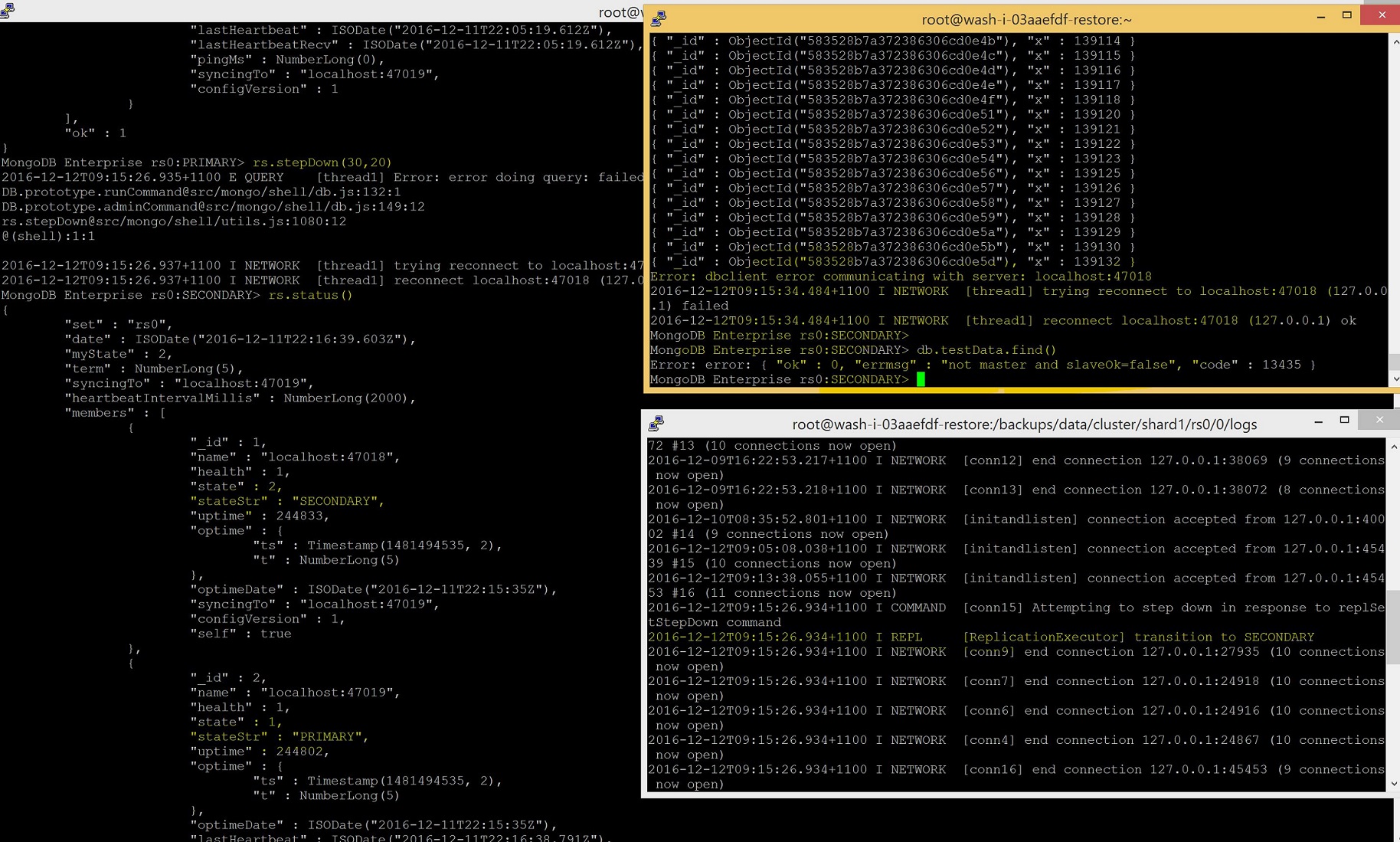
  1. I have opened three sessions and in one sessions querying a table which is running (the right top most one in screenshot)
  2. In another session tail the log file so can understand what happens when a step down is initiated
  3. In the session that left side , initiated the stepdown of primary , immediately disconnects the current session and also the session that running a query on the database (top left side)
  4. In the log it shows the primary is transitioning to secondary
  5. as per rs.status() the 47018 (original primary) becomes secondary.

Screenshot


MongoDB for Oracle DBA’s Part 9 : Node Evictions – Losing a Shard

In the previous post we saw when a node in replicaset lost, the secondary nodes become a primary and all data is available.

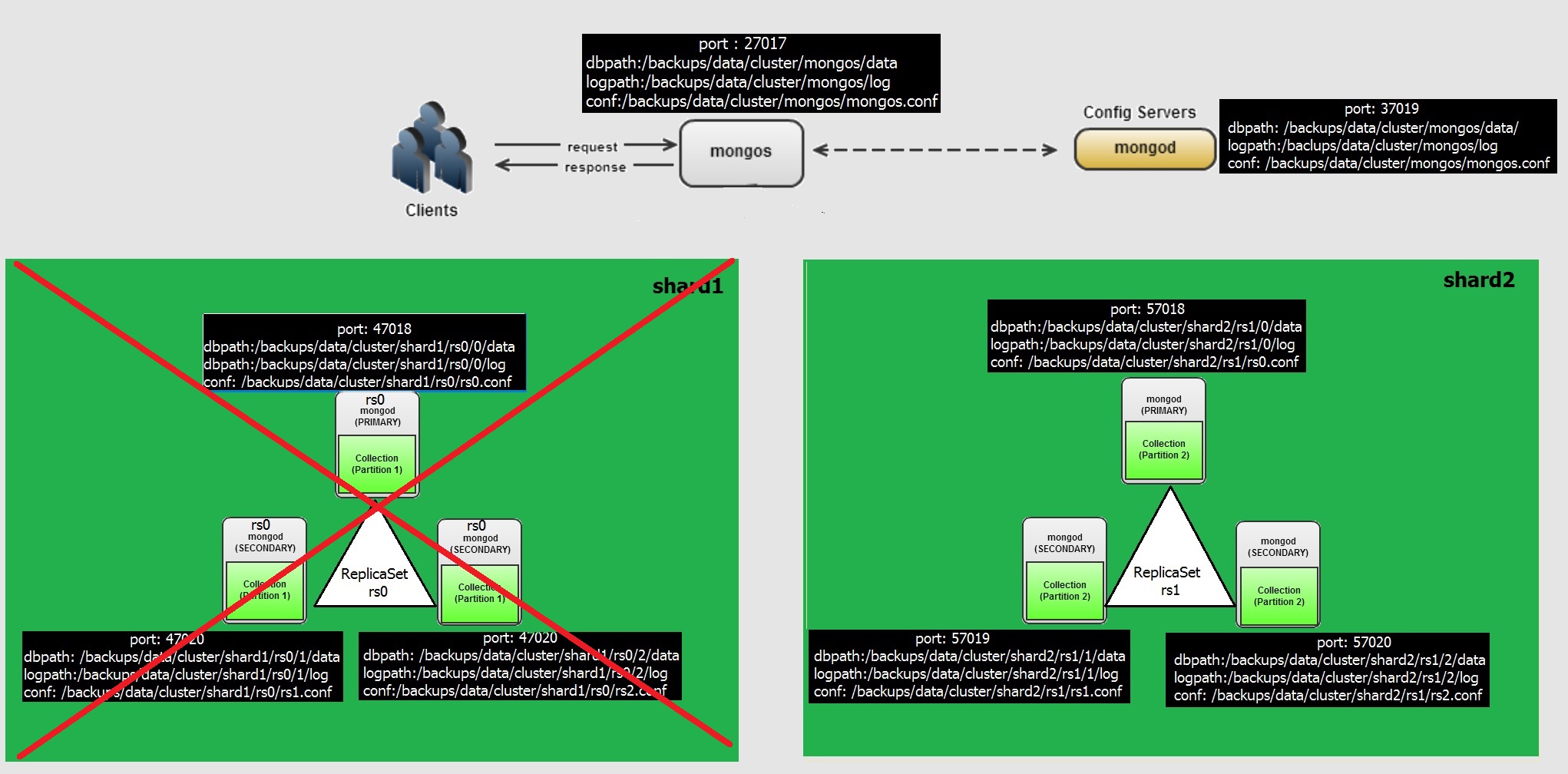
In this post we will see what if , if a shard is completely lost. A picture looks like this.

As the data is distributed across the shards, if a shard with all nodes belong to that shard, the Data is partially available. Thats why perhaps MongoDB called Basic Availability instead of High Availability (as of my understanding, anyone knows better than this can correct me as well)

Lets lose a shard, we have shard1 with three nodes of replicaset, lets kill the process.

root@wash-i-03aaefdf-restore ~ $ ps -eaf | grep mongo

root      4462  4372  0 13:02 pts/0    00:00:00 grep mongo

root     21678     1  0 Nov23 ?        01:35:23 mongod -f /backups/data/cluster/shard1/rs1.conf

root     21744     1  0 Nov23 ?        01:32:55 mongod -f /backups/data/cluster/shard1/rs2.conf

root     21827     1  0 Nov23 ?        01:17:21 mongod -f /backups/data/cluster/mongoc/mongoc.conf

root     21844     1  0 Nov23 ?        00:38:52 mongos -f /backups/data/cluster/mongos/mongos.conf

root     22075     1  0 Nov23 ?        01:32:45 mongod -f /backups/data/cluster/shard2/rs0.conf

root     22096     1  0 Nov23 ?        01:21:05 mongod -f /backups/data/cluster/shard2/rs1.conf

root     22117     1  0 Nov23 ?        01:21:10 mongod -f /backups/data/cluster/shard2/rs2.conf

root     30107     1  0 Nov24 ?        01:11:14 mongod -f /backups/data/cluster/shard1/rs0.conf

### Kill the process highlighted , this eventually bring down the shard

root@wash-i-03aaefdf-restore ~ $ kill -9 30107 21678 21744

### Lets log to mongos instance and check the sharding status

Let me explain the out put

  1. This has two shard with three nodes in each rs0 and rs1 replicaset.
  2. Last reported error says that rs0 replicaset in shard1 is not reachable of any nodes.
  3. Database Foo has sharding enabled
  4. Under Foo Database testData table is partitioned across nodes with three each of these chunks distributed

MongoDB Enterprise mongos> sh.status()

--- Sharding Status ---

  sharding version: {

        "_id" : 1,

 ....

 }

  shards:

        {  "_id" : "rs0",  "host" : "rs0/localhost:47018,localhost:47019,localhost:47020" }

        {  "_id" : "rs1",  "host" : "rs1/localhost:57018,localhost:57019,localhost:57020" }

 ..

 balancer:

...

       Last reported error:  None of the hosts for replica set rs0 could be contacted.

        Time of Reported error:  Fri Dec 09 2016 13:03:35 GMT+1100 (AEDT)

..

 databases:

        {  "_id" : "foo",  "primary" : "rs0",  "partitioned" : true }

                foo.testData

                        shard key: { "x" : "hashed" }

                        unique: false

                        balancing: true

                        chunks:

                                rs0     3

                                rs1     3

                        { "x" : { "$minKey" : 1 } } -->> { "x" : NumberLong("-6932371426663274793") } on : rs1 Timestamp(3, 0)

                        { "x" : NumberLong("-6932371426663274793") } -->> { "x" : NumberLong("-4611686018427387902") } on : rs0 Timestamp(3, 1)

                        { "x" : NumberLong("-4611686018427387902") } -->> { "x" : NumberLong("-2303618986662011902") } on : rs0 Timestamp(2, 8)

                        { "x" : NumberLong("-2303618986662011902") } -->> { "x" : NumberLong(0) } on : rs0 Timestamp(2, 9)

                        { "x" : NumberLong(0) } -->> { "x" : NumberLong("4611686018427387902") } on : rs1 Timestamp(2, 4)

                        { "x" : NumberLong("4611686018427387902") } -->> { "x" : { "$maxKey" : 1 } } on : rs1 Timestamp(2, 5)


### As we killed the mongod process for RS0 replicaset, lets take a look of Primary node log file replicaset RS1 in shard2

It reports , all nodes in replicaset rs0 are down and triying to keep pooling.

root@wash-i-03aaefdf-restore /backups/data/cluster/shard2/rs1/0/logs $ tail -20f rs1.log

2016-12-09T13:04:02.553+1100 W NETWORK  [ReplicaSetMonitorWatcher] Failed to connect to 127.0.0.1:47020, reason: errno:111 Connection refused

2016-12-09T13:04:02.553+1100 W NETWORK  [ReplicaSetMonitorWatcher] Failed to connect to 127.0.0.1:47018, reason: errno:111 Connection refused

2016-12-09T13:04:02.553+1100 W NETWORK  [ReplicaSetMonitorWatcher] No primary detected for set rs0

2016-12-09T13:04:02.553+1100 I NETWORK  [ReplicaSetMonitorWatcher] All nodes for set rs0 are down. This has happened for 6 checks in a row. Polling will stop after 24 more failed checks

This means, another shard i.e shard2 which having replicaset rs1 and its data is available. This is what partial data availability. Lets query the table with random data, so we can see any errors

### If I want to see all documents aka rows , this will throw an error right away saying rs0 cannot be contacted.

mongo localhost:27017

MongoDB Enterprise mongos> db.testData.find()

Error: error: {

        "ok" : 0,

        "errmsg" : "None of the hosts for replica set rs0 could be contacted.",

        "code" : 71

}

MongoDB Enterprise mongos>

### Lets find the random data, find the document with x=750000, throws errors , so it seems that this particular document is in replicaset rs0

MongoDB Enterprise mongos> db.testData.find({x : 750000})

Error: error: {

        "ok" : 0,

        "errmsg" : "None of the hosts for replica set rs0 could be contacted.",

        "code" : 71

}

### Lets find the document for 1000000, see its available and shown the row. as such this document is available in replicaset rs1

MongoDB Enterprise mongos> db.testData.find({x : 1000000})

{ "_id" : ObjectId("58362c23c5169089bcd6683e"), "x" : 1000000 }

### Lets find the document for 900000, again this row got an error

MongoDB Enterprise mongos> db.testData.find({x : 900000})

Error: error: {

        "ok" : 0,

        "errmsg" : "None of the hosts for replica set rs0 could be contacted.",

        "code" : 71

}

### Lets find for row 900001, just a next row of previous one. Ohoa, its available no error.

MongoDB Enterprise mongos> db.testData.find({x : 900001})

{ "_id" : ObjectId("58362bcbc5169089bcd4e19f"), "x" : 900001 }

MongoDB Enterprise mongos>

### Some more random tests, few rows resulted and few not.

MongoDB Enterprise mongos> db.testData.find({x : 840000 })

{ "_id" : ObjectId("58362b98c5169089bcd3f73e"), "x" : 840000 }

MongoDB Enterprise mongos> db.testData.find({x : 930000 })

{ "_id" : ObjectId("58362be5c5169089bcd556ce"), "x" : 930000 }

MongoDB Enterprise mongos> db.testData.find({x : 250000 })

Error: error: {

        "ok" : 0,

        "errmsg" : "None of the hosts for replica set rs0 could be contacted.",

        "code" : 71

}

So plan the shards or shard key in such a way that you achieve high availability even in case complete loss.

-Thanks

Geek DBA

MongoDB for Oracle DBA’s Part 9 : Node Evictions

In MongoDB the high availability is called as basic availability, means in event a primary replicaset lost , the secondary can become primary with in that replicaset. But when the whole shard is down (including all nodes within that replicaset) then there is no High Availability, the data is partially available with respects to the nodes that are available as such of non shared storage, (well its the basis for a distributed processing system )

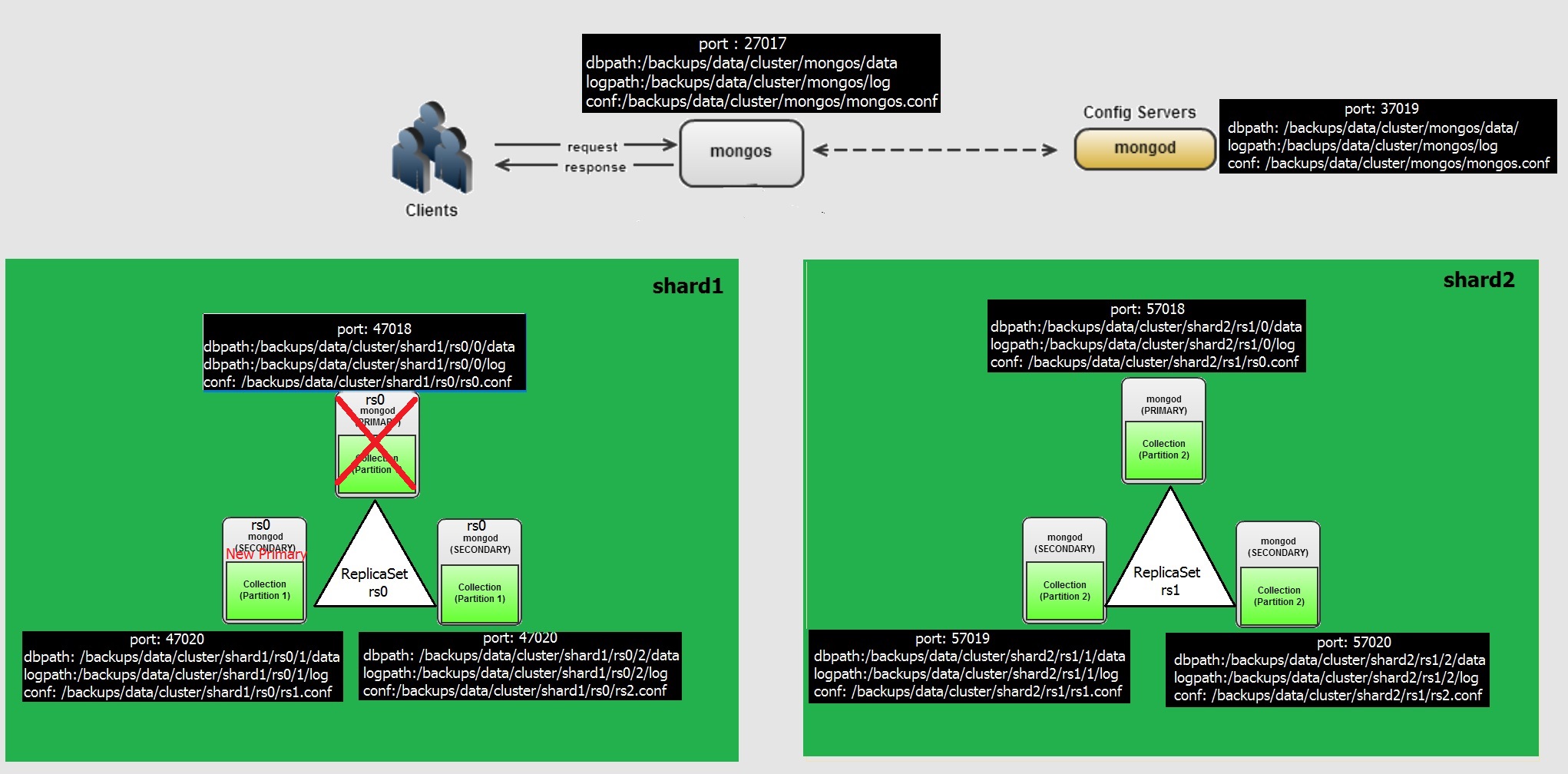
In this post we will see, What if a Primary Node is down with in replicaset  (as like below), how other nodes elect primary
Case 1:- Primary Node eviction with in replicaset

In our configuration, the Replicaset RS0 is sitting on shard1 with nodes 0 (port 47018) , 1 (port 47019) and 2 (port 47020)

So if we kill the process for node 0 in the RS0 , then the secondary nodes can become primary.

Let's check the process for shard1, RS0 and kill the primary node

### Kill the mongo process of replicaset rs0 , node 11-24T02

ps -eaf | grep mongo

root@wash-i-03aaefdf-restore /backups/data/cluster/shard1/rs0/2/logs $ ps -eaf | grep mongo

root     21695     1  1 Nov23 ?        00:18:14 mongod -f /backups/data/cluster/shard1/rs0.conf

root     21678     1  1 Nov23 ?        00:18:14 mongod -f /backups/data/cluster/shard1/rs1.conf

root     21744     1  1 Nov23 ?        00:18:03 mongod -f /backups/data/cluster/shard1/rs2.conf

root     21827     1  0 Nov23 ?        00:05:05 mongod -f /backups/data/cluster/mongoc/mongoc.conf

root     21844     1  0 Nov23 ?        00:05:26 mongos -f /backups/data/cluster/mongos/mongos.conf

root     22075     1  0 Nov23 ?        00:11:31 mongod -f /backups/data/cluster/shard2/rs0.conf

root     22096     1  0 Nov23 ?        00:10:25 mongod -f /backups/data/cluster/shard2/rs1.conf

root     22117     1  0 Nov23 ?        00:10:26 mongod -f /backups/data/cluster/shard2/rs2.conf

root     29699 27585 78 13:24 pts/0    00:06:03 mongo

root     29882 29287  0 13:30 pts/2    00:00:00 mongo localhost:47020

root     29951 29515  0 13:32 pts/3    00:00:00 grep mongo

### Kill the process ID 21695 

kill -9 21695

##### Verify the logs for rs0 node 1, 2 (secondary nodes)

As you see below , the Node 0 got killed, the Node 1 with in the replicaset recognises it and the heartbeat failed(in red), then an election mechanism has been happened (in green) and a New primary has been selected and the Node 1 (secondary node) is selected as primary.

tail -20f /backups/data/cluster/shard1/rs0/1/logs/rs0.log

2016-11-24T13:23:30.169+1100 I NETWORK  [SyncSourceFeedback] SocketException: remote: (NONE):0 error: 9001 socket exception [RECV_ERROR] server [127.0.0.1:47018]

2016-11-24T13:23:30.169+1100 I REPL     [SyncSourceFeedback] SyncSourceFeedback error sending update: network error while attempting to run command 'replSetUpdatePosition' on host 'localhost:47018'

2016-11-24T13:23:30.169+1100 I REPL     [ReplicationExecutor] Error in heartbeat request to localhost:47018; HostUnreachable Connection refused

2016-11-24T13:23:30.169+1100 I REPL     [SyncSourceFeedback] updateUpstream failed: HostUnreachable network error while attempting to run command 'replSetUpdatePosition' on host 'localhost:47018' , will retry

...

2016-11-24T13:23:35.171+1100 I REPL     [ReplicationExecutor] Error in heartbeat request to localhost:47018; HostUnreachable Connection refused

2016-11-24T13:23:40.114+1100 I REPL     [ReplicationExecutor] Starting an election, since we've seen no PRIMARY in the past 10000ms

2016-11-24T13:23:40.114+1100 I REPL     [ReplicationExecutor] conducting a dry run election to see if we could be elected

2016-11-24T13:23:40.114+1100 I REPL     [ReplicationExecutor] dry election run succeeded, running for election

2016-11-24T13:23:40.115+1100 I REPL     [ReplicationExecutor] VoteRequester: Got failed response from localhost:47018: HostUnreachable Connection refused

2016-11-24T13:23:40.115+1100 I REPL     [ReplicationExecutor] election succeeded, assuming primary role in term 3

2016-11-24T13:23:40.115+1100 I REPL     [ReplicationExecutor] transition to PRIMARY

2016-11-24T13:23:40.115+1100 W REPL     [ReplicationExecutor] The liveness timeout does not match callback handle, so not resetting it.

....

2016-11-24T13:23:40.175+1100 I REPL     [rsSync] transition to primary complete; database writes are now permitted

2016-11-24T13:23:40.219+1100 I NETWORK  [initandlisten] connection accepted from 127.0.0.1:44171 #7 (4 connections now open)

2016-11-24T13:23:40.219+1100 I SHARDING [conn7] remote client 127.0.0.1:44171 initialized this host as shard rs0

2016-11-24T13:23:40.219+1100 I SHARDING [ShardingState initialization] first cluster operation detected, adding sharding hook to enable versioning and authentication to remote servers

2016-11-24T13:23:40.219+1100 I SHARDING [ShardingState initialization] Updating config server connection string to: localhost:37019

2016-11-24T13:23:40.221+1100 I NETWORK  [ShardingState initialization] Starting new replica set monitor for rs0/localhost:47018,localhost:47019,localhost:47020

2016-11-24T13:23:40.221+1100 I NETWORK  [ReplicaSetMonitorWatcher] starting

### Check the Replicaset Node 2 log

Initially a Socket Exception with Node 0, for port 47018 and connection refused then after a while the Secondary Node recognises that current Primary is Node 1 (in green) and trying to sync. And still trying to reach the node 0 (old primary)

tail -20f /backups/data/cluster/shard1/rs0/2/logs/rs0.log

2016-11-24T13:23:30.168+1100 I NETWORK  [SyncSourceFeedback] SocketException: remote: (NONE):0 error: 9001 socket exception [RECV_ERROR] server [127.0.0.1:47018]

2016-11-24T13:23:30.168+1100 I REPL     [SyncSourceFeedback] SyncSourceFeedback error sending update: network error while attempting to run command 'replSetUpdatePosition' on host 'localhost:47018'

2016-11-24T13:23:30.168+1100 I NETWORK  [conn3] end connection 127.0.0.1:22726 (5 connections now open)

2016-11-24T13:23:30.168+1100 I REPL     [SyncSourceFeedback] updateUpstream failed: HostUnreachable network error while attempting to run command 'replSetUpdatePosition' on host 'localhost:47018' , will retry

2016-11-24T13:23:30.169+1100 I NETWORK  [conn6] end connection 127.0.0.1:22754 (3 connections now open)

2016-11-24T13:23:30.171+1100 I REPL     [ReplicationExecutor] could not find member to sync from

2016-11-24T13:23:30.171+1100 W REPL     [ReplicationExecutor] The liveness timeout does not match callback handle, so not resetting it.

2016-11-24T13:23:30.171+1100 I ASIO     [ReplicationExecutor] dropping unhealthy pooled connection to localhost:47018

2016-11-24T13:23:30.171+1100 I ASIO     [ReplicationExecutor] after drop, pool was empty, going to spawn some connections

2016-11-24T13:23:30.171+1100 I REPL     [ReplicationExecutor] Error in heartbeat request to localhost:47018; HostUnreachable Connection refused

2016-11-24T13:23:30.171+1100 I REPL     [ReplicationExecutor] Error in heartbeat request to localhost:47018; HostUnreachable Connection refused

2016-11-24T13:23:30.172+1100 I REPL     [ReplicationExecutor] Error in heartbeat request to localhost:47018; HostUnreachable Connection refused

....

2016-11-24T13:23:40.172+1100 I REPL     [ReplicationExecutor] Member localhost:47019 is now in state PRIMARY

2016-11-24T13:23:40.174+1100 I REPL     [ReplicationExecutor] Error in heartbeat request to localhost:47018; HostUnreachable Connection refused

....

2016-11-24T13:23:45.173+1100 I REPL     [ReplicationExecutor] syncing from: localhost:47019

2016-11-24T13:23:45.174+1100 I REPL     [SyncSourceFeedback] setting syncSourceFeedback to localhost:47019

2016-11-24T13:23:45.174+1100 I ASIO     [NetworkInterfaceASIO-BGSync-0] Successfully connected to localhost:47019

...

2016-11-24T13:23:45.175+1100 I REPL     [ReplicationExecutor] Error in heartbeat request to localhost:47018; HostUnreachable Connection refused

### Check the Status , Connect to Node 2 (port 47019) specifically and check replicaset status, output is edited for brevity

As you see in Below, I marked red color for the Node 0, which states it not reachable and Node 1 which becomes current primary and Node 2 still as secondary.

mongo localhost:47019

MongoDB Enterprise rs0:SECONDARY> rs.status()

{

        "set" : "rs0",

         ...

        "syncingTo" : "localhost:47019",

        "heartbeatIntervalMillis" : NumberLong(2000),

        "members" : [

                {

                        "_id" : 1,

                        "name" : "localhost:47018",

                        "health" : 0,

                        "state" : 8,

                        "stateStr" : "(not reachable/healthy)",

                        "uptime" : 0,

                       .....

                        "lastHeartbeatMessage" : "Connection refused",

                        "configVersion" : -1

                },

                {

                        "_id" : 2,

                        "name" : "localhost:47019",

                     ...

                        "stateStr" : "PRIMARY",

                        "uptime" : 92823,

                        ....                    

                        "electionTime" : Timestamp(0, 0),

                        "electionDate" : ISODate("1970-01-01T00:00:00Z"),

                        "configVersion" : 1

                },

                {

                        "_id" : 3,

                        "name" : "localhost:47020",

                        ...

                        "stateStr" : "SECONDARY",

                        "uptime" : 92824,

                        ...,

                        "syncingTo" : "localhost:47019",

                        "configVersion" : 1,

                        "self" : true

                }

        ],

        "ok" : 1

}

MongoDB Enterprise rs0:SECONDARY>

### Lets bring up the Node 0

mongod -f //backups/data/cluster/shard1/rs0/rs0.conf

about to fork child process, waiting until server is ready for connections.

forked process: 30107

child process started successfully, parent exiting

### check the logs of node 1,2 of replicaset rs0

As per logs, it says connection accepted and Node 0 i.e 47018 becomes online and joins as Secondary and Node 1 still primary

tail -20f /backups/data/cluster/shard1/rs0/1/logs/rs0.log

2016-11-24T13:40:33.628+1100 I NETWORK  [initandlisten] connection accepted from 127.0.0.1:50596 #15 (8 connections now open)

2016-11-24T13:40:33.628+1100 I NETWORK  [conn15] end connection 127.0.0.1:50596 (7 connections now open)

2016-11-24T13:40:33.630+1100 I NETWORK  [initandlisten] connection accepted from 127.0.0.1:50600 #16 (8 connections now open)

2016-11-24T13:40:34.667+1100 I ASIO     [NetworkInterfaceASIO-Replication-0] Successfully connected to localhost:47018

2016-11-24T13:40:34.668+1100 I REPL     [ReplicationExecutor] Member localhost:47018 is now in state SECONDARY


tail -20f /backups/data/cluster/shard1/rs0/2/logs/rs0.log

2016-11-24T13:40:31.730+1100 I REPL     [ReplicationExecutor] Error in heartbeat request to localhost:47018; HostUnreachable Connection refused

2016-11-24T13:40:33.628+1100 I NETWORK  [initandlisten] connection accepted from 127.0.0.1:32435 #10 (5 connections now open)

2016-11-24T13:40:33.628+1100 I NETWORK  [conn10] end connection 127.0.0.1:32435 (4 connections now open)

2016-11-24T13:40:33.731+1100 I ASIO     [NetworkInterfaceASIO-Replication-0] Successfully connected to localhost:47018

2016-11-24T13:40:33.731+1100 I REPL     [ReplicationExecutor] Member localhost:47018 is now in state SECONDARY

2016-11-24T13:40:39.631+1100 I NETWORK  [initandlisten] connection accepted from 127.0.0.1:32445 #12 (6 connections now open)


### check rs.status by connecting to any of the replicaset node directly, now the 47018 the primary node showing as SECONDARY

root@wash-i-03aaefdf-restore /backups/data/cluster/shard1/rs0/1/logs $ mongo localhost:47018

MongoDB shell version: 3.2.1

connecting to: localhost:47018/test

MongoDB Enterprise rs0:SECONDARY> rs.status()

{

        "set" : "rs0",

        "date" : ISODate("2016-11-24T02:43:18.815Z"),

        "myState" : 2,

        "term" : NumberLong(3),

        "syncingTo" : "localhost:47020",

        "heartbeatIntervalMillis" : NumberLong(2000),

        "members" : [

                {

                        "_id" : 1,

                        "name" : "localhost:47018",

                        "health" : 1,

                        "state" : 2,

                        "stateStr" : "SECONDARY",

                        "uptime" : 195,

                      ......

                {

                        "_id" : 2,

                        "name" : "localhost:47019",

                        "health" : 1,

                        "state" : 1,

                        "stateStr" : "PRIMARY",

                    .......

                },

                {

                        "_id" : 3,

                        "name" : "localhost:47020",

                        "health" : 1,

                        "state" : 2,

                        "stateStr" : "SECONDARY",

                        "uptime" : 165,

                       .....

        "ok" : 1

}

MongoDB Enterprise rs0:SECONDARY>

Next Post: Case 2, What if an entire shard is down with all nodes in replicaset.

-Thanks

Geek DBA

MongoDB for Oracle DBA’s Part 8 : Understanding Data Distribution between Shards

With previous post, we have configured the two shards with each having replicaset rs0 and rs1.

In this post we will insert some data and observe how the data distribution is happening between shards.

To do the data distributed,

  • firstly the database must have the sharding enabled
  • secondly, the collection which data need to be distributed should have the shard key (shard key can be range, hash, tag based)

High Level Steps are,

  • connect to mongos
  • enable sharding on foo database
  • enable sharding on foo.testdata collection with hashed shard key
  • insert data into foo.testdata collection
  • check data distribution and replication

### Connect to Mongos

root@wash-i-03aaefdf-restore $ mongo localhost:27017

MongoDB shell version: 3.2.1

connecting to: localhost:27017/test

Server has startup warnings:

2016-11-23T11:43:50.348+1100 I CONTROL  [main] ** WARNING: You are running this process as the root user, which is not recommended.

2016-11-23T11:43:50.348+1100 I CONTROL  [main]

### Enable Sharding on foo database

MongoDB Enterprise mongos> sh.enableSharding("foo")

{ "ok" : 1 }

### Insert some sample data

MongoDB Enterprise mongos> for (var i = 1; i <= 100; i++) db.testData.insert( { x : i } )

### Enable sharding on collection (table) testData for column "x" with hashed mechanism

MongoDB Enterprise mongos> sh.shardCollection("foo.testData", { "x": "hashed" })

{ "collectionsharded" : "foo.testData", "ok" : 1 }

### Insert more data after enable sharding on collection

MongoDB Enterprise mongos> for (var i = 101; i <= 1000000; i++) db.testData.insert( { x : i } )

WriteResult({ "nInserted" : 1 })

### Check the status of sharding 

MongoDB Enterprise mongos> sh.status()

--- Sharding Status ---

  sharding version: {

        "_id" : 1,

        "minCompatibleVersion" : 5,

        "currentVersion" : 6,

        "clusterId" : ObjectId("5834e646a2c25f3b06d65226")

}

  shards:

        {  "_id" : "rs0",  "host" : "rs0/localhost:47018,localhost:47019,localhost:47020" }

        {  "_id" : "rs1",  "host" : "rs1/localhost:57018,localhost:57019,localhost:57020" }

  active mongoses:

        "3.2.1" : 1

  balancer:

        Currently enabled:  yes

        Currently running:  no

        Failed balancer rounds in last 5 attempts:  0

        Migration Results for the last 24 hours:

                1 : Success

  databases:

        {  "_id" : "foo",  "primary" : "rs0",  "partitioned" : true }

                foo.testData

                        shard key: { "x" : "hashed" }    --> collection shard key

                        unique: false

                        balancing: true

                        chunks:

                                rs0     2           --> Two chunk distributed to rs0 replicaset

                                rs1     2           --> two chunk distributed to rs1 replicaset

                        { "x" : { "$minKey" : 1 } } -->> { "x" : NumberLong("-4611686018427387902") } on : rs0 Timestamp(2, 2)

                        { "x" : NumberLong("-4611686018427387902") } -->> { "x" : NumberLong(0) } on : rs0 Timestamp(2, 3)

                        { "x" : NumberLong(0) } -->> { "x" : NumberLong("4611686018427387902") } on : rs1 Timestamp(2, 4)

                        { "x" : NumberLong("4611686018427387902") } -->> { "x" : { "$maxKey" : 1 } } on : rs1 Timestamp(2, 5)

        {  "_id" : "test",  "primary" : "rs0",  "partitioned" : false }

### Check the data distribution for collection 

MongoDB Enterprise mongos> db.testData.getShardDistribution()

Shard rs0 at rs0/localhost:47018,localhost:47019,localhost:47020

 data : 22.32MiB docs : 487794 chunks : 2

 estimated data per chunk : 7.44MiB

 estimated docs per chunk : 162598

Shard rs1 at rs1/localhost:57018,localhost:57019,localhost:57020

 data : 2.86MiB docs : 62648 chunks : 2

 estimated data per chunk : 978KiB

 estimated docs per chunk : 20882

Totals

 data : 25.19MiB docs : 550442 chunks : 4

 Shard rs0 contains 88.61% data, 88.61% docs in cluster, avg obj size on shard : 48B


 Shard rs1 contains 11.38% data, 11.38% docs in cluster, avg obj size on shard : 48B

Note: the uneven distribution of data is possible until the chunks reach according to specification.

MongoDB for Oracle DBA’s Part 7 : Adding a New Shard to existing Cluster in Standalone Server

In this post we will see how to Add a new shard shard2 and new replicaset rs1

  • Create Directories
  • Create Config Files
  • Start the instances in replicaset rs1
  • add the instances for replication to replicaset rs1
  • add the replicaset rs1 to shard

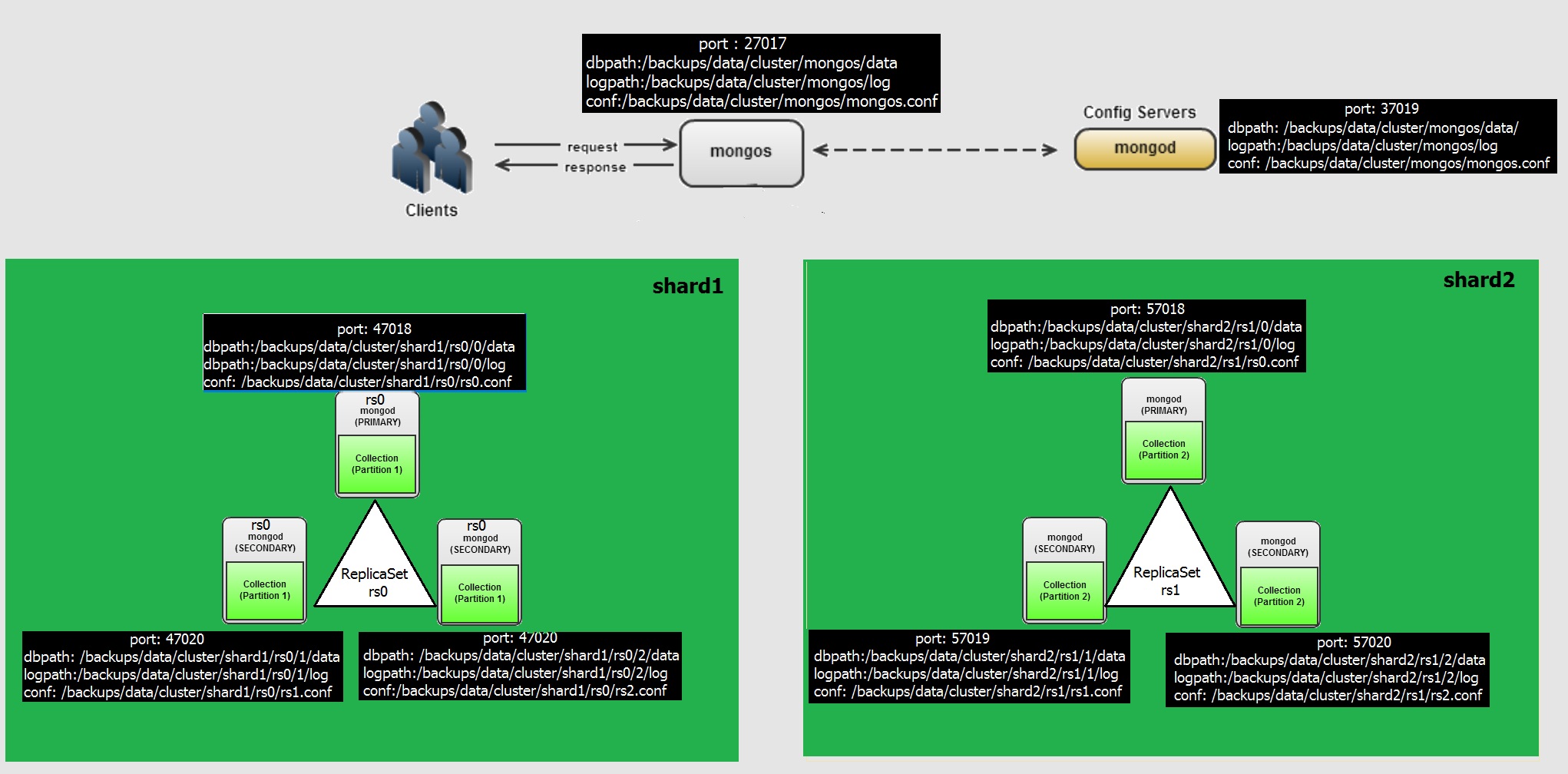
The final diagram in my single host, Mongos , MongoC, MongoD with replicaset along with shards looks like this. Best way to practice isnt 🙂

mongocluster

### Create directories ###

Note: See the directory shard2 and replicaset rs1, the existing one was in shard1 and rs0.

### Shard1 with Primary & Two Secondaries ###

mkdir -p /backups/data/cluster/shard2/rs1/0/logs

mkdir -p /backups/data/cluster/shard2/rs1/0/data

mkdir -p /backups/data/cluster/shard2/rs1/1/logs

mkdir -p /backups/data/cluster/shard2/rs1/1/data

mkdir -p /backups/data/cluster/shard2/rs1/2/logs

mkdir -p /backups/data/cluster/shard2/rs1/2/data

### Create Configuration file for  node 1 , Note the port number & directory paths ###

Note: Look at the port numbers and replicaset name which is different than existing rs0 replicaset

vi /backups/data/cluster/shard2/rs0.conf

systemLog:

destination: file

path: "/backups/data/cluster/shard2/rs1/0/logs/rs1.log"

logAppend: true

processManagement:

pidFilePath: "/backups/data/cluster/shard2/rs1/0/shard2.pid"

fork: true

net:

bindIp: 127.0.0.1

port: 57018

storage:

engine: "mmapv1"

dbPath: "/backups/data/cluster/shard2/rs1/0/data"

directoryPerDB: true

operationProfiling:

mode: all

replication:

oplogSizeMB: 5120

replSetName: "rs1"

#### Create configuration file for node 2, Note the port number & directory paths ###

vi /backups/data/cluster/shard2/rs1.conf

systemLog:

destination: file

path: "/backups/data/cluster/shard2/rs1/1/logs/rs1.log"

logAppend: true

processManagement:

pidFilePath: "/backups/data/cluster/shard2/rs1/1/shard2.pid"

fork: true

net:

bindIp: 127.0.0.1

port: 57019

storage:

engine: "mmapv1"

dbPath: "/backups/data/cluster/shard2/rs1/1/data"

directoryPerDB: true

operationProfiling:

mode: all

replication:

oplogSizeMB: 5120

replSetName: "rs1"

#### Create configuration file for node 3, Note the port number & directory paths ###

vi /backups/data/cluster/shard2/rs2.conf

systemLog:

destination: file

path: "/backups/data/cluster/shard2/rs1/2/logs/rs1.log"

logAppend: true

processManagement:

pidFilePath: "/backups/data/cluster/shard2/rs1/2/shard2.pid"

fork: true

net:

bindIp: 127.0.0.1

port: 57020

storage:

engine: "mmapv1"

dbPath: "/backups/data/cluster/shard2/rs1/2/data"

directoryPerDB: true

operationProfiling:

mode: all

replication:

oplogSizeMB: 5120

replSetName: "rs1"

### Start the mongod instances in New Shard

mongod -f /backups/data/cluster/shard2/rs0.conf

mongod -f /backups/data/cluster/shard2/rs1.conf

mongod -f /backups/data/cluster/shard2/rs2.conf

### Add the instances to replicaset

MongoDB Enterprise mongos> mongo localhost:57018

MongoDB Enterprise mongos> rs.initiate({_id:"rs1", members: [{"_id":1, "host":"localhost:57018"},{"_id":2, "host":"localhost:57019"},{"_id":3, "host":"localhost:57020"}]})

MongoDB Enterprise mongos> rs.status()

### Add the replicat rs1 to shard2, log to mongos

MongoDB Enterprise mongos> mongo localhost:27017

MongoDB Enterprise mongos>  sh.addShard("rs1/localhost:57018,localhost:57019,localhost:57020");

MongoDB Enterprise mongos> sh.status()

--- Sharding Status ---

sharding version: {

"_id" : 1,

"minCompatibleVersion" : 5,

"currentVersion" : 6,

"clusterId" : ObjectId("5834e646a2c25f3b06d65226")

}

shards:

{  "_id" : "rs0",  "host" : "rs0/localhost:47018,localhost:47019,localhost:47020" }

{  "_id" : "rs1",  "host" : "rs1/localhost:57018,localhost:57019,localhost:57020" }

active mongoses:

"3.2.1" : 1

balancer:

Currently enabled:  yes

Currently running:  no

Failed balancer rounds in last 5 attempts:  0

Migration Results for the last 24 hours:

No recent migrations

databases:

{  "_id" : "mydb",  "primary" : "rs0",  "partitioned" : true }

}

### And finally mongo process looks like this in my standalone server

root@wash-i-03aaefdf-restore /backups/data/cluster/shard1/rs0/1/data/foo $ ps -eaf | grep mongo

root     21615     1  6 11:42 ?        00:02:28 mongod -f /backups/data/cluster/shard1/rs0.conf

root     21678     1  5 11:43 ?        00:01:56 mongod -f /backups/data/cluster/shard1/rs1.conf

root     21744     1  5 11:43 ?        00:01:52 mongod -f /backups/data/cluster/shard1/rs2.conf

root     21827     1  0 11:43 ?        00:00:07 mongod -f /backups/data/cluster/mongoc/mongoc.conf

root     21844     1  4 11:43 ?        00:01:29 mongos -f /backups/data/cluster/mongos/mongos.conf

root     22075     1  0 11:57 ?        00:00:05 mongod -f /backups/data/cluster/shard2/rs0.conf

root     22096     1  0 11:57 ?        00:00:04 mongod -f /backups/data/cluster/shard2/rs1.conf

root     22117     1  0 11:57 ?        00:00:04 mongod -f /backups/data/cluster/shard2/rs2.conf

MongoDB for Oracle DBA’s Part 6 : Creating a Shard for ReplicaSet in Standalone Server

In previous post we saw, to create a replicaset like standby in standalone server.

Basically with a replicaset the read/writes can be achieved via primary node and secondary nodes are inaccessible, this creates a concurrency issues with single node cluster. So we create a shard i.e data partitioning across nodes. The data will be distributed to shards , shard 1 with replicaset and to shard2 with replicaset. 

To do this, we need

  • The existing replicaset should be modified to enable sharding
  • Create a mongoc instance , to store the metadata for data distribution for shard keys
  • Create a mongos instance, to route the database requests to right shard

The steps broadly will be,

  • Stop all the mongod instances
  • Change the configuration file to add shardsvr = true
  • Create config and mongos nodes
  • Start the mongod instances in replicaset rs0
  • Add the replicatset rs0 to a shard

###Stop all the mongod instances

mongod -f /backups/data/cluster/shard1/rs0.conf --shutdown

mongod -f /backups/data/cluster/shard1/rs1.conf --shutdown

mongod -f /backups/data/cluster/shard1/rs2.conf --shutdown

###Change the configuration file

vi /backups/data/cluster/shard1/rs0.conf

vi /backups/data/cluster/shard1/rs1.conf

vi /backups/data/cluster/shard1/rs2.conf

Append this line

sharding:

  clusterRole: shardsvr

### Create Mongo config node by creating directories and configuration file

mkdir -p /backups/data/cluster/mongoc/logs

mkdir -p /backups/data/cluster/mongoc/data

vi /backups/data/cluster/mongoc/mongoc.conf

systemLog:

  destination: file

  path: "/backups/data/cluster/mongoc/logs/mongoc.log"

  logAppend: true

processManagement:

  pidFilePath: "/backups/data/cluster/mongoc/mongoc.pid"

  fork: true

net:

  bindIp: 127.0.0.1

  port: 37019

storage:

  engine: "wiredtiger"

  dbPath: "/backups/data/cluster/mongoc/data"

  directoryPerDB: true

sharding:

  clusterRole: configsvr

operationProfiling:

  mode: "all"

        replication:

           oplogSizeMB: 5120

           replSetName: "crs0"

Note: the Port and Cluster role is configsvr and the directory path

### Create mongos instances configuration

mkdir -p /backups/data/cluster/mongos/logs

mkdir -p /backups/data/cluster/mongos/data

vi /backups/data/cluster/mongos/mongos.conf

systemLog:

  destination: file

  path: "/backups/data/cluster/mongos/logs/mongos.log"

  logAppend: true

processManagement:

  pidFilePath: "/backups/data/cluster/mongos/mongos.pid"

  fork: true

net:

  bindIp: 127.0.0.1

  port: 27017

sharding:

  configDB: "crs0/localhost:37019"

  autoSplit: true

  Note: For mongos instance it is wise to use 27017 a default port and look at configDB points to Mongo Config Server (port) 

  ###Start the servers

###Firstly Start the mongod instances 

 mongod -f /backups/data/cluster/shard1/rs0.conf

 mongod -f /backups/data/cluster/shard1/rs1.conf

 mongod -f /backups/data/cluster/shard1/rs2.conf

###Start the mongod config server instance, from 3.4 onwards the config server must have replicaset enabled, hence we are adding replicaset with one node for development purpose.

 mongod -f /backups/data/cluster/mongoc/mongoc.conf

        mongo localhost:37019

rs.initiate({_id:"crs0", members: [{"_id":1, "host":"localhost:37019"}

###Start the mongos

 mongos -f /backups/data/cluster/mongos/mongos.conf

 ### Finally , Add the replica set to shard

###Connect to mongos, where our mongos is running on port 27017

mongo localhost:27017

sh.addShard("rs0/localhost:47018,localhost:47019,localhost:47020");

###Enable the sharding for foo database

mongo localhost:27017

sh.enableSharding("mydb")

###Check the shard status

mongo localhost:27017

sh.status()

--- Sharding Status ---

  sharding version: {

        "_id" : 1,

        "minCompatibleVersion" : 5,

        "currentVersion" : 6,

        "clusterId" : ObjectId("5834e646a2c25f3b06d65226")

}

  shards:

        {  "_id" : "rs0",  "host" : "rs0/localhost:47018,localhost:47019,localhost:47020" }

  active mongoses:

        "3.2.1" : 1

  balancer:

        Currently enabled:  yes

        Currently running:  no

        Failed balancer rounds in last 5 attempts:  0

        Migration Results for the last 24 hours:

                No recent migrations

  databases:

        {  "_id" : "foo",  "primary" : "rs0",  "partitioned" : true }

The above shows that the replicaset rs0 is a shard and this cluster has only single shard with database foo sharding is enabled.

Next Post , Adding a New Shard in standalone server

-Thanks

GeekDBA

MongoDB for Oracle DBA’s Part 5 : Converting Standalone MongoDB Database to Single Replicaset in Standalone Server

In Previous post we saw, how to install MongoDB and Create a standalone database.

In this post we will see how to achieve high availability in MongoDB by using replicasets. In MongoDB the high availability is acheived by using replicaset as like Standby in Oracle. They are called as Primary and Secondary Replicaset. Whenever there is DML on primary it is populated to secondaries and there is voting mechanism between these replicaset to maintain the primary status. If you are having only two nodes for your replicaset you will need to setup an arbiter for voting process.

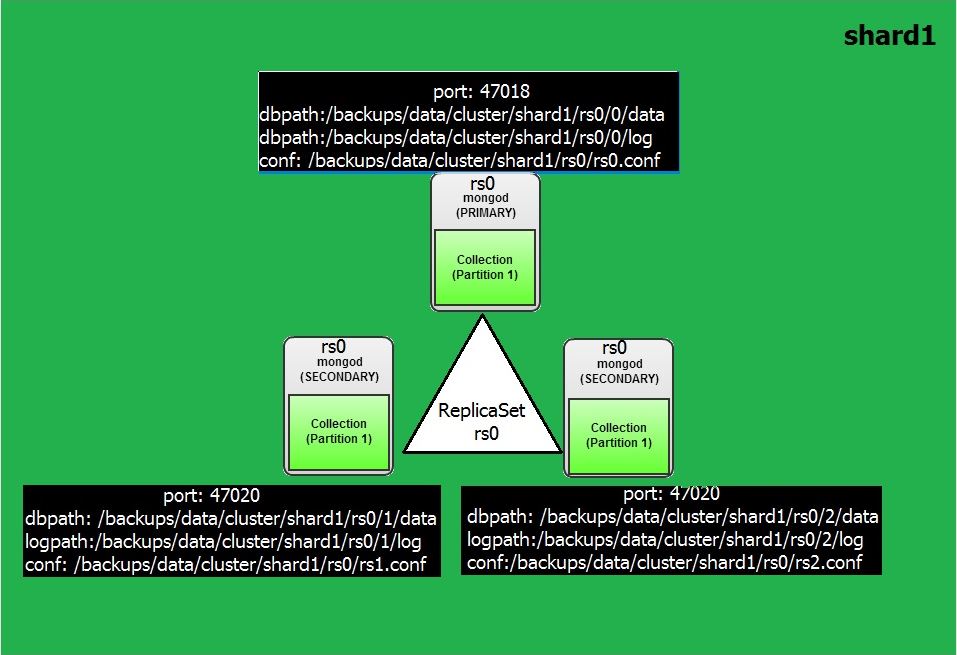
In order to acheive this, I will create a replicaset in the single host for our learning purpose. For this we need a different directories to hold the data/log files and different port number for each instance and start them. Here is the directory structure looks like for a Primary with two Secondary replicaset and also note the port numbers which we will configure in configuration files.

Parameter Primary Secondary 1 Secondary 2
Base Directory /backups/data/cluster/shard1/ /backups/data/cluster/shard1/ /backups/data/cluster/shard1/
ReplicaSetDirectory /backups/data/cluster/shard1/rs0 /backups/data/cluster/shard1/rs0 /backups/data/cluster/shard1/rs0
Node Identifcation /backups/data/cluster/shard1/rs0/0 /backups/data/cluster/shard1/rs0/1 /backups/data/cluster/shard1/rs0/2
Port Number 47018 47019 47020
Config File Location /backups/data/cluster/shard1/rs0.conf /backups/data/cluster/shard1/rs1.conf /backups/data/cluster/shard1/rs2.conf
Datafile Location /backups/data/cluster/shard1/rs0/0/data /backups/data/cluster/shard1/rs0/1/data /backups/data/cluster/shard1/rs0/2/data
LogFile Location /backups/data/cluster/shard1/rs0/0/log /backups/data/cluster/shard1/rs0/1/log /backups/data/cluster/shard1/rs0/2/log
Pid File Location /backups/data/cluster/shard1/rs0/0/1.pid /backups/data/cluster/shard1/rs0/1/2.pid /backups/data/cluster/shard1/rs0/2/2.pid
ReplicaSet Name rs0 rs0 rs0

This is all in a single server for the test pupose so the diagram looks like this.

Lets build the replicaset,

### Shard1 with Primary & Two Secondaries ###

mkdir -p /backups/data/cluster/shard1/rs0/0/logs

mkdir -p /backups/data/cluster/shard1/rs0/0/data

mkdir -p /backups/data/cluster/shard1/rs0/1/logs

mkdir -p /backups/data/cluster/shard1/rs0/1/data

mkdir -p /backups/data/cluster/shard1/rs0/2/logs

mkdir -p /backups/data/cluster/shard1/rs0/2/data

### Create Configuration file for  node 1 , Note the port number & directory paths###

Note: Look at the configuration file marked red, the port number and replicaset name etc in order to make this instances part of a replicaset

vi /backups/data/cluster/shard1/rs0.conf

systemLog:

  destination: file

  path: "/backups/data/cluster/shard1/rs0/0/logs/rs0.log"

  logAppend: true

processManagement:

  pidFilePath: "/backups/data/cluster/shard1/rs0/0/shard1.pid"

  fork: true

net:

  bindIp: 127.0.0.1

  port: 47018

storage:

  engine: "mmapv1"

  dbPath: "/backups/data/cluster/shard1/rs0/0/data"

  directoryPerDB: true

operationProfiling:

  mode: all

replication:

    oplogSizeMB: 5120

    replSetName: "rs0"

#### Create configuration file for node 2, Note the port number & directory paths ###

vi /backups/data/cluster/shard1/rs1.conf

systemLog:

  destination: file

  path: "/backups/data/cluster/shard1/rs0/1/logs/rs0.log"

  logAppend: true

processManagement:

  pidFilePath: "/backups/data/cluster/shard1/rs0/1/shard1.pid"

  fork: true

net:

  bindIp: 127.0.0.1

  port: 47019

storage:

  engine: "mmapav1"

  dbPath: "/backups/data/cluster/shard1/rs0/1/data"

  directoryPerDB: true

operationProfiling:

  mode: all

replication:

    oplogSizeMB: 5120

    replSetName: "rs0"

#### Create configuration file for node 2, Note the port number & directory paths ###

vi /backups/data/cluster/shard1/rs2.conf

systemLog:

  destination: file

  path: "/backups/data/cluster/shard1/rs0/2/logs/rs0.log"

  logAppend: true

processManagement:

  pidFilePath: "/backups/data/cluster/shard1/rs0/2/shard1.pid"

  fork: true

net:

  bindIp: 127.0.0.1

  port: 47020

storage:

  engine: "mmapav1"

  dbPath: "/backups/data/cluster/shard1/rs0/2/data"

  directoryPerDB: true

operationProfiling:

  mode: all

replication:

    oplogSizeMB: 5120

    replSetName: "rs0"

### Start the mongod instances

 mongod -f /backups/data/cluster/shard1/rs0.conf

 mongod -f /backups/data/cluster/shard1/rs1.conf

 mongod -f /backups/data/cluster/shard1/rs2.conf

### Connect to first instances, Ensure give port number the first one is 47018 and the nodes to replicaset

mongo localhost:47018

mongo> rs.initiate() & rs.add(host:port) does not worked for members due to /etc/hosts issue. Hence used below way.

mongo> rs.initiate({_id:"rs0", members: [{"_id":1, "host":"localhost:47018"},{"_id":2, "host":"localhost:47019"},{"_id":3, "host":"localhost:47020"}]})

### Check the replicaset status 

MongoDB  rs0:SECONDARY> rs.status()

{

        "set" : "rs0",

        "date" : ISODate("2016-11-22T23:31:42.863Z"),

        "myState" : 1,

        "term" : NumberLong(1),

        "heartbeatIntervalMillis" : NumberLong(2000),

        "members" : [

                {

                        "_id" : 1,

                        "name" : "localhost:47018",

                        "health" : 1,

                        "state" : 1,

                        "stateStr" : "PRIMARY",

                        "uptime" : 537,

                        "optime" : {

                                "ts" : Timestamp(1479857491, 1),

                                "t" : NumberLong(1)

                        },

                        "optimeDate" : ISODate("2016-11-22T23:31:31Z"),

                        "infoMessage" : "could not find member to sync from",

                        "electionTime" : Timestamp(1479857490, 1),

                        "electionDate" : ISODate("2016-11-22T23:31:30Z"),

                        "configVersion" : 1,

                        "self" : true

                },

                {

                        "_id" : 2,

                        "name" : "localhost:47019",

                        "health" : 1,

                        "state" : 2,

                        "stateStr" : "SECONDARY",

                        "uptime" : 23,

                        "optime" : {

                                "ts" : Timestamp(1479857491, 1),

                                "t" : NumberLong(1)

                        },

                        "optimeDate" : ISODate("2016-11-22T23:31:31Z"),

                        "lastHeartbeat" : ISODate("2016-11-22T23:31:42.712Z"),

                        "lastHeartbeatRecv" : ISODate("2016-11-22T23:31:42.477Z"),

                        "pingMs" : NumberLong(0),

                        "syncingTo" : "localhost:47018",

                        "configVersion" : 1

                },

                {

                        "_id" : 3,

                        "name" : "localhost:47020",

                        "health" : 1,

                        "state" : 2,

                        "stateStr" : "SECONDARY",

                        "uptime" : 23,

                        "optime" : {

                                "ts" : Timestamp(1479857491, 1),

                                "t" : NumberLong(1)

                        },

                        "optimeDate" : ISODate("2016-11-22T23:31:31Z"),

                        "lastHeartbeat" : ISODate("2016-11-22T23:31:42.712Z"),

                        "lastHeartbeatRecv" : ISODate("2016-11-22T23:31:42.476Z"),

                        "pingMs" : NumberLong(0),

                        "syncingTo" : "localhost:47018",

                        "configVersion" : 1

                }

        ],

        "ok" : 1

}

Note Above red marked : The instance which running on port 47018 is acting as primary and instances running on port 47019 and 47020 as secondaries.

Now our replicaset in a single node is ready with one primary and two secondaries.

Next Post: Converting Replicaset to a sharded server in Standalone Server

-Thanks

Geek DBA

MongoDB for Oracle DBA’s Part 4 : Creating Standalone MongoDB Database

In this post, we will see how to create a standalone MongoDB Instance.

Installation is pretty straight forward just download and modify few configuration options and start the instance. This is just to prepare and know ourself, whilst the next posts will be continuation of this post , to convert the single instance to a replica set in standalone server (for practice) and then converting to a shard, which all will be hosted on single host for practice purpose.

To do the installation the following steps are necessary, 

  • Complete some pre-requisities
  • Create Mongo user
  • Create Data Directories and Log Directories (specific to our setup)
  • Download and Install the MongoDB Software
  • Modify the Options
  • Start the mongodb instance
  • Diagram of the Instance

### Complete the pre-requisties ###

  • /sys/kernel/mm/transparent_hugepage/defrag should be 'never'
  • soft rlimits too low. rlimits set to 1024 processes, 64000 files. Number of processes should be at least 32000 : 0.5 times number of files
  • Ports from 27017 to 65556 should be open (we use some range for all our nodes in future posts)
  • 32Bit version can hold only 2gb of data, hence use 64bit operating system

### Create mongo User ###

useradd -g mongo mongo

passwd mongo

### Create Directories ###

mkdir -p /backups/data/cluster/shard1/rs0/0/logs

mkdir -p /backups/data/cluster/shard1/rs0/0/data

Note: /backups/data/cluster is my base directory and shard1 is to identify the shard and rs0 belongs to replicaset and 0 is node sequence, this is just to for directory nomenclature to host all in one standalone server for practice purpose.

### Download and Install MongoDB Software ###

### Create Repo File

vi /etc/yum.repos.d/mongodb.repo

[mongodb]

name=mongodb Repository

baseurl=http://downloads-distro.mongodb.org/repo/redhat/os/x86_64

gpgcheck=0

enabled=1

:wq

### Install Mongo using yum, this will install all pre-requisities RPM for MongoDB ###

yum install mongo-*

A typical output will be like this

Installed:

 mongodb-enterprise.x86_64 0:3.2.1-1.el6  mongodb-enterprise-server.x86_64 0:3.2.1-1.el6 mongodb-enterprise-shell.x86_64 0:3.2.1-1.el6

 mongodb-enterprise-tools.x86_64 0:3.2.1-1.el6

Dependency Installed:

 cyrus-sasl-gssapi.x86_64 0:2.1.23-15.el6_6.2 cyrus-sasl-plain.x86_64 0:2.1.23-15.el6_6.2 net-snmp.x86_64 1:5.5-57.0.1.el6_8.1

Dependency Updated:

 net-snmp-libs.x86_64 1:5.5-57.0.1.el6_8.1         net-snmp-utils.x86_64 1:5.5-57.0.1.el6_8.1

### Alternatively you can directly download using wget


### Configure the Conf file ###

vi /backups/data/cluster/shard1/rs0.conf

systemLog:

  destination: file

  path: "/backups/data/cluster/shard1/rs0/0/logs/rs0.log"

  logAppend: true

processManagement:

  pidFilePath: "/backups/data/cluster/shard1/rs0/0/shard1.pid"

  fork: true

net:

  bindIp: 127.0.0.1

  port: 47018

storage:

  engine: "mmapv1"

  dbPath: "/backups/data/cluster/shard1/rs0/0/data"

  directoryPerDB: true

operationProfiling:

  mode: all

:wq

### Start the mongod instance ###

mongod -f  /backups/data/cluster/shard1/rs0.conf

### Verify the process running ###

root@wash-i-03aaefdf-restore /backups/data/cluster/shard1/rs0/1/data/foo $ ps -eaf | grep mongo

root     21615     1  6 11:42 ?        00:02:28 mongod -f /backups/data/cluster/shard1/rs0.conf

### Stop the mongod Instance ###

mongod -f /backups/data/cluster/shard1/rs0.conf --shutdown

### login into the mongodb instance ###

mongo localhost:47018

### Creating a Sample Database & Collection ###

mongo localhost:47018

use foo

### Insert Records

for (var i = 1; i <= 500000; i++) db.testData.insert( { x : i } )

Output: WriteResult({ "nInserted" : 1 })

### Querying the Database ###

mongo localhost:47018

use foo

db.testData.find()

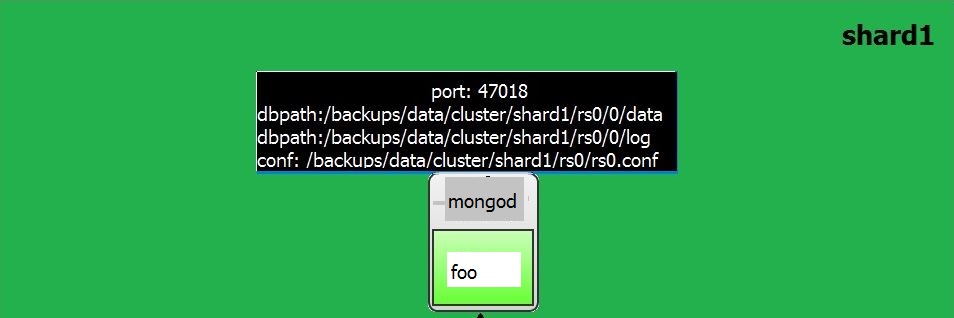
### The single instance looks like as this diagram ###

Next Post: Converting the Single MongoDB Instance to Replicaset in Standalone Server

MongoDB for Oracle DBA’s Part 1 – Features or Keywords Comparision

Welcome to first Post on MongoDB.  

Given my experience over RDBMS during past decade, exploring the current NOSQL database technologies and keep ourself updated. This will not only help ourselves but also enable us to know where to use this, since majority NOSQL databases are not fit for everything, they are customised and fit for purpose, Like MongoDB have this issues.

  • cannot be used for transactional purpose or commerce/erp applications since its cannot meet the ACID requirements (partial available).
  • MongoDB states that complex queries / joins / aggregations should be avoidable as much as possible.
  • The more the normalized data it suit good but it inherits duplicacy in data.
  • Familiar SQL language is not useful, you should know how to write a query with complex {,}() etc.
  • Schemaless , means not a defined characteristic, means anyone can with any type of data is loaded, means if application required an specific characteristics like datatype check etc.
  • As version evolves, the changes to the database core engine, there is subtle difference between 2.0, 2.6 and 3.2, much more changes and one to keep understand all those.
  • More relies on OS Page cache and flush mechanism no control over but can ask OS to flush often
  • Cannot call as a Fully High Availability Database, hence the new definition BASE, (Basic Availability + Eventual Consistency)
  • Basic Availability - At one point of time, if you loose a shard (with all replica sets) until that shard is available , data is not availabel to business
  • Eventual Consistency - No guarantee that data is shown was consistency, typical example (Thanks to Tim Hall) - Inventory stock in webcommerce can show in two different sessions although the order for that stock is already placed. You will get refund for your order or your order get cancelled after a while
  • Locking - As version changes MongoDB locks also got changed drasitically, initially a database level lock, then a collection level as of 3.2 Document Level lock
  • Locking - Readers lock the writer (shared lock) as of old version
  • MVCC - No undo, until 3.2 , unless use wiredtiger engine
  • Storage - Double sizing due write ahead allocation.

The above is small set of what I understand from small implementations and reading documents. The following is the list of common keywords that we know as Oracle DBA's and what they called in MongoDB.

Oracle MongoDB Description
SGA No SGA MongoDB relies completely on OS Page Cache and Flushing Mechanisms, No Specific SGA concept
BufferPool OS Level Page Cache Controls by OS
Shared Pool Query Cache MongoDB Manages all statements parsed by three query frameworks Query,Aggregation,Sort and the query passes through this engines and parse control by "internalquerycachesize" parameter
Dictionary loaded into memory through .ns file Stores in memory map in the physical ram and use OS level mmap, while mongodb starts this metadata is loaded into memory and map the physical structures through the namespace file 
spfile/pfile /etc/mongod.conf Contains data directory location etc. Port, Sharding, Replication, security informations
StorageEngine mmapv1

wiredtiger

inmemory

This is what I look this is adopted by MySQL terminology MYISAM , INNODB, The Memory Storage Engine

Similarly until MongoDB 3.0 uses default mmapv1, and 3.2 allows wiredtiger as default engine basically (uses read/write or MVCC) and the final one is memory engine

Database Server mongod mongod is database instance
Database Client mongo Like SQLPLUS Shell
Database Listener Router aka mongos In a sharded cluster the mongos instance receives all connections and process
Dictionary Config Servers - mongod MongoD instances roles can be Database, configserver, sharded database
redolog journalfile A file called .j_0 is created in journal folder under storage directory and any write operations writes data to this file before flush for durability purposes, journal file is used for recovery purposes. Once the journal entry is written even mongod crashed without flushing dirty buffers to disk, this journal helps to reapply the statement, well like our instance recovery
database database A database is associated with a namespace file at physical level with default 16MB size and can contain 12000 collections means 12000 tables, and the filename like dbname.ns , which typically contains collections names and indexes details and this file will be mapped in memory
schema None
datafile datafile datafile denotes with database name for example if my database is mydb1 then datafile looks like mydb.1 , mydb.2 etc. Each file starts with 64MB  and new file created doubling the size, So as your database grows the files grows.
alertlog /var/log/mongodb/mongod.log Log for mongodb
Datatypes See table other side
table collection A table is a collection associated with .ns file which loaded into memory
row document
Joins embedded documents or linking
shutdown use admin; db.shutdownServer()
startup service mongod start
expdp mongodump --out <directory>
impdp mongorestore <directory>
v$sysstat db.stats()
v$lock db.currentOp()  shows locks information as well current operations in that node.
v$session db.currentOp()
kill session db.killOp(opid)
v$osstat db.serverStatus()
dba_tables db.collection.stats()
Create Table implicit creation When you insert a first row, the table is implicitly created, no definition is required

Drop Table db.tablename.drop()
Add column db.collection.update( set) To add a column
db.users.update(
{ },
{ $set: { join_date: new Date() } },
{ multi: true }
)
Drop Column db.collection.update( unset) db.users.update(
{ },
{ $unset: { join_date: "" } },
{ multi: true }
)
select db.tablename.find()
select only few columns See other column db.users.find(
{ status: "A" },
{ user_id: 1, status: 1, _id: 0 }
)
select with where see other column db.users.find(
{ status: "A" }
)
insert  Insert will eventually create a table db.users.insert(
{ user_id: "bcd001", age: 45, status: "A" }
)
update  Update a column age > 25 with status C db.users.update(
{ age: { $gt: 25 } },
{ $set: { status: "C" } },
{ multi: true }
)
delete db.tablename.remove()
select with join as of 3.2 version you can use $lookup
Group by db.tablename.group() only available in 3.2 , earlier versions should use db.tablenameaggregate().
count db.tablename.count() Count the documents i.e rows
OEM MMS  GUI tool
RAC Sharding  MongoDB use sharded cluster, each node will have its own partition of data through the key (range,hash,tag)
ASM  Nothing like that  Uses OS Filesystem page cache
Diskgroups  Disks  Uses disks
ASM Mirroring Replica Sets
Clustering Sharding with ReplicaSets Manage BASIC Availability, in event of a node failure with replica sets the data is partially available not completely hence called BASIC Availability not high availability
Private Network No need of private network
addnode sh.addShard("localhost:portnum")
Listener Router or MongoS in a cluster environment to redirect to specific shard for your query, the mongos instance will be used,
Client Mongos mongos is the instance that run client like tns entry
Nothing like that Configservers ConfigServers contains information about data distribution keys and route the request to certain shard. It synchronises the metadata often.
Master-Slave Master-Master MongoDB maintains a router instance called mongos and connect
redolog threads oplog In rac we use threads to detect the instance specific actions, here in MongoDB the high availability means at node level which contain the Primary and replica set with in the node itself, so the Primary and replica set maintain polling mechanism, to ensure all changes replicated to the replica set Oplog will be used for that node only.
datafile resize db.repairDatabase() Reduces the Datafiles for that databases
create user db.addUser db.addUser({ user: "geek",
pwd: "password",
roles: [ "readWrite", "dbAdmin" ]
})
dba_users db.system.users.find()
create database use dbname Eventually Create a new database.
drop database db.dropDatabase()
v$banner db.version()  
voting heartbeat voting between replicatset uses arbiter process to vote between a primary and secondary replica set in two node replicaset, remember not the other shards.
Optimizer  plancache  Plan cache is a program that resides in the memory and process the query
Statistics  Maintain metadata in the extents  Like the datafile header in oracle contains the extent information the table statistics is maintain in extents in the ns file
listener  router aka mongos  Mongos instance works like a listener listen your request, read that request, get the distribution keys from config servers and send request to the nodes.
Port 1521 Port 27017  Default port is 27017
sqlplus mongo  mongo shell
sql tracing db.setProfilingLevel(level, slowms)
  • 0 - logger off
  • 1 - log slow queries
  • 2 - log all queries
cluster status sh.status()
disk replication status rs.status()

rs.printslavereplicationinfo()

Shows how much lag replication is behind primary
Disk Striping sh.enableSharding("students") in ASM striping is done by default to diskgroups, where in mongodb the striping can be enabled at database level and then at collection level striping what is the basis of striping like which column

sh.shardCollection("students.testData", { "x": "hashed", "_id": "hashed" })

startup mongod -f <config filename> mongod is the instance that starts and acts as database node
Limits See the other column Heaps of limitations and varies with versions See, references, https://docs.mongodb.com/manual/reference/limits/

  • 16 MB is maximum row size (aka document)
  • A collection aka table can have 64 indexes
  • A composite index can contain 31 fields aka columns
  • Database Name limited to 64 Characters and case sensitive
  • Embedded documents aka rows i.e 1-N can be upto 100
  • The size of the database in single instance can be subjected to 64TB (archivelog aka journled) 128TB without archive logging (for linux)
  • Cannot rename views
  • Normal write operations from app cannot be more than 1000 unless use mongoshell or bulk () operations
  • Index field must not contain more than 1024 bytes
  • 12 nodes in a replicat set and can have 7 voting nodes
  • Striping aka Sharding of a table to distribute data to other nodes should not be more than 256gb
  • Group/Sort queries fails if it exceeds more than 10% of memory
  • Max connections can be 20K (hardcoded)
  • The namesspace file (a metadata file for collections or database) cannot have more than 24000 collections, hence in simple words each database cannot contain more than 24000 objects i.e collections + indexes
Flush SQL ID db.runCommand(

{

planClearCache: "orders"

})

Explain plan db.tablename.find(query).explain You can also explain by query and specific where condition see documentation

Next Post is on Installing & Creating Standalone MongoDB Database

-Thanks

Geek DBA