Disclaimer All information is offered in good faith and in the hope that it may be of use for educational purpose and for Database community purpose, but is not guaranteed to be correct, up to date or suitable for any particular purpose. db.geeksinsight.com accepts no liability in respect of this information or its use.
This site is independent of and does not represent Oracle Corporation in any way. Oracle does not officially sponsor, approve, or endorse this site or its content and if notify any such I am happy to remove.
Product and company names mentioned in this website may be the trademarks of their respective owners and published here for informational purpose only.
This is my personal blog. The views expressed on these pages are mine and learnt from other blogs and bloggers and to enhance and support the DBA community and this web blog does not represent the thoughts, intentions, plans or strategies of my current employer nor the Oracle and its affiliates or any other companies. And this website does not offer or take profit for providing these content and this is purely non-profit and for educational purpose only.
If you see any issues with Content and copy write issues, I am happy to remove if you notify me.
Contact Geek DBA Team, via geeksinsights@gmail.com
|
Hello All,
IAOUG and APACOUC proudly announces ANZ Webinar Tour - 2017.
The 2017 Webinar Tour will be running from July 3rd until August 25th with the participation of over 20 International Speakers that will be presenting over 50 interesting presentations, making it the largest webinar series ever made in the Oracle world!
Registration Links are open for 1st wave. Please find more information here.
http://www.apacouc.org/2017-webinar-tour.html
I will be presenting the following topics, register for free , 13- days to go for first one.
- July 5, 2017 - 19:00 AEST - Suresh Gandhi presenting: Oracle Sharding - More info or register Here
- July 28, 2017 - 19:00 AEST - Suresh Gandhi presenting: DevOps for Databases - Registration Not open yet
- Aug 18, 2017 - 19:00 AEST - Suresh Gandhi presenting: Building Datalake - Registration Not open yet
And Full List of First wave is here
- July 3, 2017 - 19:00 AEST - Connor McDonald presenting: 12 things about 12c Release 2 - More info or register Here
- July 5, 2017 - 10:00 AEST - Tim Gorman presenting: Securing Data Using Data Obfuscation - More info or register Here
- July 5, 2017 - 19:00 AEST - Suresh Gandhi presenting: Oracle Sharding - More info or register Here
- July 7, 2017 - 10:00 AEST - Kai Yu presenting: Under the hood of Oracle Database Cloud Service for Oracle DBAs - More info or register Here
- July 7, 2017 - 19:00 AEST - Lucas Jellema presenting: The Art of Intelligence – A Practical Introduction Machine Learning for Oracle professionals - More info or register Here
- July 10, 2017 - 10:00 AEST - Charles Kim presenting: Bulletproof Your Data Guard Environment - More info or register Here
- July 10, 2017 - 17:00 AEST - Gurcan Orhan presenting: Is Data Warehousing dying? - More info or register Here
- July 12, 2017 - 10:00 AEST - Satyendra Pasalapudi presenting: Experience of being a Oracle Bare Metal Cloud DBA - More info or register Here
- July 12, 2017 - 19:00 AEST - Joel Perez presenting: What I must know to be expert managing Databases in the Cloud ? - More info or register Here
- July 14, 2017 - 19:00 AEST - Debra Lilley presenting: EBS to Cloud Applications – A Govt Case Study - More info or register Here
- July 17, 2017 - 10:00 AEST - Arup Nanda presenting: Docker and Oracle Database in the Cloud - More info or register Here
-Thanks
Geek DBA
In Previous post of the series, I have written about an overview of Oracle Sharding and its features.
In this post, you will be seeing how to configure oracle shard and what steps are need to be performed.
Over all, I felt its very easy to setup and configurewhen compare to RAC setup. All you need to install the oracle home software in all nodes and gsm installation in shard catalog node and rest all are simple commands. One of the excited part is deploy , which creates databases in shards automatically and get shard database ready.
You can also download the presentation from Here
Continue reading Oracle Sharding : Part 2 – Installating & Configuring Shards
Oracle is releasing a whistle blowing feature in distributed databases (shared nothing architecture) which has been dominated by many other databases in recent years. In upcoming release Oracle 12.2 , the Oracle Sharding feature provides the exact capability of shared nothing architecture with Leader node and shard nodes to distribute the data to nodes and scale upto 1000 shards and without compromising on high availability and relational database properties.
For all other distributed databases in the market, consistency is the main issue , none of them or couple of them provides full consistency due to non implementation of MVCC (undo) in their databases and users has to compromise on data consistency or infact set the consistency level to full but on the other hand loosing performance. But Oracle with its sharding it provide full consistency and also relational schema support.
Oracle Sharding features is rich combination of Connection Pools, ONS, Sharding software (GSM), Partitioning, and Powerful Oracle Database. It is fully ACID complaint as like other RDBMS infact this can be major break through.
The following are the supportable features in Oracle Sharding
- Relational schemas
- Database partitioning
- ACID properties and read consistency (very rich feature when compare to other databases)
- SQL and other programmatic interfaces
- Complex data types
- Online schema changes
- Multi-core scalability
- Advanced security
- Compression
- High Availability features
- Enterprise-scale backup and recovery
The main components of Oracle Sharding are,
- Sharded database (SDB) – a single logical Oracle Database that is horizontally partitioned across a pool of physical Oracle Databases (shards) that share no hardware or software, the schema of this database is partitioned in other database (different hosts)
- Shards - independent physical Oracle databases that host a subset of the sharded databas SDB (schema)
- Global service - database services that provide access to data in an SDB , implementation of general service to a distributed service.
- Shard catalog – an Oracle Database that supports automated shard deployment, centralized management of a sharded database, and multi-shard queries, as like leader node, config instance in mongodb.
- Shard directors – network listeners that enable high performance connection routing based on a sharding key, its like mongos instance for instance and holds the key information which stored in shard catalog.
- Connection pools - at runtime, act as shard directors by routing database requests across pooled connections
- Management interfaces - GDSCTL (command-line utility) and Oracle Enterprise Manager (GUI) to manage shards
What you need to consider before implementing sharding
-
Licensing for Sharding/Partitioning
-
Application suitability, in general OLTP applications suits best with regional data distributed to single node and access through that node.
-
Design of relational schema/table, especially the data distribution key as like other databases.
-
Its not a RAC (shared everything) architecture, its distributed database (shard/partitioning shared nothing)
How the data is distributed?
-
When a table is created with type sharded table one of the column need to specified as distribution key , this is common in any distributed databases
-
The distribution key can be of type consistent,hash,list.
-
The distribution metadata is stored in shard catalog called gsmcatalog
- The table now created in multiple shards aka databases with partitions evenly distributed to each shard.
Data Access flow
-
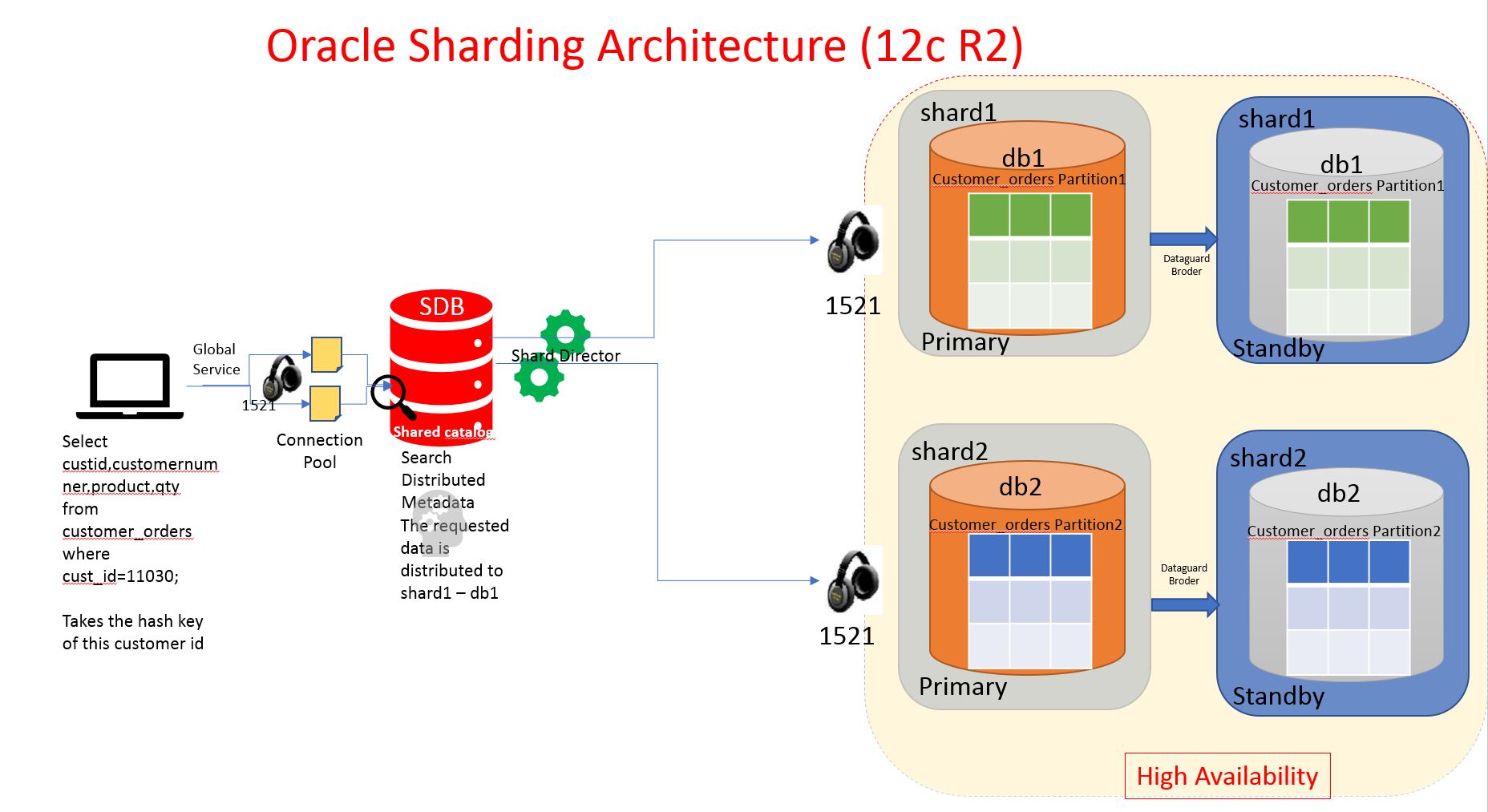
A service called GSM global service will be created in shard catalog database (sdb) with type and its region affinity etc using gsdctl
-
This service will be used by user/application
-
When user fire a query, The service will connect to shard catalog and get the metadata of distribution and shard directors reroutes the connection to specific nodes or all nodes.
-
The shard catalog acts as leader node/config node.
General Architecture of Oracle Sharding with two shards and one shard catalog database.
General Software Requirements of Oracle Sharding
-
Oracle Database 12c Release 2 , Non Container Databases
-
Oracle 12c Global Service Manager (Seperate Oracle Home)
-
Oracle Non container databases for shard catalog (SDB) database
Creating a sample Oracle Shard Table.
SQL> ALTER SESSION ENABLE SHARD DDL;
SQL> CREATE SHARDED TABLE customers
( cust_id NUMBER NOT NULL
, name VARCHAR2(50)
, address VARCHAR2(250)
, region VARCHAR2(20)
, class VARCHAR2(3)
, signup DATE
CONSTRAINT cust_pk PRIMARY KEY(cust_id)
)
PARTITION BY CONSISTENT HASH (cust_id)
TABLESPACE SET ts1
PARTITIONS AUTO
;
- When the session has shard ddl enabled,
- The DDL commands will be fired across the shard nodes through database links created in sdb database
- A tablespace ts1 will be created in shardcatalog and shard nodes
- Paritions of table will be created in shard catalog (the first metadata) and shard nodes (exact partitions) distributed evenly.
In next post, I will be showing how to Install and configure the Oracle Sharding and explore more about this exciting feature.
-Thanks
Geek DBA
I have been asked by one of colleague (Vasu) about a weird issue, that the query returns rows in sort order in one database not in the other database.
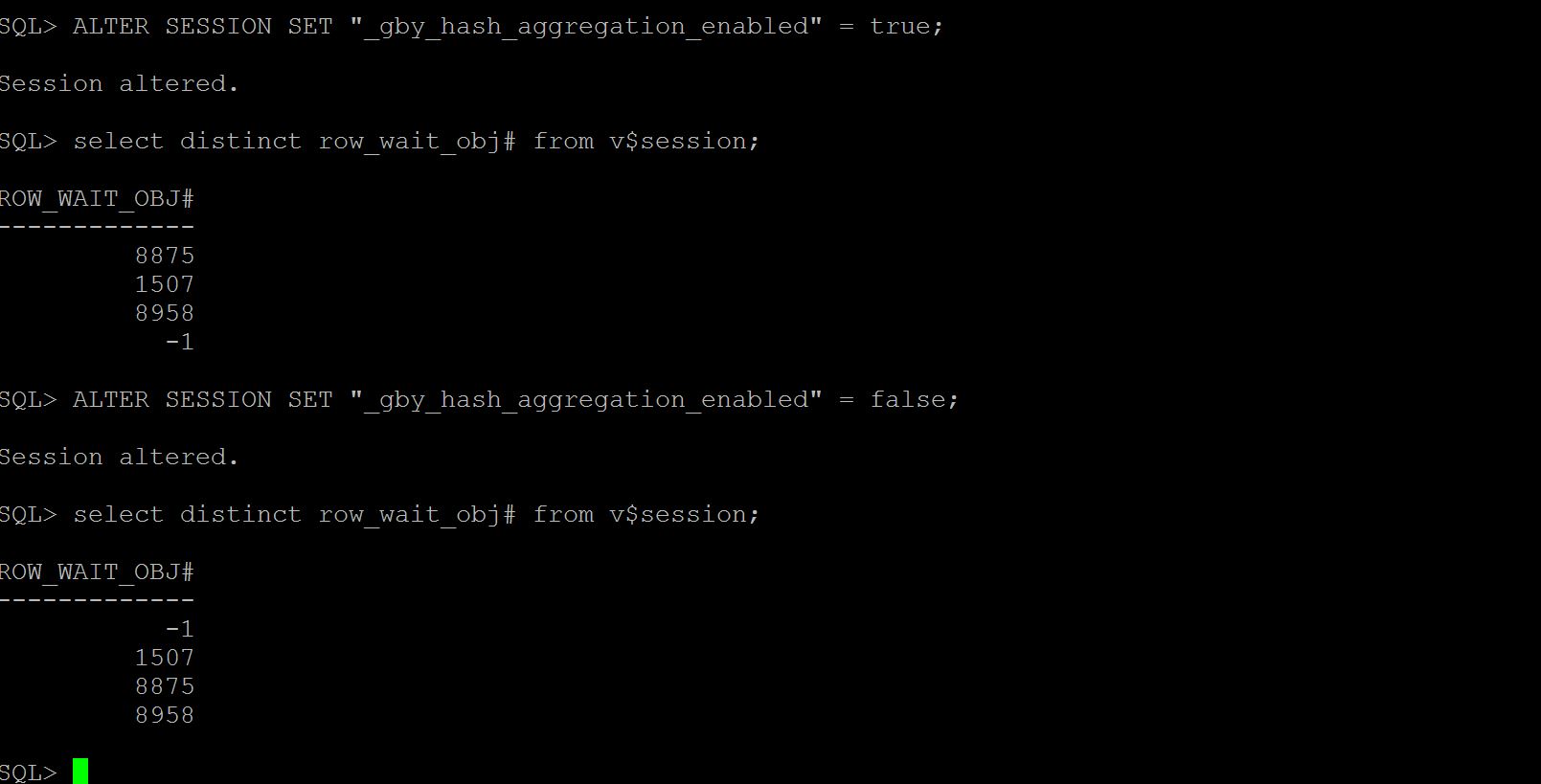
Without having much hassle, by running dbms_xplan.display_cursor('sql_id',NULL,'ADVANCED) mode tell's us the optimizer parameter "_gby_hash_aggregation_enabled" is having different values in each database. Which is mean to perform the sort group by or hash group by operation.
To simulate the issue, I just did the following, a quick check on v$session row_wait_obj# column with parameter false/true.
The result show rows in non sorted for true, (means performed a hash group by operation) where in with false the rows are in sorted order (sort group by has been performed)
-Thanks
Suresh
In earlier versions of Oracle, when one want to convert a table to partition, one must use move or export/import method and rename it.
Now in 12.2 release we can use ALTER table command to convert the table into Partitioned Table. Here is sample command it is from the documentation excerpt,
ALTER TABLE test_table MODIFY
PARTITION BY RANGE (amount) INTERVAL (100)
(PARTITION P1 VALUES LESS THAN (500), PARTITION P2 VALUES LESS THAN (1000),
ONLINE
UPDATE INDEXES (IDX01_AMOUNT LOCAL (PARTITION IDX_P1 VALUES LESS THAN (MAXVALUE)));
-Geek DBA
Memory & Guaranteed BufferCache/Shared Pool can be allocated at PDB Level. From the white paper here it is

Well so far I haven't seen any such need to keep a separate memory settings for each PDB as we have a consolidated databases of same size/resource usage sitting in one single container. But a good feature just in case if one PDB requires much SGA than others this can help.
-Thanks
Geek DBA
Hi,
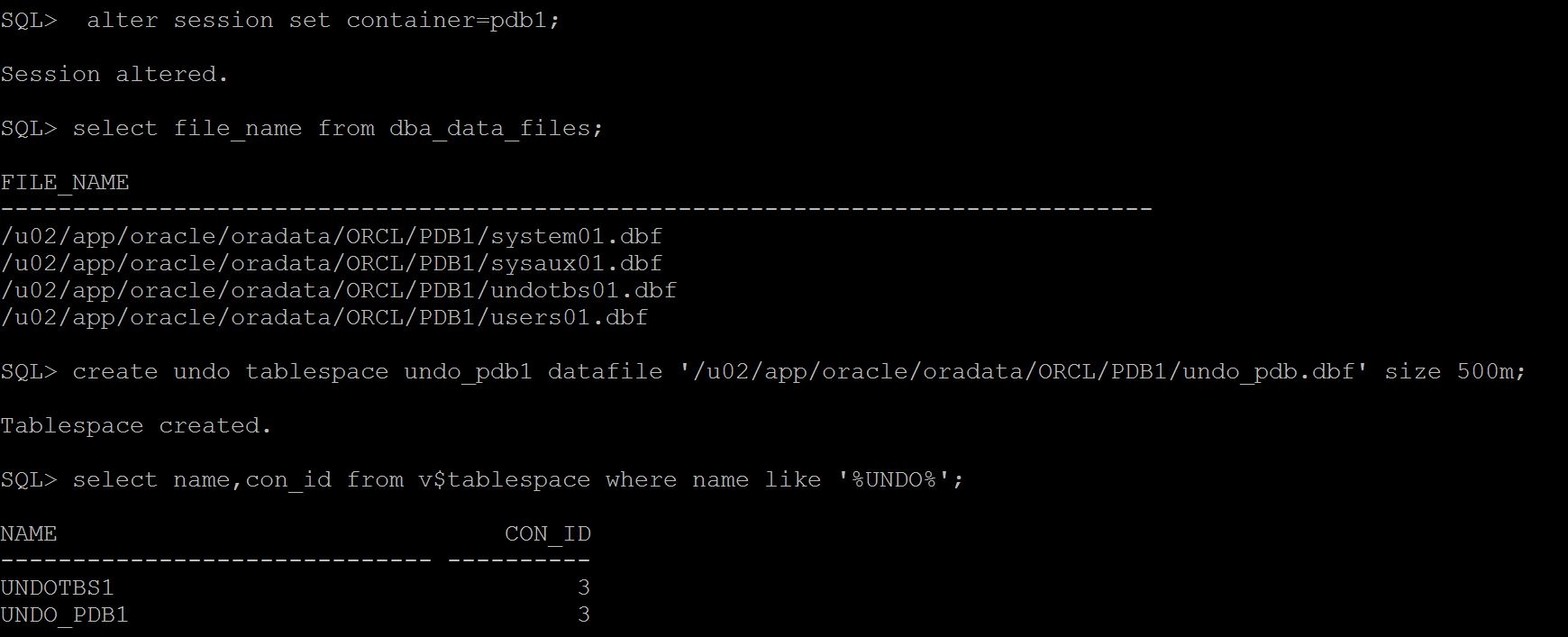
You can now flashback PDB database exclusively with Local UNDO enabled. In earlier versions, Oracle shares the undo tablespace for CDB and PDB's and creates a common view for transaction and instance recovery done at all CDB and PDB level. With local undo , Oracle has to change this a bit, it has to either maintain records of master cdb and pdb in shared undo and also in Local UNDO for pdb level. I will have to further dig into, but for now this feature is available and flashback is possible.
To do this, Enable Local UNDO on PDB level and restart the database. It will create a undo tablespace automatically and PDB start using it.
Steps
SQL> shutdown immediate
SQL> startup upgrade
SQL> alter database local undo on;
SQL> shutdown immediate
SQL> alter pluggable database all open;
SQL> select name,con_id from v$tablespace where name like '%UNDO%' ;
NAME CON_ID
---------- -------------
UNDOTBS1 1 -- >Root
UNDO_1 2 -- >PDBSEED
UNDO_1 3 -- >PDB1
Do a flashback,
SQL> flashback pluggable database pdb1 to timestamp systimestamp - interval '1' hour;
SQL> alter pluggable database pdb1 open resetlogs;
-Thanks
GEEK DBA
In 12.2 release, one of the coolest things that every DBA would love is to get history in SQLPLUS :).
Now you can have history ON/OFF with SQLPLUS and see history
SET HISTORY ON|OFF
SHOW HISTORY
Some other features like, FAST OPTION -F flag to set the ARRAYSIZE PAGESIZE STATEMENTCACHE all at once.
Cool one is HISTORY feature.

-Thanks
Geek DBA
DBA's , Oracle is coming with Sharding. The one killer feature that No-SQL databases claiming distributed processing with sharding aka a non-shared database storage.
Now with release 12.2 Oracle releasing Sharding feature, with new command "Create Sharded Table" and with a catalog schema, well hold on second , its basically distributed partitioning relied on partitioning feature and standby and you need a license for it :). Oh No common...
I really want to dirt my hands on this feature hearing of many new databases from past few years, and I want to tell "Hey Oracle supports this too" 🙂
From the internet sources and OOW presentations, what I understood from Oracle Sharding , Looks complex to me not a simple as like other databases.
- uses dbca for creating shards intially
- use a new catalog called GSM (global service manager a features introduced in 11.2)
- and catalog contains sharded nodes and key information(mongo config instance)
- can be created by using "Create Sharded Table" command
- uses consistent hashing with either Traditional hashing/Linear Hashing (even)
- is based on Distributed Partitioning (licensing)
- needs standby databases (active dataguard and its licences)
- uses set of tablespaces for each shard
- uses dblinks for getting data from each shard
- use GSM service and clients need to use this service for their connection (like mongos )
- uses listener to redirect the connection to right shard for your data (ex: mongo router instance)
What best with this feature is , Unlike Many NoSQL featurs lack of capability having RDBMS and ACID complaince with distributed processing capabilities , whilst if Oracle can keep this sharding simple then this can be a whistle blower to all other new databases.
-Thanks
Geek DBA
Oracle 12.2. is out and in Cloud first. 🙂
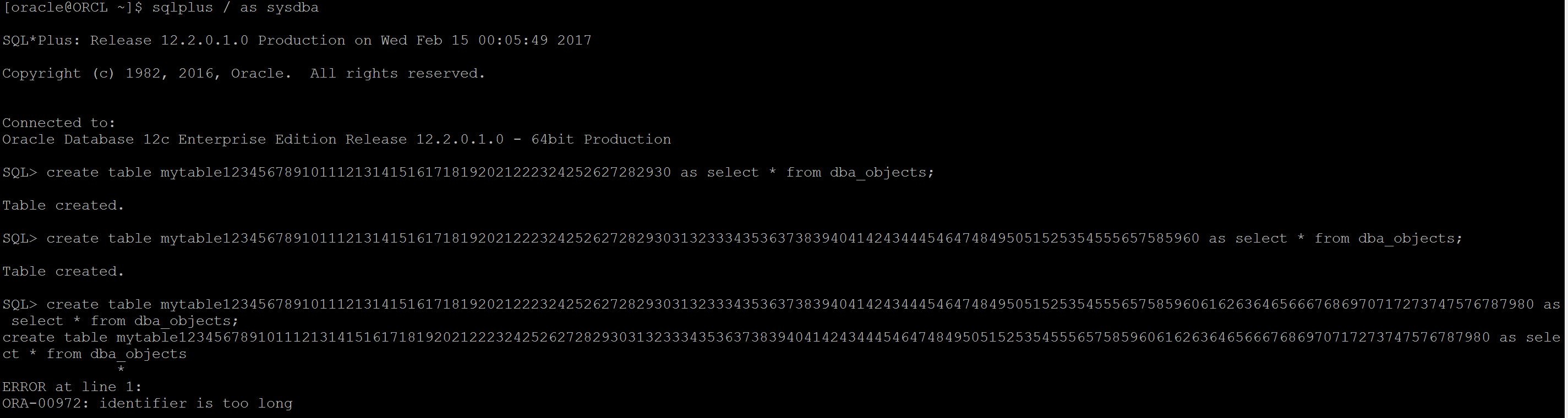
Out of all features one future must aware and important thing is long identifiers limitation relief , earlier any table or index cannot exceed more than 30 character length.
Not sure how many of you have face issues with character limit, but I was, and many times encountered this limitation as an obstacle to push Oracle as the database for some projects. And I have suggested alternate approaches always to developers and they used to refer some other database allow it why not Oracle. 🙂
Especially when you use Salesforce as your CRM , it allowed more than 30 characters as name length for an object (ofcourse the underlying database for Salesforce is oracle only but they have their own application layer tables like apex ) and having a Datawarehouse or data lake by pulling the data from salesforce and from your application and creating a BI reports and dimensions is difficult in such cases.
So well, now back to post , now Oracle allows more than 30 characters for a name of table/index etc.
As 12.2. its in beta and only released in cloud so far, Here is the screenshot
|
 Oracle 23c New Features for DBA's
Follow Me!!!