Subscribe to Posts by Email

Subscriber Count

    705

Disclaimer

All information is offered in good faith and in the hope that it may be of use for educational purpose and for Database community purpose, but is not guaranteed to be correct, up to date or suitable for any particular purpose. db.geeksinsight.com accepts no liability in respect of this information or its use. This site is independent of and does not represent Oracle Corporation in any way. Oracle does not officially sponsor, approve, or endorse this site or its content and if notify any such I am happy to remove. Product and company names mentioned in this website may be the trademarks of their respective owners and published here for informational purpose only. This is my personal blog. The views expressed on these pages are mine and learnt from other blogs and bloggers and to enhance and support the DBA community and this web blog does not represent the thoughts, intentions, plans or strategies of my current employer nor the Oracle and its affiliates or any other companies. And this website does not offer or take profit for providing these content and this is purely non-profit and for educational purpose only. If you see any issues with Content and copy write issues, I am happy to remove if you notify me. Contact Geek DBA Team, via geeksinsights@gmail.com

Pages

AWS RDS – Storing CloudWatch metrics for historical analysis

Update: 17 nov. AWS announced the cloudwatch metrics now stores until 15 months read this. Oh AWS world its ever chaning.....

https://aws.amazon.com/about-aws/whats-new/2016/11/cloudwatch-extends-metrics-retention-and-new-user-interface/

all aware, AWS CloudWatch metrics only hold for two weeks in console and beyond that you cannot analyse what happened unlike our other monitoring tools.

For those who are new to RDS or AWS world, cloudwatch is monitoring tool and its metrics are like host monitoring metrics , ex: CPU, Memory, Storage, IO Latencies etc.

If you largely depend on Cloudwatch metrics and assume you do not have any other monitoring system, I would suggest to store the metrics by download them into a flat file using AWS CLI.

The following scripts does this,

  • set your region
  • Set date to 1 day ago
  • Takes input of your database instance identifier
  • For every 5 mins from 00:00 to 23:59 of last day using aws cloudwatch get-metric-statistics --namespace AWS/RDS to a flat file
  • skim the file as per requirement using sed
  • load them to my oracle database using sqlldr utilisation, freeablememory, freestorage, writelatency, diskqueuedepth etc.

Sample snippet of script.

#!/bin/ksh

        export AWS_DEFAULT_REGION=ap-southeast-2

        echo `date`

        ${METRICDATE}=`date +"%d-%m-%y" --date="1 days ago"`

        METRICDATE=`date +"%d-%m-%y"`

        echo $${METRICDATE}

        echo $METRICDATE

        NOW=$(date +"%Y-%m-%d")

        export WASHLOGFILE=logs/WASHPROD_$NOW.log

#####################################################################

## Get New Endpoint Name

#####################################################################

        EPNAME=`aws rds describe-db-instances --db-instance-identifier $1 | grep -i "Address" | cut -d '"' -f4` >> $WASHLOGFILE 2>&1

        echo $EPNAME

####################################################################

## Get metrics for given identifier

####################################################################

        DBNAME=`aws rds describe-db-instances --db-instance-identifier $1 | grep -i "DBName" | cut -d '"' -f4` >> $WASHLOGFILE 2>&1

        echo $DBNAME

aws cloudwatch get-metric-statistics --namespace AWS/RDS --metric-name CPUUtilization --start-time $${METRICDATE}T00:00:00Z --end-time ${METRICDATE}T23:59:00 --statistics Maximum --period 600 --dimensions Name=DBInstanceIdentifier,Value=$1 --output text >> CPUUtilization.txt

sed -i 's/DATAPOINTS/CAMPUS-PROD CPU/g' CPUUtilization.txt

sed -i '1d' CPUUtilization.txt

sed -i 's/Z//g' CPUUtilization.txt

sed -i 's/' '/,/g' CPUUtilization.txt

sed -i 's/T/ /g' CPUUtilization.txt

####################################################################

## Load them into a table

####################################################################

sqlldr dbmanager/sss@$EPNAME/$DBNAME control=CPUUtilization.ctl

########################################################################

Sample: sqlldr control file

########################################################################

LOAD DATA

 INFILE CPUUtilization.txt

 APPEND INTO TABLE CloudWatch_Metrics_History

 FIELDS TERMINATED BY ','

(instance_name,

metric_type,

value,

collection_timestamp date 'YYYY-MM-DD HH24:MI:SS',

metric_unit)

Usage: process_cloudwatchmetrics.sh <instancename>

############################################################################

Installation Instructions

############################################################################

1. Create the table in oracle database or desired database. (if not oracle you have to use different method than sqlldr to copy the data)

      CREATE TABLE "DBMANAGER"."CLOUDWATCH_METRICS_HISTORY" 

        ("INSTANCE_NAME" VARCHAR2(50 BYTE), 

"METRIC_TYPE" VARCHAR2(30 BYTE), 

"VALUE" NUMBER(15,2), 

"COLLECTION_TIMESTAMP" DATE, 

"METRIC_UNIT" VARCHAR2(20 BYTE)  ;

2. Run the script CloudWatch_Metric_History.sh <instance_name>

Hope this helps.

Thanks

AWS RDS – Start & Stop Feature Available

Folks,

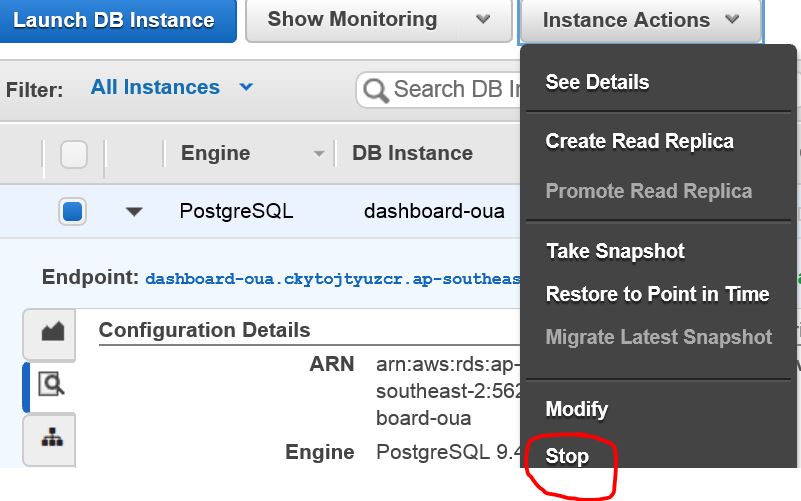
Finally, The long awaited feature AWS RDS Stop/Start database feature is available with Amazon RDS,  As of now you can only modify / terminate but cannot stop / start.

Check out your console and you see option to stop and start.

Seems not officially stated but available in console. 🙂

Enjoy

-Thanks


Independent Australia Oracle Users Group OTN DAYS 2016 – Conferences

Hello All,

IAOUG is back again in Australia for its second year consecutive year OTN Days, with Arup/Tim Hall/Connor around, two conferences being planned, please checkout if you are around Sydney / Goldcoast / or in Australia.

http://www.iaoug.com/home.html

Sydney, October 31st 2016

At Courtyard Marriott North Ryde

From 8:30 am until 5:30 pm

Buy Tickets Here

Check Agenda Here


Gold Coast, November 2nd 2016

At Marriott Surfers Paradise Resort

From 8:30 am until 5:30 pm

Buy Tickets Here

Check Agenda Here


Discount Codes Hurry Up:- 

For All 50% discount:-AIOUGFRIEND

For Students 90%Discount:- IAOUGEDU

Speakers

  • Arup Nanda (Oracle ACE Director - Database - Author - Oracle Magazine)
  • Bjoern Rost (Oracle ACE Director - Database)
  • Gustavo Gonzalez (Oracle ACE Director - Applications - Author )
  • Biju Thomas (Oracle ACE Director - Database/Development - Author)
  • Dr. Tim Hall (Oracle ACE Director - Database/Development -The man behind www.oracle-base.com )
  • Dr. Frank Munz (Oracle ACE Director - Middleware/Cloud - Author)
  • Satyendra Kumar (Oracle ACE Director - Applications - Author)
  • Chris Muir (Oracle Product Manager- Development/ADF)
  • Connor McDonald  (Oracle - Database/Development - The man behind asktom.com)
  • Debra Lilley (Oracle ACE Director - Applications)
  • Francisco Munoz Alvarez (Oracle ACE Director - Database - Author)
  • Jim Czuprynski (Oracle ACE Director - Database - Author)
  • Ronald Bradford (Oracle ACE Director - MySQL - Author)

Also register as member for free before 31st December 2016 and avail discounts for future conferences. Dont Miss it. 

http://www.iaoug.com/home.html


See you there in Sydney!!!

-Thanks


Quick Quiz : Find the best way to find how much time a query has taken to execute

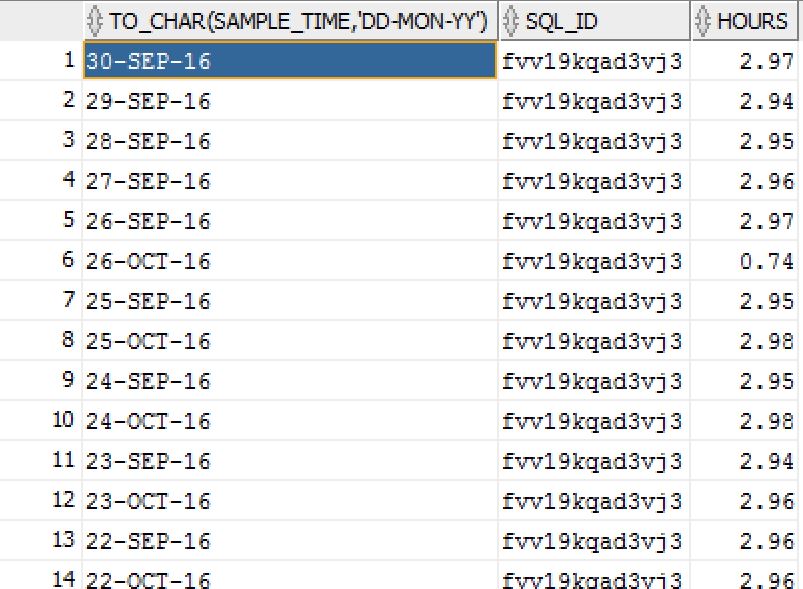
Find the best way to find how much time the query (sql_id) has ran in past or current

ASH stores whenever a session is active every second in v$active_session_history for past two hours, In rotation one sample of every 10 seconds will be visible to dba_hist_active_session_history.

From v$active_session_history

 select to_char(sample_time,'DD-MON-YY HH24') Time, sql_id,sql_plan_hash_value,sql_exec_id,round((count(*))/60/60, 2) as Hours

     from v$active_session_history 

     where sql_id='fvv19kqad3vj3' 

     group by to_char(sample_time,'DD-MON-YY HH24'),sql_id,sql_plan_hash_value,sql_exec_id 

     order by 4;   


From dba_hist_active_sess_history (if query has executed sometime back more than 2 hours)

select to_char(sample_time,'DD-MON-YY HH24') Time, sql_id,sql_hash_value,sql_exec_id,round((count(*) * 10)/60/60, 2) as Hours

     from dba_hist_active_sess_history 

     where sql_id='fvv19kqad3vj3' 

     group by to_char(sample_time,'DD-MON-YY HH24'),sql_id,sql_hash_value,sql_exec_id 

     order by 4;

    Sample Output


Cassandra for Oracle DBA’s Part 18 : Change of Replication Factor & Repair Nodes

As like in ASM, when ever a disk is added a rebalance operation takes place between the disks, similarly when the replication factor is changed at keyspace level in the cassandra, the rebalance operation should take place, I have changed the replication factor for Keyspace and you should start the repair of each node so data is again redistributed and key ranges will be adjusted..


root@wash-i-16ca26c8-prod ~/.ccm/repository/4.5.2/demos/portfolio_manager/bin $ ccm node1 cqlsh

Connected to geek_cluster at 127.0.0.1:9160.

[cqlsh 4.1.1 | Cassandra 2.0.10.71 | DSE 4.5.2 | CQL spec 3.1.1 | Thrift protocol 19.39.0]

Use HELP for help.

cqlsh> ALTER KEYSPACE "Excalibur" WITH REPLICATION ={ 'class' : 'SimpleStrategy', 'replication_factor' : 3 };

root@wash-i-16ca26c8-prod ~/.ccm/repository/4.5.2/demos/portfolio_manager/bin $ ccm node1 nodetool repair

[2016-07-11 01:47:05,302] Nothing to repair for keyspace 'system'

[2016-07-11 01:47:05,310] Starting repair command #1, repairing 3 ranges for keyspace PortfolioDemo

[2016-07-11 01:47:12,591] Repair session 5edc4330-4709-11e6-a73e-e7c99fc0dbe2 for range (-3074457345618258603,1415355439304195653] finished

[2016-07-11 01:47:12,591] Repair session 60ae9230-4709-11e6-a73e-e7c99fc0dbe2 for range (3074457345618258602,-9223372036854775808] finished

[2016-07-11 01:47:12,717] Repair session 621ec400-4709-11e6-a73e-e7c99fc0dbe2 for range (1415355439304195653,3074457345618258602] finished

[2016-07-11 01:47:12,717] Repair command #1 finished

[2016-07-11 01:47:12,725] Starting repair command #2, repairing 4 ranges for keyspace dse_system

[2016-07-11 01:47:14,173] Repair session 6346f050-4709-11e6-a73e-e7c99fc0dbe2 for range (-3074457345618258603,1415355439304195653] finished

[2016-07-11 01:47:14,174] Repair session 638076e0-4709-11e6-a73e-e7c99fc0dbe2 for range (-9223372036854775808,-3074457345618258603] finished

[2016-07-11 01:47:14,175] Repair session 63b828b0-4709-11e6-a73e-e7c99fc0dbe2 for range (3074457345618258602,-9223372036854775808] finished

[2016-07-11 01:47:14,175] Repair session 63ed4270-4709-11e6-a73e-e7c99fc0dbe2 for range (1415355439304195653,3074457345618258602] finished

[2016-07-11 01:47:14,175] Repair command #2 finished

[2016-07-11 01:47:14,182] Starting repair command #3, repairing 2 ranges for keyspace system_traces

[2016-07-11 01:47:14,529] Repair session 64254260-4709-11e6-a73e-e7c99fc0dbe2 for range (3074457345618258602,-9223372036854775808] finished

[2016-07-11 01:47:14,534] Repair session 64401d60-4709-11e6-a73e-e7c99fc0dbe2 for range (1415355439304195653,3074457345618258602] finished

[2016-07-11 01:47:14,534] Repair command #3 finished


root@wash-i-16ca26c8-prod ~/.ccm/repository/4.5.2/demos/portfolio_manager/bin $ ccm node2 nodetool repair


[2016-07-11 01:47:58,676] Nothing to repair for keyspace 'system'

[2016-07-11 01:47:58,682] Starting repair command #1, repairing 3 ranges for keyspace PortfolioDemo

[2016-07-11 01:48:03,446] Repair session 7eac2ef0-4709-11e6-b499-e7c99fc0dbe2 for range (-9223372036854775808,-3074457345618258603] finished

[2016-07-11 01:48:03,446] Repair session 800be600-4709-11e6-b499-e7c99fc0dbe2 for range (3074457345618258602,-9223372036854775808] finished

[2016-07-11 01:48:03,453] Repair session 81086e70-4709-11e6-b499-e7c99fc0dbe2 for range (1415355439304195653,3074457345618258602] finished

[2016-07-11 01:48:03,453] Repair command #1 finished

[2016-07-11 01:48:03,463] Starting repair command #2, repairing 4 ranges for keyspace dse_system

[2016-07-11 01:48:04,869] Repair session 8184f170-4709-11e6-b499-e7c99fc0dbe2 for range (-3074457345618258603,1415355439304195653] finished

[2016-07-11 01:48:04,869] Repair session 81bc5520-4709-11e6-b499-e7c99fc0dbe2 for range (-9223372036854775808,-3074457345618258603] finished

[2016-07-11 01:48:04,870] Repair session 81f1e410-4709-11e6-b499-e7c99fc0dbe2 for range (3074457345618258602,-9223372036854775808] finished

[2016-07-11 01:48:04,871] Repair session 82230630-4709-11e6-b499-e7c99fc0dbe2 for range (1415355439304195653,3074457345618258602] finished

[2016-07-11 01:48:04,871] Repair command #2 finished

[2016-07-11 01:48:04,878] Starting repair command #3, repairing 2 ranges for keyspace system_traces

[2016-07-11 01:48:05,287] Repair session 825cdae0-4709-11e6-b499-e7c99fc0dbe2 for range (-9223372036854775808,-3074457345618258603] finished

[2016-07-11 01:48:05,292] Repair session 82812bc0-4709-11e6-b499-e7c99fc0dbe2 for range (3074457345618258602,-9223372036854775808] finished

[2016-07-11 01:48:05,292] Repair command #3 finished


root@wash-i-16ca26c8-prod ~/.ccm/repository/4.5.2/demos/portfolio_manager/bin $ ccm node3 nodetool repair


[2016-07-11 01:48:12,500] Nothing to repair for keyspace 'system'

[2016-07-11 01:48:12,506] Starting repair command #1, repairing 3 ranges for keyspace PortfolioDemo

[2016-07-11 01:48:16,205] Repair session 86e967e0-4709-11e6-bd37-e7c99fc0dbe2 for range (-3074457345618258603,1415355439304195653] finished

[2016-07-11 01:48:16,205] Repair session 87c98eb0-4709-11e6-bd37-e7c99fc0dbe2 for range (-9223372036854775808,-3074457345618258603] finished

[2016-07-11 01:48:16,211] Repair session 88bc5320-4709-11e6-bd37-e7c99fc0dbe2 for range (1415355439304195653,3074457345618258602] finished

[2016-07-11 01:48:16,211] Repair command #1 finished

[2016-07-11 01:48:16,219] Starting repair command #2, repairing 4 ranges for keyspace dse_system

[2016-07-11 01:48:17,591] Repair session 891f5ab0-4709-11e6-bd37-e7c99fc0dbe2 for range (-3074457345618258603,1415355439304195653] finished

[2016-07-11 01:48:17,591] Repair session 89511910-4709-11e6-bd37-e7c99fc0dbe2 for range (-9223372036854775808,-3074457345618258603] finished

[2016-07-11 01:48:17,592] Repair session 89891900-4709-11e6-bd37-e7c99fc0dbe2 for range (3074457345618258602,-9223372036854775808] finished

[2016-07-11 01:48:17,593] Repair session 89bd9680-4709-11e6-bd37-e7c99fc0dbe2 for range (1415355439304195653,3074457345618258602] finished

[2016-07-11 01:48:17,593] Repair command #2 finished

[2016-07-11 01:48:17,600] Starting repair command #3, repairing 2 ranges for keyspace system_traces

[2016-07-11 01:48:17,885] Repair session 89f21400-4709-11e6-bd37-e7c99fc0dbe2 for range (-3074457345618258603,1415355439304195653] finished

[2016-07-11 01:48:17,889] Repair session 8a05c310-4709-11e6-bd37-e7c99fc0dbe2 for range (1415355439304195653,3074457345618258602] finished

[2016-07-11 01:48:17,889] Repair command #3 finished


root@wash-i-16ca26c8-prod ~/.ccm/repository/4.5.2/demos/portfolio_manager/bin $ ccm node4 nodetool repair

[2016-07-11 01:48:25,045] Nothing to repair for keyspace 'system'

[2016-07-11 01:48:25,051] Starting repair command #1, repairing 3 ranges for keyspace PortfolioDemo

[2016-07-11 01:48:27,804] Repair session 8e63c600-4709-11e6-8071-e7c99fc0dbe2 for range (-3074457345618258603,1415355439304195653] finished

[2016-07-11 01:48:27,804] Repair session 8ee81130-4709-11e6-8071-e7c99fc0dbe2 for range (-9223372036854775808,-3074457345618258603] finished

[2016-07-11 01:48:27,809] Repair session 8f92d020-4709-11e6-8071-e7c99fc0dbe2 for range (3074457345618258602,-9223372036854775808] finished

[2016-07-11 01:48:27,809] Repair command #1 finished

[2016-07-11 01:48:27,817] Starting repair command #2, repairing 4 ranges for keyspace dse_system

[2016-07-11 01:48:29,062] Repair session 90091190-4709-11e6-8071-e7c99fc0dbe2 for range (-3074457345618258603,1415355439304195653] finished

[2016-07-11 01:48:29,062] Repair session 90397060-4709-11e6-8071-e7c99fc0dbe2 for range (-9223372036854775808,-3074457345618258603] finished

[2016-07-11 01:48:29,063] Repair session 906896b0-4709-11e6-8071-e7c99fc0dbe2 for range (3074457345618258602,-9223372036854775808] finished

[2016-07-11 01:48:29,068] Repair session 90957310-4709-11e6-8071-e7c99fc0dbe2 for range (1415355439304195653,3074457345618258602] finished

[2016-07-11 01:48:29,069] Repair command #2 finished

[2016-07-11 01:48:29,080] Starting repair command #3, repairing 2 ranges for keyspace system_traces

[2016-07-11 01:48:29,367] Repair session 90c9c980-4709-11e6-8071-e7c99fc0dbe2 for range (-3074457345618258603,1415355439304195653] finished

[2016-07-11 01:48:29,372] Repair session 90e05ec0-4709-11e6-8071-e7c99fc0dbe2 for range (-9223372036854775808,-3074457345618258603] finished

[2016-07-11 01:48:29,372] Repair command #3 finished

-Thanks

Geek DBA

Cassandra for Oracle DBA’s Part 14: Tombstones – Undo type structures

Undo like pointers, tombstones

Cassandra uses a log-structured storage engine. Because of this, deletes do not remove the rows and columns immediately and in-place. Instead, Cassandra writes a special marker, called a tombstone, indicating that a row, column, or range of columns was deleted. These tombstones are kept for at least the period of time defined by the gc_grace_seconds per-table setting. Only then a tombstone can be permanently discarded by compaction.

This scheme allows for very fast deletes (and writes in general), but it’s not free: aside from the obvious RAM/disk overhead of tombstones, you might have to pay a certain price when reading data back if you haven’t modelled your data well.

gc_grace_seconds - Kind of undo retention


tombstone_warn_threshold 

    (Default: 1000) The maximum number of tombstones a query can scan before warning.


tombstone_failure_threshold 

    (Default: 100000) The maximum number of tombstones a query can scan before aborting. 

Cassandra for Oracle DBA’s Part 17: Backup & Recovery

Backup in Cassandra maintain at node level , so any backup that taken in the one node does not contain other nodes data, so you must take backup of each node, cassandra maintains backups as snapshots means an entire sstables at disk level copied to a different folder with snapshot id as like below.

root@wash-i-16ca26c8-prod ~/.ccm/repository/4.5.2/resources/cassandra/bin $ ccm node1 nodetool snapshot PortfolioDemo

Requested creating snapshot for: PortfolioDemo

Snapshot directory: 1468236726789

root@wash-i-16ca26c8-prod ~/.ccm/geek_cluster/node2/data0/PortfolioDemo/Portfolios/snapshots $ ls -ltr

total 0

root@wash-i-16ca

root@wash-i-16ca26c8-prod ~/.ccm/geek_cluster/node1/data0/PortfolioDemo/Portfolios/snapshots/1468236726789 $ ls -ltr

total 1072

-rw-r--r-- 2 root root  13456 Jul 11 12:02 PortfolioDemo-Portfolios-jb-5-Filter.db

-rw-r--r-- 2 root root 220000 Jul 11 12:02 PortfolioDemo-Portfolios-jb-5-Index.db

-rw-r--r-- 2 root root 576097 Jul 11 12:02 PortfolioDemo-Portfolios-jb-5-Data.db

-rw-r--r-- 2 root root    243 Jul 11 12:02 PortfolioDemo-Portfolios-jb-5-CompressionInfo.db

-rw-r--r-- 2 root root   4406 Jul 11 12:02 PortfolioDemo-Portfolios-jb-5-Statistics.db

-rw-r--r-- 2 root root     79 Jul 11 12:02 PortfolioDemo-Portfolios-jb-5-TOC.txt

-rw-r--r-- 2 root root   1652 Jul 11 12:02 PortfolioDemo-Portfolios-jb-5-Summary.db

-rw-r--r-- 2 root root   3696 Jul 11 19:58 PortfolioDemo-Portfolios-jb-6-Filter.db

-rw-r--r-- 2 root root  64548 Jul 11 19:58 PortfolioDemo-Portfolios-jb-6-Index.db

-rw-r--r-- 2 root root 169778 Jul 11 19:58 PortfolioDemo-Portfolios-jb-6-Data.db

-rw-r--r-- 2 root root     99 Jul 11 19:58 PortfolioDemo-Portfolios-jb-6-CompressionInfo.db

-rw-r--r-- 2 root root   4390 Jul 11 19:58 PortfolioDemo-Portfolios-jb-6-Statistics.db

-rw-r--r-- 2 root root     79 Jul 11 19:58 PortfolioDemo-Portfolios-jb-6-TOC.txt

-rw-r--r-- 2 root root    532 Jul 11 19:58 PortfolioDemo-Portfolios-jb-6-Summary.db

root@wash-i-16ca26c8-prod ~/.ccm/geek_cluster/node1/data0/PortfolioDemo/Portfolios/snapshots/1468236726789 $


Size of Snapshot for One SS Table

root@wash-i-16ca26c8-prod ~/.ccm/geek_cluster/node1/data0/PortfolioDemo/Portfolios/snapshots $ du -sh *

1.1M    1468236726789

Size of Data for One SS Table

root@wash-i-16ca26c8-prod ~/.ccm/geek_cluster/node1/data0/PortfolioDemo/Portfolios $ du -h

1.1M    .

root@wash-i-16ca26c8-prod ~/.ccm/geek_cluster/node1/data0/PortfolioDemo/Portfolios/snapshots $ ls -ltr

total 4

drwxr-xr-x 2 root root 4096 Jul 11 21:32 1468236726789


Deleting Snapshots

root@wash-i-16ca26c8-prod ~/.ccm/geek_cluster/node1/data0/PortfolioDemo/Portfolios $ ccm node1 nodetool clearsnapshot PortfolioDemo

Requested clearing snapshot for: PortfolioDemo

root@wash-i-16ca26c8-prod ~/.ccm/geek_cluster/node1/data0/PortfolioDemo/Portfolios $

root@wash-i-16ca26c8-prod ~/.ccm/geek_cluster/node1/data0/PortfolioDemo/Portfolios $ ls -ltr

total 1072

-rw-r--r-- 1 root root  13456 Jul 11 12:02 PortfolioDemo-Portfolios-jb-5-Filter.db

-rw-r--r-- 1 root root 220000 Jul 11 12:02 PortfolioDemo-Portfolios-jb-5-Index.db

-rw-r--r-- 1 root root 576097 Jul 11 12:02 PortfolioDemo-Portfolios-jb-5-Data.db

-rw-r--r-- 1 root root    243 Jul 11 12:02 PortfolioDemo-Portfolios-jb-5-CompressionInfo.db

-rw-r--r-- 1 root root   4406 Jul 11 12:02 PortfolioDemo-Portfolios-jb-5-Statistics.db

-rw-r--r-- 1 root root     79 Jul 11 12:02 PortfolioDemo-Portfolios-jb-5-TOC.txt

-rw-r--r-- 1 root root   1652 Jul 11 12:02 PortfolioDemo-Portfolios-jb-5-Summary.db

-rw-r--r-- 1 root root   3696 Jul 11 19:58 PortfolioDemo-Portfolios-jb-6-Filter.db

-rw-r--r-- 1 root root  64548 Jul 11 19:58 PortfolioDemo-Portfolios-jb-6-Index.db

-rw-r--r-- 1 root root 169778 Jul 11 19:58 PortfolioDemo-Portfolios-jb-6-Data.db

-rw-r--r-- 1 root root     99 Jul 11 19:58 PortfolioDemo-Portfolios-jb-6-CompressionInfo.db

-rw-r--r-- 1 root root   4390 Jul 11 19:58 PortfolioDemo-Portfolios-jb-6-Statistics.db

-rw-r--r-- 1 root root     79 Jul 11 19:58 PortfolioDemo-Portfolios-jb-6-TOC.txt

-rw-r--r-- 1 root root    532 Jul 11 19:58 PortfolioDemo-Portfolios-jb-6-Summary.db

root@wash-i-16ca26c8-prod ~/.ccm/geek_cluster/node1/data0/PortfolioDemo/Portfolios $

root@wash-i-16ca26c8-prod ~/.ccm/geek_cluster/node1/data0/PortfolioDemo/Portfolios $ ccm node1 nodetool clearsnapshot PortfolioDemo -t 1468236726789


Enabling Incremental Snapshots

root@wash-i-16ca26c8-prod ~/.ccm/repository/4.5.2/resources/cassandra/conf $ grep increment cassandra.yaml

incremental_backups: false

Change it to true.

-Thanks

Geek DBA


Cassandra for Oracle DBA Part 17: Tracing Sessions

As like oracle 100046  , you can also trace the Cassandra Session and it provide you the following information , the highlighted blue parts are important to understand that data has been fetched from different nodes and how many undo it has to read and how many from cache and how many reads from tables, this is very useful to understand the data distribution and the times that taking to get data from distributed nodes.


cqlsh>tracing on

Tracing session: ad1bd5e0-47c9-11e6-a439-e7c99fc0dbe2

cqlsh> select * from "PortfolioDemo"."Portfolios" LIMIT 10000;

 activity                                                                                       | timestamp    | source    | source_elapsed

------------------------------------------------------------------------------------------------+--------------+-----------+----------------

                                                                             execute_cql3_query | 10:43:39,968 | 127.0.0.1 |              0

                                Parsing select * from "PortfolioDemo"."Portfolios" LIMIT 10000; | 10:43:39,968 | 127.0.0.1 |            639

                                                                            Preparing statement | 10:43:39,969 | 127.0.0.1 |           1207

                                                                  Sending message to /127.0.0.2 | 10:43:39,971 | 127.0.0.1 |           3151

                                                      Executing single-partition query on users | 10:43:39,971 | 127.0.0.1 |           3455

                                                                   Acquiring sstable references | 10:43:39,971 | 127.0.0.1 |           3488

                                                                    Merging memtable tombstones | 10:43:39,971 | 127.0.0.1 |           3539

                                                                    Key cache hit for sstable 2 | 10:43:39,971 | 127.0.0.1 |           3649

                                                    Seeking to partition beginning in data file | 10:43:39,971 | 127.0.0.1 |           3660

                      Skipped 0/1 non-slice-intersecting sstables, included 0 due to tombstones | 10:43:39,972 | 127.0.0.1 |           4180

                                                               Message received from /127.0.0.1 | 10:43:39,972 | 127.0.0.2 |             88

                                                     Merging data from memtables and 1 sstables | 10:43:39,972 | 127.0.0.1 |           4195

                                                             Read 1 live and 0 tombstoned cells | 10:43:39,972 | 127.0.0.1 |           4251

                                                                  Sending message to /127.0.0.3 | 10:43:39,974 | 127.0.0.1 |           6523

                                                      Executing single-partition query on users | 10:43:39,974 | 127.0.0.2 |           1567

                                                                   Acquiring sstable references | 10:43:39,974 | 127.0.0.2 |           1653

                                                                    Merging memtable tombstones | 10:43:39,974 | 127.0.0.2 |           1767

                                                                    Key cache hit for sstable 2 | 10:43:39,974 | 127.0.0.2 |           1945

                                                    Seeking to partition beginning in data file | 10:43:39,974 | 127.0.0.2 |           1994

                      Skipped 0/1 non-slice-intersecting sstables, included 0 due to tombstones | 10:43:39,975 | 127.0.0.2 |           2654

                                                     Merging data from memtables and 1 sstables | 10:43:39,975 | 127.0.0.2 |           2677


-Thanks

GeekDBA

Cassandra for Oracle DBA’s Part 16 : Shutting Down Best Practices

Shutdown Best Practice While Cassandra is crash-safe, you can make a cleanershutdown and save some time during startup thus:

- Make other nodes think this one is down. 

- nodetool -h $(hostname) -p 8080 disablegossip

- Wait a few secs, cut off anyone from writing to this node. 

- nodetool -h $(hostname) -p 8080 dissablethrift

- Flush all memtables to disk. 

- nodetool -h $(hostname) -p 8080 drain

- Shut it down.

- /etc/init.d/cassandra stop


Cassandra for Oracle DBA’s Part 15 : Partition Merging & Compacting

Partition Merging or Compact or merging ss tables


Cassandra does not do in-place writes or updates. Rather, it uses a log structured format. Writes are done to Memtables, which are periodically flushed to disk as SSTables. As a result of this approach, the number of SSTables grows over time.

Having multiple SSTables causes read operations to be less efficient as columns for an associated key may be spread over multiple SSTables. Cassandra uses Compaction to merge multiple SSTables into a single larger one. This recipe shows how to adjust two compaction settings: MinCompactionThreshold and MaxCompactionThreshold.

root@wash-i-16ca26c8-prod /scripts/db_reconfiguration $ ccm node1 nodetool getcompactionthreshold PortfolioDemo Portfolios

Current compaction thresholds for PortfolioDemo/Portfolios:

 min = 4,  max = 32

If you use Size-Tiered Compaction Strategy you have an opportunity to have really large SSTables. 

STCS will combine SSTables in a minor compaction when there are at least min_threshold (default 4) sstables of the same size by combining them into one file, expiring data and merging keys. This has the possibility to create very large SSTables after a while.

Using Leveled Compaction Strategy there is a sstable_size_in_mb option that controls a target size for SSTables. 

In general SSTables will be less than or equal to this size unless you have a partition key with a lot of data ('wide rows').

With Date-Tiered Compaction Strategy, but that works similar to STCS in that it merges files of the same size, but it keeps data together in time order and it has a configuration to stop compacting old data (max_sstable_age_days) which could be interesting.

The key is to find the compaction strategy which works best for your data and then tune the properties around what works best for your data model / environment.

-Thanks