Subscribe to Posts by Email

Subscriber Count

    705

Disclaimer

All information is offered in good faith and in the hope that it may be of use for educational purpose and for Database community purpose, but is not guaranteed to be correct, up to date or suitable for any particular purpose. db.geeksinsight.com accepts no liability in respect of this information or its use. This site is independent of and does not represent Oracle Corporation in any way. Oracle does not officially sponsor, approve, or endorse this site or its content and if notify any such I am happy to remove. Product and company names mentioned in this website may be the trademarks of their respective owners and published here for informational purpose only. This is my personal blog. The views expressed on these pages are mine and learnt from other blogs and bloggers and to enhance and support the DBA community and this web blog does not represent the thoughts, intentions, plans or strategies of my current employer nor the Oracle and its affiliates or any other companies. And this website does not offer or take profit for providing these content and this is purely non-profit and for educational purpose only. If you see any issues with Content and copy write issues, I am happy to remove if you notify me. Contact Geek DBA Team, via geeksinsights@gmail.com

Pages

Cassandra for Oracle DBA’s Part 5 : Read and Write Consistency

With the Data not shared model, how does a client or query get a consistent data and how does a write ensure that it is writing right data.

Obvious answer is the maintaining consistency in a database involves in adhering the ACID Properties.

Cassandra follows Atomicity, Isolation, Durability but consistency is an eventual consistency or a Tunable Consistency. 

Having said that, data will eventually become consistent among nodes.

What is eventual consistency? 

ANS: The data will become consistency when required or by on Demand over a period of time. 

But, Does client need to wait until it become consistent?

ANS: No, when client send a request for data, the underlying query have a consistency level for a session level or query level , for which ALL, ANY, ONE etc. should be mentioned,  

For example: select * from Portfolios.PortfolioDemo USING CONSISTENCY ALL|ONE|TWO|THREE|QUORUM|LOCAL QUORUM

When replication factor is set and read happens the co-ordinator that receives the client request will send a request to the nodes that contain the partition range of data and nodes will revert back with data to coordinator node. Whilst its the coordinator node to merge all the parts of the data and check with digest it received from each node and see the data is latest.  If any node data is not matched with digest then that node data will be repaired in backend and so forth become consistent eventually.

I do not want to waste any efforts in rewriting this stuff since Datastax documentation has very good page for Read/Write Paths in Cassandra with all scenarios. 

https://docs.datastax.com/en/cassandra_win/2.2/cassandra/dml/dmlClientRequestsReadExp.html

https://docs.datastax.com/en/cassandra_win/2.2/cassandra/dml/dmlClientRequestsWrite.html

So with Consistency Levels in place and the digest matching and read repair online, the Data that retrieves Cassandra ensures consistency of data can be achieved eventually and depends on your requirement.

Next Post High Availability Comparing with Oracle RAC, cluster interconnect, node evictions etc.

12c Upgrade Gotchas

The following are various gotchas during upgrade or post upgrade to 12c collect from various sources and also few of them in my environment.

1. Change of resource_limit parameter to true by default

   Impact: Resource Manager will be invoked automatically and push the resource limits to the sessions and users may receive cpu/io restriction messages.

2. Global Temporary Tables Statistics session level

   Impact: Earlier versions of Oracle uses shared statistics for global temporary tables, where in 12c the statistics on global temporary tables are session level. 

   that means other users cannot see it

3. HISTGRM$ add column 

Impact: n 12.1, optimizer group added a column to histgrm$ which is a clustered table. For upgrade from 11.2 to 12.1, this column ep_repeat_count is added as a default value column with a not null constraint. Since histgrm$ table on a database could have millions of rows, this addition of a default value column could take a long time since we need to update all existing rows with a default value. This in turn slows down the upgrade significantly to apply the patch 19333670 on 12.1.0.2

4. Drop column with null default value can cause corruption bug 17325413

5. Dynamic Statistics - Performance Problems

   Impact:- Dynamic statistics has been enhanced in Oracle 12c, but this can lead to a longer parse time.

   Automatic dynamic statistics is used more often in 12c which can lead to a parse time increase in the more cases than before.

6. Wri$_optstat_histhead_history Size can cause much time to upgrade, before upgrade purge or reorg the table.

7. Wrong results in group by with outjoin for a bind variable

   alter system set "_optimizer_aggr_groupby_elim"=false scope=both;

   alter system set "_optimizer_reduce_groupby_key"=false scope=both;

8. In memory database - Do not enable unless you have a license

9. DBA_REGISTRY also reports CATALOG and CATPROC in "UPGRADED" status as shown below:

    Solution: run utlrp.sql

10. SPD & Dynamic Sampling more CPU Utilisation & Cause result cache also fill.

11. Oracle 12c has deprecated the sec_case_sensitive_logon parameter. Changing to case sensitive passwords could break your application. 

12. If you have client/JDBC version below 10g , ensure you must update the sqlnet.ora in database host SQLNET.ALLOWED_LOGON_VERSION_SERVER  to 10 or 8 or 9.

     This is due to in earlier versions it was 8 where in 12c it was 11, that means 11g client can connect to db. By keeping it 10 or 8 or 9 you are allowing other version clients to connect to database.

13. Be aware of, By default, In 12c version the auditing runs in mixed-mode, which means you can combine traditional auditing with unified auditing. There is one gotcha    

    to be aware of:

  – if the database has been upgraded, then there will be no Unified Policy enabled!

  – if the database has been newly created, then there will be 2 Unified Policies enabled : ORA_SECURECONFIG and ORA_LOGON_FAILURES. 

Thanks

GEEK DBA

Cassandra for Oracle DBA’s Part 4 – Data Distribution across Nodes

Shared Disk architecture in RAC where the data is shared across the nodes and at any point of time , every instance will give the same data using cache fusion.

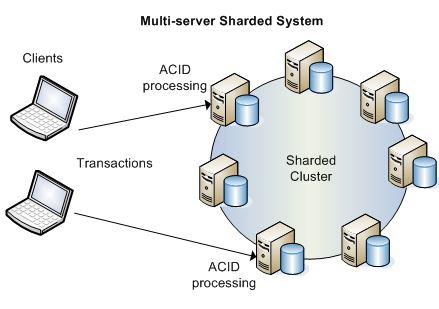
But in Cassandra, the important part is storage is not shared storage, instead its sharded means partitioned and stored in each node. 

And when you see RAC architecture we see an horizontal landscape (the hub nodes), like below figure 1, where in Cassandra nodes formed as ring (the peer architecture or hub-leaf spoke technology). In a ring architecture every node acts as coordinator there is no master in cluster unlike RAC.

Note: In 12c we use the same mechanism called Flex Cluster, but still the Hub Nodes aka database uses shared storage. Do not  confuse with it.

Diagrams RAC & Cassandra

Image result for flex cluster oracle rac architecture                       

             RAC 12c Flex Cluster Architecture                                          Cassandra Sharded Cluster Nodes


Well, if the data is not shared , we as a DBA the common questions that come to our mind are, 🙂

1. How does the data is distributed to the nodes?

2. How does nodes see a consistent data if a read happens? 

3. How does node knows if a write happen in one node the other node knows about it?

4. How about data availability?What if the one of the node corrupted or disk failed?

Before to answer this questions, Lets catch up our ASM Diskgroup Mirroring and Striping methods

ASM uses diskgrup level redundancy aka mirroring with Normal (two copies) and High (three copies), so at any time it maintains the data that stored in data diskgroup that many copies. Even a diskgroup/disk failure will not have any data loss.

ASM uses disk level striping so it evenly distribute the data to the number of disks in that diskgroup, when a disk added or deleted the data is distributed to other disk first called re-balancing and then allow disk operations on it. This ensures the data can be read / write evenly to avoid a single point of contention on disks.

Keeping those in mind, Just mark yourself rather diskgroup level, in Cassandra the data is maintained at node level replication and stripingSo each node store its own set of data and may be a replicated data of other nodes.

In Cassandra, Mirroring is achieved by Replication Factor and Striping is achieved by Token Range of the nodes called Partitioner ( I am not covering Vnodes here )

Partitioner/Tokens:- Cassandra uses a hashing mechanism to assign a token range for a node. When a node is added and deleted one must re-assign the tokens (not the vnodes configuration) so that data will be redistributed to the other/new nodes as like the ASM Diskgroup Rebalancing. Now with token in place for each node, there is another thing that required is table level partition key, which is based on a column to store certain partitioned data into a separate node. And then while any DML operation performed that row will be hashed and checked with node token range and insert into that particular node. In this way each node has a non shared data means a part of data for a table.

Cassandra uses different types of hash mechanism to provide token to nodes and A partitioner determines how data is distributed across the nodes in the cluster (including replicas). Basically a partitioner is a function for deriving a token representing a row from its partion key, typically by hashing. Each row of data is then distributed across the cluster by the value of the token. Both the Murmur3Partitioner and RandomPartitioner use tokens to help assign equal portions of data to each node and evenly distribute data from all the tables throughout the ring or other grouping, such as a keyspace. This is true even if the tables use different partition key, such as usernames or timestamps. Moreover, the read and write requests to the cluster are also evenly distributed and load balancing is simplified because each part of the hash range receives an equal number of rows on average.

You can set the partitioner type in cassandra.yaml file using

  • Murmur3Partitioner: org.apache.cassandra.dht.Murmur3Partitioner
  • RandomPartitioner: org.apache.cassandra.dht.RandomPartitioner
  • ByteOrderedPartitioner: org.apache.cassandra.dht.ByteOrderedPartitioner

Mirroring/Replication :- Cassandra stores replicas on multiple nodes to ensure reliability and fault tolerance. A replication strategy determines the nodes where replicas are placed. The total number of replicas across the cluster is referred to as the replication factor. 

Replication Factor can be configured at Key Space Level. i.e A tablespace/schema level, and then each object/table in that Keyspace will maintain that Replicas in nodes. A replication factor of 1 means that there is only one copy of each row on one node. A replication factor of 2 means two copies of each row, where each copy is on a different node. All replicas are equally important; there is no primary or master replica. As a general rule, the replication factor should not exceed the number of nodes in the cluster. However, you can increase the replication factor and then add the desired number of nodes later. 

Replication Strategies can be determined by Using class option at Key Space Level so that each data center will maintain a set of data replicas. 

Two replication strategies are available:


  • SimpleStrategy: Use only for a single data center and one rack. If you ever intend more than one data center, use the NetworkTopologyStrategy.
  • NetworkTopologyStrategy: Highly recommended for most deployments because it is much easier to expand to multiple data centers when required by future expansion.

With above, look at the example with replication factor 3 with single and multiple datacenter.

Mutli-datacenter clusters for geograpically separate data


Now lets answer the questions above.

1. How does the data is distributed to the nodes?

Ans: Data Distribution of nodes is based on Token Range assigned to the node. So each node stores different data.

2. How about data availability?What if the one of the node corrupted or disk failed?

Ans: As such the data is replicated to other nodes, even if a node / disk failed the other nodes can get the data. This way data high availability is maintained.

3. As if the data is not shared how about read consistency and write consistency.

Ans: Cassandra Maintains the eventual consistency in forms of multiple read requests to the nodes if it sees the data digest is not matching. So it try to read the most recent data from other replicated nodes.  

Read Next post for Read/Write Paths.

Thanks

Geek DBA

Cassandra for Oracle DBA’s Part 3 – Architecture

In Oracle (infact for any RDBMS) , will have a memory structures and processes (or thread) to process the data. 

If we take Oracle as an example, lets look the similarities

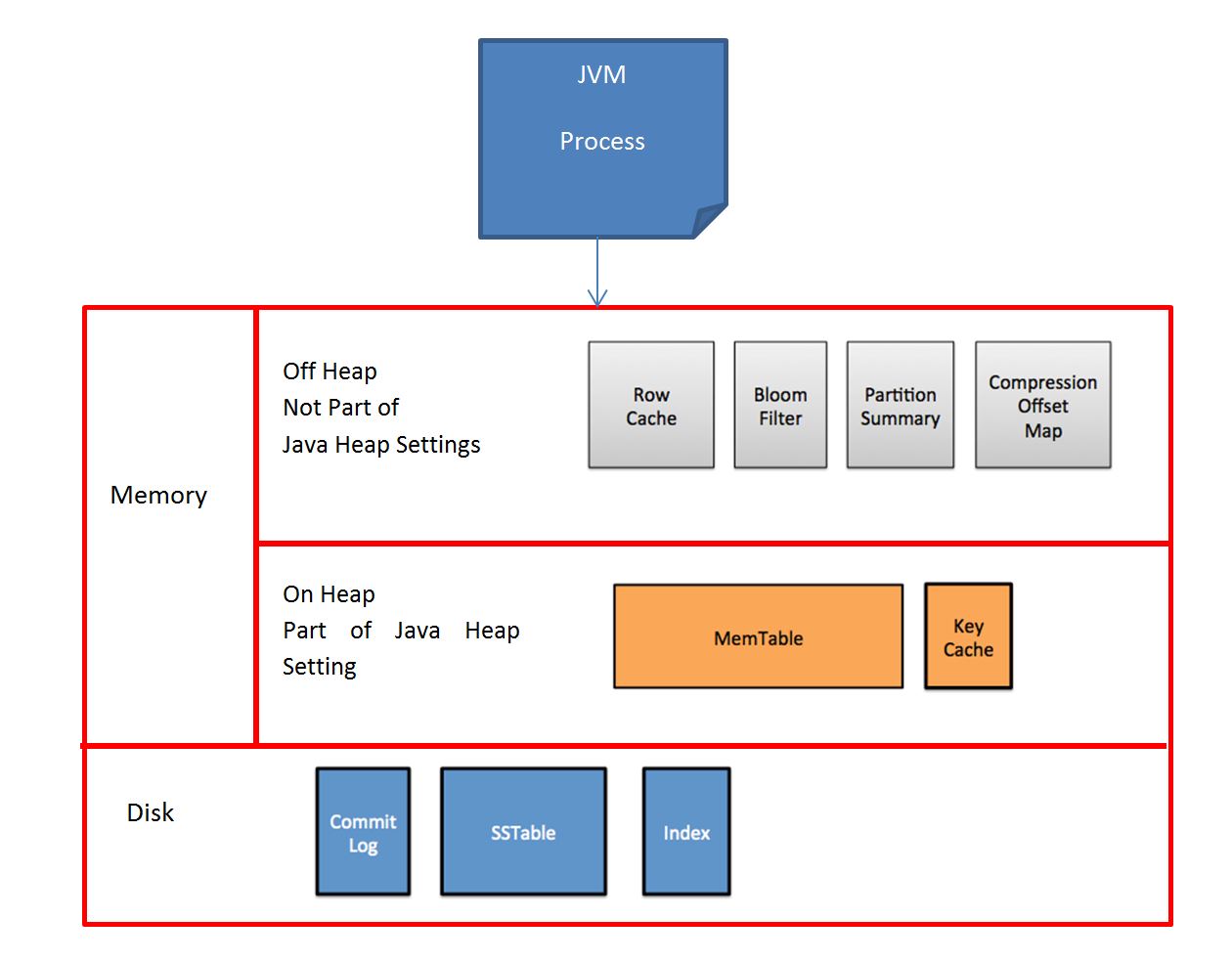
1. Memory Architecture

Oracle Cassandra (NO-SQL DB) Parameter to Set in Cassandra.yaml file Comments
SGA Java Heap Memory

cassandraenv.sh 

MAX_HEAP_SIZE

SGA is shared global area , where in the Java Heap Memory is used for Cassandra Core Engine

BufferPool Memtables memtable_total_space_in_mb

Memtables in Cassandra used for each single table to store the recently used or modifying data, unlike a large buffer cache

suppose you have DML on 4 tables , it will create 4 Memtables in the memory 

Result Cache Row Cache row_cache_size_in_mb  As like result cache in Oracle, you can store certain rows (entire rows) in table in memory by using rowcache
RowCache Partition Key Cache key_cache_size_in_mb

When an operation has to perform on a block, one must know the Block location in terms of Block Number, Disk number, node name etc.

To achieve this, Oracle relies on Data Dictionary Cache and get block number and file number and then read from the disk.

In Cassandra, Data Stores on disk based on Partition Key Value and this Key will be stored in Partition Key Cache to effectively get the data from disk 

Hash Buckets Bloom Filter bloom_filter_fp_chance

In Oracle to find the data block in buffer cache, Oracle uses mod function to find the right bucket for the data. This will help process not to traverse entire block chain.

Similarly, Cassandra checks the Bloom filter to discover which SSTables are likely to have the request partition data. The Bloom filter is stored in off-heap memory. Each SSTable has a Bloom filter associated with it.

Create table ..... (bloom_filter_fp_chance = 0.01)

NA PartitionSummary

min_index_interval 128 and max_index_interval 2048, or index_interval 128

The partition summary is an off-heap in-memory structure that stores a sampling of the partition index. A partition index contains all partition keys, whereas a partition summary samples every X keys, and maps the location of every Xth key's location in the index file. For example, if the partition summary is set to sample every 20 keys, it will store the location of the first key as the beginning of the SSTable file, the 20th key and its location in the file, and so on.

NA CompressionOffsets  

Compression offset maps holds the offset information for compressed blocks. By default all tables in Cassandra are compressed and more the compression ratio larger the compression offset table.

2. Physical Structures

Oracle Cassandra Parameter Comments
RedoLog CommitLog

commitlog_total_space_in_mb

commitlog_segment_size_in_mb

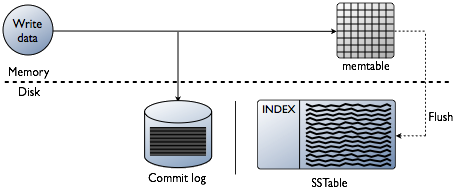
To maintain the durability of the Transaction any database should write the transaction to off a file like redo log or transaction log or a commit log in case of cassandra. . The purpose of the commitlog is to be able to recreate the memtable after a node crashes or gets rebooted. This is important, since the memtable only gets flushed to disk when it's 'full'
Datafile SSTables

sstable_size_in_mb

sstable_min_threshold

In oracle the table is stored in form of segments and extents and blocks in a physical datafile. And it is contiguous or non-contigous and fits into a single or multiple large datafiles.

Where the SSTables

  • Each table will have a physical SSTable on disk
  • SSTables are immutable, well immutable means it cannot be written again, kind of Write and then Readonly (like temp)
  • So how about a write that need to modify the Table aka SSTable?
  • A transaction will create a new SSTable with new data on same disk with increment the file number
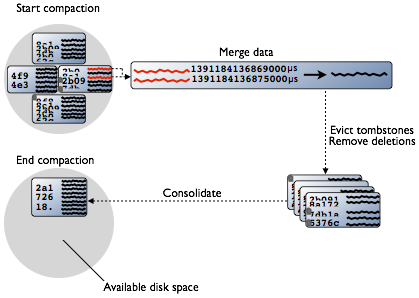
  • Both of this SSTables (aka files) will be merged together called Compaction when required or when reached the number of SSTables threshold
  • In multinode environment, this SSTables are spawned across nodes with data distributed based on Token Range of that node.

SSTables consists of different types:-

  • BloomFilter
  • Index
  • Compression File
  • Statistics File
  • Datafile
  • Summary File
  • TOC.txt

General Architecture

How Read Occurs in Cassandra?

  • Check the memtable
  • Check row cache, if enabled
  • Checks Bloom filter
  • Checks partition key cache, if enabled
  • Goes directly to the compression offset map if a partition key is found in the partition key cache, or checks the partition summary if not

    If the partition summary is checked, then the partition index is accessed

  • Locates the data on disk using the compression offset map
  • Fetches the data from the SSTable on disk

How Write Occurs in Cassandra

Cassandra processes data at several stages on the write path, starting with the immediate logging of a write and ending in compaction:

  • Logging data in the commit log
  • Writing data to the memtable
  • Flushing data from the memtable
  • Storing data on disk in SSTables
  • Compaction, by merging the SSTables

3. Logical Structures

Oracle Cassandra Command Comments
Schema Keyspace
CREATE KEYSPACE TEST
  WITH REPLICATION = { 'class' : 'SimpleStrategy', 'replication_factor' : n };

Keyspace is a schema a collection of Tables a top level namespace

Replication Factor is used to determine the Mirroring of data in a multinode environment

Table ColumnFamily
CREATE TABLE TEST.Users(
  ID text,
  firstname text,
  lastname text,
  PRIMARY KEY (ID)
)

A table is often called as ColumnFamily in NO-SQL , created with primary key , 

ParitionKey PartitionKey
CREATE TABLE TEST.Users(
  ID text,
  firstname text,
  lastname text,
  PRIMARY KEY (ID)
)

primary key means the partition key to store the data in column pair not the primary key in Oracle.

As like Oracle's Composite Primary Key aka Partitioning you can set multiple columns to the Primary Key

Indexes Index
CREATE INDEX user_state
   ON TEST.Users (lastname);
Creating a simple index whichi inturn creates a file on disk.
Sequence Counter
CREATE TABLE TEST.page_view_counts
  (counter_value counter,
  url_name varchar,
  page_name varchar,
  PRIMARY KEY (url_name, page_name)
);

Here the datatype counter depicts , its a sequence based value, so you just can increment in your dml and code 

ex: UPDATE counterks.page_view_counts SET counter_value = counter_value + WHERE url_name='www.datastax.com' AND page_name='home';

Trigger Trigger
CREATE TRIGGER TEST.myTrigger
  ON myTable
  USING 'org.apache.cassandra.triggers.INDEXCHECK'
In RDBMS, Triggers are stored as compiled code in the memory of the Database called SharedPool/Library Cache, where in the cassandra implementation, To create a trigger, you must first build a jar with a class implementing the ITrigger interface and put it into the triggers directory on every node, then perform a CQL3 CREATE TRIGGER request to tie your trigger to a Cassandra table (or several tables)
Type Type
 CREATE TYPE TEST.address (
  street text,
  city text,
  zip_code int,
  phones set<text>
)
Facilitates handling multiple fields of related information, such as address information: street, city, and postal code.
Undo Tombstones gc_grace_seconds Deletes do not remove the rows and columns immediately and in-place. Instead, Cassandra writes a special marker, called a tombstone, indicating that a row, column, or range of columns was deleted. These tombstones are kept for at least the period of time defined by the gc_grace_seconds per-table setting

Image Courtesy: Datastax

-Thanks

GeekDBA

Cassandra for Oracle DBA’s Part 2 – Three things you need to know

Cassandra has three important differences if compared with RDBMS,

  • NO-SQL
  • Data Stored as Columnar Structure 
  • Distributed Systems with Nothing Shared Architecture

Cassandra is combination of the Distributed Processing Systems (for high availability and scalability) with NO-SQL (to process unstructured data & schema less structure) & with Column Store(to store wide variety and velocity of data), an adoption of Google BigTable & Amazon DynomoDB.

Let's delve into each of these things.

1. NOSQL - Not Only SQL

NoSQL technologies address narrow yet important business needs.  Most NoSQL vendors support structured, semi-structured, or non-structured data which can be very useful indeed. The real value, comes in the fact that NoSQL can ingest HUGE amounts of data, very fast.  Forget Gigabytes, and even Terabytes, we are talking Petabytes!  Gobs and gobs of data!  With clustering support and multi-threaded inner-workings, scaling to the future expected explosion of data will seem a no-brainer with a NoSQL environment in play.  Let’s get excited, but temper it with the understanding that NoSQL is COMPLIMENTARY and not COMPETITIVE to ROW and COLUMN based databases. And also note that NoSQL is NOT A DATABASE but a high performance distributed file system and really great at dealing with lots and lots of data

There are three variants of NOSQL,


  • Key Value  – which support fast transaction inserts (like an internet shopping cart); Generally stores data in memory and great for web. applications that need considerable in/out operations
  • Document Store (ex. MongoDB) – which stores highly unstructured data as named value pairs; great for web traffic analysis, detailed information, and applications that look at user behavior, actions, and logs in real time. 
  • Column Store (Cassandra) – which is focused upon massive amounts of unstructured data across distributed systems (think Facebook & Google); great for shallow but wide based data relationships yet fails miserably at ad-hoc queries .

2. Data Stored as Columnar Structure

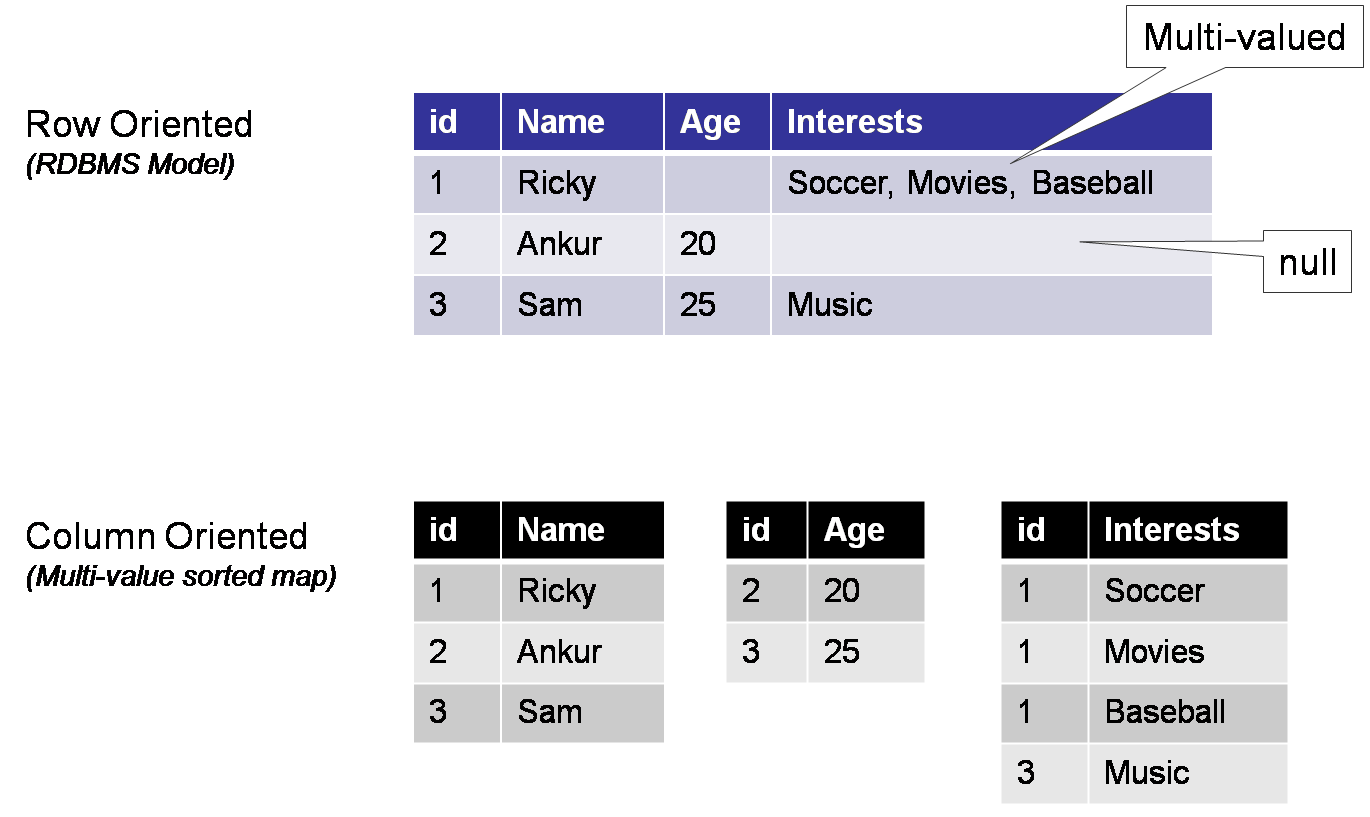
Imagine a Row vs Column Structure

Creating a Table in RDBMS                                         Creating a Table using CQL  (Thirft naming convention: Column Family) with Column Database like Cassandra

Create table emp                                                          Create table emp

(id number primary key,                                                (id int,

name varchar2(10),                                                       name text,

age number,                                                                 age number,

interests varchar2(100));                                               interests text,

                                                                                        PRIMARY KEY((id), name, age, interests)  

The Nomenclature is as follows,

  • id:  The Partition Key is responsible for data distribution across your nodes. Data sorted in the Columns with Key value in each separate files on the disk.
  • name:age:interests: The column key values that store for each partition

3. Distributed Systems with  Shared Nothing Architecture

  • For Cassandra, the usage of distributed system is Shared Nothing Architecture where in  Oracle RAC Architecture uses Shared Disk Architecture.
  • As you see, the data is stored in each node locally
  • And unlike RAC master-slave architecture(cluster & database instance level), this is peer-peer architecture and every node act as coordinator

  • As such the data is stored locally , data will be evenly distributed (stripes) to each node when data writes into tables.
  • Each Node contains the Token Range to accept and store data
  • Token Range is determined by Partition Schemes used by Cassandra Random Partitioner, Murmur partitioner, OrderPreserving Partitioner etc.
  • If a node is added/deleted, as like in ASM Diskgroup Re-balancing, Cassandra will re-balance node data to other nodes by rearranging the token assigned to each node.

  • But as such the data stores locally, there is likely hood that Data may lost in case of failure
  • To avoid this, while inserting the data , Cassandra uses Replicaton Factor for each Schema/Keyspace
  • So that all tables in that schema/keyspace will have the data mirrored (ASM Disk Mirroring) across nodes
  • This avoids single point of failure and as well as contention on Read/Write I/O.

Cassandra mirrors Data to Nodes based on Two things, Strategy and replication factor

    • SimpleStrategy (Single Data Centre), NetworkTopology Strategy with multiple DC or Single DC with specific identification of IP & Servers, so that data mirrors across data centres.
    • Replication Factor: How many copies of data should be maintained in cluster.

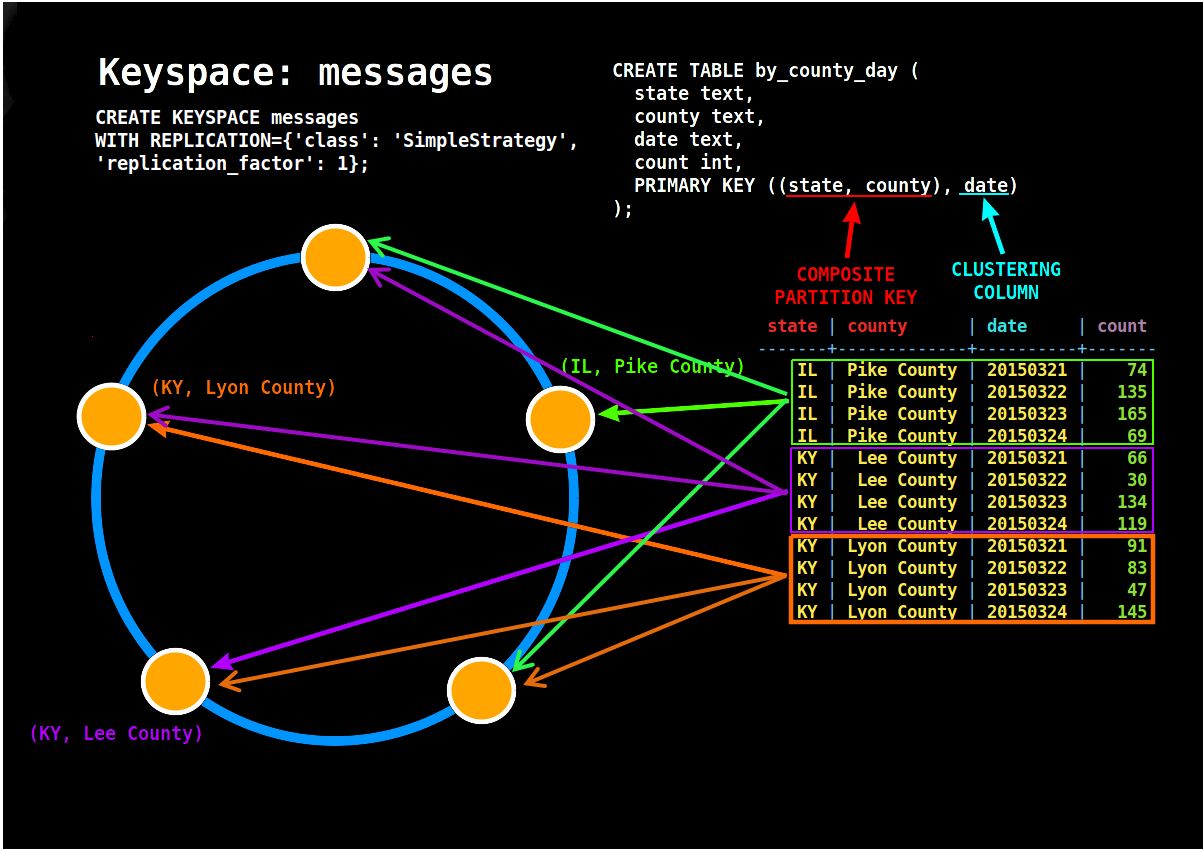
    In the below diagram, with 5 Node Cassandra , we have created a Keyspace Called Messages with replication placement strategy of Simple & Replication Factor 1

    Replication Factor: 1 : In this case 1, means the data will be not be mirrored and you see the IL, KY with their county has been written to different nodes

    In case of failure of a node, the data in that node will not be available to the clients means a data loss/unavailability.

    Example of a cluster with a composite partition key

    Take another example, In the below diagram, with 5 Node Cassandra , we have created a Keyspace Called Messages with replication placement strategy of Simple & Replication Factor 3

    Replication Factor: 3 : In this case 3, means the data will be mirrored to three nodes at least in the cluster and you see the IL, KY with their county has been written to different node,

    In case of failure of a node, the data in that node will not be available but the co-ordinator will get the data from other replicas.

    But in case of data centre loss, it is likely hood that whole cluster is not available.


    Take another example, In the below diagram, with 5 Node Cassandra , we have created a Keyspace Called Messages with replication placement strategy of NetworkTopology Strategy & Replication Factor as, for us-west data center is 3 and us-east is 2.

    As you see below, the data is spawned/mirrored three copies in us-west and two copies in us-east

    Mutli-datacenter clusters for geograpically separate data


    That's all about in this post, There's nothing new I have written above most of things available in Internet, but to have a series of posts I would like to have an introduction first and then dig into more for DBA's.

    Lets take a closer look at architecture of Cassandra and its components for each node in next post.

    Image Courtesy: Random Blogs in internet & Apache Cassandra website.

    GeekDBA


    Cassandra for Oracle DBA’s Part 6 – Installing Cassandra

    Installing Cassandra is straight forward, With CCM, is a tool to simulate a Cassandra cluster in a single host, Ideal for test environments or you want to make your hands on in Cassandra.

    Further to install Cassandra in production size, you can directly download the Cassandra from Apache.org or Datastax for an enterprise version.

    I cover here both of these methods.

    For CCM Installation,

    Step 1: Upgrade Python to 2.7 (this is must for ccm based installations also we have to do alternate install for python to upgrade 2.7 if not this will break your libraries.)

       cd /usr/src

       wget https://www.python.org/ftp/python/2.7.10/Python-2.7.10.tgz

       tar xzf Python-2.7.10.tgz

      cd Python-2.7.10

      ./configure

      make altinstall

      ls -ltr /usr/bin/python*

      ls -ltr /usr/local/bin/python*

      ln -s /usr/local/bin/python2.7 /usr/local/bin/python

      ln -s /usr/local/bin/python2.7 /usr/local/bin/python

      wget https://bitbucket.org/pypa/setuptools/raw/bootstrap/ez_setup.py

      sudo /usr/local/bin/python2.7 ez_setup.py

      sudo /usr/local/bin/easy_install-2.7 pip

      sudo easy_install six

      sudo easy_install pyyaml


    Step 2: Download the CCM Package from Git hub

    git clone https://github.com/pcmanus/ccm.git

    or

    pip install ccm

    change the setup.py to point to /usr/local/bin/python instead of /usr/bin/env python (this is important if not CCM will not work)

    cd ccm; sudo ./setup.py install; cd ..

    Step 3: Creating a CCM cluster for DSE stack (this command only download the Cassandra to the directory you are running into)

    ccm create --version 1.2.0 --nodes 3 --start test

    or 

    ccm create dse_cluster --dse --dse-username=emaildi --dse-password=password -v 4.5.2 -n 3 -s

    Step 4: Verify the installation

    root@wash-i-16ca26c8-prod ~/.ccm/repository/4.5.2/resources/cassandra/conf $ ccm node4 nodetool ring

    Note: Ownership information does not include topology; for complete information, specify a keyspace

    Datacenter: Cassandra

    ==============

    Address    Rack        Status State   Load            Owns                Token

    127.0.0.1  rack1       Up     Normal  3.05 MB         33.33%              -9223372036854775808

    127.0.0.2  rack1       Up     Normal  2.99 MB         33.33%              -3074457345618258603


    127.0.0.3  rack1       Up     Normal  3.5 MB          33.33%              3074457345618258602


    Installing Cassandra Cluster Manually on each of the node

    Step 1: Downloading and Installing Cassandra


    sudo su - cassandra

    wget http://mirrors.ae-online.de/apache/cassandra/2.1.3/apache-cassandra-2.1.3-bin.tar.gz

    sudo tar -xvf /home/cassandra/apache-cassandra-2.1.3-bin.tar.gz -C /usr/local/

    cd /usr/local/

    sudo mv apache-cassandra-2.1.3 cassandra-2.1.3

    sudo ln -s /usr/local/cassandra-2.1.3 /usr/local/cassandra

    sudo chown -R cassandra:cassandra /usr/local/cassandra-2.1.3

    xport JAVA_HOME=$(readlink -f /usr/bin/java | sed "s:bin/java::")

    export CASSANDRA_INSTALL=/usr/local/cassandra

    export CASSANDRA_HOME=$CASSANDRA_INSTALL

    Just edit the $CASSANDRA_HOME/conf/cassandra.yaml file vim $CASSANDRA_HOME/conf/cassandra.yaml and replace the following keys with proper values:

    cluster_name: 'MyFirstCluster'

    seeds: "10.64.200.47, 10.64.200.48"

    listen_address: 10.64.200.47

    rpc_address: 10.64.200.47

    Note: Seeds address are those nodes performing as seed, Listen and RPC address should be the node IP which you have installed.

    Step 2: Start Cassandra on all nodes

    $CASSANDRA_HOME/bin/cassandra -f

    Step 3: Check status of cluster

    $CASSANDRA_HOME/bin/nodetool status

    -Thanks

    Geek DBA

    Cassandra for Oracle DBA’s – Part 1 : Nomenclature or Commands or Features Comparision

    Although, there are heaps of fundamental changes between Oracle & Cassandra,

    Just for fun, or for nomenclature or for commands or similar features are listed here , which may provide handy information to Oracle DBA's

    Oracle Keyword Cassandra Feature / Nomenclature
    SGA Java Heap Memory
    Buffer Cache Memtables
    LRU List Parition Index Summary Cache
    Buffer Cache Partition Key Cache
    KeepPool/Result Cache Row Cache
    Background Process Nothing Like that
    SQLPLUS CQLSH
    TNS THRIFT
    Dictionary Cache Nothing Like That
    Tablespace Keyspace
    Table Column Family/Table
    Datafiles SSTABLES
    Index Index for partition key
    Partition Key for row level Partition Key as column level to store relevant rows
    Merge Partition Compaction of SSTABLES
    sql_trace = on tracing on
    C and ANSI SQL Java and CQL
    Schema Keyspace
    User User
    SYSDBA SuperUser
    Backup Copies SNAPSHOTS
    Incremental Incremental Backups
    redolog commitlog
    undo tombstone
    Temp Data Actually Stores in Order no need of temp
    Interconnect Protocol RDP/UDP Gossip Protocol
    Network /Disk Heartbeat Only one heartbeat network heartbeat in messages
    Master / Slave Nodes Peer Nodes (no master) indeed every node act as coordinator
    Shared Storage Local Storage to each node
    ASM Striping Tokens: Data Stripes using token range at node level
    ASM Mirroring Replication Factor: Data Mirrors across nodes using RF=ONE, ALL, N..
    Disk Repair Time Hinted Handoffs
    Prefered_read_failgroup, diskgroup level table level / query level CL=QUORUM, LOCAL, ONE, ALL
    init.ora or spfile.ora cassandra.yaml in /softwarelocation/conf/
    redo log sizes & location commitlog size determined by parameters in cassandra.yaml file commitlog_directory
    redo log flush commitlog flush determined by parameter commitlog_segment_size_in_mb,commitlog_sync_period_in_ms,commitlog_sync
    archives commitlog will be copied as archives determined by parameter cassandra/conf/commitlog_archiving.properties
    alert log/crsd.log/node.log Log located at /cassandrasoftware/clustername/nodename/logs/system.log
    crsctl / srvctl nodetool
    Rebalance of Data in diskgroups nodetool repair or nodetool repair -st -et
    private network or private ips no private ip's
    OCR/Voting Disk Nothing Like that, but maintains list of peer nodes to communicate using seeds parameter in cassandra.yaml
    scn_to_timestamp or rowscn functions writetime function
    alter session set schema use keyspace
    dbms_metadata.get_ddl  desc tablename or describe keyspace shows metadata
    v$asm_operation, rebalance operation nodetool netstats or nodetool tpstats
    cssd.log (disk heartbeat and network heartbeat) nodetool gossipinfo
    size of table: bytes in dba_tables Because the table data is striped across the nodes, For each node, calculate Space used (total), bytes: output from

    nodetool cfstats keyspace.tablename


    num of rows in table: num_rows in dba_tables Because the table row/columns are striped across the nodes, for each node, calculate Number of Keys (estimate) from

    Number of keys (estimate):

    Number of keys (estimate): 10112

    size of Tablespace / Schema: sum(bytes)  in dba_segments For each node, calculate the Space Used (total), bytes: output from 

    nodetool cfstats system | grep "Space Used (total)"  | awk '{ SUM += $5} END { print SUM/1024/1024 }'

    Size of Buffer Cache For each node, calculate the each keyspace memtables count

    nodetool cfstats | grep "Memtable data size"  | awk '{ SUM += $5} END { print SUM/1024/1024 }'

    Flush Buffer Cache nodetool flush keyspace tablename
    Size of result cache Row Cache 
    undo_retention gc_grace_seconds for holding tombstones
    addnode.sh nodetool join
    crsctl delete node nodetool decomission

    and then when status show decommissioned ,

    nodetool remove token

    result cache size  / keep pool size row_cache_size_in_mb
    multiple dbwr writers memtable_flush_writers parameter in cassandra.yaml parameter file
    buffer cache flushing (3 seconds,ckpt etc) memtable_cleanup_threshold parameter in cassandra.yaml
    Shutdown instance, srvctl stop instance nodetool -h $(hostname) -p 8080 disablegossip

    nodetool -h $(hostname) -p 8080 dissablethrift

    nodetool -h $(hostname) -p 8080 drain

    /etc/init.d/cassandra stop

    crsctl status cluster nodetool status o nodetool ring or nodetool describecluster
    rman>backup tablespace tag 'today' For each node,

    backup keyspace -t today

    backup keyspace.table -t today

    rman> backup incremental tag 'incr' Just enable incremental_backups: true in cassandra.yaml file, which creates incremental snapshots when take snapshot using backup keyspace -t
    rebuild index or reorg table rebuild index keyspace tablename idx1, idx2
    logical recovery

    rman> recover block 57;

    rman> recover datafile

    logical recovery at table level

    scrub [keyspace] [tablename] [-s|--skip-corrupted]

    restricted mode? nodetool drain
    statistics Nothing like that

    Disabling Active Dataguard Feature

    As we all know Active Dataguard is a licensed feature and whilst there is no parameter to control, indeed if just in case if you do not have a license and by chance your DBA has opened the standby database in readonly and started MRP then you are in troubles as it activates the Active Dataguard.

    In earlier versions when you open the standby in readonly and try to start MRP it will not start. But from 11g Onwards , MRP will still start and that activates your active dataguard feature.

    If you want to disable completely that feature by not accidentally enabling it, there is undocumented parameter called

    SQL> alter system set “_query_on_physical”=false scope=spfile;

    System altered.

    And when you open readonly and try to start MRP


    ORA-16669: instance cannot be opened because the Active Data Guard option is disabled

    -Thanks


    Database Migration & Upgrade 11g to 12c, Non ASM to ASM, Non RAC to RAC

    Consider a Typical Database Migration which contains all of this below (and if down time is not a problem)

    1. Into a new Database Host (NEW SERVER)

    2. Convert to Non-ASM to ASM

    3. Convert to Single Instance to  RAC, 

    4. Upgrade to Database to 12c


    Environment Details

    Source Target
    DB Version: 11.2.0.4 DB Version: 12.1.0.2
    Instance Type : Standalone Instance Type : RAC
    Storage: Non - ASM Storage Type: ASM


    ##################################################################################

    Step 1:- In order to upgrade or convert to rac We must install 11g software as non - rac assuming installed in Target side

    ##################################################################################

    Assuming its already installed here, Oracle_Home: /u01/app/oracle/11.2.0.4/db_1

    ###################################################################################

    Step 2:- Create Tnsnames.ora and Listener.ora (separate) in 11.2.0.4 home in target side

    ###################################################################################

    in new 11g home

    tnsnames.ora 

    dbdup =

      (DESCRIPTION =

        (ADDRESS = (PROTOCOL = TCP)(HOST = target.localdomain)(PORT = 1522))

        (CONNECT_DATA =

          (SERVER = DEDICATED)

          (SERVICE_NAME = dbname.localdomain)

        )

      )

    dbname =

      (DESCRIPTION =

        (ADDRESS = (PROTOCOL = TCP)(HOST = source.localdomain)(PORT = 1521))

        (CONNECT_DATA =

          (SERVER = DEDICATED)

          (SERVICE_NAME = dbname.localdomain)

        )

      )

    listener.ora

    SID_LIST_LISTENER =

      (SID_LIST =

        (SID_DESC =

          (GLOBAL_DBNAME = dbname.localdomain)

          (ORACLE_HOME = /ora/app/oracle/product/12.1.0.1/db_1)

          (SID_NAME = dbname)

        )

      )

    LISTENER =

      (DESCRIPTION_LIST =

        (DESCRIPTION =

          (ADDRESS = (PROTOCOL = TCP)(HOST = target.localdomain)(PORT = 1522))

        )

      )


     Start the listener

     cd /u01/app/oracle/11.2.0.4/db_1/network/admin

     lsnrctl start


    ###################################################################################

    Step 3:- Copy password file to target machine

    ###################################################################################

    On source

    scp $ORACLE_HOME/dbs/orapwdbname target:$ORACLE_HOME/orapwdbname

    ###################################################################################

    Step 4:- Take a pfile copy in source database and copy it

    ###################################################################################

    sqlplus / as sysdba

    create pfile='/tmp/initdbname.ora' from spfile;

    ###################################################################################

    Step 5:- Modify the parameter file especially the following

    ###################################################################################

    *.control_files='+DATA','+DATA'

    *.db_create_file_dest='+DATA'

    *.db_recovery_file_dest='+FRADG'

    *.log_archive_dest_1='location=+FRADG'


    #######################################################

    Sample File

    #######################################################

    dbname.__data_transfer_cache_size=0

    dbname.__db_cache_size=536870912

    dbname.__java_pool_size=16777216

    dbname.__large_pool_size=150994944

    dbname.__oracle_base='/ora/app/oracle'

    dbname.__pga_aggregate_target=671088640

    dbname.__sga_target=989855744

    dbname.__shared_io_pool_size=50331648

    dbname.__shared_pool_size=218103808

    dbname.__streams_pool_size=0

    *.compatible='12.1.0.2.0'

    *.control_files='+DATA','+DATA'

    *.db_block_size=8192

    *.db_domain='localdomain'

    *.db_name='dbname'

    *.db_create_file_dest='+DATA'

    *.db_recovery_file_dest='+FRADG'

    *.db_recovery_file_dest_size=4560m

    *.diagnostic_dest='/ora/app/oracle'

    *.dispatchers='(PROTOCOL=TCP) (SERVICE=dbnameXDB)'

    *.log_archive_dest_1='location=+FRADG'

    *.log_archive_dest_state_1='enable'

    *.open_cursors=300

    *.processes=300

    *.remote_login_passwordfile='EXCLUSIVE'

    *.undo_tablespace='UNDOTBS1'


    ###################################################################################

    Step 6:-  Start the instance in non mount mode in target machine

    ###################################################################################

    export ORACLE_HOME=/u01/app/oracle/11.2.0.4/db_1

    export PATH=$ORACLE_HOME/bin:$PATH

    export ORACLE_SID=dbname

    sqlplus / as sysdba

    startup nomount pfile='$ORACLE_HOME/dbs/initdbname.ora'


    ###################################################################################

    Step 7:- In target machine, Using RMAN , run duplicate command as below

    ###################################################################################

    rman 

    connect target sys/password@dbname

    connect auxiliary sys/password@dbdup        (must to be dbdup as per your tns entry)

    run {

    allocate channel c1 device type disk;

    allocate auxiliary channel t1 device type disk;

    duplicate target database to dbname from active database

    pfile=$ORACLE_HOME/dbs/initdbname.ora

    logfile

    group 1 ('+DATA','+FRADG') SIZE 200M;

    group 2 ('+DATA','+FRADG') SIZE 200M;

    release channel t1;

    }

    The above will create a database in ASM with single instance now you need to make this as RAC instance before upgrading to 12c.


    ###################################################################################

    Step 8:- Convert Database to RAC, In target database run the following`

    ###################################################################################

    alter database add logfile thread 2 group 3 ('+DATA','+FRADG') size 200m reuse;

    alter database add logfile thread 2 group 4 ('+DATA','+FRADG') size 200m reuse;

    alter database enable public thread 2;

    create undo tablespace UNDOTBS2 datafile  '+DATA' size 500M;


    ###################################################################################

    Step 9:- Add the parameters in init file and copy the parameter files to remote nodes as well

    ###################################################################################

    *.cluster_database_instances=2

    *.cluster_database=true

    dbname1.instance_number=1

    dbname2.instance_number=2

    dbname1.thread=1

    dbname2.thread=2

    dbanme1.undo_tablespace='UNDOTBS1'

    dbanme2.undo_tablespace='UNDOTBS2'

    cd $ORACLE_HOME/dbs

    cp initdbname.ora initdbname1.ora

    scp initdbname.ora node2:$ORACLE_HOME/dbs/initdbname2.ora


    ###################################################################################

    Step 10: Shut down and compile the binaries with RAC option, this ensures oracle home is enabled with RAC options

    ###################################################################################

    sqlplus / as sysdba

    shut immediate

    Convert the binaries to RAC

    cd $ORACLE_HOME/rdbms/lib  

    make -f ins_rdbms.mk rac_on  

    make -f ins_rdbms.mk ioracle  


    ###################################################################################

    Step 11: Startup the instance in node 1/db_1

    ###################################################################################

    Change the 

    export ORACLE_HOME=/u01/app/oracle/11.2.0.4/db_1

    export PATH=$ORACLE_HOME/bin:$PATH

    export ORACLE_SID=dbname1  --> ensure this is instance name you are starting

    sqlplus / as sysdba

    startup mount pfile='/u01/app/oracle/11.2.0.4/db_1/initdbname1.ora'

    create spfile='+DATA' from pfile;

    shut immediate

    startup

    ###################################################################################

    Step 12 : Register database with Oracle CRS

    ###################################################################################

    srvctl add database -d dbname -o /u01/app/oracle/11.2.0.4/db_1 -p $ORACLE_HOME/dbs/spfileDBNAME.ora

    srvctl add instance -d dbname -i dbname1 -n node1

    srvctl add instance -d dbanme -i dbname2 -n node2

    ###################################################################################

    Step 13:- With all above, the database is converted to RAC & ASM, now the remaining part is to upgrade the database to 12c.

    ###################################################################################

    # Stop the database & 

    srvctl stop database -d dbname

    # Copy the password file and spfile to new home

    $ cp /u01/app/oracle/11.2.0.4/db_1/dbs/spfiledbname.ora /u01/app/oracle/product/12.1.0.2/db_1/dbs

    $ cp /u01/app/oracle/11.2.0.4/db_1/dbs/orapwdbname1 /u01/app/oracle/product/12.1.0.2/db_1/dbs

    # Set Oracle HOME and PATH to 12c database home

    export ORACLE_HOME=/u01/app/oracle/12.1.0.2/db_1

    export PATH=$ORACLE_HOME/bin:$PATH

    export ORACLE_SID=dbname1

    sqlplus / as sysdba

    startup upgrade

    cd $ORACLE_HOME/rdbms/admin

    $ORACLE_HOME/perl/bin/perl catctl.pl catupgrd.sql

    ###################################################################################

    Step 13: Change the CRS registry for new home

    ###################################################################################

    srvctl modify database -d dbname -o /u01/app/oracle/12.1.0.2/db_1

    ###################################################################################

    Step 14:- Change the environemnt variables and /etc/oratab entries to new home

    ###################################################################################

    Performance Troubleshooting Series : Identifying or Estimating How much PGA needed by Session/Query

    Have got a question from one of fellow DBA that how much PGA the session will use or needed.

    Well to answer this, first we need to know what PGA looks like and what it used for?

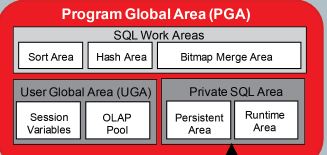
    The follow shows the components of a PGA, the little space used for Stack, Env Variables and Private SQL area.

    Image Courtesy: Oracle Architecture Diagram

    Where the most of the utilisation will be SORT AREA, HASH AREA 

    SORT AREA : is used when the session performing a sorting of data and use approximately 

    HASH AREA: is used when execution plan contains hash join and stores the hashed data and once data is matched or processed the final data put into buffer cache (db file scattered read) but stores with in PGA for Direct Path Reads.

    Bit Map Merge area:- When using bitmap keys and merging of data uses.

    To further dig into , the PGA setting is not hard limit, it can grow and utilize all free memory at OS if needed by oracle sessions. Until 12c you cannot limit the pga memory size.

    For example if you have given PGA_AGGREGATE_TARGET =5g  , pga can still grow more than 5gb accumulating of all sessions not by single session.

    In dedicated architecture where each session will have its own PGA space and put the private data like variables , sorting, hashed data etc. However, although the PGA can grow much more than your setting each individual session can have only 200MB of PGA due to hidden parameter _pga_max_size which default to 200MB or 5% of pga_aggregate_target parameter. So that means if a session needs more than 200MB it has to spill to disk to do sorting.

    How to find how much each of this area used by your query ,

    select inst_id,sid,sql_id,operation_type,sum(actual_mem_used)/1024/1024,sum(work_area_size)/1024/1024, sum(tempseg_size)/1024/1024 from gv$sql_workarea_active  group by inst_id,sid,sql_id,operation_type;

    So far we seen the PGA dynamics and allocations of memory, but how to know and estimating how much sorting/hash need of PGA Memory. As of my understanding, this is two fold,

    Sort : Once the sort area is full with in pga it will spill to temp space , so ideally with gather plan statistics hint we can find out the temporary space need

    Hash: Basically a full table scans, ideally used for hash joins of two tables, find the two tables that join with hash you are looking for find the avg_row_len * num of rows should give you approximate hash utilization.

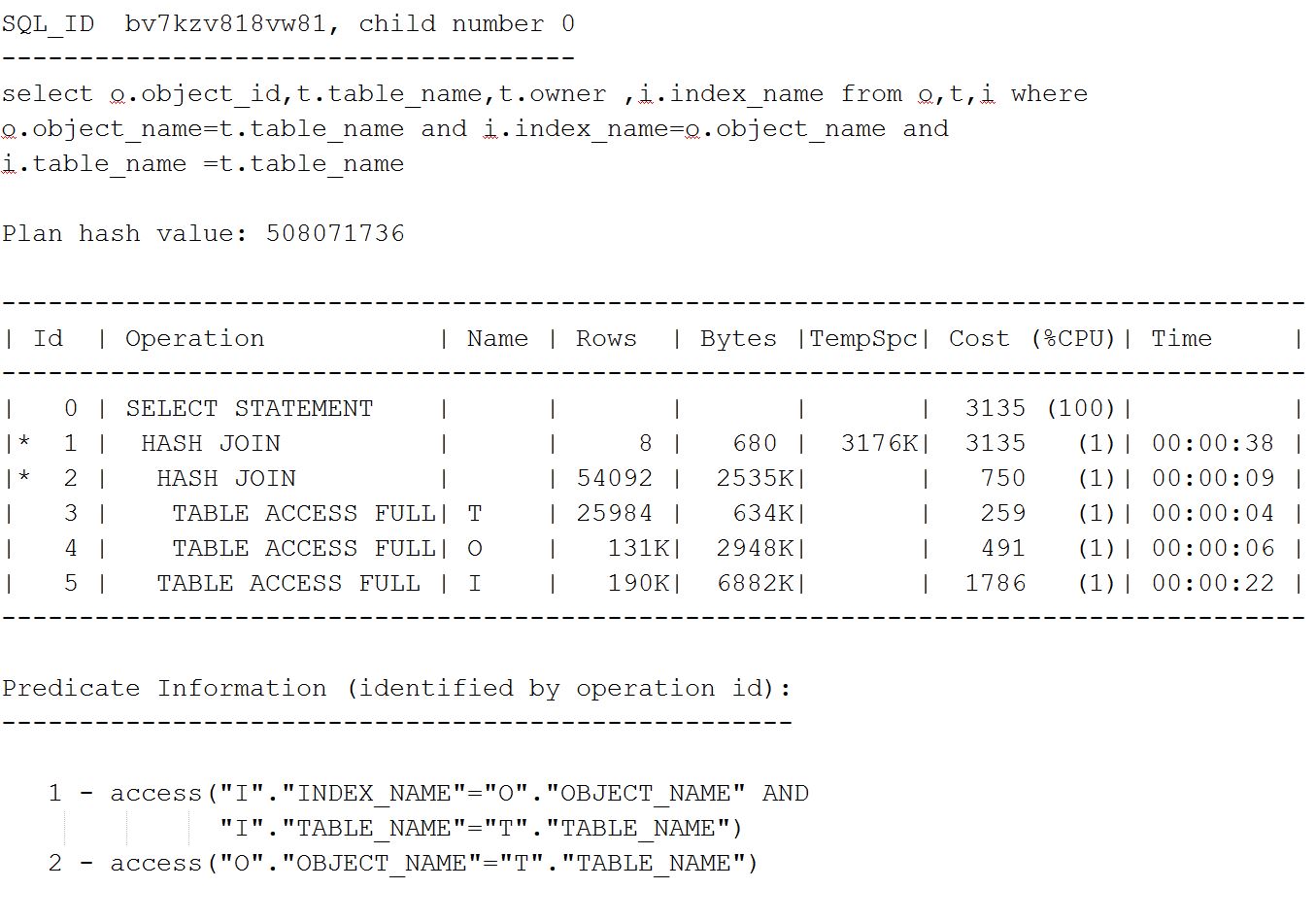
    For example consider a simple query below, which does a full table scan of each table O,T,I.

    The plan shows three tables having full tables doing hash join to finalize the data after equal predicates.

    Lets look at the calculation tables (here I done some estimations to prove avg_row_len can be used but cases may vary, and its not hard fact rule it will be matched)

    Estimation Calculation, to do estimation I have taken the exact row length and rows from dba_tables and the number of rows returned from query. I have added few columns manually to do calculation, the query may not return below. 

    Lets look at v$sql_workarea_active to see how much expected and actual pga / workarea used for this query.

    As you see above, the Expected_MB column shows the expected pga utilization for this query which matches to our Estimation table above.

    Happy Reading

    Geek DBA