Subscribe to Posts by Email

Subscriber Count

    705

Disclaimer

All information is offered in good faith and in the hope that it may be of use for educational purpose and for Database community purpose, but is not guaranteed to be correct, up to date or suitable for any particular purpose. db.geeksinsight.com accepts no liability in respect of this information or its use. This site is independent of and does not represent Oracle Corporation in any way. Oracle does not officially sponsor, approve, or endorse this site or its content and if notify any such I am happy to remove. Product and company names mentioned in this website may be the trademarks of their respective owners and published here for informational purpose only. This is my personal blog. The views expressed on these pages are mine and learnt from other blogs and bloggers and to enhance and support the DBA community and this web blog does not represent the thoughts, intentions, plans or strategies of my current employer nor the Oracle and its affiliates or any other companies. And this website does not offer or take profit for providing these content and this is purely non-profit and for educational purpose only. If you see any issues with Content and copy write issues, I am happy to remove if you notify me. Contact Geek DBA Team, via geeksinsights@gmail.com

Pages

Quick referenc of Index coalesce and rebuild

Hello,

If some one asks you about difference between Rebuild and coalesce indexes, here is the short list of the same.


Rebuild Index							Coalesce Index 
Quickly moves index to another tablespace				Cannot move index to another tablespace

Higher costs: requires more disk space					Lower costs: does not require more disk space

Creates new tree, shrinks height if applicable				Coalesces leaf blocks within same branch of tree

Enables you to quickly change storage and tablespace 			Quickly frees up index leaf blocks for use
parameters without having to drop the original index			 

-Thanks
Geek DBA

12c is out now in oracle site too

Here you go,

http://www.oracle.com/technetwork/database/enterprise-edition/downloads/index.html

I love to see the documentation first.

Started downloading

12c database available for download

Linux version 12.1.0.1 is available for download at edelivery.oracle.com

Does index unusable drops the storage segment?

Answer 10g No, 11gR2 Yes

10g:-

SQL> select * from v$version;

BANNER
-------------------------------------------------------
Oracle Database 11g Release 10.2.0.5.0 - Production
PL/SQL Release 10.2.0.5.0 - Production
CORE    10.2.0.5.0      Production
TNS for 32-bit Windows: Version 10.2.0.5.0 - Production
NLSRTL Version 10.2.0.5.0 - Production

SQL> create table test as select rownum id, 'TEST' name from dual connect by level <= 1000000;
Table created.

SQL> create index TEST_IDX on test(id);
Index created.

SQL> exec dbms_stats.gather_table_stats(ownname=>null, tabname=>'TEST', cascade=> true, estimate_percent=> null, method_opt=> 'FOR ALL COLUMNS SIZE 1');
PL/SQL procedure successfully completed.

SQL> alter index TEST_IDX unusable;
Index altered.

SQL> select index_name, blevel, leaf_blocks, num_rows, status, dropped from dba_indexes where index_name = 'TEST_ID_I';
INDEX_NAME     BLEVEL LEAF_BLOCKS   NUM_ROWS STATUS   DRO
---------- ---------- ----------- ---------- -------- ---
TEST_ID_I          2        2226    1000000 UNUSABLE  NO

SQL> select segment_name, bytes, blocks, extents from dba_segments where segment_name = 'TEST_ID_I';
SEGMENT_NAME      BYTES     BLOCKS    EXTENTS
------------ ---------- ---------- ----------
TEST_ID_I     18874368       2304         18

Note above, the Segment is not dropped.


Same test repeat in 11g:-


SQL> select * from v$version;

BANNER
-------------------------------------------------------
Oracle Database 11g Release 11.2.0.3.0 - Production
PL/SQL Release 11.2.0.3.0 - Production
CORE    11.2.0.3.0      Production
TNS for 32-bit Windows: Version 11.2.0.3.0 - Production
NLSRTL Version 11.2.0.3.0 - Production

SQL> create table test as select rownum id, 'TEST' name from dual connect by level <= 1000000;
Table created.

SQL> create index TEST_IDX on test(id);
Index created.

SQL> exec dbms_stats.gather_table_stats(ownname=>null, tabname=>'TEST', cascade=> true, estimate_percent=> null, method_opt=> 'FOR ALL COLUMNS SIZE 1');
PL/SQL procedure successfully completed.

SQL> alter index TEST_IDX unusable;
Index altered.

SQL> select index_name, blevel, leaf_blocks, num_rows, status, dropped from dba_indexes where index_name = 'TEST_ID_I';
INDEX_NAME     BLEVEL LEAF_BLOCKS   NUM_ROWS STATUS   DRO
---------- ---------- ----------- ---------- -------- ---
TEST_ID_I          2        2226    1000000 UNUSABLE NO

SQL> select segment_name, bytes, blocks, extents from dba_segments where segment_name = 'TEST_ID_I';
no rows selected

This feature is useful to save the storage when you large partition indexes etc which are unused at all. But be aware this may consume more time of index rebuild when you try to mark usable back.

There is also a bug :- Bug 10258337 - Unusable index segment not removed for "ALTER TABLE MOVE" [ID 10258337.8]

-Thanks

Geek DBA

11g Archive backups

Have you ever heard of archive backups in 11g, if not here it is,

Normally to make sure that database can be brought up from a particular backupset rman will retain all archived redo logs as well which are necessary.

This happens because rman also considers the option that you may want to consider incomplete recovery.

This is not true for archival backups as they are complete in themselves and thus at the end may save you some space as well.

The name is bit confusing, its not just the archival backups it about whole self contained backup which includes your datafiles/controlfiles+archive logs to provide a consistent recovery.

Normally you need the archives to recover once you restore the database, but in this case we don’t need as your backups contained the archives and also they retention is independent of the control_file_record_keep_time and also the retention policy.

RMAN> backup database
format '/u01/app/backup/db_%U.bkp'
tag M1
keep until time 'sysdate+730'
restore point rs1;
Starting backup at 20-MAR-13
using target database control file instead of recovery catalog
current log archived
allocated channel: ORA_DISK_1
channel ORA_DISK_1: SID=1400 device type=DISK
backup will remain until date 20-FEB-15
archived logs required to recover from this backup will be backed up
channel ORA_DISK_1: starting full datafile backup set
channel ORA_DISK_1: specifying datafile(s) in backup set
including current control file in backup set
channel ORA_DISK_1: starting piece 1 at 20-MAR-13
channel ORA_DISK_1: finished piece 1 at 20-MAR-13
piece handle=/u01/app/backup/db_poos2dgof_1_1.bkp tag=M1 comment=NONE
channel ORA_DISK_1: backup set complete, elapsed time: 00:00:01
Finished backup at 20-MAR-13

Note: Do not use flash recovery area for archival backups like above, it will fail since this backups has to be retained 2 years, flash recovery area is managed by oracle and the content will be deleted according to the flash retention target.

So the above backup is self contained and no dependency of the archives, you can safely keep them in vault.

Another important aspect to consider is that restore point , if you see above the restore point clause, it will create a restore point in the database with the scn we have backup and its easier to restore with backup now.

Further, the existing backups also can be marked as archival backup with tag and clause keep forever or keep until as like below.

RMAN> change backup tag 'WEEKLY' keep forever;

Hope this helps

-Thanks

Geek DBA

11g: Restore point preserve?

In 11g there are two major enhancements to restore points

1. Create restore point as of scn, until 10g you can create a restore point with current scn only

SQL> create restore point p1 as of scn 19393930;

2. Preserve the restore points

SQL> create restore point p1 preserve;

The second point above need a bit explanation which normally confused by documentation:-

Here is excerpt from the documentation

CREATE RESTORE POINT statement to create a restore point, which is a name associated with a timestamp or an SCN of the database. A restore point can be used to flash back a table or the database to the time specified by the restore point without the need to determine the SCN or timestamp. Restore points are also useful in various RMAN operations, including backups and database duplication. You can use RMAN to create restore points in the process of implementing an archival backup.

PRESERVE

Specify PRESERVE to indicate that the restore point must be explicitly deleted. Such restore points are useful when created for use with the flashback history feature

GUARANTEE FLASHBACK DATABASE

A guaranteed restore point enables you to flash the database back deterministically to the restore point regardless of the DB_FLASHBACK_RETENTION_TARGET initialization parameter setting. The guaranteed ability to flash back depends on sufficient space being available in the flash recovery area.

Guaranteed restore points guarantee only that the database will maintain enough flashback logs to flashback the database to the guaranteed restore point. It does not guarantee that the database will have enough undo to flashback any table to the same restore point.


It is that, Guaranteed restore points are always preserved. A preserved restore point is same as guaranteed restore points, which enables you to flashback a database to restore point regardless of setting for the db_flash_back_retention_target parameter. The oracle will not drop the restore point even though it reaches the maximum restore points (i.e 2048 per instance). You have to explicitly delete or drop the restore point in both the cases. When you specify preserve rather guaranteed it just maintain as like guaranteed except it does note or mark as guaranteed.  Not sure why this much confusion Oracle creates.

-Thanks

Geek DBA

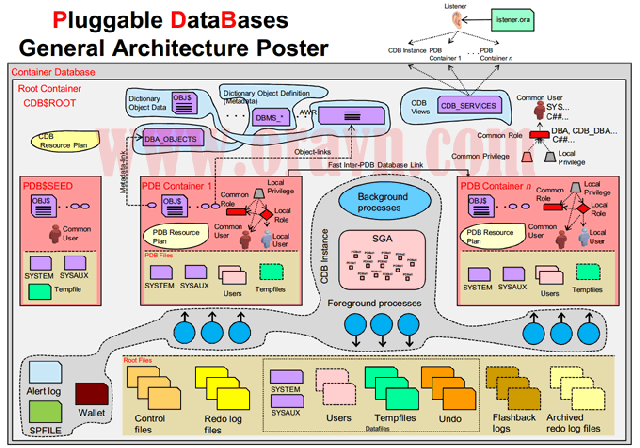
12c database architecture

Got this architecture diagram from the internet for 12c database


12c_pluggable_database_sSource:-

Some explanation according to my understanding:-

1) Oracle SGA is shared between multiple databases called Pluggable databases (PDB)

2) A root database called container database which holds all the Oracle dictionary globally (CDB) shareable across PDB’s

3) Listener registers both CDB instance and PDB as services

4) There will be

  •       global roles and local roles
  •       local user and common user
  •       common privilege and local privilege

      at CDB level and PDB level, depends on the role setting, the activities (DBA) will be performed accordingly on the local/global database.

5) CDB$ROOT holds oracle data dictionary (assumption)

6) PDB$SEED is the template kind of database for a pluggable database which can be used to create the PDB databases

7) There will be local and global datafiles, as you can see in pink boxes all datafiles that are related to PDB1/2 databases, where there are other files at last in diagram which holds all the global dictionary i.e container database

8) Background processes will be shared across, where in the foreground processes are unique to their databases, this helps to reduce the footprint of processes , Ex: If you have 10 databases in a 11g environment by default 30 BG processes will start, so 30*10 = 300 bg processes, where in 12c cases only 30 BG processes will be used for all 10 databases. User processes i.e foreground anyways depends on the application usability.

Thats all for now, will be adding more once I understand more on this.

-Thanks

Geek DBA

Archive missing ? Recover standby using roll forward standby with incremental backup

Here is the step by step document for recovering the standby if archive is missing and not recoverable, using a feature called rollforward standby using incremental backup introduced in 10g.

1) After recovery in step above login to sqlplus and get the current scn from standby database;

SQL> col CURRENT_SCN format 999999999999

SQL> select current_scn from v$database;

CURRENT_SCN

-------------

87261128900

SQL>

2) Take a incremental backup in production using above scn

RMAN> backup incremental from scn 87261128900 database format ‘/DBBACKUP/SCPRD/RMAN/incr_t%t_s%s_p%p' tag 'forstandby1'

3) Take a current control file backup also,

RMAN> backup current controlfile for standby format '/DBBACKUP/SCPRD/RMAN/Standbyctrl.ctl';

4) Moved backups to Standby using scp

5) catalog the new backups to standby database; At this moment your standby database is in mount mode;

RMAN> catalog start with '/DBBACKUP/SCPRD/RMAN';

using target database control file instead of recovery catalog

searching for all files that match the pattern /DBBACKUP/SCPRD/RMAN

List of Files Unknown to the Database

=====================================

File Name: /DBBACKUP/SCPRD/RMAN/incr_t729927310_s7510_p1

File Name: /DBBACKUP/SCPRD/RMAN/incr_t729925053_s7509_p1

File Name: /DBBACKUP/SCPRD/RMAN/Standbyctrl.ctl

Do you really want to catalog the above files (enter YES or NO)? yes

cataloging files...

cataloging done

List of Cataloged Files

=======================

File Name: /DBBACKUP/SCPRD/RMAN/incr_t729927310_s7510_p1

File Name: /DBBACKUP/SCPRD/RMAN/incr_t729925053_s7509_p1

File Name: /DBBACKUP/SCPRD/RMAN/Standbyctrl.ctl

6) Initiate the recovery for making database upto latest with latest incremental backups, note the recover with noredo as it not generate any redo while recovery, this is required

RMAN> recover database noredo;

Starting recover at 17-SEP-10

allocated channel: ORA_DISK_1

channel ORA_DISK_1: sid=651 devtype=DISK

channel ORA_DISK_1: starting incremental datafile backupset restore

channel ORA_DISK_1: specifying datafile(s) to restore from backup set

destination for restore of datafile 00001: /SYSCTRL/SCPRD/system01.dbf

destination for restore of datafile 00002: /UNDO/SCPRD/undotbs01.dbf

destination for restore of datafile 00003: /SYSCTRL/SCPRD/sysaux01.dbf

destination for restore of datafile 00004: /SCPRDDATA/SCPRD/data01.dbf

destination for restore of datafile 00005: /SCPRDDATA/SCPRD/data02.dbf

destination for restore of datafile 00006: /SCPRDINDEX/SCPRD/index01.dbf

destination for restore of datafile 00007: /SCPRDDATA/SCPRD/patrol01.dbf

destination for restore of datafile 00008: /TEMP/SCPRD/tools.dbf

destination for restore of datafile 00009: /TEMP2/SCPRD/audit.dbf

channel ORA_DISK_1: reading from backup piece /DBBACKUP/SCPRD/RMAN/incr_t729925

7) Shut down the standby database;

SQL> shut immediate

ORA-01109: database not open

Database dismounted.

ORACLE instance shut down.

SQL> exit

Disconnected from Oracle Database 10g Enterprise Edition Release 10.2.0.4.0 - 64bit Production

With the Partitioning, Data Mining and Real Application Testing options

8) Startup in nomount

SQL> startup nomount;

ORACLE instance started.

Total System Global Area 524288000 bytes

Fixed Size 2085296 bytes

Variable Size 369102416 bytes

Database Buffers 146800640 bytes

Redo Buffers 6299648 bytes

SQL> exit

10) Restore controlfile from latest backup  and mount the database in standby mode

RMAN> restore controlfile from '/DBBACKUP/SCPRD/RMAN/Standbyctrl.ctl';

Starting restore at 17-SEP-10

using target database control file instead of recovery catalog

allocated channel: ORA_DISK_1

channel ORA_DISK_1: sid=651 devtype=DISK

channel ORA_DISK_1: restoring control file

channel ORA_DISK_1: restore complete, elapsed time: 00:00:01

output filename=/REDOCTRL/SCPRD/control01.ctl

output filename=/SYSCTRL/SCPRD/control02.ctl

output filename=/TEMP2/SCPRD/control03.ctl

Finished restore at 17-SEP-10

RMAN>

SQLPLUS> alter database mount standby database;

Database mounted.

11) Initiate recovery on standby

SQL> recover standby database using backup controlfile;

ORA-00279: change 87262758883 generated at 09/17/2010 05:46:29 needed for

thread 1

ORA-00289: suggestion : /ARCHIVE1/SCPRD/arch221936138553801.arc

ORA-00280: change 87262758883 for thread 1 is in sequence #22193

Specify log: {<RET>=suggested | filename | AUTO | CANCEL}

auto

ORA-00279: change 87262778312 generated at 09/17/2010 06:27:42 needed for

thread 1

ORA-00289: suggestion : /ARCHIVE1/SCPRD/arch221946138553801.arc

ORA-00280: change 87262778312 for thread 1 is in sequence #22194

ORA-00278: log file '/ARCHIVE1/SCPRD/arch221936138553801.arc' no longer needed

for this recovery

ORA-00308: cannot open archived log '/ARCHIVE1/SCPRD/arch221946138553801.arc'

ORA-27037: unable to obtain file status

IBM AIX RISC System/6000 Error: 2: No such file or directory

Additional information: 3

At this moment, if you want you can copy the above archive log from production if its there and keep recovery going on

12) Keep the database in managed recovery mode 

SQL> alter database recover managed standby disconnect from session;

Database altered.

13) Just a check of standby scn and production scn.

Standby SCN

SQL> select current_scn from v$database; SQL> select current_scn from v$database;

CURRENT_SCN

------------ -----------

87262780632

Production SCN

SQL> col current_scn format 99999999999 SQL> col current_scn format 99999999999

CURRENT_SCN

-----------------

87262778311 à Almost nearer

SQL_ID missing in dba_hist_sqlstat? Why

We have got into a trouble today with dba_hist_sqlstat when we are working on a performance issue.

This performance issue is about a statement that running very slow compared to its previous run of 20 mins. Thats another story.

As this story continues yesterday and today, we found our sql statement comfortably in v$sql and active session history without any issues yesterday.

When it comes to today’s troubleshooting, and trying to pull from awr view dba_hist_sqlstat we could not find the same and lead to another discovery which may helpful to you all as well.

So we kept our performance issue aside (; ) and then started looking this. ofcourse we resolved that issue later part.

AWR does not collect information for all statements that are in sql area indeed collects the number of statements that are according to TOPNSQL setting in awr control settings.

DBMS_workload_repository.modify_snapshot_settings takes the following inputs.

retention=> value in minutes so (45 days * 24 (hours per day) * 60 minutes per hour = 64800),
            max value can be set by passing a value of 0 which means forever. 
            So one would want to set for X days the value would be X * 24 (hours per day) * 60 (minutes per hour)
interval => 60min (snap at this interval), a value of 0 will turn off AWR

topnsql => top N sql size, specify value of NULL will keep the current setting

TOPNSQL:-
The topnsql is used to specify the number of SQL to collect for each criteria like elapsed time, CPU time, parse calls, shareable memory, version count. The topnsql is normally set to a small number like 10, because you only want to see the most current SQL statements. This SQL information is normally purged after a period of time, after which the SQL source code is no longer needed. And it depends on statistics level parameter (Typical 30, ALL 100)

If STATISTICAL_LEVEL=TYPICAL, MMON captured each 30 TOP SQL in above criteria. So totally it captured 420 SQL. (30 SQL * 14 Criteria = 420 sql)
If STATISTICAL_LEVEL=ALL, MMON captured each 100 TOP SQL in above criteria.So totally it captured 1400 SQL. (100 SQL * 14 Criteria = 1400 sql)

Criteria Category:-
============

1. Elapsed Time (ms)
2. CPU Time (ms)
3. Executions
4. Buffer Gets
5. Disk Reads
6. Parse Calls
7. Rows
8. User I/O Wait Time (ms)
9 Cluster Wait Time (ms)
10. Application Wait Time (ms)
11. Concurrency Wait Time (ms)
12. Invalidations
13. Version Count
14. Sharable Mem(KB)

Modify snapshot settings
================

SQL> exec dbms_workload_repository.modify_snapshot_settings(retention=>64800,  interval=>60, topnsql=>100);
PL/SQL procedure successfully completed.

shows retention and interval after it was modified

SQL>  select * extract( day from snap_interval) *24*60+extract( hour from snap_interval) *60+extract( minute from snap_interval ) snapshot_interval,
extract( day from retention) *24*60+extract( hour from retention) *60+extract( minute from retention ) retention_interval,
topnsql from dba_hist_wr_control;

Snapshot Interval     Retention Interval     topnsql
================    ==================    ========   
60                  64800                100

References:-

Bug 8484269 : ORA-13530: INVALID TOPNSQL 50001, MUST BE IN THE RANGE (30, 50000)

http://docs.oracle.com/cd/B19306_01/appdev.102/b14258/d_wkrpos.htm

http://www.freelists.org/post/oracle-l/AW-Missing-SQL-in-DBA-HIST-SQLSTAT,1

Shrink Space

Just to note if anyone need,

Difference between shrink space/compact/cascade

Shrink space compact -Just moves the rows from end of the table to beginning of the table. Does not drop the high water mark of the table.

Shrink space - Moves the rows from end of the table to the beginning of the table and also drop the high water mark of the table. This action has been split into two , first move the rows and then lock the table and then move high water mark

Shrink space cascade - Rebuild indexes of that table and drop the high water mark of the table too.

-Thanks
Geek DBA